Description
Yealink RoomPanel Plus E2 10.1″ Meeting Room Scheduling Panel Dubai
Stop Meeting Room Confusion Before It Starts
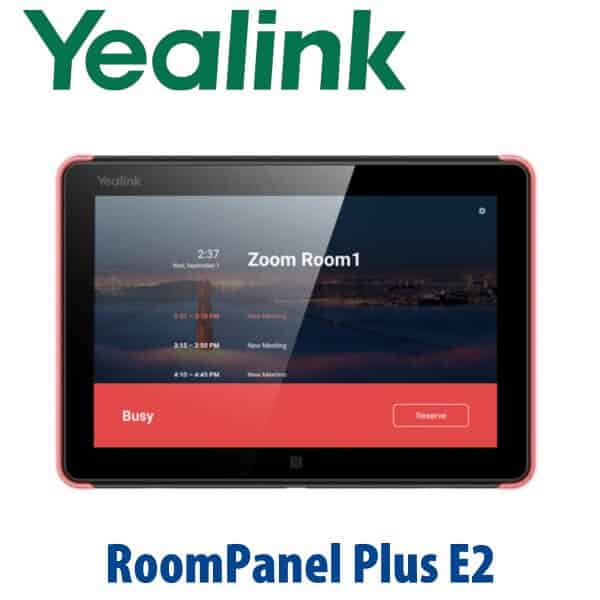
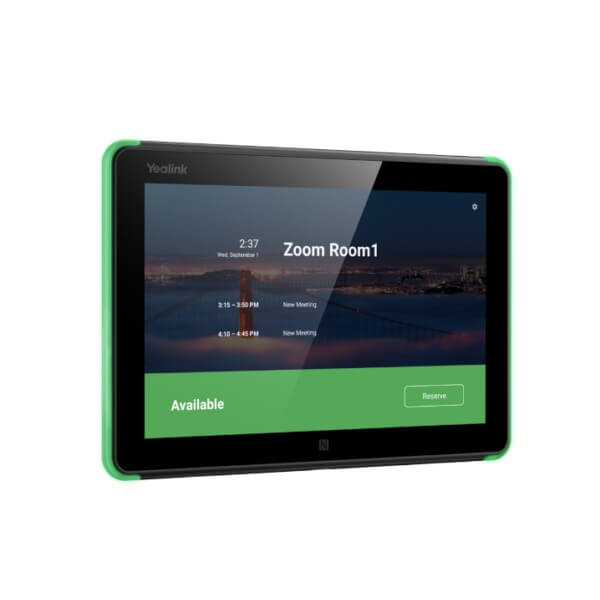
The Yealink RoomPanel Plus E2 is a 10.1-inch meeting room scheduling panel built for offices where meeting rooms are constantly booked, released, extended and re-booked through the day. Mounted outside the room entrance, it gives staff a clear view of room availability before they open the door, while the side status lights make the room state visible from the corridor. For Dubai offices running Microsoft Teams Rooms, Zoom Rooms, or mixed hybrid meeting spaces, the RoomPanel Plus E2 turns the room door into a live booking point instead of a paper sign or calendar guess.
Vector Digital Systems supplies, stages and supports Yealink meeting-room hardware in Dubai. We confirm the platform, room account, network path, PoE availability and mounting method before dispatch, so each panel arrives ready for your IT team or installer to place at the room entrance.
Platform Check — Teams, Zoom or Calendar Scheduling?
Room scheduling panels are platform-sensitive. The hardware may look simple, but the room account, calendar permissions and meeting-room platform decide whether the panel works correctly. Before publishing or quoting a Teams/Zoom claim, verify the active certification status against the official Microsoft Teams and Zoom hardware lists. For the paste page, use this platform table to route the buyer correctly and avoid unsupported claims.
| Your Room Platform | Right Yealink Device | What You Need |
|---|---|---|
| Microsoft Teams Rooms | Yealink RoomPanel Plus E2 — verify current Teams certification status before order | Teams room account, Microsoft 365 room mailbox, Teams Rooms policy and network access |
| Zoom Rooms | Yealink scheduling display range — verify Zoom hardware status before order | Zoom Rooms licence, calendar integration and room resource setup |
| Outlook / Google calendar workflow | RoomPanel Plus E2 after compatibility confirmation | Room mailbox, calendar permissions and network access to the scheduling service |
Tell David whether your rooms run Teams Rooms, Zoom Rooms, Outlook room calendars, Google calendar resources, or a mix. The panel quote should always follow the room platform — not just the screen size.
PoE Truth — Plan the Cable Before the Glass Mount
The cleanest RoomPanel Plus E2 installation is PoE. A single Ethernet cable provides network and power when the switch port supports Power over Ethernet. If the room entrance has glass walls or a finished corridor wall, plan the cable route before ordering. For new fit-outs in DIFC, DMCC, Business Bay and Dubai Hills offices, the best time to cable scheduling panels is during the meeting-room build, before the final wall and glass work closes.
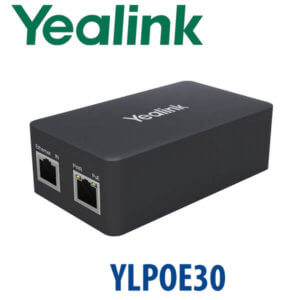
If your switch is not PoE-capable, ask David for the correct powering option and installation plan. Do not assume a power adapter is included or that a nearby socket will produce a neat result — room panels sit at eye level and messy cabling is immediately visible to visitors.
Where RoomPanel Plus E2 Sits in the Yealink Room Range
The RoomPanel Plus E2 is the larger, more visible scheduling-panel option for front-of-room corridors, executive meeting suites and multi-room office floors. The standard RoomPanel E2 is better for compact rooms where an 8-inch display is sufficient. The Plus E2 gives a larger 10.1-inch interface for high-traffic corridors, shared office floors and meeting areas where staff need to read booking status quickly while walking past.
RoomPanel E2 vs RoomPanel Plus E2 — Which One Should Dubai Offices Choose?
| Feature | RoomPanel E2 | RoomPanel Plus E2 ★ | RoomPanel Plus E2 + Room System Bundle |
|---|---|---|---|
| Display | Compact scheduling display | 10.1″ WXGA touch display | 10.1″ panel plus camera/bar/controller as required |
| Best for | Small meeting rooms and huddle spaces | Executive rooms, corridors and shared office floors | New Teams Rooms or Zoom Rooms build-outs |
| Room status visibility | Good for close-range viewing | Better corridor readability | Full room workflow from door to meeting table |
| Power | Plan PoE / approved power route | Plan PoE / approved power route | PoE and room-device power plan |
| Mounting | Wall or glass entrance | Wall or glass entrance, ideal for premium rooms | Entrance panel plus in-room hardware placement |
| Platform | Teams / Zoom scheduling after verification | Teams / Zoom scheduling after verification | Complete Teams Rooms or Zoom Rooms workflow |
| Replaces | Paper room signs and manual booking labels | Older RoomPanel / paper signs / tablet-on-wall setups | Manual room booking plus unmanaged AV setups |
| Price tier | Lower | Mid-premium | Project bundle |
| Choose if… | You need a simple panel for smaller rooms | You want a larger, clearer room-booking display for busy Dubai office corridors | You are building or refreshing the entire meeting room |
Where RoomPanel Plus E2 Works in Dubai
DIFC and DMCC executive floors. Premium office floors often have glass-fronted meeting rooms and fast-moving client schedules. A 10.1-inch room panel outside each door reduces interruptions, shows whether the room is genuinely free, and gives reception or office managers fewer booking disputes to handle.
Business Bay and Downtown shared meeting suites. Multi-tenant offices, serviced offices and consulting teams need room visibility from the corridor. The RoomPanel Plus E2 is especially useful when rooms are booked back-to-back and staff need to see free/busy status without opening doors.
Hotel meeting floors and training centres. Hotels in Deira, Sheikh Zayed Road and Dubai Marina often run multiple boardrooms, training rooms and private meeting suites. A scheduling panel gives each room a professional digital sign and reduces the “which room is ours?” confusion during client events.
Enterprise hybrid-work rollouts. When Teams Rooms or Zoom Rooms are deployed across a floor, the room entrance should be part of the workflow. The panel shows availability at the door, while the in-room Yealink camera, bar or controller handles the meeting itself. Vector Digital Systems can quote the scheduling panel alone or as part of a complete Yealink room package.
Full Technical Specifications
| Specification | Yealink RoomPanel Plus E2 |
|---|---|
| Device type | Meeting room scheduling panel / room booking display |
| Display | 10.1-inch WXGA touch display |
| Main use | Room availability, meeting schedule, room booking, check-in and room-status display |
| Room status indication | Visual room-status display with corridor-visible status lighting |
| Platform use | Teams Rooms / Zoom Rooms / calendar scheduling workflows after compatibility and certification verification |
| Network | Ethernet for managed office deployment; confirm Wi-Fi policy at order stage if wireless use is required |
| Power | Plan for PoE where available; confirm power accessory requirement before installation |
| Mounting | Wall or glass entrance mounting, subject to site survey and mounting kit confirmation |
| Typical deployment | One panel outside each meeting room, boardroom, training room or shared collaboration room |
| Configuration required | Room account, calendar permissions, network profile, platform sign-in and booking-policy test |
| Best-fit environments | Corporate offices, serviced offices, hotels, training centres, universities, clinics and enterprise meeting floors |
Accessories and Installation Items to Confirm
| Item | Why It Matters | Vector Digital Systems Check |
|---|---|---|
| PoE switch port | Gives the cleanest single-cable installation | We confirm PoE availability before quote finalisation |
| Power accessory | Needed where PoE is not available or cabling is not approved | David confirms the correct powering option for UAE 220V installations |
| Wall / glass mounting kit | Meeting-room entrances vary: gypsum wall, glass partition, wooden panel or marble finish | We confirm mounting surface and kit before dispatch |
| Room account details | The panel needs the correct room mailbox or platform account | We stage the room account workflow and test calendar sync where credentials are supplied |
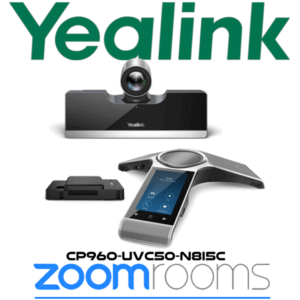
| Complete room hardware | Scheduling is only the door-side part of the meeting-room experience | Ask David for Yealink A-series, MVC or MeetingBar room hardware if you are building the full room |
Staging Before Dispatch — What We Configure
Every Yealink RoomPanel Plus E2 supplied by Vector Digital Systems can be staged before dispatch from Dubai. We confirm the room platform, load the network profile, validate the room account or calendar workflow, set the display and booking behaviour, check the room-status light behaviour, and label the panel for the correct room before delivery. For multi-room projects, we create a room-by-room deployment list so the installer knows exactly which panel belongs outside Boardroom 1, Training Room 2, Interview Room 3 or the executive meeting suite.
For Teams Rooms and Zoom Rooms projects, we also check the rest of the room stack: in-room camera, speaker, controller, compute/appliance, licence, room mailbox, cable path and PoE switch capacity. That prevents the common Dubai fit-out problem where the door panel arrives before the network or room account is ready.
Export from Dubai
Vector Digital Systems exports Yealink RoomPanel Plus E2 scheduling panels and meeting-room hardware from Dubai to system integrators, hotel groups, corporate IT teams and AV installers across the region. Common export destinations include Oman, Saudi Arabia, Kuwait, Bahrain and Qatar in the Gulf; Jordan and Egypt in the wider Middle East; Kenya and Tanzania in East Africa; and Pakistan and Sri Lanka for South Asian projects. Shipments move FOB Dubai with commercial invoice, packing list and certificate of origin on request.
For export buyers, the key is pre-project verification: confirm the meeting platform, licence model, mounting method, plug/power requirement and the quantity of panels per floor. David can quote single-room replacements or project quantities for new office fit-outs, hotel meeting floors and enterprise collaboration refreshes.
Get a same-day quote in AED — Yealink RoomPanel Plus E2 Dubai
Tell David: quantity, Teams or Zoom platform, number of rooms, PoE availability, wall or glass mounting, and whether you need the full Yealink meeting-room bundle. Quote includes VAT breakdown and delivery charges.
Frequently Asked Questions — Yealink RoomPanel Plus E2
What is the Yealink RoomPanel Plus E2 used for?
The Yealink RoomPanel Plus E2 is a 10.1-inch meeting room scheduling panel mounted outside a meeting room, boardroom or training room. It shows room availability, upcoming bookings, meeting status and check-in prompts so staff can see whether a room is free before entering.
Does the Yealink RoomPanel Plus E2 work with Microsoft Teams?
The RoomPanel Plus E2 is designed for modern room-scheduling workflows, including Teams room environments, but active Microsoft Teams certification must be verified against Microsoft’s current certified-device list before publishing or quoting a Teams-certified claim. Vector Digital Systems checks this status at quotation stage.
Does the Yealink RoomPanel Plus E2 work with Zoom Rooms?
The RoomPanel Plus E2 can be considered for Zoom room-scheduling projects, but active Zoom hardware status must be verified before any Zoom-certified claim is used. Tell David your Zoom Rooms licence and calendar setup so Vector Digital Systems can confirm the correct Yealink scheduling option.
Does the RoomPanel Plus E2 need PoE?
PoE is the preferred installation method because it gives a clean single-cable route for power and network. If your meeting-room entrance does not have a PoE switch port or approved cable path, ask David to confirm the correct power accessory and mounting plan before installation.
Can the RoomPanel Plus E2 be mounted on glass?
Yes, glass entrance mounting is a common requirement in Dubai offices, especially in DIFC, DMCC and Business Bay fit-outs. The mounting method and cable route should be confirmed before dispatch because glass, gypsum wall and wooden partition installs require different planning.
RoomPanel E2 vs RoomPanel Plus E2 — which one should I buy?
Choose the standard RoomPanel E2 for smaller rooms where a compact door display is enough. Choose the RoomPanel Plus E2 when you want a larger 10.1-inch display, better corridor visibility and a more premium look for executive meeting rooms, hotel meeting floors or high-traffic office corridors.
Can Vector Digital Systems configure the RoomPanel Plus E2 before delivery?
Yes — Vector Digital Systems stages the panel before dispatch where the customer provides the required room-account details. Staging can include network profile, room account, calendar workflow, display behaviour, room-status light check and room label mapping for multi-room deployments.
Who is the Yealink authorised supplier in Dubai?
Vector Digital Systems LLC has supplied and integrated Yealink products in Dubai since 2009. David handles Yealink pre-sales specification, project pricing, room-device staging and local warranty support, so Dubai customers do not need to manage international courier claims.
What is the best Yealink room scheduling panel for a Dubai office?
For a busy corridor, executive boardroom area or premium client-facing office, the Yealink RoomPanel Plus E2 is the better choice because the 10.1-inch display is easier to read from the hallway. For smaller huddle rooms, the standard RoomPanel E2 may be enough. For a new room build, ask David to quote the panel with the full Yealink room system.
Does Vector Digital Systems export Yealink RoomPanel Plus E2 from Dubai?
Yes — Vector Digital Systems exports Yealink room scheduling panels and meeting-room hardware from Dubai to integrators, hotel groups and corporate IT teams in Oman, Saudi Arabia, Kuwait, Bahrain, Qatar, Jordan, Egypt, Kenya, Tanzania, Pakistan and Sri Lanka. Shipments are FOB Dubai with commercial invoice, packing list and certificate of origin on request.