Description
Yealink MVC-S80 Microsoft Teams Rooms Large Room 4K AI Video System Dubai
Yealink MVC-S80 for Large Microsoft Teams Rooms in Dubai
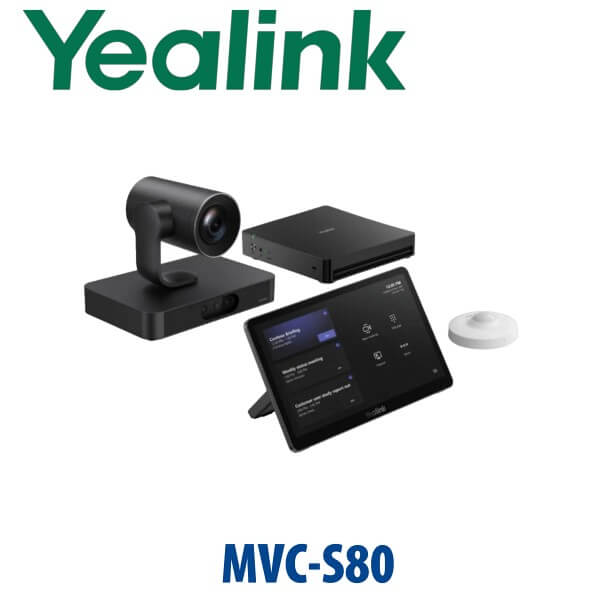
The Yealink MVC-S80 is built for the boardroom problem most large meeting rooms still have: people at the far end of the table look tiny, side seats are missed, and remote participants cannot follow who is speaking. The MVC-S80 solves that with the SmartVision 80 four-lens 4K intelligent camera, MCore 4 Teams Rooms mini-PC, MTouch Plus 11.6-inch control panel and RoomSensor. Vector Digital Systems supplies and stages the full room kit in Dubai, with same-day quote in AED, VAT breakdown, delivery charges and project installation guidance included.
Platform Choice — Teams Rooms, Zoom Rooms, BYOD or SIP?
The MVC-S80 is a Microsoft Teams Rooms on Windows system. It is not a SIP conference phone and it is not a Zoom Rooms kit unless a separate verified Zoom configuration is ordered. This matters because the room platform decides the hardware, licence, sign-in method and support path.
| Your Room Platform | Right Yealink Solution | What You Need |
|---|---|---|
| Microsoft Teams Rooms | Yealink MVC-S80 (this page) | Microsoft Teams Rooms licence, room account, display, audio package and network access |
| Zoom Rooms | Yealink Zoom Rooms range — verify certification status before order | Zoom Rooms licence and compatible Zoom-certified room kit |
| BYOD laptop room | MVC-S80 with BYOD Extender or separate USB/BYOD camera design | Laptop connection plan, USB/HDMI path and room audio design |
| SIP audio conference | Yealink CP-series conference phone, not MVC-S80 | SIP account from 3CX, Yeastar, UCM or hosted PBX |
Certification note: Microsoft Teams Rooms certification should be verified against Microsoft’s official device list at quote stage. Vector Digital Systems checks the current Microsoft listing before final order approval, because Teams Rooms certification status can change by SKU and region.
Important Room Truth — The Core Kit Does Not Include Room Audio
The MVC-S80 core kit is video, compute, control and sensor — not a complete audio room by itself. Yealink lists the MVC-S80 package with SmartVision 80, MCoreKit-C5U, MTouch Plus and RoomSensor, with no audio device in the core bundle. For a working large boardroom, David will size the audio separately: wired tabletop microphones, wireless microphones, ceiling microphones, MSpeaker Pro, ceiling speakers or DSP depending on the room size, table shape, ceiling height and glass-wall acoustics.
Where the MVC-S80 Sits in the Yealink MVC Range
The MVC-S80 sits above the MVC-S50 and below the higher-end MVC-S90 / MVC-S98 style ProAV rooms. Choose it when the room is too large for a front-of-room bar but does not need a fully customised multi-camera training-room design. It is the practical large-boardroom option for Dubai offices standardising on Microsoft Teams Rooms.
| Feature | MVC-S50 | MVC-S80 ★ | MVC-S90 / MVC-S98 |
|---|---|---|---|
| Best room fit | Medium to large rooms | Large rooms and boardrooms | Extra-large / ProAV rooms |
| Camera | A50 triple-lens video bar | SmartVision 80 four-lens 4K PTZ camera | Multi-camera / ProAV camera design |
| Zoom / reach | Bar-camera room coverage | 20x optical PTZ for far-end seats | Custom far-end and multi-zone coverage |
| Compute | MCore 4 | MCore 4 with Intel Core Ultra 5 | MCore / ProAV processing design |
| Touch control | MTouch Plus | MTouch Plus 11.6″ | MTouch Plus / multiple controls |
| Audio | Built around video bar audio / added audio | Audio selected separately: VCM, CM, MSpeaker, DSP | Custom ProAV audio and DSP |
| Platform | Microsoft Teams Rooms | Microsoft Teams Rooms on Windows | Microsoft Teams Rooms / ProAV design |
| Price tier | Lower | Large-room project tier | Highest / custom |
| Choose if… | You need a cleaner bar-based Teams room | You need clear far-end video and flexible audio for a large boardroom | You need an extra-large, multi-camera or training-room build |
Dubai Use Cases for the Yealink MVC-S80
DIFC and DMCC executive boardrooms. Senior teams need remote directors, legal advisers and regional managers to see every speaker clearly, not just the person sitting nearest the screen. The MVC-S80’s SmartVision 80 camera gives the room a proper PTZ camera with AI framing, while MTouch Plus keeps meeting control simple for non-technical users.
Business Bay, JLT and Dubai Marina headquarters. Many UAE offices have upgraded to Microsoft Teams but still run meetings from laptops, USB webcams and speakerphones. The MVC-S80 turns the space into a dedicated Teams Room with room account sign-in, one-touch join, controlled content sharing and a permanent camera/audio design.
Training rooms and regional project rooms. For construction, logistics, healthcare and government suppliers running hybrid training sessions, the SmartVision 80’s PTZ reach and presenter tracking help remote attendees follow the person leading the room. Where the room is larger or has multiple zones, David will confirm whether MVC-S80 is enough or whether an MVC-S90 / MVC-S98 ProAV design is the safer route.
Full Technical Specifications
| Specification | Yealink MVC-S80 |
|---|---|
| Room type | Large Microsoft Teams Rooms and executive boardrooms |
| Core bundle | SmartVision 80 camera, MCore 4 mini-PC, MTouch Plus touch console, RoomSensor |
| Platform | Microsoft Teams Rooms on Windows — certification status verified against Microsoft’s device list at quote stage |
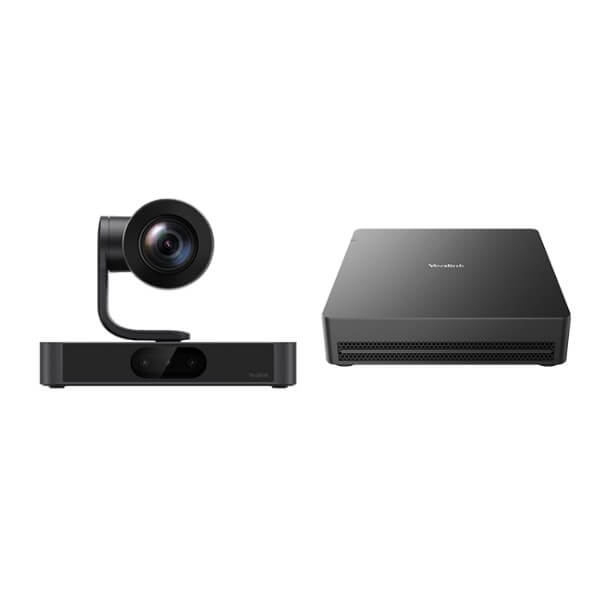
| Camera | SmartVision 80 intelligent PTZ camera with 3+1 four-lens 4K system |
| Camera zoom | 20x optical PTZ zoom for far-end seats in large rooms |
| Camera AI | IntelliFocus, Speaker Tracking, Presenter Tracking, Video Fence, Picture in Picture, Auto Framing, IntelliFrame |
| SmartVision 80 audio pickup | Built-in 4-microphone array on camera; room audio still designed separately for large spaces |
| SmartVision 80 integrations | NDI | HX3 and Dante compatible |
| MCore 4 processor | Intel Core Ultra 5 with built-in NPU and up to 34 TOPS AI processing |
| MCore 4 memory / storage | 16GB DDR5 memory, 256GB SSD |
| MCore 4 display / sharing | 3× HDMI video output with CEC, built-in EDID, HDMI-in for 4K content sharing |
| MCore 4 ports | 1× MTouch RJ45 port, 4× USB 3.0, Bluetooth and Wi-Fi |
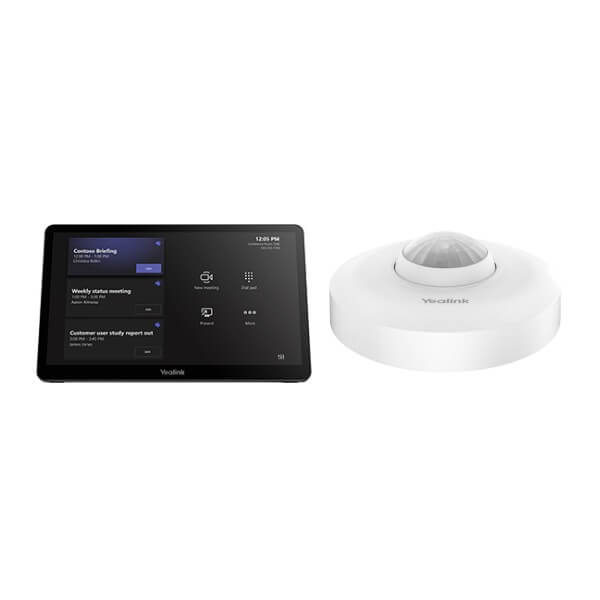
| Touch console | MTouch Plus, 11.6-inch IPS display, 1920×1080 resolution, 30°–70° screen angle |
| Content sharing | Wired HDMI / USB-C through MTouch Plus; wireless sharing supported with optional WPP30 / PA20 sharing pod |
| RoomSensor | Occupancy, temperature, humidity and light detection; Bluetooth BLE 5.2; up to 30 m reach; up to 4 sensors simultaneously via BLE mesh |
| Audio in core kit | No dedicated room audio device included — choose microphones, speakers and DSP separately |
Compatible Audio, Sharing and Room Accessories
| Accessory | Model | Purpose |
|---|---|---|
| Wired tabletop microphones | VCM35 | Table pickup for boardrooms; deployment diagrams commonly use two units for large rooms |
| Wireless tabletop microphones | VCM36 | Flexible table layouts where cabling is difficult |
| Ceiling microphones | CM20 / CM50 | Clean boardroom tables, high-end fit-outs and U-shaped rooms |
| Room speakers | MSpeaker Pro / CS10-D | Front soundbar or ceiling speaker design depending on room size and ceiling layout |
| DSP | AP08 | Audio processing for larger or acoustically difficult rooms |
| Wireless sharing | WPP30 / PA20 | One-click laptop presentation sharing for visitors and executives |
| BYOD extender | MVC-BYOD-Extender | Lets users bring a laptop and use the room camera/audio for non-Teams calls where supported |
Staging Before Dispatch — What Vector Digital Systems Configures
Vector Digital Systems does not ship the MVC-S80 as a box-only Teams Rooms kit. We stage the MCore 4, update firmware, check Microsoft Teams Rooms readiness, confirm display output, pair the MTouch Plus, verify RoomSensor operation, prepare the room account sign-in checklist, label cables, map the audio path and run a test call before dispatch. For project rooms, David also confirms the display count, table shape, camera location, microphone quantity, speaker placement, LAN availability and whether a BYOD path is required.
Export from Dubai
Vector Digital Systems supplies Yealink MVC-S80 Teams Rooms systems to corporate IT teams, system integrators, hotel groups, banking branch networks and government suppliers across the region. We regularly quote export projects to Oman, Saudi Arabia, Qatar, Kuwait and Bahrain in the GCC; Jordan and Egypt in the wider Arab market; Kenya and Tanzania in East Africa; and Pakistan, Sri Lanka and Bangladesh for South Asian projects. Shipments move FOB Dubai with commercial invoice, packing list and certificate of origin on request. Project pricing is available for multi-room deployments.
Get a same-day MVC-S80 quote in AED
Tell David your room size, table shape, display count, Teams Rooms licence status, ceiling height, microphone preference and whether you need BYOD. We quote the MVC-S80 with VAT breakdown, delivery and the correct room audio package.
Frequently Asked Questions — Yealink MVC-S80
Is the Yealink MVC-S80 a Microsoft Teams Rooms system?
Yes — the Yealink MVC-S80 is designed as a Microsoft Teams Rooms on Windows system for large rooms. Vector Digital Systems verifies the exact Microsoft certification status against Microsoft’s official device list at quote stage before final order approval.
What room size is the Yealink MVC-S80 designed for?
The MVC-S80 is designed for large meeting rooms, executive boardrooms and conference rooms where a basic video bar cannot clearly capture far-end seats. It is the right tier for many 12–20 person Dubai boardrooms, subject to table shape, display position and audio design.
What is included in the Yealink MVC-S80 core kit?
The core kit includes SmartVision 80, MCore 4 mini-PC, MTouch Plus touch console and RoomSensor. It does not include the dedicated room microphones and speakers required for most large rooms, so Vector Digital Systems sizes the audio package separately.
Does the MVC-S80 include microphones and speakers?
The SmartVision 80 camera has a built-in 4-microphone array, but the MVC-S80 core room package does not include a full dedicated room audio system. For large boardrooms, David will quote VCM35, VCM36, CM20, CM50, MSpeaker Pro, CS10-D or AP08 depending on the room layout.
MVC-S80 vs MVC-S50 — which one should I buy?
Choose the MVC-S50 for medium-to-large rooms where an A50 video bar design is enough. Choose the MVC-S80 when the room is larger, far-end seats need a 20x optical PTZ camera, or the audio design needs separate microphones and speakers. For extra-large or training rooms, ask David to compare MVC-S90 or MVC-S98.
Can the MVC-S80 be used for Zoom or BYOD meetings?
The MVC-S80 page is for Microsoft Teams Rooms. If your organisation runs Zoom Rooms, Vector Digital Systems will verify the correct Zoom-certified Yealink configuration before quoting. For laptop-based BYOD calls, ask David about adding the MVC-BYOD-Extender or designing a separate BYOD room path.
Does Vector Digital Systems configure the MVC-S80 before delivery?
Yes — Vector Digital Systems stages the MVC-S80 before dispatch in Dubai: firmware check, Teams Rooms readiness, display output, MTouch Plus pairing, RoomSensor check, cable labelling, audio-path planning and a test call. Room account credentials and Microsoft licensing remain under the customer’s Microsoft 365 tenant.
Who is the Yealink authorised supplier in Dubai?
Vector Digital Systems LLC has supplied Yealink solutions in Dubai since 2009. David handles Yealink room-system specification, Teams Rooms hardware selection, project pricing, staging and local warranty handling so UAE buyers do not deal with overseas courier claims.
What is the best Yealink Teams Rooms system for a Dubai boardroom?
For a large Dubai boardroom where far-end seats must be visible, the MVC-S80 is the standard recommendation because it combines SmartVision 80’s four-lens PTZ camera with MCore 4 and flexible audio design. For smaller rooms, MVC-S50 may be enough; for training halls or extra-large spaces, step up to MVC-S90 or MVC-S98 after a room review.
Does Vector Digital Systems export Yealink MVC-S80 systems from Dubai?
Yes — Vector Digital Systems exports Yealink Teams Rooms systems from Dubai to integrators and enterprise buyers in Oman, Saudi Arabia, Qatar, Kuwait, Bahrain, Jordan, Egypt, Kenya, Tanzania, Pakistan and Sri Lanka. Shipments are quoted FOB Dubai with commercial invoice, packing list and certificate of origin on request.