Description
Yealink MTouch Plus-MB Touch Console Dubai
The Right Touch Console for Yealink MeetingBoard Pro Rooms
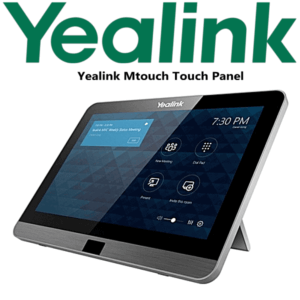
The Yealink MTouch Plus-MB is the dedicated 11.6-inch touch console for Yealink MeetingBoard and MeetingBoard Pro rooms running Microsoft Teams Rooms on Windows. It gives the room a familiar tabletop or wall-mounted control point for joining meetings, managing participants, controlling the session, and keeping the main board free for presentation, camera view, and whiteboard work. For Dubai boardrooms, classrooms, training rooms, and executive collaboration spaces, it solves the common problem of people walking up to the large screen just to control the meeting.
Vector Digital Systems LLC supplies Yealink room accessories in Dubai with bundle checking before dispatch. Tell David your MeetingBoard model, screen size, MCore OPS version, room platform, and mounting preference; we quote the correct MTouch Plus-MB accessory with VAT breakdown, delivery, and staging support included.
Platform Fit — Do Not Buy It as a Generic Touch Panel
The MTouch Plus-MB is not a SIP phone accessory and it is not the same buying decision as a desk-phone expansion module. It is a room-control panel for Yealink MeetingBoard / MeetingBoard Pro MTRoW board deployments. The buyer trap is ordering a generic MTouch Plus or a Teams Rooms controller without checking the board, MCore OPS, and room platform. We verify the room bundle before quoting so the panel matches the installed Yealink system.
| Your Room Platform | Right Yealink Device | What You Need to Confirm |
|---|---|---|
| Microsoft Teams Rooms on Windows — MeetingBoard / MeetingBoard Pro | MTouch Plus-MB with the compatible MCore OPS-T or MCore OPS-G2T setup | MeetingBoard model, MCore OPS version, Teams Rooms account, licence, cabling route, and mounting position |
| Standard Yealink MVC room kit | MTouch Plus or the controller supplied with the MVC bundle — verify before ordering | MCore model, camera kit, room size, cable distance, and Teams Rooms bundle compatibility |
| Zoom Rooms or BYOD-only rooms | Ask David to verify the correct Yealink Zoom or BYOD room-control option | Zoom Room licence or BYOD workflow, display hardware, camera/audio kit, and touch-control requirement |
Certification note: the Microsoft Teams certification check should be made against the complete Yealink MeetingBoard Pro MTR-Windows room system or bundle, not treated as a standalone MTouch Plus-MB certification claim. Vector Digital Systems verifies the current Microsoft Teams device status before quoting any Teams Rooms bundle.
Power, Cabling, and Installation Truth
The MTouch Plus-MB is a room accessory, so the power and cabling plan depends on the MeetingBoard / MCore OPS layout. Before dispatch, we confirm where the touch console will sit: on the table, wall-mounted near the entrance, or placed flat beside the board. This avoids the usual meeting-room mistake where the panel arrives but the cable path, mounting surface, or room-controller compatibility was never checked.
Buyer check: share photos of the MeetingBoard wall, table position, floor box, and cable route with David before ordering. We confirm whether the MTouch Plus-MB should be desk placed, wall mounted, or flat placed, and whether any additional cabling or site preparation is needed.
Where It Sits in the Yealink Room-Control Range
The MTouch Plus-MB sits in the Yealink room-system accessory family, above a basic bundled room controller and alongside Yealink’s MeetingBoard Pro ecosystem. Choose it when the main room display is a Yealink MeetingBoard / MeetingBoard Pro running MTRoW and users need a separate 11.6-inch control surface. If you are building a normal MVC room, David will verify whether the standard MTouch Plus is the better match. If you are refreshing the full room, the correct comparison is not just the controller — it is the complete MeetingBoard Pro room system, screen size, camera/audio coverage, and Teams Rooms licence plan.
| Feature | MTouch Plus | MTouch Plus-MB ★ | MeetingBoard Pro Room Bundle |
|---|---|---|---|
| Primary Role | Touch controller for compatible Yealink MVC room systems | Touch console for Yealink MeetingBoard / MeetingBoard Pro MTRoW boards | Complete interactive Teams Rooms display, camera, audio, whiteboard, and control ecosystem |
| Display | 11.6″ IPS touch panel | 11.6″ IPS touch panel | 65″, 75″, or 86″ class interactive board, depending on bundle |
| Resolution | Full HD panel class | 1920 × 1080 Full HD | Depends on selected MeetingBoard Pro display size and system configuration |
| Touch | Multi-touch | 10-point multi-touch | Large-format collaborative whiteboard and meeting controls |
| Platform Match | MVC / compatible room kits — verify | MTRoW boards with MCore OPS-T / MCore OPS-G2T | Full Teams Rooms on Windows or Android bundle, depending on SKU |
| Installation | Desk or room placement, depending on kit | Wall, desk, or flat placement | Wall mount or mobile stand, plus room accessory planning |
| Best Use | Existing MVC room needing touch control | MeetingBoard / MeetingBoard Pro room needing a separate controller | New room build or full refresh |
| Choose if… | You already have a compatible MVC room kit and need the standard controller | You have a MeetingBoard / MeetingBoard Pro MTRoW room and need the correct board console | You are buying the complete interactive Teams room, not just the touch panel |
Dubai Use Cases for the MTouch Plus-MB
DIFC and Business Bay boardrooms. Executive rooms using Yealink MeetingBoard Pro need a clean tabletop control point so directors can join Teams meetings, manage participants, and control the room without walking to the main display. The MTouch Plus-MB keeps the premium room experience simple for guests and senior users.
Training rooms and classrooms. In Dubai education, corporate training, and government workshop spaces, the main board is usually used for whiteboarding and presentation. A separate console lets the facilitator control the meeting while the screen stays focused on content.
DMCC, JLT, and free-zone hybrid offices. Shared meeting rooms see different teams every hour. A fixed MTouch Plus-MB on the table or wall reduces meeting-start friction: users see the room control point immediately instead of searching for a remote, keyboard, or hidden Windows interface.
Hospitality and enterprise project rooms. Hotels, project consultants, engineering teams, and regional HQs often use interactive boards for remote client reviews. The MTouch Plus-MB gives the host a dedicated control panel while the board remains visible to the room and remote participants.
Full Technical Specifications
| Specification | Yealink MTouch Plus-MB |
|---|---|
| Product Type | Touch console / room-control panel for Yealink MeetingBoard and MeetingBoard Pro MTRoW rooms |
| Part Number | 1306072 |
| Compatible Room System | Yealink MeetingBoard / MeetingBoard Pro MTRoW solution; verify final compatibility with MCore OPS-T or MCore OPS-G2T before order |
| Display Size | 11.6-inch touch display |
| Display Type | IPS screen with anti-fingerprint and anti-glare coating |
| Resolution | 1920 × 1080 Full HD |
| Touch Support | 10-point multi-touch |
| Deployment Methods | Wall placement, desk placement, or flat placement depending on room layout |
| Primary Function | Meeting join, meeting control, room-control access, and touch operation for supported MeetingBoard Pro MTRoW deployments |
| Platform | Microsoft Teams Rooms on Windows board ecosystem — certification verified at room-system/bundle level before quote |
| Colour / Finish | Modern black room-control finish suitable for boardrooms and training spaces |
| Best Rooms | Executive boardrooms, hybrid meeting rooms, classrooms, training rooms, project rooms, and MeetingBoard Pro collaboration spaces |
Compatible Accessories and Room Items
| Item | Model / Category | Purpose |
|---|---|---|
| MeetingBoard / MeetingBoard Pro | Verify screen size and platform before quote | Main interactive display, camera, audio, and whiteboard system |
| MCore OPS Controller | MCore OPS-T / MCore OPS-G2T | Windows room-controller platform required for the supported MTRoW board workflow |
| Mounting Position | Desk, wall, or flat placement | Chosen during staging so the touch panel matches the room furniture and cable route |
| Room Cabling | Site dependent | Confirm cable path, floor box, wall route, and table location before dispatch |
| Teams Rooms Licence | Microsoft Teams Rooms licence | Required by the room system; licence and tenant setup should be confirmed by the customer’s Microsoft 365 administrator |
Staging Before Dispatch — What Vector Digital Systems Checks
Every Yealink MTouch Plus-MB order is checked before it leaves Dubai. Vector Digital Systems confirms the MeetingBoard / MeetingBoard Pro model, MCore OPS version, Teams Rooms platform, mounting plan, cable route, and room use case. For project orders, we label room accessories by location, prepare bundle notes for the installer, and confirm whether the touch console will be placed on the desk, wall, or flat surface. This staging step prevents the common Dubai meeting-room issue: the right brand was ordered, but the controller, board, cable plan, or room licence was mismatched.
Export from Dubai
Vector Digital Systems exports Yealink MeetingBoard accessories and room-control components from Dubai to system integrators, AV installers, telecom partners, corporate procurement teams, and education projects across the region. Common export routes include Oman, Saudi Arabia, Kuwait, Bahrain, Qatar, Jordan, Egypt, Kenya, Nigeria, and Pakistan. Shipments move FOB Dubai with commercial invoice, packing list, and certificate of origin on request. For export orders, share the full Yealink room-system bill of materials so David can confirm that the MTouch Plus-MB is the correct controller before packing.
Get a same-day quote in AED for Yealink MTouch Plus-MB
Tell David your MeetingBoard model, room platform, MCore OPS version, quantity, mounting position, and delivery location. We quote with VAT breakdown, delivery charges, and compatibility notes included.
Frequently Asked Questions — Yealink MTouch Plus-MB
What is the Yealink MTouch Plus-MB used for?
The Yealink MTouch Plus-MB is an 11.6-inch touch console for Yealink MeetingBoard and MeetingBoard Pro rooms running Microsoft Teams Rooms on Windows. It gives users a separate control point for joining and managing meetings while the main board remains available for video, presentation, and whiteboarding.
Is the MTouch Plus-MB the same as the standard MTouch Plus?
No. The standard MTouch Plus is used with compatible Yealink room systems such as MVC-style room kits, while the MTouch Plus-MB is specifically intended for Yealink MeetingBoard / MeetingBoard Pro MTRoW board deployments. Vector Digital Systems checks your board and MCore OPS version before quoting.
Does the MTouch Plus-MB work with Microsoft Teams Rooms?
Yes, the MTouch Plus-MB is designed for Yealink MeetingBoard / MeetingBoard Pro Microsoft Teams Rooms on Windows solutions. The certification check should be made at the room-system or bundle level, not assumed from the controller alone. Vector Digital Systems verifies the current Microsoft device status before quoting Teams Rooms hardware.
Can I use the MTouch Plus-MB with Zoom Rooms?
Do not assume Zoom compatibility from the MTouch Plus-MB name. This model is positioned for MeetingBoard / MeetingBoard Pro MTRoW board deployments. If your room runs Zoom Rooms, ask David to verify the correct Yealink Zoom-certified room controller or bundle before you order.
What screen does the Yealink MTouch Plus-MB have?
The MTouch Plus-MB has an 11.6-inch IPS touchscreen with anti-fingerprint and anti-glare coating, 1920 × 1080 Full HD resolution, and 10-point multi-touch support. The screen is designed for clear meeting-room control from a desk, wall, or flat placement.
Where can the MTouch Plus-MB be installed in a meeting room?
The MTouch Plus-MB supports wall, desk, or flat placement. For Dubai meeting rooms, Vector Digital Systems checks the table position, wall surface, floor box, cable path, and user flow before dispatch so the panel is installed where meeting hosts can reach it naturally.
Who is the Yealink authorised supplier for MTouch Plus-MB in Dubai?
Vector Digital Systems LLC has supplied Yealink products and VoIP / collaboration systems in Dubai since 2009. David is the Yealink specialist for pre-sales checking, room accessory matching, staging notes, project pricing, warranty handling, and export support.
What is the best Yealink touch console for a MeetingBoard Pro room in Dubai?
For a Yealink MeetingBoard or MeetingBoard Pro room running Microsoft Teams Rooms on Windows, the MTouch Plus-MB is the correct touch-console option to verify first. For a standard MVC room, the standard MTouch Plus or bundled controller may be more appropriate. David checks the room system before recommending the final model.
Does Vector Digital Systems configure the MTouch Plus-MB before delivery?
Yes. Vector Digital Systems checks the MeetingBoard model, MCore OPS version, platform, mounting plan, and cabling notes before dispatch. For project orders, room labels and installer notes can be prepared so each MTouch Plus-MB reaches the correct boardroom or training space.
Does Vector Digital Systems export Yealink MTouch Plus-MB from Dubai?
Yes. Vector Digital Systems exports Yealink room accessories from Dubai to integrators and enterprise buyers in Oman, Saudi Arabia, Kuwait, Bahrain, Qatar, Jordan, Egypt, Kenya, Nigeria, and Pakistan. Shipments are FOB Dubai with commercial invoice, packing list, and certificate of origin on request.