
Description
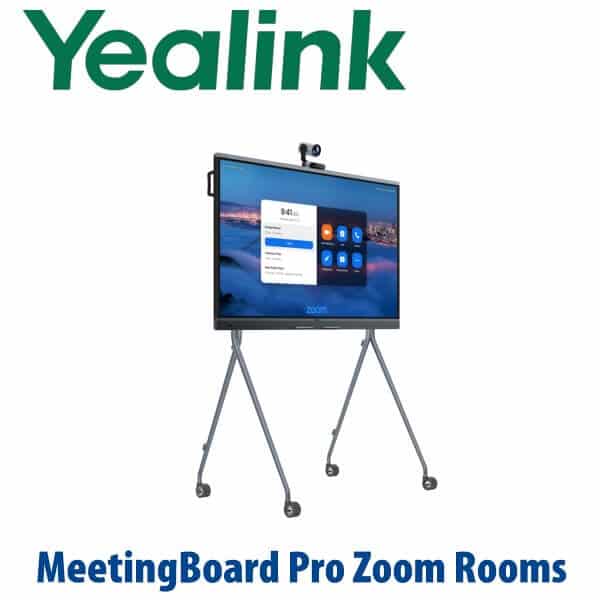
Yealink MeetingBoard Pro Zoom Rooms Appliances 65/75/86-Inch All-in-One Smart Board Dubai
Zoom Rooms, Whiteboard and Boardroom Display in One Device
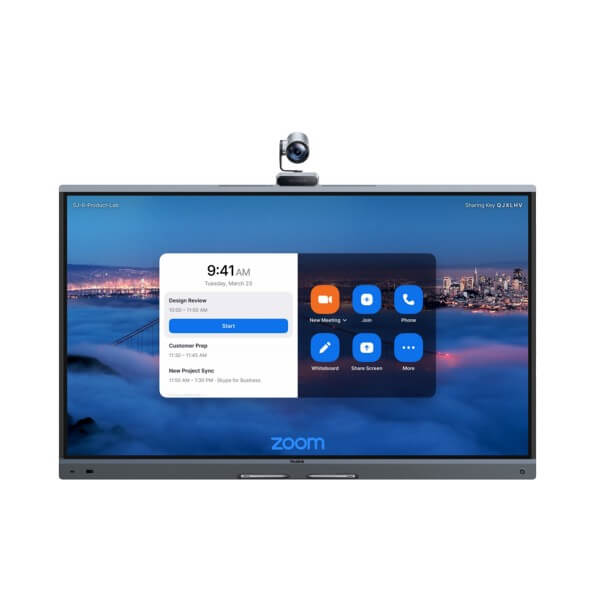
The Yealink MeetingBoard Pro Zoom Rooms appliance is built for Dubai meeting rooms that have outgrown laptop calls, loose webcams and separate interactive screens. It combines a 4K touch display, triple 50MP camera system, 16-microphone room audio, speakers, wireless content sharing and digital whiteboarding into one wall-mounted or floor-standing unit. Instead of quoting a display, camera bar, microphone array, room PC and whiteboard separately, Vector Digital Systems supplies one Yealink board, stages it in Dubai, and installs it as a complete Zoom Rooms experience.
Choose 65 inches for compact meeting rooms, 75 inches for the mainstream executive room, and 86 inches for large boardrooms and training spaces. For DIFC, DMCC, Business Bay, JLT and Abu Dhabi corporate rooms where the meeting must start first time, the MeetingBoard Pro gives your team one native Zoom Rooms interface on the screen — not a cable tray full of adapters.
Your Room Platform Comes First — Zoom, Teams, BYOD or SIP?
MeetingBoard Pro is available for modern cloud rooms, but the platform must be specified correctly before ordering. A Zoom Rooms board should be quoted for Zoom Rooms. A Microsoft Teams room should be quoted as the Teams Rooms edition. For guest calls and laptop-driven meetings, BYOD and General Mode can be scoped separately. Do not buy a room board the way you buy a normal TV — the licence, platform and room account are part of the system.
| Your Platform | Right Yealink Setup | What You Need |
|---|---|---|
| Zoom Rooms | Yealink MeetingBoard Pro Zoom Rooms appliance — this page | Zoom Rooms licence, room account, wired network and room deployment plan |
| Microsoft Teams Rooms | Yealink MeetingBoard Pro Teams Rooms appliance | Microsoft 365 tenant, Teams Rooms licence and room resource account |
| BYOD / laptop meetings | MeetingBoard Pro with BYOD accessories and General Mode scoped by room | Laptop workflow, USB/content-sharing plan and user training |
| SIP / PBX audio calls | Use a Yealink SIP conference phone or desk phone instead of a Zoom Rooms board | SIP credentials from 3CX, Yeastar, Grandstream UCM or hosted PBX |
Zoom Rooms hardware status is verified at quote stage against Zoom’s current hardware directory. For mixed-platform estates, David will confirm whether the room should be delivered as Zoom Rooms, Teams Rooms, BYOD or a separate SIP audio endpoint before the order is placed.
Power, Network and Installation Truth
Do not treat the MeetingBoard Pro like a normal office screen. It is a room system. It needs mains power, a stable wired network point, correct wall or floor mounting, a Zoom Rooms licence, and commissioning before users enter the room. Vector Digital Systems surveys the wall, camera height, table depth, cable path and network position before installation. We also confirm whether the room needs a wall mount, mobile floor stand, extra microphones, second touchscreen or external camera.
Why MeetingBoard Pro Instead of a Display + Camera Bar?
A traditional Zoom room often becomes five separate parts: display, camera, microphone, speaker, whiteboard and sometimes a room PC. The MeetingBoard Pro brings those jobs into a single Yealink appliance. The triple 50MP camera system captures people across the table, AI features such as IntelliFocus and Video Fence keep the framing useful, the 16-MEMS microphone array is designed for up to 12m full-duplex pickup, and the 4K touch display becomes the shared digital whiteboard.
For a Dubai office, the benefit is not just cleaner hardware. It is cleaner ownership. One supplier scopes the room, supplies the board, installs the mount, stages the Zoom Rooms account, tests audio/video, and remains responsible for warranty and support. That is the Vector Digital Systems difference for Yealink video collaboration projects.
Where MeetingBoard Pro Fits in the Yealink Zoom Rooms Range
Use the MeetingBoard Pro when the screen itself must be interactive. If the room only needs Zoom video with a normal display, a MeetingBar A40 or A50 may be better value. If the room is a divisible boardroom, auditorium or ProAV space, a larger Yealink architecture with multiple cameras, ceiling audio and AVHub may be the right design. For the full family overview, see the Yealink MeetingBoard Dubai guide.
| Feature | MeetingBar A50 Zoom | MeetingBoard Pro Zoom ★ | Large Room / AVHub Design |
|---|---|---|---|
| Display | Uses your existing room display | Built-in 65”, 75” or 86” 4K touch display | Separate displays or LED wall |
| Room size | Small to medium rooms | Small, medium and large rooms | Large boardrooms, halls, divisible rooms |
| Camera | All-in-one bar camera | Triple 50MP built-in camera system | Multi-camera PTZ / SmartVision layout |
| Whiteboard | No built-in touch whiteboard | Built-in digital whiteboard and annotation | External interactive display if required |
| Audio | Built-in bar audio; extend as needed | 16-MEMS mic array, 12m pickup, 36W speakers | Ceiling microphones and room speakers |
| Zoom Rooms fit | Best when screen already exists | Best when display + camera + whiteboard should be one unit | Best for complex room geometry |
| Mounting | Display mount + bar mount | Wall mount or floor stand | Survey-led AV installation |
| Price tier | Lower | Premium all-in-one | Project scoped |
| Choose if… | You already have a display and only need Zoom room audio/video | You want one Zoom Rooms touch board for video, audio, display and whiteboarding | Your room needs multiple cameras, ceiling audio or divisible-room engineering |
MeetingBoard Pro Room Sizes
| Model Size | Recommended Room | Dubai Use Case |
|---|---|---|
| MeetingBoard 65 Pro | Small room, 1–6 people | Partner room, startup meeting room, clinic consultation room, compact manager office |
| MeetingBoard 75 Pro | Medium room, 6–12 people | Mainstream executive room in DIFC, DMCC, Business Bay and JLT offices |
| MeetingBoard 86 Pro | Large room, 12–20 people | Boardroom, training room, education space, government briefing room, hotel meeting suite |
Where It Works in Dubai and the UAE
DIFC and DMCC executive rooms. Client meetings need polished video, readable content and quick whiteboard decisions. MeetingBoard Pro keeps Zoom Rooms, content sharing and annotation on one screen, so the room does not depend on a visitor finding the right HDMI adapter.
Business Bay and JLT hybrid teams. Project teams can present, annotate and bring remote stakeholders into the same board session. The triple 50MP camera system and AI framing help remote users see the people in the room instead of a wide, flat table shot.
Education, healthcare and training rooms. The 75-inch and 86-inch boards suit training centres, universities, clinics and medical briefing rooms where the presenter needs to draw, explain and call remote participants into the same session.
Hotel meeting suites and export projects. Hotels in Dubai, Abu Dhabi and Ras Al Khaimah need rooms that work for visiting teams without AV support standing inside every meeting. A Zoom Rooms MeetingBoard gives the client one familiar interface, one touch start and one display to interact with.
Full Technical Specifications
| Specification | Yealink MeetingBoard Pro Zoom Rooms Appliance |
|---|---|
| Product type | All-in-one interactive meeting device for Zoom Rooms |
| Available sizes | 65″, 75″ and 86″ |
| Display | 4K multi-touch LCD display with anti-glare coating |
| Camera system | Built-in triple-eye camera system with 3× 50MP sensors, telephoto and wide-angle lens coverage |
| AI video | IntelliFocus, Video Fence and AI-powered room framing features |
| Microphones | 16 MEMS microphone array with up to 12m full-duplex pickup |
| Speakers | 36W speaker system for rich room audio |
| Audio processing | AI noise cancellation and reverberation reduction for meeting rooms |
| Whiteboard | Digital whiteboard with premium inking, diagrams and collaborative content |
| Platforms | Zoom Rooms edition on this page; Teams Rooms edition and General Mode available by platform selection |
| Mounting | Wall mount or optional floor stand depending on room design |
| Deployment | Requires mains power, wired network, Zoom Rooms licence and room account |
| Best fit | Small to large meeting rooms, open collaboration spaces, executive offices and training rooms |
Compatible Accessories and Room Options
| Accessory | Purpose | When David Adds It |
|---|---|---|
| MB-FS-P650T / MB-FS-P750T / MB-FS-P860T | Floor stand options for 65″, 75″ and 86″ boards | Rented offices, glass walls, training spaces and movable collaboration areas |
| MB-WallMount-650 / MB-WallMount-860 | Wall mounting hardware | Permanent boardrooms and executive rooms with reinforced wall position |
| CTP25 | Touch control panel for room control workflows | Executive rooms where users should control meetings from table position |
| MB-12X Pro | Optional 12X camera extension | Long rooms, training rooms or rooms where the front table is far from the board |
| CS10 / CM20 | Speaker and ceiling microphone options | Rooms where the built-in audio needs distributed ceiling coverage |
| PA20 / VCM36-W | Wireless sharing and microphone extension options | BYOD rooms, training rooms and layouts with extended table depth |
Staging and Installation Before Handover
Vector Digital Systems stages each Yealink MeetingBoard Pro Zoom Rooms appliance before handover. We confirm firmware, platform mode, Zoom Rooms account readiness, network access, display and audio settings, camera framing, whiteboard operation, content sharing and room-control workflow. For installed projects, our Dubai team surveys the wall or floor-stand position, checks table depth, confirms power and LAN availability, installs the board, pairs accessories, tests a live Zoom call and trains the user team before the room is signed off.
Export from Dubai
Vector Digital Systems exports Yealink MeetingBoard Pro Zoom Rooms appliances and room kits from Dubai to system integrators, hotel groups, education providers, corporate IT teams and government procurement buyers. Common routes include Oman, Saudi Arabia, Qatar, Kuwait and Bahrain across the GCC; Jordan and Egypt in the wider Arab market; Kenya, Tanzania and Nigeria for African deployments; and Pakistan, Sri Lanka and Bangladesh for South Asian projects. Export quotes are prepared FOB Dubai with commercial invoice, packing list and certificate of origin on request. For MeetingBoard projects, we also confirm crate handling, mount selection and destination-side installation requirements before shipping.
Related Yealink Room Pages
- Yealink MeetingBoard Dubai guide — 65, 75 and 86 inch MeetingBoard Pro explained
- Yealink MeetingBoard Pro Teams Rooms Appliances Dubai — Teams edition for Microsoft rooms
- Video Conferencing Systems Dubai — multi-brand room design guide
- Yealink Teams Rooms Dubai — MVC, ZVC and platform comparison guide
- Yealink MeetingBar A50 Zoom Rooms Appliances Dubai — step-down choice when you already have a display
- Yealink Large Meeting Room Dubai — step-up design for multi-camera boardrooms
Get a same-day quote in AED — Dubai supply, staging and installation
Tell David your room size, platform, preferred board size, wall or floor-stand requirement, and whether you need installation. We quote with VAT breakdown, delivery, mounting and staging included.
Frequently Asked Questions — Yealink MeetingBoard Pro Zoom Rooms
Is the Yealink MeetingBoard Pro a Zoom Rooms appliance?
Yes — the Yealink MeetingBoard Pro is available as a Zoom Rooms appliance for interactive meeting rooms. Vector Digital Systems verifies the exact SKU and size against Zoom’s current hardware directory at quote stage, then supplies the correct Zoom Rooms edition for your room in Dubai.
Does the MeetingBoard Pro work with Microsoft Teams as well as Zoom?
MeetingBoard Pro supports separate platform editions and modes, but the room must be specified correctly before ordering. Choose the Zoom Rooms appliance for Zoom Rooms, and choose the Teams Rooms edition for Microsoft Teams Rooms. If your office uses both platforms, David will confirm whether you need Zoom Rooms, Teams Rooms, General Mode or a BYOD workflow.
Which MeetingBoard Pro size should I buy — 65, 75 or 86 inch?
Choose 65 inch for small rooms of about 1–6 people, 75 inch for medium rooms of about 6–12 people, and 86 inch for large rooms of about 12–20 people. In Dubai, the 75 inch is the mainstream executive-room choice, while the 86 inch suits boardrooms, training rooms and education spaces.
Does the Yealink MeetingBoard Pro need a separate camera or microphone?
Most standard rooms do not need separate devices because the MeetingBoard Pro includes a triple 50MP camera system, 16-MEMS microphone array and 36W speakers. For long tables, training rooms or larger spaces, Vector Digital Systems may add options such as MB-12X Pro, CM20, CS10 or VCM36-W after a room survey.
Can the MeetingBoard Pro be wall mounted or used on a mobile stand?
Yes — the MeetingBoard Pro can be installed on a wall mount or specified with an optional floor stand. Wall mounting is best for permanent boardrooms, while a floor stand suits glass partitions, rented offices, training rooms and open collaboration spaces where the board may need to move.
MeetingBoard Pro vs MeetingBar A50 — which is better for a Zoom Room?
Choose MeetingBoard Pro when you want the display, camera, audio and interactive whiteboard in one device. Choose MeetingBar A50 when you already have a display and only need a Zoom Rooms video bar. For most new executive rooms in Dubai where whiteboarding matters, MeetingBoard Pro is the cleaner premium solution.
Does Vector Digital Systems install and configure the MeetingBoard Pro before handover?
Yes — Vector Digital Systems stages the MeetingBoard Pro in Dubai, checks firmware, confirms Zoom Rooms readiness, tests camera framing, audio pickup, speaker output, whiteboard, content sharing and accessories, then installs and commissions the board on site when installation is included in the quote.
Who is the Yealink authorised supplier for MeetingBoard Pro in Dubai?
Vector Digital Systems LLC has supplied Yealink solutions in Dubai since 2009. David is the Yealink specialist for product selection, room sizing, Zoom Rooms platform checks, project pricing, staging, installation coordination and local warranty support.
What is the best Yealink board for a Zoom Rooms training room in Dubai?
For most training rooms, the Yealink MeetingBoard Pro 86 inch Zoom Rooms appliance is the best choice because the larger 4K touch display is easier to read and annotate from the back of the room. For smaller training rooms or executive workshops, the 75 inch version is usually sufficient. David can confirm the size from your room photo and table depth.
Does Vector Digital Systems export Yealink MeetingBoard Pro from Dubai?
Yes — Vector Digital Systems exports Yealink MeetingBoard Pro systems from Dubai to integrators, hotel groups, education providers and corporate buyers in Oman, Saudi Arabia, Qatar, Kuwait, Bahrain, Jordan, Egypt, Kenya, Nigeria, Pakistan and Sri Lanka. Export shipments are quoted FOB Dubai with commercial invoice, packing list and certificate of origin on request.