Description
Yealink MeetingBar A50 Zoom Rooms Triple 50MP AI Video Bar for Medium-Large Rooms Dubai
Zoom Rooms Without the Laptop Chaos
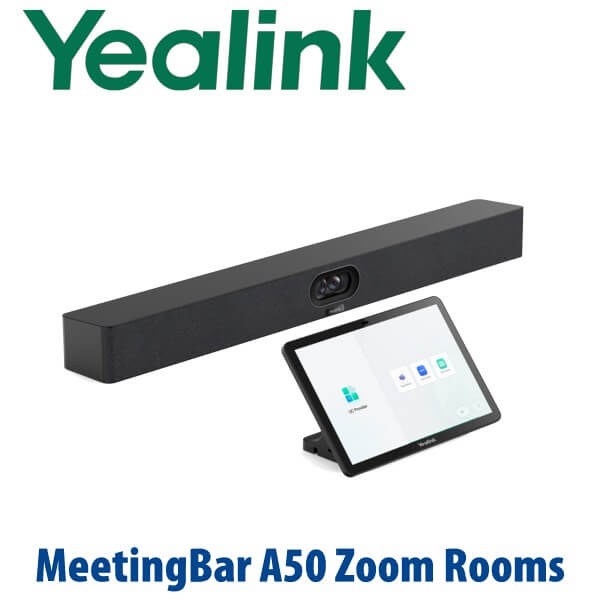
The Yealink MeetingBar A50 Zoom Rooms appliance is built for Dubai meeting rooms that have outgrown laptop webcams, USB speakerphones and loose HDMI cables. It combines a triple 50MP camera system, built-in microphone array, room speakers, Android-based room intelligence and optional CTP25 touch control into one professional video bar for medium-to-large rooms. For a DIFC boardroom, DMCC training room, Business Bay executive meeting space or hybrid classroom, the A50 gives users a dedicated room system: walk in, tap to join, present, and leave the room ready for the next meeting.
Zoom Rooms, Teams Rooms or BYOD? Get the Platform Right Before You Order
Meeting room bars are now platform-specific. A Zoom Rooms appliance is not the same purchasing decision as a Microsoft Teams Rooms bundle, and a BYOD USB room is a different workflow again. The A50 hardware family can appear in different platform bundles, so Vector Digital Systems confirms your meeting platform before quoting. For this page, the buyer intent is Zoom Rooms.
| Your Meeting Platform | Right Yealink Choice | What You Need |
|---|---|---|
| Zoom Rooms | Yealink MeetingBar A50 Zoom Rooms appliance — this page | Zoom Rooms licence, room account, display, network access and optional CTP25 touch console |
| Microsoft Teams Rooms | Yealink MeetingBar A50 Teams Rooms bundle or MVC S50 — ask David for the current certified configuration | Microsoft Teams Rooms licence, Teams tenant and certified Teams room bundle |
| BYOD / Laptop Meetings | A50 with BYOD workflow, or a Yealink USB video bar depending on room size | USB-C room cable, user laptop and the meeting app of the day |
| SIP / PABX Conference Calling | Yealink CP-series conference phone, not the A50 video bar | SIP account from 3CX, Yeastar, Grandstream UCM or hosted PBX |
Zoom certification status should be verified at quote stage against the current Zoom hardware directory. David will confirm the exact bundle and platform status before procurement, especially for enterprise projects that require compliance paperwork.
Power and Cabling Truth — This Is a Room Appliance, Not a PoE Desk Phone
The MeetingBar A50 is powered by its room power adapter; it is not powered like a PoE desk phone. The room design normally needs AC power at the display wall, network access, HDMI to the room display, and the correct touch-console cable path. With the CTP25 touch console workflow, the bar-to-console cabling can simplify the table layout, but the room still needs proper power, network and mounting preparation. Vector Digital Systems confirms these items before dispatch so installation day does not become a cable hunt.
Where the A50 Sits in the Yealink MeetingBar Range
The A50 is the premium MeetingBar choice for larger rooms that need stronger camera intelligence and longer audio pickup than small-room bars. It sits above the A40 in the all-in-one range and below a full custom MVC-style room system with separate camera, microphones, speakers and compute. For many Dubai offices, the A50 is the sweet spot: serious boardroom performance without a full rack-based AV build.
| Feature | MeetingBar A40 | MeetingBar A50 Zoom Rooms ★ | MVC S50 / Custom Room Kit |
|---|---|---|---|
| Best Room Fit | Small-to-medium rooms | Medium-to-large rooms | Large and complex boardrooms |
| Camera System | Wide-room AI camera system | Triple 50MP cameras — wide plus telephoto | Separate room camera options |
| Audio Pickup | Up to 6m class | Up to 10m class | Designed with table / ceiling microphones |
| Room Control | Touch console option | CTP25 touch console option | Touch console plus room integration |
| Platform | Teams / Zoom bundle dependent | Zoom Rooms appliance on this page | Teams Rooms / Zoom Rooms design dependent |
| Expansion | Extended mic support | Extension mics and ceiling audio support | Full AV design with multiple peripherals |
| Replaces | Older small-room USB bars | Laptop webcam + speakerphone boardrooms | Traditional PC-based room kits |
| Price Tier | Lower | Premium all-in-one | Project / AV design tier |
| Choose if… | Your room is smaller and the farthest seat is closer to the screen | You want a clean Zoom Rooms boardroom bar with stronger camera and 10m audio pickup | You need a larger AV design with separate microphones, displays and room integration |
Where the MeetingBar A50 Works in Dubai
DIFC and Downtown executive boardrooms. The A50 is for rooms where the people at the far end of the table still need to be seen clearly. The triple-camera design uses a wide lens and telephoto lenses to keep faces readable, while AI framing and speaker tracking help remote participants follow the real discussion instead of staring at a distant room view.
DMCC, JLT and Business Bay hybrid offices. Many UAE companies now run Zoom Rooms as the standard room experience across multiple branches. The A50 gives IT a repeatable room template: same video bar, same touch-console workflow, same management approach and the same user training across several meeting spaces.
Training rooms, clinics and education spaces. For a medium-to-large room where presenters move, participants sit across a wider table, or the room hosts hybrid training, the A50’s 10m pickup class and AI audio help reduce the “can you hear the back row?” problem. Add extension microphones or ceiling audio when the room shape demands it.
Boardrooms replacing laptop Zoom setups. A laptop on the table creates recurring problems: low camera angle, blocked microphone, dead battery, wrong user logged in, and someone always searching for the HDMI cable. The A50 turns Zoom into a room appliance — not a personal laptop ritual.
Full Technical Specifications
| Specification | Yealink MeetingBar A50 Zoom Rooms |
|---|---|
| Product Type | All-in-one Android video collaboration bar for Zoom Rooms |
| Room Size | Medium-to-large meeting rooms and premium boardrooms |
| Operating System | Android 13 platform |
| Processor | Qualcomm 8550 processor for AI video and room performance |
| Camera System | Triple 50MP camera system — wide-angle lens plus two telephoto lenses |
| Video Resolution | Up to 4K Ultra HD output depending on platform, display and room configuration |
| AI Video Features | IntelliFocus, Auto Framing, Speaker Tracking, Video Fence, people-focused meeting views |
| Privacy | Physical / electric privacy shutter closes when the meeting ends |
| Microphones | Built-in 16 MEMS microphone array |
| Pickup Range | Up to 10 meters, with support for extension microphones and ceiling microphones |
| Speakers | Built-in 4-speaker audio system |
| AI Audio | Full-duplex audio, AI noise cancellation, reverberation suppression and voice enhancement |
| Room Control | Optional CTP25 touch console for one-tap join, room control, sharing and BYOD workflow |
| Display Output | Dual HDMI output for single or dual screen rooms |
| USB / BYOD | USB connectivity for sharing and BYOD workflows when configured with the correct bundle |
| Network | Gigabit Ethernet network connection for room appliance operation and management |
| Management | Zoom Device Management, Yealink Management Cloud Service and remote firmware management options |
| Mounting | Wall, display or table placement depending on room design and bracket selection |
| Power | Room power adapter required for the bar; verify power point position before installation |
Compatible Accessories and Room Add-ons
| Accessory | Model / Type | Purpose |
|---|---|---|
| Touch Console | CTP25 | One-tap Zoom Rooms control, room sign-in, sharing and BYOD workflow |
| Table Microphones | VCM35 / VCM36 depending on design | Extends pickup for longer tables and wider rooms |
| Ceiling Audio | CM20 ceiling mic + CS10 ceiling speaker | Cleaner room table, better coverage in formal boardrooms and training rooms |
| Presentation Pod | PA20 where available | Wireless presentation workflow; regional availability confirmed at quote stage |
| Mounting Kit | VB-TVMOUNT-01 / wall mount options | Mounts the bar below or near the display for clean room installation |
| Content Camera | UVC30 where supported | Whiteboard or document capture for classrooms and training spaces |
Staging Before Dispatch — What Vector Digital Systems Configures
Every Yealink MeetingBar A50 Zoom Rooms order is checked before dispatch from Dubai. Vector Digital Systems stages the room bundle against your deployment plan: firmware update, Zoom Rooms account and sign-in readiness, network settings, display output test, CTP25 pairing check, microphone and speaker test, camera framing test, BYOD workflow check where applicable, and a final room checklist for your installer. For multi-room projects, we label each unit by room name — Boardroom, Training Room, CEO Meeting Room, Clinic 1 — so the site team installs the correct bundle in the correct room.
Export from Dubai
Vector Digital Systems supplies Yealink room systems to UAE companies and export buyers across the region. Common export destinations include Oman, Saudi Arabia, Kuwait, Qatar, Bahrain, Jordan, Egypt, Kenya, Pakistan and Sri Lanka. We support telecom operators, system integrators, AV installers, hotel groups, banking branch networks, corporate procurement teams and education projects. Shipments can move FOB Dubai with commercial invoice, packing list and certificate of origin on request. Ask David for project pricing when ordering multiple A50 rooms or mixing A50 with A40, MeetingBoard or MVC room systems.
Get a same-day AED quote for Yealink MeetingBar A50 Zoom Rooms
Tell David your room size, seating layout, display count, Zoom Rooms licence status, network access, and whether you need CTP25, ceiling microphones or installation accessories. We quote with VAT breakdown and Dubai delivery included.
Frequently Asked Questions — Yealink MeetingBar A50 Zoom Rooms
Is the Yealink MeetingBar A50 for Zoom Rooms or Microsoft Teams Rooms?
This page is for the Yealink MeetingBar A50 Zoom Rooms appliance. The A50 hardware family can appear in different platform bundles, so do not assume a Zoom Rooms unit and a Microsoft Teams Rooms unit are interchangeable. If your company uses Teams Rooms, ask David for the Teams Rooms A50 or MVC S50 configuration. If your company uses Zoom Rooms, this A50 Zoom Rooms bundle is the correct direction, with final certification status verified at quote stage.
What room size is the Yealink MeetingBar A50 designed for?
The MeetingBar A50 is designed for medium-to-large meeting rooms and premium boardrooms. It is a better fit than a small-room bar when the table is longer, participants sit farther from the display, or the room needs stronger camera intelligence and up to 10m class audio pickup. For smaller rooms, the A40 may be enough; for complex large rooms, David may recommend an MVC or custom room kit.
Does the MeetingBar A50 need a separate camera, microphone or speaker?
No for many standard rooms — the A50 already includes triple 50MP cameras, a built-in 16 MEMS microphone array and built-in speakers. For longer boardrooms, training rooms or rooms with difficult acoustics, Vector Digital Systems can add extension microphones or ceiling audio such as CM20 ceiling mics and CS10 ceiling speakers.
Does the Yealink MeetingBar A50 come with the CTP25 touch console?
It depends on the bundle ordered. The A50 can be quoted as a bar bundle or with the Yealink CTP25 touch console. For Zoom Rooms, the CTP25 is strongly recommended because it gives users one-tap join, room control, content sharing and a cleaner BYOD workflow. David will quote the correct bundle in AED with VAT and delivery shown clearly.
Can the MeetingBar A50 be used for BYOD laptop meetings?
Yes, when the correct bundle and cabling are specified, the A50 can support BYOD workflows so a laptop can use the room camera, microphones and speakers for third-party meetings. Tell David whether your users need native Zoom Rooms only, BYOD only, or both, because that changes the cable plan and user training.
A40 vs A50 — which Yealink MeetingBar should I buy?
Choose the A40 for smaller rooms where the farthest seat is closer to the display and room audio is easier. Choose the A50 for medium-to-large rooms that need triple 50MP cameras, stronger AI framing, longer pickup and a more premium boardroom experience. For very large rooms or rooms with multiple displays and ceiling audio, ask David about an MVC or custom Yealink room kit.
Does Vector Digital Systems configure the MeetingBar A50 before delivery?
Yes — Vector Digital Systems stages the MeetingBar A50 before dispatch: firmware check, Zoom Rooms readiness, CTP25 pairing, display output test, network settings, speaker and microphone test, camera framing test and BYOD workflow check where required. Multi-room orders are labelled by room name so installation is faster on site.
Who is the Yealink authorised supplier in Dubai for MeetingBar A50?
Vector Digital Systems LLC has supplied Yealink solutions in Dubai since 2009. David is the Yealink specialist for room systems, IP phones, DECT and headsets. Vector Digital Systems handles pre-sales room sizing, staging, local warranty handling, project pricing and export documentation from Dubai.
What is the best Yealink video bar for a Zoom boardroom in Dubai?
For a medium-to-large Zoom boardroom, the Yealink MeetingBar A50 with CTP25 is the best all-in-one recommendation because it combines triple 50MP cameras, up to 10m class pickup, built-in speakers and a dedicated touch-console workflow. For smaller rooms, the A40 can be more cost-effective. For larger executive rooms with ceiling audio or multiple displays, step up to an MVC or custom room design.
Does Vector Digital Systems export Yealink MeetingBar A50 from Dubai?
Yes — Vector Digital Systems exports Yealink MeetingBar A50 systems to integrators, telecom operators, AV installers and enterprise buyers in Oman, Saudi Arabia, Kuwait, Qatar, Bahrain, Jordan, Egypt, Kenya, Pakistan and Sri Lanka. Exports ship FOB Dubai with commercial invoice, packing list and certificate of origin on request.