Description
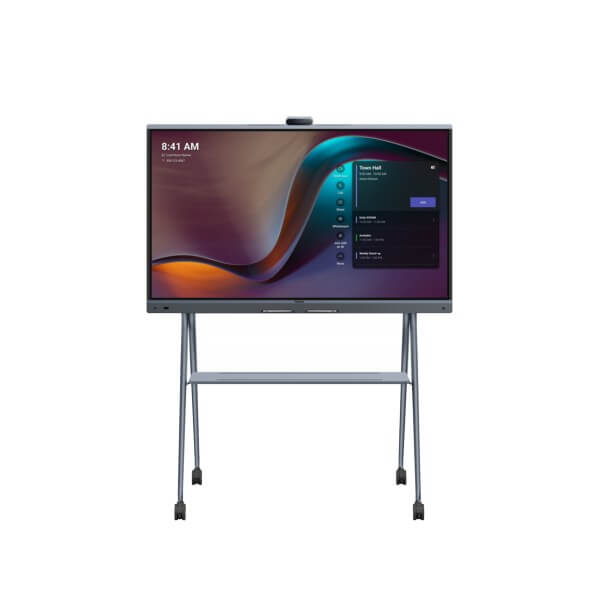
Yealink MeetingBoard Pro 65 75 86 Inch Teams & Zoom Interactive Whiteboard Dubai
The Meeting Room Board That Replaces the Screen, Camera, Speakerphone and Whiteboard
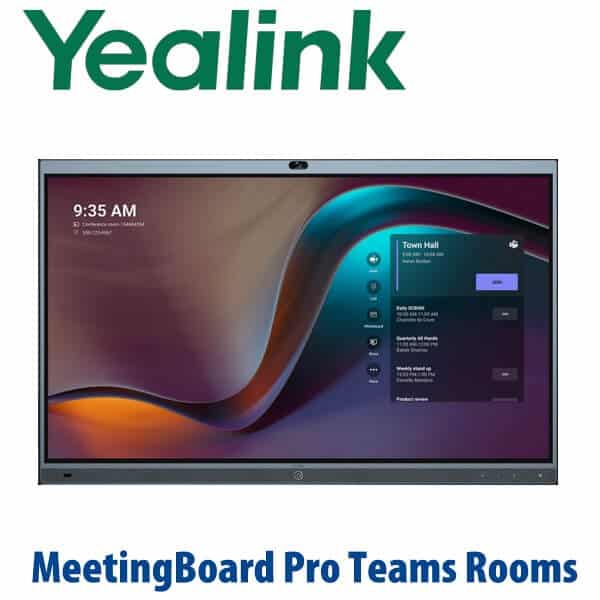
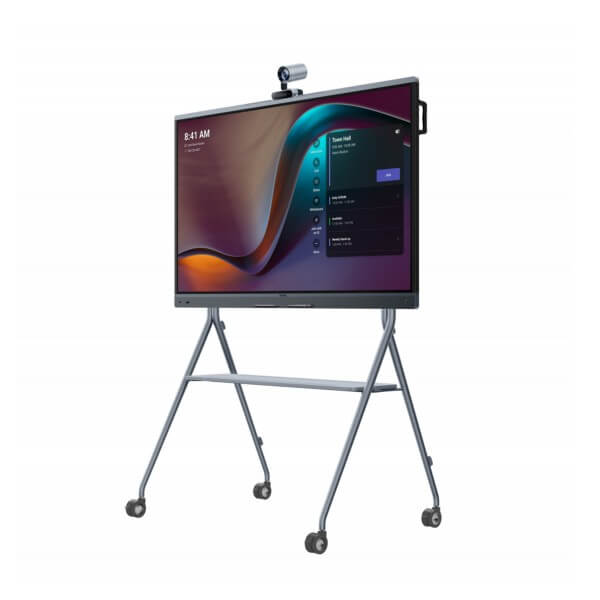
The Yealink MeetingBoard Pro is built for Dubai offices that no longer want a loose TV, USB camera, table speakerphone, HDMI cable mess and separate whiteboard in the same room. It combines a 4K interactive touch display, triple 50MP camera system, 16-microphone array, 36W speaker system, wireless content sharing and smart whiteboarding into one clean meeting-room device. Vector Digital Systems supplies the MeetingBoard Pro in Dubai for Teams Rooms, Zoom Rooms and flexible BYOD-style meeting spaces, with pre-sales room sizing, staging, installation support, VAT breakdown and same-day quote in AED.
Teams, Zoom or General Mode? Get the Platform Right Before You Order
MeetingBoard Pro is not a normal SIP conference phone and it is not a desk phone. It is a room collaboration system, so the platform decision matters before procurement. Some buyers need a dedicated Microsoft Teams Rooms device; others need Zoom Rooms; others want a flexible board for mixed platforms and guest meetings. Tell David which platform your meeting rooms use before the quote, because the correct operating mode, licence, controller and installation path depend on it.
| Your Meeting Platform | Right MeetingBoard Pro Setup | What You Need |
|---|---|---|
| Microsoft Teams Rooms | MeetingBoard Pro Teams Rooms configuration — certification checked on 14 July 2026; verify exact 65/75/86 SKU before final quote | Microsoft 365 tenant, Teams Rooms licence, room account and network access |
| Zoom Rooms | MeetingBoard Pro Zoom Rooms configuration — 65/75/86 listed as Zoom certified through Sep 2027 | Zoom Rooms licence, room calendar integration and controller workflow |
| Mixed platforms / guest meetings | General Mode or BYOD workflow — confirm room requirement before ordering | USB-C/HDMI sharing plan, user training and clear meeting-room instructions |
Power and Cabling Truth — This Is a Room Appliance, Not a PoE Desk Phone
MeetingBoard Pro is a large interactive display and room appliance, so plan proper AC power, wall/floor mounting, network, HDMI/USB-C access and cable routing before installation. Do not treat it like a PoE desk phone. Optional controllers, schedulers and room accessories may have their own power or network requirements. Vector Digital Systems checks the room layout, screen size, mounting choice, network path and accessory list before dispatch so the installation team does not discover missing cables or brackets on site.
Where MeetingBoard Pro Sits in the Yealink Room Range
MeetingBoard Pro is the collaboration-board option in Yealink’s room portfolio. Choose a MeetingBar when the room already has a display and mainly needs camera/audio. Choose MeetingBoard Pro when the room needs the display, camera, audio and whiteboard in one device. Choose a full MVC or larger room system when the boardroom needs distributed microphones, ceiling audio, PTZ cameras or a more complex AV design.
| Feature | MeetingBar A50 | MeetingBoard Pro ★ | MVC / Large Room System |
|---|---|---|---|
| Best use | Upgrade an existing display | Replace display, camera, speakerphone and whiteboard | Boardrooms with distributed AV |
| Display | Uses existing screen | Built-in 65″, 75″ or 86″ 4K touch display | External room display or video wall |
| Room size | Medium to large rooms | 65: 1–6 people · 75: 6–12 people · 86: 12–20 people | Large and extra-large boardrooms |
| Camera | Integrated meeting bar camera | Triple-eye camera system with 3× 50MP sensors | PTZ or multi-camera room design |
| Audio | Integrated bar audio | 16 MEMS mics, 12m pickup, 36W speakers | Room microphones and speakers |
| Whiteboard | Platform dependent | Built-in touch whiteboard and annotation workflow | Depends on display and controller design |
| Platform | Teams / Zoom variants | Teams, Zoom and General Mode — verify exact SKU | Teams Rooms or Zoom Rooms kit design |
| Installation | Mount above display | Wall mount or floor stand | Full AV survey recommended |
| Choose if… | You already have a good display and need a smart video bar | You want a clean all-in-one board for meetings, whiteboarding and content sharing | Your room needs custom microphones, cameras or control integration |
Choose the Right Size: 65, 75 or 86 Inch
MeetingBoard Pro 65 is the clean choice for huddle rooms, partner offices, small training rooms and executive cabins with 1–6 people. It gives a compact Teams or Zoom collaboration space without overfilling the wall.
MeetingBoard Pro 75 is the sweet spot for most Dubai meeting rooms: 6–12 people, enough display area for shared Excel sheets, project plans, site drawings and Teams whiteboard sessions, while still fitting standard conference-room walls.
MeetingBoard Pro 86 is for larger boardrooms, training centres and project review rooms with 12–20 people. Choose this size when people at the far end of the table need to read drawings, budgets, technical diagrams or training content clearly.
Dubai Use Cases
DIFC and DMCC boardrooms. Executive teams want a room that opens Teams or Zoom quickly, shows everyone clearly and supports fast whiteboard decisions during legal, finance and investment reviews. MeetingBoard Pro removes the laptop-on-table routine and makes the room feel ready for clients.
Business Bay and Dubai Internet City project rooms. Product, engineering and agency teams need touch annotation, camera framing and screen sharing in the same workflow. The triple 50MP camera system and 4K touch display make sprint reviews, campaign planning and technical walkthroughs easier for hybrid teams.
Training centres, clinics and education rooms. The 75″ and 86″ models are strong for instructor-led sessions where remote participants need to see the trainer, the room and the marked-up content. Healthcare, education and professional training teams can standardise the same board across multiple UAE rooms.
Government and semi-government meeting spaces. MeetingBoard Pro reduces device sprawl: one managed meeting-room appliance instead of separate screens, cameras, USB bars and untracked accessories. Vector Digital Systems can stage the platform, controller and room account workflow before handover.
Full Technical Specifications
| Specification | Yealink MeetingBoard Pro |
|---|---|
| Product Type | All-in-one interactive meeting board for video conferencing, wireless sharing and smart whiteboarding |
| Available Sizes | 65″, 75″ and 86″ |
| Recommended Room Size | 65: 1–6 people · 75: 6–12 people · 86: 12–20 people |
| Display | 4K multi-touch LCD with anti-glare coating |
| Camera System | Built-in triple-eye camera system with 3× 50MP cameras, wide-angle and telephoto coverage |
| AI Video | IntelliFocus, Video Fence and AI-powered participant framing features |
| Microphones | 16 MEMS microphone array with full-duplex pickup up to 12 metres |
| Speakers | 36W stereo speaker system |
| Audio Processing | AI noise cancellation, dereverberation and full-duplex meeting audio |
| Platform Modes | Native Teams, native Zoom and General Mode support — exact SKU verified at quote stage |
| Solution Architecture | Dual-solution options for Android Rooms Appliance and Windows Teams Rooms deployment |
| Collaboration | Interactive whiteboard, annotation, content sharing and meeting-room collaboration workflows |
| Mounting | Wall mounting and optional floor stand options depending on screen size and room layout |
| Certification Note | Zoom certification verified for MeetingBoard Pro 65/75/86 through Sep 2027. Microsoft Teams certification verified for MeetingBoard Pro MTRW Series-75 on 14 July 2026; confirm exact Teams SKU before final order. |
Compatible Accessories and Room Add-ons
| Accessory | Model / Option | Purpose |
|---|---|---|
| Touch Controller | CTP25 | Meeting control from the table; optional but strongly recommended for executive rooms |
| Floor Stand | MB-FS-P650T / MB-FS-P750T / MB-FS-P860T | Mobile or non-wall-mounted installation for open spaces, training rooms and temporary project rooms |
| Wall Mount | MeetingBoard Pro wall mount options by size | Clean fixed-room installation; wall strength and cable route checked before installation |
| External Camera | MB-12X Pro | Extended camera coverage for larger rooms or special seating layouts |
| Room Audio | CS10 / CM20 / VCM36-W options | Additional audio coverage where the room shape, ceiling or seating distance requires expansion |
| Wireless Presentation | PA20 | Wireless content sharing for meeting-room users; availability depends on market and platform workflow |
Staging Before Dispatch and Installation
Vector Digital Systems stages the MeetingBoard Pro before delivery wherever the customer provides the platform details. We confirm the room size, screen size, platform mode, Teams or Zoom room account, network requirements, controller workflow, accessory list and mounting plan. For Teams Rooms deployments we prepare the device handover around the Microsoft 365 room account and Teams Rooms licence. For Zoom Rooms deployments we prepare the room workflow, controller pairing and meeting-start experience. The aim is simple: when the board reaches your Dubai office, it is not just a screen in a box — it is a planned meeting-room system.
Export from Dubai
Vector Digital Systems exports Yealink MeetingBoard Pro systems from Dubai to system integrators, AV installers, telecom operators, education groups and corporate IT procurement teams. Common export routes include Oman, Saudi Arabia, Qatar, Kuwait and Bahrain in the Gulf; Jordan and Egypt for regional projects; Kenya, Tanzania and Nigeria for enterprise and training-room deployments; and Pakistan, Sri Lanka and Bangladesh for South Asian integrators. Shipments are quoted FOB Dubai with commercial invoice, packing list and certificate of origin on request. For 75″ and 86″ boards, confirm crate handling, delivery access and site unloading before finalising the quote.
Get a same-day MeetingBoard Pro quote in AED
Tell David the room size, preferred screen size, Teams or Zoom platform, mounting choice, controller requirement and delivery location. Vector Digital Systems quotes with VAT breakdown, delivery, staging and installation notes included.
Frequently Asked Questions — Yealink MeetingBoard Pro
Is Yealink MeetingBoard Pro for Microsoft Teams or Zoom?
Yealink MeetingBoard Pro supports Teams, Zoom and General Mode, but the exact room configuration must match your platform. Zoom lists MeetingBoard Pro 65/75/86 as certified through Sep 2027. Microsoft’s certified device list was checked on 14 July 2026 and shows MeetingBoard Pro MTRW Series-75; verify the exact Teams SKU and screen size with David before final quote.
Which MeetingBoard Pro size should I buy: 65, 75 or 86 inch?
Choose 65″ for huddle rooms and executive offices with 1–6 people, 75″ for the typical Dubai conference room with 6–12 people, and 86″ for larger boardrooms, training rooms and project review spaces with 12–20 people. Vector Digital Systems checks the room depth, wall size, table layout and camera sightline before recommending a size.
Does MeetingBoard Pro replace a camera, speakerphone and display?
Yes. MeetingBoard Pro combines the 4K touch display, triple 50MP camera system, 16 MEMS microphones, 36W speakers, wireless sharing and smart whiteboard in one device. It is designed for rooms where you want a clean all-in-one collaboration system instead of separate display, camera, speakerphone and whiteboard hardware.
Does MeetingBoard Pro need PoE?
No. MeetingBoard Pro is a large interactive meeting-room appliance and uses proper AC power, not PoE like a desk phone. The room still needs planned network connectivity, cable routing, mounting hardware and accessory power where required. Vector Digital Systems checks these details before delivery so installation is not delayed.
MeetingBoard Pro vs MeetingBar A50 — which one should I buy?
Choose MeetingBar A50 when your meeting room already has a good display and mainly needs a smart camera and audio bar. Choose MeetingBoard Pro when the room needs the display, camera, speaker system, microphone array and whiteboard in one integrated device. MeetingBoard Pro is the cleaner option for new boardrooms, training rooms and executive collaboration spaces.
Can MeetingBoard Pro work in mixed-platform rooms?
Yes, MeetingBoard Pro supports platform flexibility including General Mode, but the exact user experience depends on how the room is configured. If your office uses Teams for internal meetings, Zoom for client calls and occasional BYOD sharing, tell David before ordering so the correct controller, sharing and room-start workflow can be planned.
Who is the authorised Yealink supplier in Dubai?
Vector Digital Systems LLC has supplied Yealink solutions in Dubai since 2009. David handles Yealink pre-sales, room sizing, project pricing, staging and local warranty coordination. Buying through Vector Digital Systems gives Dubai businesses local support instead of relying on overseas box-shipping for a large meeting-room system.
Does Vector Digital Systems install and configure MeetingBoard Pro before delivery?
Yes. Vector Digital Systems confirms the room size, platform, licence requirement, account workflow, mounting choice, network path, controller and accessory list before dispatch. Where customer credentials and room accounts are available, the team stages the Teams or Zoom workflow and prepares the device for installation handover.
What is the best Yealink meeting room solution for a Dubai boardroom?
For most Dubai boardrooms that need a clean display, camera, speakerphone and whiteboard in one device, the Yealink MeetingBoard Pro 75 is the strongest starting point. For larger boardrooms or training spaces, step up to the 86″ model. If the room already has a display, consider a MeetingBar A50 instead; if it needs custom microphones and cameras, ask for an MVC or large-room system design.
Does Vector Digital Systems export Yealink MeetingBoard Pro from Dubai?
Yes. Vector Digital Systems exports Yealink MeetingBoard Pro systems from Dubai to integrators and enterprise buyers in Oman, Saudi Arabia, Qatar, Kuwait, Bahrain, Jordan, Egypt, Kenya, Tanzania, Nigeria, Pakistan and Sri Lanka. Quotes are FOB Dubai with commercial invoice, packing list and certificate of origin on request.