Description
Yealink MeetingBar A25 Microsoft Teams Rooms Video Bar for Focus Rooms Dubai
A Proper Teams Room for Dubai Focus Rooms
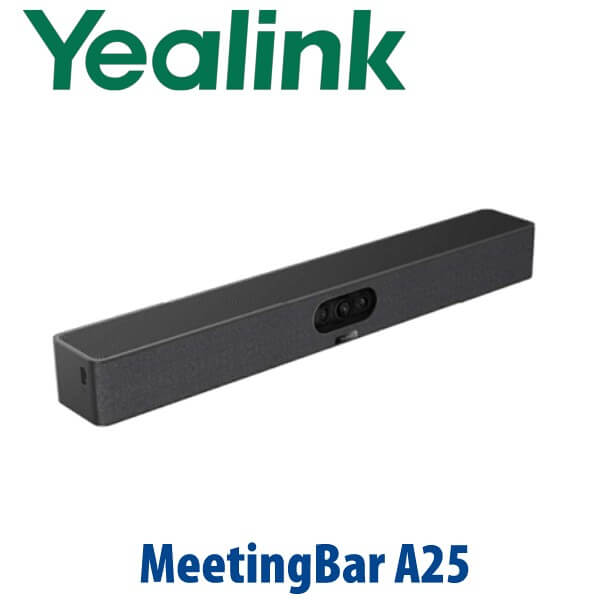
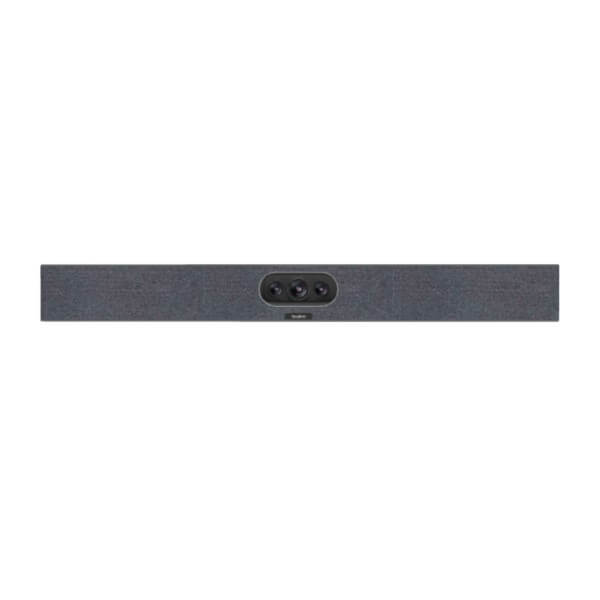
The Yealink MeetingBar A25 is built for the room that is too important for a laptop webcam and too small for an overbuilt boardroom system. In compact Dubai focus rooms, huddle spaces, manager cabins, and small project rooms, the A25 gives you a dedicated Microsoft Teams Rooms on Android experience with an ultra-wide 151° camera view, AI-powered framing, built-in audio, and the CTP25 touch console workflow. Vector Digital Systems supplies the A25 in Dubai with room-fit advice, tenant sign-in guidance, staging, VAT breakdown, delivery, and export documentation where required.
Platform Trap: Teams Rooms, Zoom Rooms, or BYOD?
The biggest mistake with room systems is buying the right hardware for the wrong meeting platform. A Teams Rooms appliance is not the same thing as a SIP conference phone, and a Zoom deployment should not be assumed from the model name alone. For the A25, Microsoft Teams Rooms status has been checked against Microsoft’s device listing on 18 July 2026. For Zoom, write the quote as verify certification status before promising a Zoom-certified room.
| Your Platform | Right Device | What You Need |
|---|---|---|
| Microsoft Teams Rooms | Yealink MeetingBar A25 (this page) | Microsoft 365 tenant, Teams Rooms licence, room account, network access, display |
| Zoom Rooms | Verify Zoom certification status before quoting | Zoom Rooms licence, room account, platform verification at quote stage |
| BYOD / laptop meetings | A25 with CTP25 USB-C sharing path | USB-C laptop connection for 4K sharing, BYOD, and PD charging where supported |
| SIP audio conference | Use Yealink CP-series conference phone instead | SIP account from 3CX, Yeastar, UCM, hosted PBX, or operator platform |
Power and Cabling Truth: Plan the Room Before Delivery
The MeetingBar A25 is not a loose USB webcam. It is a room appliance that needs the correct display, network, power, touch console position, and cable route before installation. Yealink’s one-cable design allows a single Cat5e cable from the bar to the CTP25 touch console to carry power and network connectivity to the console, keeping the table cleaner. A USB-C cable from the console to a PC supports 4K sharing, BYOD, and PD charging where supported by the laptop. Vector Digital Systems confirms the room layout before dispatch so the screen wall, meeting table, and console position all match the deployment plan.
Where the A25 Sits in the MeetingBar Range
The A25 is the compact-room MeetingBar: stronger than a basic huddle-room webcam setup, but not intended to replace an A40 or A50 in a larger boardroom. Its 151° field of view is designed for tight rooms where people sit close to the screen or along wall-side tables. For medium rooms, move up to the A40; for larger rooms with more participants and longer pickup requirements, the A50 tier is the better fit.
| Feature | MeetingBar A10 | MeetingBar A25 ★ | MeetingBar A40 |
|---|---|---|---|
| Best room fit | Huddle / very small room | Focus room, up to 5 people | Medium room, up to 12 people |
| Camera view | Compact-room camera | 151° HFOV ultra-wide | 110° HFOV |
| AI view features | Confirm by current SKU | IntelliFocus, Video Fence, Auto Framing, Speaker Tracking, PiP | IntelliFocus, Video Fence, Auto Framing, Speaker Tracking, People Counting, PiP |
| Microphones | Confirm by current SKU | Built-in 8 MEMS mic array | Built-in 8 MEMS mic array, supports extended mic |
| Pickup range | Huddle range | 5 m | 6 m |
| Speaker | Built-in speaker | Built-in speaker | Built-in 2 stereo speakers |
| Expansion | Small-room setup | CTP25 console workflow | CTP25 + optional extended mic layouts |
| Replaces | Laptop webcam / huddle camera | Laptop-on-table meeting setup | Older medium-room video bar or A20/A30 refresh |
| Choose if… | You need a basic huddle-room room bar | You want a dedicated Teams Room for compact spaces with ultra-wide coverage | You have a larger room, more seats, or need extended mic planning |
Where the MeetingBar A25 Works in Dubai
DIFC and DMCC focus rooms. Many free zone offices have small glass rooms that seat three to five people, often with the table pushed close to the display wall. The A25’s 151° ultra-wide view is designed for exactly this layout, keeping participants visible even when they are seated close to the screen.
Business Bay and JLT SME meeting rooms. A laptop on the table looks cheap during client calls and creates cable chaos. The A25 turns the room into a dedicated Teams Room: walk in, tap the CTP25 console, join the meeting, and keep the laptop free for notes and file sharing.
Manager cabins and project rooms. Construction firms, consultancies, clinics, and trading companies often need one reliable small room for supplier calls, regional approvals, and hybrid staff meetings. AI framing, Speaker Tracking, and Video Fence keep the call focused on the people in the room rather than the glass wall, corridor, or background movement.
Full Technical Specifications
| Specification | Yealink MeetingBar A25 |
|---|---|
| Product Type | All-in-one video bar for focus rooms |
| Room Size | Compact focus rooms, up to 5 people |
| Platform | Microsoft Teams Rooms on Android; Zoom status to be verified before certification claim |
| Operating System | Android 13 |
| Camera System | Triple-camera system: one ultra-wide lens plus two telephoto lenses |
| Field of View | 151° horizontal field of view |
| AI Video Features | IntelliFocus, Video Fence, Auto Framing, Speaker Tracking, Picture-in-Picture |
| Microphones | Built-in 8 MEMS microphone array |
| Pickup Range | 5 m |
| Speaker | Built-in speaker |
| AI Audio | AI Audio 2.0 with noise cancellation, Audio Fence, reverberation suppression, and full-duplex audio |
| Touch Console | Supports CTP25 touch console with direct bar connection or IP connection |
| Sharing / BYOD | USB-C from touch console to PC supports 4K sharing, BYOD, and PD charging where supported |
| Management | Microsoft Teams Admin Center, MTR Portal Management Platform, Zoom Device Management where applicable, and Yealink Management Cloud Service |
| Security Note | Android 13; Microsoft Device Ecosystem Platform support noted by Yealink as coming soon |
Compatible Accessories and Room Items
| Accessory | Model / Item | Purpose |
|---|---|---|
| Touch Console | CTP25 | Room control, join button, sharing path, direct bar connection or IP connection |
| Display | Meeting-room display or TV | Required for the room; size depends on viewing distance and seating layout |
| Mounting | Bar mount / wall or TV mount | Positions the A25 at the correct height below or above the display |
| Console Mount | Desk or wall mounting option for CTP25 | Keeps the touch console fixed and protected in shared meeting rooms |
| Cables | Cat5e bar-to-console cable, USB-C laptop cable | Clean table routing for power/network to console and BYOD/sharing to PC |
Staging Before Dispatch
Vector Digital Systems stages the Yealink MeetingBar A25 before dispatch where tenant access is provided: firmware check, Teams Rooms readiness check, room account sign-in guidance, CTP25 console pairing, network and update-path check, display and sharing workflow test, camera framing review, and final packing for desk delivery. For multi-room projects, we label each unit by room name before delivery so the installer does not mix up Business Bay meeting rooms, DIFC focus rooms, or branch-office units.
Export from Dubai
Vector Digital Systems supplies Yealink MeetingBar A25 systems to corporate IT teams, AV integrators, telecom operators, and project contractors across the region. Common export routes include Oman, Saudi Arabia, Qatar, Kuwait, Bahrain, Jordan, Egypt, Kenya, Pakistan, and Sri Lanka. Shipments move FOB Dubai with commercial invoice, packing list, and certificate of origin on request. For project orders, send David the room count, platform, display plan, and delivery destination for a same-day AED quote with VAT and delivery notes.
Get a same-day quote in AED — Yealink MeetingBar A25 Dubai
Tell David: room size, number of seats, Microsoft Teams or Zoom requirement, display size, cable route, and whether you need installation support. Quote includes VAT breakdown and delivery charges.
Frequently Asked Questions — Yealink MeetingBar A25
Is the Yealink MeetingBar A25 certified for Microsoft Teams Rooms?
Microsoft Teams Rooms device status was checked on 18 July 2026, and the A25 is listed by Yealink as a MeetingBar A25 Microsoft Teams Rooms on Android device. Vector Digital Systems verifies the current Microsoft listing again before quoting any multi-room project.
Does the Yealink MeetingBar A25 work with Zoom Rooms?
The A25 page describes support for diverse video platform experiences, including Zoom, Microsoft Teams, and BYOM. However, Zoom Rooms certification should be written as verify certification status until the exact SKU is checked against Zoom’s official hardware list at quote stage.
What room size is the Yealink MeetingBar A25 designed for?
The MeetingBar A25 is designed for compact focus rooms and small meeting spaces, typically up to 5 people. Its 151° ultra-wide field of view is useful when the table is close to the display wall or participants sit near the camera.
A25 vs A40 — which Yealink MeetingBar should I buy?
Choose the A25 for focus rooms and compact spaces up to 5 people where a 151° ultra-wide view matters. Choose the A40 for medium rooms up to 12 people, longer pickup, stereo speakers, and extended mic planning. David can size the room from a photo, seating count, and display-wall distance.
Does the Yealink MeetingBar A25 need a PC in the room?
No. The A25 is an Android-based room appliance for Teams Rooms, so the room can join meetings from the CTP25 touch console without leaving a laptop permanently connected. A laptop can still connect by USB-C for BYOD and 4K sharing where supported.
What audio does the Yealink MeetingBar A25 include?
The A25 includes an 8 MEMS microphone array, built-in speaker, 5 m pickup range, full-duplex audio, AI noise cancellation, Audio Fence, and reverberation suppression. It is built for small-room speech clarity rather than large-boardroom coverage.
Can the Yealink MeetingBar A25 hide people outside the meeting area?
Yes. The Video Fence feature marks the virtual meeting boundary so remote participants see and hear what is inside the defined space. This is useful in Dubai glass offices, shared coworking rooms, and focus rooms beside corridors.
Does Vector Digital Systems configure the A25 before delivery?
Yes. Vector Digital Systems can check firmware, pair the CTP25 console, verify the sharing workflow, guide Teams Rooms room-account sign-in, test camera and audio behaviour, and label each unit by room name before dispatch.
Who is the Yealink authorised supplier in Dubai?
Vector Digital Systems LLC has supplied Yealink products and VoIP collaboration solutions in Dubai since 2009. David is the Yealink product specialist for quotes, room sizing, staging, warranty handling, and project pricing.
Does Vector Digital Systems export Yealink MeetingBar A25 from Dubai?
Yes. Vector Digital Systems exports Yealink room systems from Dubai to integrators and enterprise buyers in Oman, Saudi Arabia, Qatar, Kuwait, Bahrain, Jordan, Egypt, Kenya, Pakistan, and Sri Lanka. Export shipments are quoted FOB Dubai with commercial invoice, packing list, and certificate of origin on request.