Description
Yealink MeetingBoard 75C MB75C EDLA 75-Inch 4K BYOM Collaboration Display Dubai
A 75-Inch Meeting Board for Dubai’s Medium Hybrid Rooms
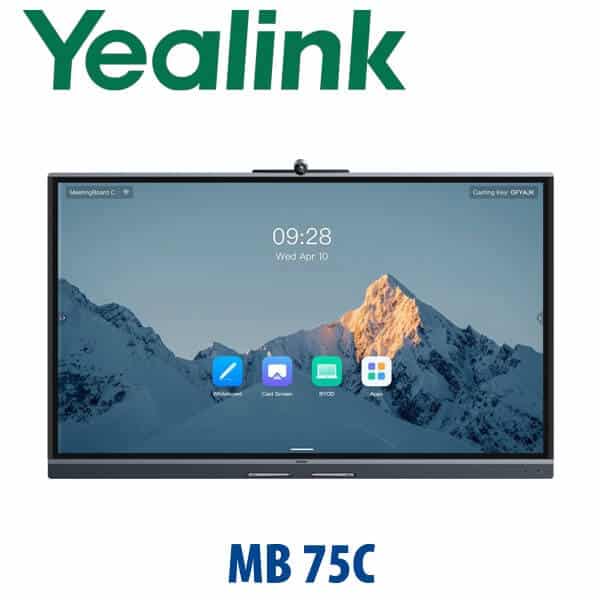
The Yealink MeetingBoard 75C, also searched as MB75C or MB75C-EDLA, is built for offices that want one large 4K touch display to handle video meetings, digital whiteboarding, wireless sharing and BYOM laptop calls without building a full rack-based AV system. It combines a 75-inch interactive screen, 50MP AI camera, 8 beamforming microphone arrays, stereo speakers, Google EDLA access and Yealink’s collaboration board experience in one device. For Dubai meeting rooms in DIFC, DMCC, Business Bay, JLT and Dubai Internet City, it is the practical middle size: larger than a 65-inch huddle board, but easier to place than an 86-inch board in a standard 6–12 person room.
Platform Check: Google EDLA, BYOM, Teams and Zoom
The MeetingBoard 75C is not a SIP desk phone and it is not the T7/MP phone platform. It is a Google EDLA-based collaboration board designed for BYOM, Google ecosystem workflows, app access and room sharing. The buyer trap is different from desk phones: do not assume that every large Yealink board is a native Microsoft Teams Rooms or Zoom Rooms appliance. For MB75C pages, write the platform clearly: use it for Google EDLA workflows and BYOM meetings; verify Microsoft Teams Rooms or Zoom Rooms certification status before promising a native room experience.
| Your Meeting Platform | Right Yealink Route | What You Need |
|---|---|---|
| Google Workspace / Google Meet / Android app workflows | Yealink MeetingBoard 75C EDLA (this page) | Google account, network access and app policy approved by your IT admin |
| BYOM laptop meetings — Teams, Zoom, Webex, Google Meet | MeetingBoard 75C with VCH51 Pro one-cable BYOM workflow | User laptop with meeting app, correct cable path and room USB/HDMI design |
| Native Microsoft Teams Rooms | Verify certification status — ask David for the current certified Yealink MeetingBoard / MTR package | Teams Rooms licence, Teams tenant policy and certified hardware bundle |
| Native Zoom Rooms | Verify certification status — ask David for the current Zoom-certified Yealink board or room kit | Zoom Rooms licence, room controller plan and certified hardware status |
Certification check date for this page: 14 July 2026. The safe sales position is: MB75C is a Google EDLA / BYOM meeting board; native Teams or Zoom certification must be verified before quoting a room-standard deployment.
Power and Installation Truth — This Is Not a PoE Desk Phone
The Yealink MeetingBoard 75C is AC powered, not PoE powered. Unlike Yealink desk phones, it does not run from a PoE switch port. The room needs a proper AC power point, network access, cable management and a decision on mounting: wall mount, mobile floor stand, or boardroom fixed installation. For BYOM rooms, also plan the laptop cable path to the table so the user does not have to stand under the screen with an HDMI cable. Vector Digital Systems checks power, wall structure, cable route and room layout before dispatch so the board is not just delivered — it is usable.
Why the 75C Exists: The Middle Size That Fits Real Meeting Rooms
The MeetingBoard C range is built around two practical sizes: 65-inch for smaller rooms and 75-inch for medium rooms and open collaboration spaces. The 75C is the size most Dubai offices ask for when a standard TV is too passive and a full AV room is too complex. It gives the team a touch-first canvas for whiteboarding, a camera wide enough for the table, microphone coverage for typical 6–12 person rooms, and BYOM flexibility for companies that do not want to lock every meeting room to only one cloud platform.
Yealink MeetingBoard C Range — Where the MB75C Fits
Choose the MeetingBoard 65C when the room is small and seating is close to the screen. Choose the MeetingBoard 75C when the room seats 6–12 people, the table is deeper, or users will stand at the board for workshops. Step up to a MeetingBoard Pro or larger certified room package when the customer needs native Teams Rooms or Zoom Rooms deployment, larger space coverage, or more formal enterprise room management.
| Feature | MeetingBoard 65C | MeetingBoard 75C / MB75C ★ | MeetingBoard Pro / Larger Room Kit |
|---|---|---|---|
| Display | 65-inch 4K touch display | 75-inch 4K touch display | 65 / 75 / 86-inch Pro or room kit options |
| Room size | Small room, 1–6 people | Medium room, 6–12 people | Large rooms, formal boardrooms, platform-certified spaces |
| Platform angle | Google EDLA / BYOM | Google EDLA / BYOM with larger canvas | Verify Teams / Zoom certified package |
| Camera | 50MP wide-angle AI camera | 50MP wide-angle AI camera | Model-dependent; verify room kit design |
| Microphones | Beamforming array | 8 beamforming mic arrays, up to 8m coverage | May add external mics depending on room |
| BYOM | Supported with correct accessories | Best fit with VCH51 Pro one-cable BYOM | Depends on Teams / Zoom / Windows room design |
| Mounting | Wall or mobile stand | Wall, mobile stand or boardroom fixed install | Project design recommended |
| Replaces | Small-room TV + webcam + speakerphone | Medium-room TV, whiteboard, USB camera and speakerphone bundle | Full platform-specific AV room kit |
| Choose if… | You have a compact huddle room and want a smaller collaboration board | You need the best middle-size Yealink board for 6–12 person BYOM and Google EDLA rooms | You need native Teams Rooms / Zoom Rooms certification or a larger enterprise boardroom design |
Where the Yealink MB75C Works in Dubai
Medium boardrooms in DIFC, DMCC and Business Bay. Many Dubai offices already have a large TV, a USB camera, a speakerphone and a separate whiteboard. The MB75C replaces that clutter with one 75-inch interactive display that handles video, audio, presentation and whiteboarding from the same wall or mobile stand.
Training rooms and project war rooms. Consultants, finance teams, construction project offices and real estate developers need a large surface for drawings, pipeline reviews, timelines and remote stakeholder calls. The 75C gives presenters a 4K touch canvas with wireless sharing and Google app access, while the 50MP camera keeps the room visible to remote teams.
BYOM rooms for mixed-platform companies. Dubai offices rarely run one meeting app forever. One department uses Teams, a client sends Zoom, a supplier uses Google Meet, and a regional partner joins from Webex. With the correct BYOM accessory and cable path, the MB75C lets the user bring the meeting from their laptop and use the room’s board, camera, microphones and speakers.
Education, healthcare and workshops. Training institutes, clinics, hospitals, universities and professional services firms can use the MB75C as an interactive screen for teaching, remote consultations, annotation, planning and group collaboration. The value is not only the 75-inch display — it is the combination of inking, meeting audio, camera framing and content sharing in one device.
Full Technical Specifications
| Specification | Yealink MeetingBoard 75C / MB75C |
|---|---|
| Product type | All-in-one interactive collaboration display / meeting board |
| Model / search terms | MeetingBoard 75C · MB75C · MB75C-EDLA |
| Display size | 75-inch 4K UHD interactive display |
| Resolution | 3840 × 2160, 16:9 |
| Recommended room size | Medium rooms, 6–12 people, plus open collaboration spaces |
| Platform | Google EDLA-based board with Google Play access; Teams / Zoom native certification must be verified before quoting |
| Camera | Built-in 50MP wide-angle camera, 98.2° horizontal field of view |
| AI video features | Auto Framing, Picture-in-Picture, Multi-Focus and Video Fence |
| Microphones | 8 beamforming microphone arrays with full-duplex coverage up to 8 metres |
| Noise reduction | AI noise cancellation, up to 90dB maximum noise reduction for non-human noise |
| Speakers | Built-in stereo speaker system |
| Whiteboard | Interactive whiteboard with premium inking and diagram recognition support |
| BYOM | Supported with VCH51 Pro for one-cable laptop meeting workflow |
| Sharing options | HDMI input, Presentation Pod, Miracast and AirPlay options |
| Network | Ethernet and wireless networking; confirm final UAE stock hardware revision at quote stage |
| Power | AC power required — not PoE powered |
| Mounting options | Wall mount or mobile floor stand options; room survey recommended for wall structure and cable route |
| Best use case | Medium boardrooms, training rooms, project rooms and BYOM collaboration spaces |
Compatible Accessories and Room Options
| Accessory / Option | Model / Detail | Purpose |
|---|---|---|
| BYOM adapter | VCH51 Pro | One-cable laptop connection for BYOM meetings using the room’s board, camera, microphones and speakers |
| Mobile floor stand | Yealink floor stand option — confirm exact stand model at quote | Move the board between training rooms, workshop rooms and open collaboration areas |
| Wall mount | Yealink wall mount option — confirm wall type and load capacity | Permanent boardroom installation with neat cable route and fixed screen height |
| Presentation Pod | Yealink wireless presentation option | Wireless sharing for guests and presenters without changing the room PC or meeting board settings |
| Room cabling | HDMI / USB / network / power cable plan | Prevents messy table cables and makes BYOM simple for non-technical users |
Staging and Room Readiness Before Dispatch
Vector Digital Systems does not treat the Yealink MB75C as a box-drop display. Before dispatch or installation, we confirm the room size, wall or stand requirement, AC power position, network availability, BYOM cable route, presentation workflow and preferred apps. Where the customer uses Google Workspace, Teams, Zoom, Webex or mixed platforms, David confirms whether the room should run app-first, browser-first or laptop-first. We can stage network settings, basic device configuration, display settings, sharing workflow, test camera/audio capture and label the cable path before delivery.
Export from Dubai
Vector Digital Systems supplies and exports Yealink MeetingBoard systems from Dubai to system integrators, AV contractors, corporate IT teams, telecom operators and education projects. Common export routes include Oman, Saudi Arabia, Qatar, Kuwait and Bahrain in the GCC; Jordan and Egypt for regional meeting-room projects; Kenya, Tanzania and Uganda for East African integrators; and Pakistan, Sri Lanka and Bangladesh for South Asian procurement teams. Export quotes are prepared FOB Dubai with commercial invoice, packing list and certificate of origin on request. Because the MB75C is a large-format display, David will confirm packing, handling, stand or wall-mount accessories, and destination-side installation responsibility before shipment.
Get a same-day quote in AED — Yealink MeetingBoard 75C Dubai
Tell David your room size, platform preference, wall or stand choice, BYOM requirement and delivery location. Quotes include VAT breakdown, delivery and installation notes where required.
Frequently Asked Questions — Yealink MeetingBoard 75C / MB75C
Is the Yealink MB75C a Microsoft Teams Rooms certified device?
Do not assume native Microsoft Teams Rooms certification from the MB75C model name alone. The MeetingBoard 75C is positioned as a Google EDLA and BYOM collaboration board, while Microsoft Teams Rooms certification must be verified against Microsoft’s official certified hardware list before quoting. If your Dubai office needs native Teams Rooms, ask David to verify the current certified Yealink MeetingBoard or MTR package before order.
Does the Yealink MeetingBoard 75C work with Zoom?
The MB75C can support Zoom meetings through BYOM workflows, where the user runs Zoom from a laptop and uses the board’s room hardware through the correct cable/accessory setup. Native Zoom Rooms certification is a separate status and must be verified before claiming a Zoom-certified room deployment. For Zoom Rooms projects, David will check the latest Yealink certified options before quoting.
What room size is the Yealink MB75C designed for?
The Yealink MB75C is the 75-inch MeetingBoard C model and is best suited to medium meeting rooms of around 6–12 people, plus open collaboration spaces. Choose the 65C for smaller huddle rooms and consider a larger board or full room kit for big boardrooms, training halls or rooms that need certified Teams Rooms or Zoom Rooms deployment.
Does the Yealink MB75C need PoE or a power adapter?
The MB75C is a large interactive display and requires AC power; it is not powered from a PoE switch like a Yealink desk phone. Before delivery, Vector Digital Systems checks power socket position, network access, mounting choice and cable route so installation is clean and practical.
Can we use the Yealink MB75C for BYOM meetings?
Yes — BYOM is one of the strongest reasons to choose the MeetingBoard 75C. With the correct VCH51 Pro and cable path, users can bring a laptop running Teams, Zoom, Google Meet, Webex or another meeting app and use the room’s board, camera, microphones and speakers. Vector Digital Systems designs the cable route so non-technical users can start meetings easily.
What is the difference between Yealink MeetingBoard 65C and 75C?
The main difference is screen size and room fit. The 65C is better for small rooms and huddle spaces, while the 75C gives a larger 4K canvas for 6–12 person rooms, training sessions and workshops. If the room has a deeper table or users need to stand at the board for collaboration, the 75C is usually the better choice.
Who is the authorised Yealink supplier in Dubai for MeetingBoard systems?
Vector Digital Systems LLC has supplied Yealink products and VoIP collaboration systems in Dubai since 2009. David is the Yealink specialist for product selection, room-fit advice, project pricing, staging, delivery coordination and local warranty handling. Quotes include VAT breakdown and delivery notes, with installation guidance where required.
What is the best Yealink meeting board for a medium boardroom in Dubai?
For a 6–12 person medium boardroom, the Yealink MeetingBoard 75C is the best fit when the customer wants a 75-inch 4K touch display, built-in AI camera, beamforming microphones, wireless sharing and BYOM flexibility. For a smaller room, choose the 65C. For a native Teams Rooms or Zoom Rooms boardroom, ask David to verify the current certified MeetingBoard Pro or room kit.
Does Vector Digital Systems configure the Yealink MB75C before delivery?
Yes — Vector Digital Systems can stage the MB75C before dispatch by checking network settings, display configuration, app workflow, BYOM cable path, camera and microphone behaviour, and sharing setup. For Dubai installations, we also confirm wall or stand choice, AC power position and room layout before delivery.
Does Vector Digital Systems export Yealink MeetingBoard 75C from Dubai?
Yes — Vector Digital Systems exports Yealink MeetingBoard systems from Dubai to AV contractors, system integrators, corporate IT teams and education projects across Oman, Saudi Arabia, Qatar, Kuwait, Bahrain, Jordan, Egypt, Kenya, Tanzania, Pakistan and Sri Lanka. Export shipments are quoted FOB Dubai with commercial invoice, packing list and certificate of origin on request.