Description
Yealink MeetingBoard Pro Yealink MeetingBoard Pro Dubai
Yealink MeetingBoard Pro 65 — One Board for the Small Meeting Room
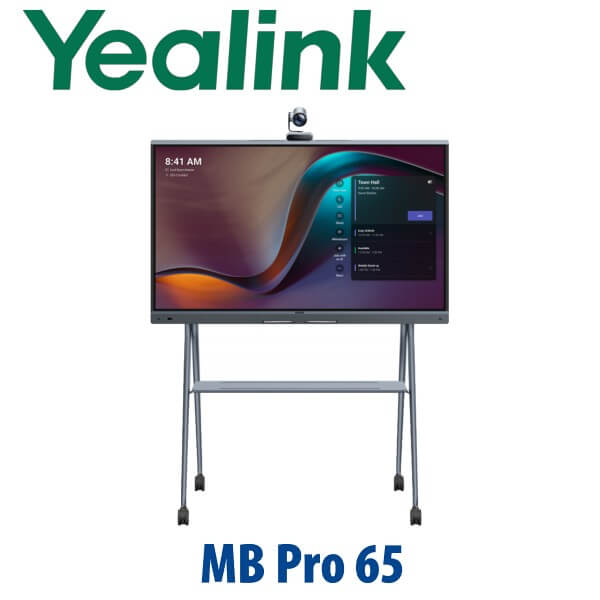
The Yealink MeetingBoard Pro 65 is the all-in-one smart whiteboard for Dubai offices that want the meeting room cleaned up: display, camera, microphone array, speakers, whiteboard and meeting platform in one 65-inch board. It is built for small rooms of 1–6 people, executive offices, glass-wall huddle rooms, training corners and open collaboration spaces where a laptop-on-TV setup is no longer acceptable. Vector Digital Systems supplies the MeetingBoard Pro 65 in Dubai with platform guidance, staging, VAT breakdown, delivery planning and local warranty handling.
Teams, Zoom or General Mode? Choose the Right Platform Before You Order
MeetingBoard Pro is a platform-sensitive room device. A Teams Rooms office, a Zoom Rooms office and a BYOD collaboration room may need different licensing, deployment mode and admin handover. Do not treat it like a normal TV screen. Tell David which meeting platform your company uses before quoting so the correct MeetingBoard Pro version, accessories and room workflow are supplied.
| Your Platform | Right Setup | What You Need |
|---|---|---|
| Microsoft Teams Rooms | Yealink MeetingBoard Pro 65 Teams Rooms configuration | Microsoft Teams Rooms licence, Microsoft 365 tenant, Teams admin access and room account |
| Zoom Rooms | Yealink MeetingBoard Pro 65 Zoom Rooms configuration | Zoom Rooms licence, Zoom admin access, room profile and network readiness |
| BYOD / General collaboration | MeetingBoard Pro with wired or wireless sharing workflow | HDMI/USB-B, VCH51, PA20, WPP30 or approved room-sharing method depending on user flow |
Certification check: Microsoft Teams device status and Zoom certification status were verified on 14 July 2026 before writing this page. Zoom lists MeetingBoard Pro 65/75/86 as certified through Sep 2027. Vector Digital Systems re-checks certification status before quoting any Teams or Zoom project.
Power and Installation Truth — This Is Not a PoE Desk Phone
The MeetingBoard Pro 65 is an AC-powered room system, not a PoE desk phone. Plan a proper power socket behind the board or near the floor stand, a wired network point for the room device, and enough wall/floor clearance for the camera view. For wall-mounted boardrooms in Business Bay, DIFC, DMCC and Dubai Marina, we recommend confirming power, LAN and mounting surface before delivery so the installation team is not forced into visible cable runs.
Where the 65 Pro Sits in the MeetingBoard Range
The MeetingBoard Pro 65 is the small-room model in the Pro family. It is the right size when the room has one meeting table, a small huddle space, an executive desk area or a collaborative pod. Step up to the MeetingBoard Pro 75 when the room reaches 6–12 people or needs more whiteboard space. For larger boardrooms and training rooms, the 86-inch class becomes the practical choice.
| Feature | MeetingBoard 65 | MeetingBoard Pro 65 ★ | MeetingBoard Pro 75 |
|---|---|---|---|
| Best room size | Small meeting room | 1–6 people | 6–12 people |
| Display | 65-inch 4K touch | 65-inch 4K multi-touch | 75-inch 4K multi-touch |
| Camera | Built-in camera | Triple 50MP camera system | Triple 50MP camera system |
| Audio | Integrated room audio | 16-MEMS mics + 36W speakers | 16-MEMS mics + 36W speakers |
| Platform | Teams / Zoom variants | Teams Rooms, Zoom Rooms or General mode | Teams Rooms, Zoom Rooms or General mode |
| Mounting | Wall / stand options | Wall mount or optional floor stand | Wall mount or optional floor stand |
| Replaces / upgrades | Legacy smart-board rooms | Laptop-on-TV huddle rooms and first-gen boards | Medium meeting rooms needing more whiteboard space |
| Price tier | Lower | Small-room Pro tier | Step-up room tier |
| Choose if… | You need a simpler 65-inch board refresh | You want the Pro camera, audio and whiteboard experience for a 1–6 person room | Your room is larger or users need more writable canvas |
Where MeetingBoard Pro 65 Works in Dubai
DIFC and DMCC executive rooms. A senior team needs Teams Rooms or Zoom Rooms to start cleanly without a laptop, USB hub, camera bar and separate whiteboard. The MeetingBoard Pro 65 gives one-touch room meetings, premium camera framing and digital ink in one device.
Business Bay and Dubai Marina huddle rooms. Compact meeting rooms often have limited wall space and messy table cabling. A 65-inch board on the wall or optional floor stand keeps the room clean while still giving a proper 4K display, camera, microphones and speakers.
Training, design and project rooms. Marketing teams, contractors, consultants and project managers can annotate, brainstorm and share content on the same surface used for the video meeting. The value is not just video quality — it is removing the gap between the call and the whiteboard.
Hybrid work refresh projects. Post-RTO offices in Dubai are replacing TV-and-webcam rooms with managed collaboration spaces. MeetingBoard Pro 65 is suited to the first wave: small rooms used every day by managers, consultants, finance teams and sales teams who need meetings to start on time.
Full Technical Specifications
| Specification | Yealink MeetingBoard Pro 65 |
|---|---|
| Product Type | All-in-one interactive meeting board with display, camera, microphones, speakers and whiteboard |
| Display Size | 65-inch 4K multi-touch LCD screen |
| Room Size | Small rooms and huddle spaces — typically 1–6 people |
| Camera | Built-in triple 50MP camera system with wide-angle and telephoto lens coverage |
| Camera Intelligence | AI meeting features including IntelliFocus-style speaker close-up and Video Fence meeting boundary control |
| Microphones | 16-MEMS microphone array with AI processing and full-duplex meeting pickup up to 12m |
| Speakers | Integrated 36W speaker system for room audio |
| Whiteboard | Digital whiteboard with premium inking, diagrams and collaboration workflow |
| Touch Experience | 4K multi-touch LCD with anti-glare coating for readable meeting-room use |
| Platform Options | Microsoft Teams Rooms, Zoom Rooms or General mode — confirm required mode at quote stage |
| Compute / OS Direction | Android solution or Windows solution depending on room platform and project requirement |
| Dual Screen | HDMI out supports 4K@60Hz external display output on supported configuration |
| Sharing / BYOD | Supports wired and wireless workflows such as HDMI in, USB-B, VCH51, CTP25, PA20, WPP30, Miracast, AirPlay and Yealink casting options where available by mode and region |
| Mounting | Wall installation or optional floor stand deployment |
| Management | Managed through the relevant room platform and Yealink management tools depending on deployment mode |
| Power | AC-powered room device — plan wall/floor power and wired LAN before installation |
Compatible Accessories and Room Add-ons
| Accessory | Use | Order Note |
|---|---|---|
| Floor Stand | Mobile or non-wall-mounted board deployment | Useful for serviced offices, training spaces and rooms where wall drilling is restricted |
| MB-12X Pro Camera | Optional extended camera coverage for larger or deeper spaces | Confirm room size and platform mode before adding |
| CM20 / CS10 audio expansion | External ceiling microphone / speaker expansion for selected room layouts | Best for rooms where users sit beyond the normal huddle-room zone |
| VCM36W wireless microphone | Adds table microphone coverage where supported | Confirm compatibility with the final MeetingBoard Pro mode |
| PA20 / WPP30 / VCH51 / CTP25 | Wired or wireless content sharing and BYOD workflow | Select based on whether the room is Teams, Zoom or General mode |
Staging Before Dispatch — What Vector Digital Systems Configures
Vector Digital Systems stages Yealink MeetingBoard Pro projects before delivery wherever possible. We confirm the platform mode, room account requirements, network readiness, Teams Rooms or Zoom Rooms licence status, firmware direction, device naming, admin handover, content-sharing workflow and accessory pairing plan. For Dubai installations we also confirm power position, LAN point, wall-mount or floor-stand requirement and delivery access before dispatch. The goal is simple: when the board reaches the room, the customer is not discovering licence gaps, wrong platform mode or missing accessories for the first time.
Export from Dubai
Vector Digital Systems exports Yealink MeetingBoard Pro systems from Dubai to system integrators, corporate IT teams, hotel groups, universities and government technology departments. Common export routes include Oman, Saudi Arabia, Qatar, Kuwait and Bahrain in the GCC; Jordan and Egypt in the broader Arab market; Kenya and Tanzania in East Africa; and Pakistan and Sri Lanka for South Asian projects. Export quotes are prepared FOB Dubai with commercial invoice, packing list and certificate of origin on request. Because MeetingBoard Pro is a large collaboration display, we confirm packing, freight mode, destination documentation and site-readiness before final dispatch.
Get a same-day quote in AED for Yealink MeetingBoard Pro 65
Tell David your room size, platform — Microsoft Teams Rooms, Zoom Rooms or BYOD — wall or floor-stand preference, and delivery location. Vector Digital Systems quotes with VAT breakdown, delivery and staging notes included.
Frequently Asked Questions — Yealink MeetingBoard Pro 65
Is the Yealink MeetingBoard Pro 65 for Microsoft Teams or Zoom?
The Yealink MeetingBoard Pro 65 can be supplied for Microsoft Teams Rooms, Zoom Rooms or General collaboration mode depending on the required deployment. Vector Digital Systems verifies the latest Teams and Zoom certification status before quoting. Certification was checked on 14 July 2026 for this page.
Is the Yealink MeetingBoard Pro 65 certified for Zoom Rooms?
Yes. Zoom’s certified hardware list shows Yealink MeetingBoard Pro 65/75/86 as certified for Collaborative Touch Space use, with certification start date 13 September 2025 and certification end date September 2027. Vector Digital Systems re-checks certification before project supply.
Is the Yealink MeetingBoard Pro 65 listed for Microsoft Teams Rooms?
Yes. Microsoft’s Teams enabled devices list includes the Yealink MeetingBoard Pro MTRW Series-65. For a Teams Rooms deployment, you still need the correct Microsoft licensing, room account, tenant access and admin setup before installation.
What room size is the Yealink MeetingBoard Pro 65 designed for?
The MeetingBoard Pro 65 is the small-room model and is best suited to 1–6 people. It works well in huddle rooms, executive offices, small client meeting rooms and collaboration pods. For 6–12 people, move up to the MeetingBoard Pro 75.
Does the Yealink MeetingBoard Pro 65 need PoE?
No. The MeetingBoard Pro 65 is not a PoE desk phone. It is an AC-powered room system, so your room needs a suitable power socket and wired network point near the board or floor stand. Vector Digital Systems confirms power and LAN readiness before delivery.
MeetingBoard Pro 65 vs MeetingBoard Pro 75 — which one should I buy?
Choose the MeetingBoard Pro 65 for 1–6 person rooms where a 65-inch 4K board is the right visual size. Choose the MeetingBoard Pro 75 when the room has 6–12 people, a deeper table or users need a larger whiteboard canvas. David can size the room from photos or dimensions before quoting.
Can we use the Yealink MeetingBoard Pro 65 as a BYOD room device?
Yes, MeetingBoard Pro supports wired and wireless sharing workflows depending on the final mode and accessories. Options may include HDMI in, USB-B, VCH51, CTP25, PA20, WPP30, Miracast, AirPlay and Yealink casting workflows. Vector Digital Systems confirms the exact BYOD method during staging.
Does Vector Digital Systems configure the Yealink MeetingBoard Pro 65 before delivery?
Yes. Vector Digital Systems checks the platform mode, room account readiness, firmware direction, device naming, accessory pairing and content-sharing workflow before dispatch. For Dubai projects we also confirm power, LAN, mounting method and delivery access.
Who is the Yealink authorised supplier in Dubai?
Vector Digital Systems LLC has supplied and integrated Yealink solutions in Dubai since 2009. David handles Yealink pre-sales, room-device guidance, project pricing, staging coordination and local warranty support for MeetingBoard Pro deployments.
Does Vector Digital Systems export Yealink MeetingBoard Pro 65 from Dubai?
Yes. Vector Digital Systems exports Yealink MeetingBoard Pro systems from Dubai to integrators, enterprise IT teams and project buyers in Oman, Saudi Arabia, Qatar, Kuwait, Bahrain, Jordan, Egypt, Kenya, Pakistan and Sri Lanka. Export quotes are FOB Dubai with commercial invoice, packing list and certificate of origin on request.