
Description
Yealink MVC-S98 Microsoft Teams Rooms System for ProAV & Extra-Large Rooms Dubai
Yealink MVC-S98 for Dubai’s Serious Microsoft Teams Rooms
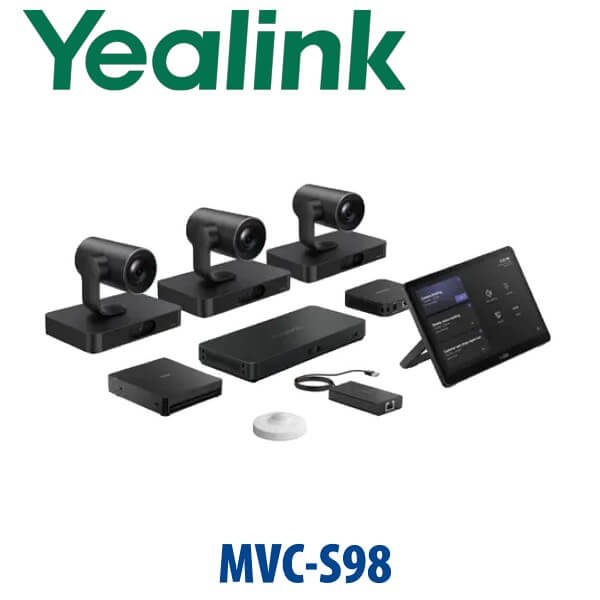
The Yealink MVC-S98 is not a normal video bar for a normal boardroom. It is Yealink’s high-end Microsoft Teams Rooms on Windows system for ProAV rooms, extra-large meeting spaces, divisible boardrooms, training rooms and executive conference suites where one camera at the front simply cannot see the room properly. The standard bundle combines three SmartVision 80 intelligent cameras, the MCore 4 mini-PC, MTouch Plus touch panel, AVHub audio/video processor, RCH40 E2 PoE+ switch, RoomSensor and BYOD-Extender — giving Dubai enterprises a Teams room that is designed around multiple views, professional AV integration and real camera coverage.
Vector Digital Systems LLC supplies, stages and supports Yealink meeting room systems from Dubai. We quote the MVC-S98 in AED with VAT and delivery shown clearly, and we help your IT and AV teams confirm the room layout, display count, ceiling audio plan, Teams Rooms licensing and installation scope before dispatch.
Teams, Zoom or SIP? Get the Platform Right Before You Order
The MVC-S98 is a Microsoft Teams Rooms on Windows system. It is the right choice when the room will run natively on Microsoft Teams, with a Teams Rooms account, Teams Rooms licence and Microsoft 365 tenant. It is not a SIP conference phone, and it is not the Zoom Rooms version. For Zoom Rooms or SIP fallback requirements, tell David before quoting so the correct Yealink range is specified.
| Your Platform | Right Yealink Range | What You Need |
|---|---|---|
| Microsoft Teams Rooms | Yealink MVC-S98 — this page | Teams Rooms account, Teams Rooms licence, Microsoft 365 tenant and room calendar |
| Zoom Rooms | Yealink ZVC / Zoom Rooms range — verify current Zoom certification before quoting | Zoom Rooms licence and Zoom admin configuration |
| SIP audio conferencing / PABX | Yealink CP-series or SIP desk/conference solution | SIP credentials from 3CX, Yeastar, UCM, hosted PBX or operator platform |
Certification check: the Yealink MVC-S98 was verified on Microsoft’s Teams enabled devices listing on 31 Jul 2026 before this page was written. Always re-check certification for project submittals and tenders where the exact bundle code must match the approved device list.
Power and Cabling Truth — This Is a Room System, Not a Plug-In Webcam
The MVC-S98 must be designed as a room installation. The bundle includes active networked components such as the MCore 4, AVHub, SmartVision 80 cameras, MTouch Plus controller, RCH40 E2 PoE+ switch and RoomSensor. Power, PoE budget, cable routes, display outputs, camera locations, audio devices and the AV network should be checked before delivery. Unlike a small meeting bar, this system is normally installed with a proper room drawing, rack or credenza location, cable containment and commissioning plan.
For Dubai fit-out projects, this matters. A boardroom in DIFC, a training suite in Business Bay or a divisible conference space in Dubai Internet City may already have floor boxes, ceiling microphones, DSPs, wall displays and AV racks. We review those details before quoting so the MVC-S98 arrives with the right accessories, cables and deployment plan instead of becoming a site surprise.
Where the MVC-S98 Sits in the Yealink MVC Range
The MVC-S98 sits at the top end of Yealink’s current MVC Microsoft Teams Rooms range. The MVC-S90 is the natural step-down for large boardrooms using multiple UVC86 cameras. The MVC-S98 moves into ProAV territory with multiple SmartVision 80 cameras, AVHub-based multi-camera routing and flexible integration for large, complex or divisible room geometry. If the room has one long table, the S90 may be enough. If the room has multiple zones, presenter areas, training layouts, government command seating or a divisible wall, the S98 is the safer specification.
| Feature | MVC-S90 | MVC-S98 ★ | Custom ProAV Room |
|---|---|---|---|
| Room Fit | Large / extra-large boardrooms | ProAV rooms, divisible rooms, training spaces, command rooms | Highly specialised halls, auditoriums and multi-room estates |
| Camera System | Multiple UVC86 cameras | 3× SmartVision 80 included | Room-specific camera schedule |
| Optical Zoom | PTZ-based coverage | 20× optical zoom on SmartVision 80 PTZ lens | Depends on selected camera package |
| Compute | MCore 4 | MCore 4 with Intel Core Ultra 5 class AI PC platform | Project-specific compute and control |
| Touch Control | MTouch Plus | MTouch Plus, multiple touch-panel deployment possible by design | Teams controller plus AV control panel if required |
| ProAV Integration | Boardroom-focused | AVHub, multi-camera design, third-party DSP pathway | Full AV consultant design |
| Expansion | Large room camera/audio expansion | AVHub supports up to 9 cameras in supported layouts | Unlimited by design, budget and certification limits |
| Price Tier | High | Flagship / ProAV | Project-priced |
| Choose if… | You need a large Teams boardroom with simpler geometry | You need multi-camera ProAV coverage for an extra-large or divisible room | You need consultant-led integration beyond a standard certified bundle |
Where the MVC-S98 Works in Dubai
Executive boardrooms in DIFC and Downtown Dubai. Long tables create the classic problem: the person at the far end becomes a postage stamp. The MVC-S98 solves that with three SmartVision 80 cameras, 20× optical zoom and AI speaker/presenter tracking so remote participants can see the person speaking instead of a static wide shot of the whole room.
Training rooms and divisible spaces in Business Bay, Dubai Internet City and JLT. Training rooms change shape: classroom one day, boardroom the next, divisible room for two departments after that. The MVC-S98 is built for flexible ProAV design with AVHub, multi-camera coverage and support for room layouts where one front camera is not enough.
Government, banking and command rooms. When meetings involve multiple speakers, observers and presentation areas, the system needs to show the right person clearly without manual camera steering. IntelliFrame, IntelliFocus, Speaker Tracking, Presenter Tracking, Video Fence, Picture-in-Picture and Auto Framing create a more controlled Teams meeting experience for high-stakes discussions.
Enterprise hybrid-work refresh projects. Dubai companies standardising on Microsoft Teams Rooms need consistent support, device management and local staging. Vector Digital Systems supplies the MVC-S98 as part of a complete room package: room survey, Bill of Materials, Teams account readiness, installation plan, commissioning and local warranty handling.
Full Technical Specifications
| Specification | Yealink MVC-S98 |
|---|---|
| Platform | Microsoft Teams Rooms on Windows |
| Room Type | ProAV rooms, extra-large rooms, boardrooms, training rooms, classrooms and divisible collaboration spaces |
| Standard Package | MCore 4 mini-PC, MTouch Plus touch panel, RoomSensor, 3× SmartVision 80 cameras, AVHub, RCH40 E2 PoE+ switch and BYOD-Extender |
| Preloaded Software | Windows 11 IoT Enterprise x64, Windows 11 IoT Enterprise licence, Microsoft Teams Rooms app and Yealink RoomConnect |
| MCore 4 Processor | Intel Core Ultra 5 / Ultra 5 125H class processor with built-in NPU and AI processing platform |
| MCore 4 Memory / Storage | 16GB DDR5 memory and 256GB SSD |
| MCore 4 Video | 3× HDMI video outputs with CEC support, built-in EDID, HDMI input for 4K content sharing |
| MCore 4 Interfaces | 4× USB 3.0, MTouch RJ45 port, LAN / AV network ports, power input, 3.5mm headset port, reset and security slot |
| SmartVision 80 Cameras | 3 included as standard; each uses a 3+1 lens intelligent PTZ camera architecture |
| SmartVision 80 Zoom | 20× optical zoom PTZ lens |
| SmartVision 80 Lens Angles | PTZ camera: 69° DFOV / 61.5° HFOV / 36° VFOV; panoramic lens: 110° DFOV / 98° HFOV / 82° VFOV; telephoto lens: 51° DFOV / 41.6° HFOV / 32° VFOV |
| SmartVision 80 AI | IntelliFocus, Speaker Tracking, Presenter Tracking, Video Fence, Picture in Picture, Auto Framing and IntelliFrame |
| SmartVision 80 Audio / AV Features | Built-in 4-mic array, NDI | HX3 and Dante compatibility listed by Yealink |
| MTouch Plus | 11.6-inch narrow-bezel IPS touch display, 1920×1080 resolution, adjustable angle, desktop / fixed / wall-mounted deployment |
| Content Sharing | Wired HDMI / USB-C input through MTouch Plus; wireless sharing supported with WPP30 where supplied and regionally available |
| AVHub | Audio and video processor for multi-camera and ProAV room layouts; supports divisible and merged room designs and intelligent multi-speaker tracking |
| Camera Capacity | AVHub can support up to 9 cameras simultaneously in supported Yealink room designs |
| RCH40 E2 | 4× Gigabit ports, 90W total PoE budget, 30W per port, 802.3af support |
| RoomSensor | Occupancy, temperature, humidity and light detection; Bluetooth BLE 5.2, 2.4GHz, up to 30m / 100ft reach, BLE mesh support |
| BYOD | BYOD-Extender included for laptop access to room audio/video devices |
| Audio Expansion | Integrates with Yealink ProAV audio options such as CM50 ceiling microphone, CS10-D ceiling loudspeaker and AP08 DSP where the room design requires them |
| Certification | Microsoft Teams enabled device listing verified on 31 Jul 2026 for Yealink MVC-S98 for ProAV Rooms |
Compatible Accessories and Room Options
| Accessory / Option | Purpose | Dubai Project Note |
|---|---|---|
| Additional SmartVision 80 cameras | Extends camera coverage in larger or divided rooms | Specify after room drawing and seating layout review |
| CM50 ceiling microphone | Clean ceiling-mounted voice pickup for boardrooms and training rooms | Best planned during fit-out before ceiling closure |
| CS10-D ceiling loudspeaker | Distributed room audio for larger spaces | Useful where front-of-room speaker bars cannot cover the seating area evenly |
| AP08 digital signal processor | DSP integration for ProAV audio design | Recommended when third-party audio, divisible rooms or advanced routing are required |
| WPP30 wireless presentation pod | Wireless content sharing from laptops | Availability and regional bundle inclusion should be confirmed at quote stage |
| RoomPanel / scheduling panel | External room booking and occupancy visibility | Useful for DIFC, DMCC and enterprise floors with shared meeting rooms |
Staging and Deployment by Vector Digital Systems
Vector Digital Systems stages the Yealink MVC-S98 before dispatch wherever project details are available: Teams Rooms account readiness check, Windows / Teams Rooms app baseline, MCore 4 and MTouch Plus pairing, Yealink RoomConnect readiness, display output planning, camera naming, RoomSensor check, BYOD-Extender test and basic commissioning checklist. For Dubai installations, we coordinate with the client’s IT team and fit-out / AV contractor so network VLANs, Microsoft 365 room account, DNS, firewall, power points, PoE, display routing and mounting locations are ready before installation day.
For tender or enterprise procurement, David can prepare a room-based Bill of Materials, certification note, deployment assumptions and optional installation scope. Same-day quote in AED is available for standard requests; complex ProAV rooms may require layout review before final pricing.
Export from Dubai
Vector Digital Systems exports Yealink MVC and Teams Rooms systems from Dubai to system integrators, AV contractors, telecom operators, corporate procurement teams and government IT departments. Common export routes include Oman, Saudi Arabia, Kuwait, Qatar and Bahrain in the Gulf; Jordan and Egypt in the broader region; Kenya and Tanzania in East Africa; and Pakistan, Sri Lanka and Bangladesh in South Asia. Shipments are quoted FOB Dubai with commercial invoice, packing list and certificate of origin on request. For MVC-S98 exports, we recommend confirming room drawings, camera mounting method, audio accessories and display quantity before shipment because ProAV room systems are much harder to correct after export than desk phones.
Get a Yealink MVC-S98 quote in AED — Dubai supply, staging and project support
Tell David your room size, table shape, number of displays, ceiling audio plan, Teams Rooms licence status and installation timeline. We quote with VAT breakdown, delivery and project assumptions clearly shown.
Frequently Asked Questions — Yealink MVC-S98
Is the Yealink MVC-S98 Microsoft Teams certified?
Yes — the Yealink MVC-S98 was verified on Microsoft’s Teams enabled devices listing on 31 Jul 2026 as a Teams Rooms system for ProAV rooms. For tenders and enterprise submittals, Vector Digital Systems can re-check the exact bundle and provide a certification note before quotation.
What room size is the Yealink MVC-S98 designed for?
The MVC-S98 is designed for ProAV rooms, extra-large meeting rooms, boardrooms, training rooms, classrooms and divisible collaboration spaces. It is the right choice when one camera cannot cover the room properly or when the layout needs multiple camera angles.
What comes in the Yealink MVC-S98 bundle?
The standard MVC-S98 bundle includes MCore 4 mini-PC, MTouch Plus touch panel, RoomSensor, three SmartVision 80 cameras, AVHub audio/video processor, RCH40 E2 PoE+ switch and BYOD-Extender. Audio accessories such as ceiling microphones, loudspeakers and DSPs are specified according to room design.
How many cameras does the MVC-S98 support?
The MVC-S98 includes three SmartVision 80 cameras as standard. With AVHub, supported designs can scale up to nine cameras, which is useful for divisible rooms, training spaces and command rooms where different seating zones need separate camera coverage.
MVC-S98 vs MVC-S90 — which one should I buy?
Choose MVC-S90 for a large boardroom with simpler geometry and multi-camera coverage based on UVC86 cameras. Choose MVC-S98 when the room is extra-large, divisible, training-oriented or ProAV-driven and needs SmartVision 80 cameras, AVHub routing, advanced AI framing and a more flexible integration path.
Can the MVC-S98 work with Zoom Rooms?
This MVC-S98 page is for Microsoft Teams Rooms on Windows. If your organisation uses Zoom Rooms, ask David for the matching Yealink ZVC or Zoom-certified room system and verify certification before ordering. Do not buy the Teams Rooms bundle for a Zoom-only room without confirming the platform requirement.
Can users connect their own laptop to the MVC-S98 room?
Yes — the MVC-S98 bundle includes BYOD-Extender, allowing users to connect a laptop and access the room’s professional audio and video devices. The MTouch Plus also supports wired content input, and wireless sharing can be added where WPP30 is included or available.
Does Vector Digital Systems install and configure the MVC-S98 in Dubai?
Yes — Vector Digital Systems supplies, stages and supports Yealink MVC-S98 projects in Dubai. We coordinate Teams Rooms account readiness, device pairing, display planning, camera naming, RoomSensor testing, BYOD test and commissioning with your IT and AV teams before handover.
Who is the authorised Yealink supplier in Dubai?
Vector Digital Systems LLC has supplied Yealink solutions in Dubai since 2009. David is the Yealink specialist for product selection, project pricing, staging, warranty handling and export support. MVC-S98 quotes include VAT breakdown, delivery assumptions and local support details.
What is the best Yealink Teams Rooms system for a large boardroom in Dubai?
For a standard large boardroom, the MVC-S90 may be enough. For an extra-large boardroom, divisible training room, command room or ProAV space, the MVC-S98 is the stronger recommendation because it includes three SmartVision 80 cameras, AVHub and a multi-camera design built for complex room coverage.
Does Vector Digital Systems export Yealink MVC-S98 systems from Dubai?
Yes — Vector Digital Systems exports Yealink MVC-S98 systems from Dubai to Oman, Saudi Arabia, Kuwait, Qatar, Bahrain, Jordan, Egypt, Kenya, Tanzania, Pakistan, Sri Lanka and Bangladesh. Exports are quoted FOB Dubai with commercial invoice, packing list and certificate of origin on request.
