Description
Yealink MVC S50 Microsoft Teams Rooms System with A50, MCore 4 & MTouch Plus Dubai
Yealink MVC S50 for Microsoft Teams Rooms in Dubai
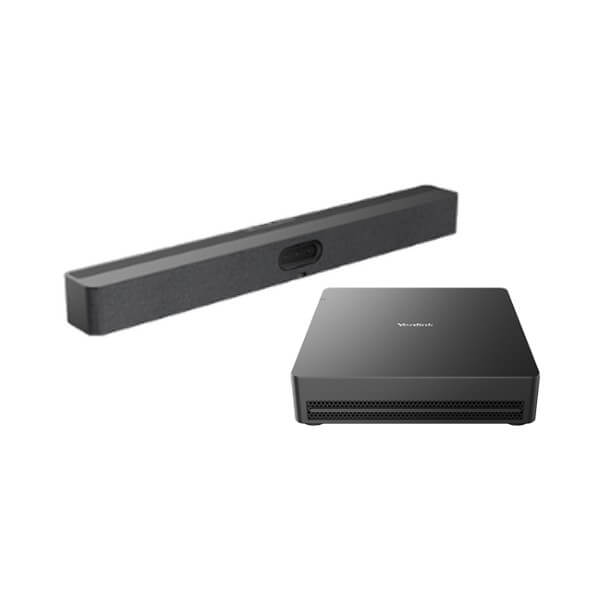
The Yealink MVC S50 is the meeting-room kit for Dubai offices that have outgrown laptop-on-table video calls. It combines the MeetingBar A50 all-in-one video bar, MCore 4 mini-PC, MTouch Plus touch console and RoomSensor into one Microsoft Teams Rooms system for medium to large rooms. For boardrooms in DIFC, training rooms in Business Bay, regional meeting spaces in DMCC and hybrid work rooms across the UAE, the MVC S50 gives users a familiar native Teams Rooms interface while IT gets a structured Windows-based room system that can be staged, installed and supported properly.
Microsoft certification status checked on 31 July 2026: Microsoft lists the Yealink MVC S50 for Microsoft Teams Rooms. Ask David for the current bundle code and room-design confirmation before ordering, because meeting-room systems depend on room size, screen count, cabling, microphone coverage and Teams licensing.
Teams Rooms, Zoom Rooms or BYOD? Get the Platform Right First
The MVC S50 is a Microsoft Teams Rooms system. That means it is built for a Microsoft 365 tenant, Teams Rooms licensing and a native Teams meeting-room experience. Do not order it as a generic SIP conference phone, and do not assume it is the right Zoom Rooms bundle. Platform mistakes in meeting rooms are expensive because they involve screens, cabling, licences and installation time — we confirm the room platform before quoting.
| Your Platform | Right Yealink Direction | What You Need |
|---|---|---|
| Microsoft Teams Rooms | Yealink MVC S50 — this page | Microsoft 365 tenant, Teams Rooms licence, display screens and network access |
| Zoom Rooms | Zoom Rooms-certified Yealink system — ask David to verify current model | Zoom Rooms licence, display screens and platform-specific room configuration |
| BYOD laptop meetings | Yealink A-series or USB/BYOD kit depending on room size | User laptop, USB/HDMI connection path and room audio/video design |
| SIP audio conference only | Yealink CP-series conference phone, not MVC S50 | SIP account from 3CX, Yeastar, Grandstream UCM or hosted PBX |
Power, Cabling and Installation Truth
The MVC S50 is not a one-cable desk accessory. It is a meeting-room system with a mini-PC, video bar, touch controller, room sensor, displays, network connection and power requirements. The room must be checked for display mounting, HDMI routing, LAN access, power sockets, table position, cable path and microphone coverage. Vector Digital Systems confirms these details before quoting so your Teams Room does not arrive before the room is ready.
The MCore 4 and MTouch Plus can be connected using a single CAT5e cable, keeping the table cleaner than older room systems with multiple visible cables. The RoomSensor uses BLE, so it avoids another cable run. For Dubai boardrooms where glass walls, executive tables and floor boxes make cabling difficult, this deployment detail matters as much as the camera specification.
Why MVC S50 Instead of a Laptop and Webcam?
A laptop meeting depends on whoever brought the laptop, whether the HDMI works, whether the speakerphone is charged and whether the room joins on time. The MVC S50 is a dedicated Microsoft Teams Rooms system: walk in, tap the MTouch Plus, join the scheduled meeting and let the A50 camera and microphone array manage the room. The triple 50MP camera system captures faces and detail across wider meeting spaces, while AI features such as IntelliFocus, speaker tracking, Video Fence, people counting, picture-in-picture and auto framing keep the remote side focused on the right participants.
Where the MVC S50 Sits in the Yealink Room Range
The MVC S50 sits above Android-based all-in-one meeting bars and below extra-large modular MVC systems. It is the practical choice when a Dubai office wants a native Windows Microsoft Teams Rooms experience for a medium or medium-large room, but does not need a full pro-AV multi-camera system. If the room is smaller, an A40-class solution may be enough. If the room is a divisible boardroom, townhall space or extra-large training room, ask David to size an MVC S90-style modular solution instead.
| Feature | MeetingBar A40 | MVC S50 ★ | MVC S90 |
|---|---|---|---|
| Best Room Fit | Small to medium rooms | Medium to large Teams rooms | Large to extra-large rooms |
| Platform | Teams Rooms on Android option | Microsoft Teams Rooms on Windows | Microsoft Teams Rooms on Windows |
| Compute | Bar-based room compute | MCore 4 mini-PC with Intel Core Ultra 5 | MCore 4 plus modular AV system |
| Camera | All-in-one meeting bar camera | A50 triple 50MP camera system | Modular camera design for larger rooms |
| Room Control Display | Touch controller option | MTouch Plus 11.6″ touch panel | MTouch Plus / room-control ecosystem |
| Audio Expansion | For compact rooms | A50 16-MEMS array; supports room audio expansion | For extended microphones, speakers and AVHub layouts |
| Content Sharing | Depends on bundle | HDMI/USB-C wired + WPP30 wireless option | Advanced room sharing and multi-display layouts |
| Price Tier | Lower | Mid-to-premium room system | Premium / project room |
| Choose if… | You need a smaller room bar with simpler deployment | You need a certified Windows Teams Rooms kit for a medium-large Dubai meeting room | You are building an extra-large boardroom, training room or pro-AV space |
Dubai Use Cases for Yealink MVC S50
DIFC and DMCC executive boardrooms. Senior teams need meetings that begin without IT intervention. The MVC S50 gives the room a dedicated Teams Rooms identity, a touch-to-join console and professional camera framing so remote directors can follow the conversation clearly.
Business Bay and JLT hybrid-work rooms. Many UAE offices now run mixed attendance: half the team in the room, half remote. The A50 triple-camera system, 16 MEMS microphones and AI speaker features make the remote participants feel included instead of watching a distant table view.
Training rooms and regional review spaces. For distributors, consultants, banks and education teams running regional sessions from Dubai, the MVC S50 supports clearer content sharing and more reliable room control than a shared laptop. The RoomSensor also helps IT understand occupancy, temperature, humidity and light data for smarter room management.
Government suppliers, banks and enterprise IT teams. MCore 4 separates AVLAN and internet design, includes TPM 2.0 support and runs a controlled Microsoft Teams Rooms environment. That makes it easier to standardise room support, remote diagnostics and security review across multiple rooms.
Full Technical Specifications
| Specification | Yealink MVC S50 |
|---|---|
| Product Type | Microsoft Teams Rooms system for medium to large rooms |
| Microsoft Certification | Listed by Microsoft as Yealink MVC S50 for Teams Rooms — checked 31 July 2026 |
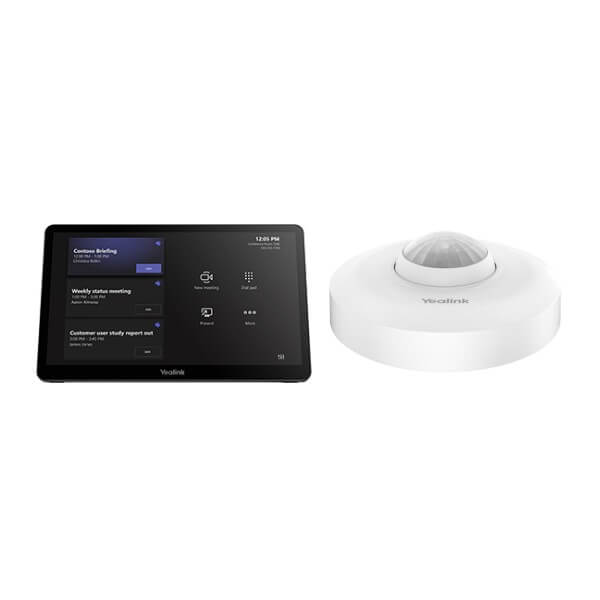
| Package Content | MCore 4 mini-PC, MTouch Plus touch panel, MeetingBar A50 all-in-one video bar, RoomSensor |
| Preloaded Software | Windows 11 IoT Enterprise, Microsoft Teams Rooms app, Yealink RoomConnect |
| A50 Camera System | Triple-eye 50MP system: 1× wide camera and 2× tele cameras |
| Camera Field of View | Wide lens: HFOV 98°, VFOV 81°; tele lenses: HFOV 41.6°, VFOV 31.8° |
| Camera AI | IntelliFocus, speaker tracking, Video Fence, people counting, picture-in-picture, auto framing |
| Privacy | Automatic physical privacy shutter on MeetingBar A50 |
| Audio Pickup | 16 MEMS microphone array with up to 10m pickup range |
| Speakers | Built-in 4×5W speakers |
| Audio AI | Full-duplex audio, AI noise cancellation and reverberation suppression |
| A50 Processor | Qualcomm QCS8550 with 48 TOPS computing power |
| MCore 4 Processor | Intel Core Ultra 5 with built-in NPU, 34 TOPS AI processing |
| MCore 4 Memory / Storage | 16GB DDR5 memory, 256GB SSD |
| MCore 4 Video I/O | 3× HDMI video output with CEC support, HDMI input for 4K content sharing |
| MCore 4 USB / Network | 4× USB 3.0, Yealink MTouch RJ45 port, Gigabit Ethernet, AV network port |
| Wireless on MCore 4 | Wi-Fi 6 and Bluetooth 5.2 |
| Touch Console | MTouch Plus 11.6″ narrow-bezel IPS display, 1920×1080 resolution |
| Content Sharing | Wired HDMI/USB-C input; wireless sharing supported with WPP30 |
| RoomSensor | Occupancy, temperature, humidity and light detection; BLE 5.2; up to 30m reach; BLE mesh multi-connectivity |
| Management | Yealink RoomConnect and Yealink management platform support for configuration, monitoring, updates and diagnostics |
Compatible Accessories and Room Options
| Accessory / Option | Purpose | Ordering Note |
|---|---|---|
| WPP30 wireless sharing pod | Wireless content sharing from laptops | Add when guests need simple cable-free presentation |
| Additional MTouch Plus | Extra room control point for larger tables or wall placement | Confirm layout and cabling before quote |
| Tabletop, wireless or ceiling microphones | Extends audio pickup in longer rooms | David sizes microphone coverage from room dimensions |
| Wall mount / display mounting kit | Clean installation below or above room displays | Confirm screen size, wall type and viewing height |
| Dual display setup | Separates gallery/video and shared content | Recommended for executive boardrooms and training spaces |
Staging Before Dispatch — What Vector Digital Systems Configures
Vector Digital Systems stages the Yealink MVC S50 before dispatch from Dubai wherever project details are available: bundle check, firmware status review, room-component verification, MCore 4 and MTouch Plus connectivity check, Teams Rooms readiness guidance, display and network checklist, content-sharing path confirmation and test notes for installation. For managed projects, we coordinate Teams tenant readiness, room account requirements, screen layout, microphone expansion and handover documentation before the room goes live.
The quote includes VAT breakdown and delivery charges. For multi-room rollouts, David can prepare a room-by-room bill of materials covering MVC S50 units, sharing pods, microphones, mounts, displays, cabling and installation notes. Project pricing is available for five or more Yealink room or phone devices.
Export from Dubai
Vector Digital Systems exports Yealink MVC S50 meeting-room systems from Dubai to system integrators, telecom operators, corporate IT teams and AV installers across the region. Common routes include Oman, Saudi Arabia, Kuwait, Bahrain and Qatar in the Gulf; Jordan and Egypt for regional enterprise projects; Kenya and Tanzania for East African deployments; and Pakistan and Sri Lanka for South Asian Teams Rooms rollouts. Export shipments are quoted FOB Dubai with commercial invoice, packing list and certificate of origin on request. Tell David the destination, room count and target installation date so the quote can include documentation and packing requirements.
Get a same-day quote in AED — Yealink MVC S50 Dubai
Send David your room size, table layout, number of screens, Microsoft Teams Rooms licence status, network point location and whether you need wireless content sharing. We quote with VAT breakdown, delivery and project accessories.
Frequently Asked Questions — Yealink MVC S50
Is the Yealink MVC S50 Microsoft Teams certified?
Yes. Microsoft lists the Yealink MVC S50 as a Microsoft Teams Rooms device, and Vector Digital Systems checked this certification status on 31 July 2026 before writing this page. Certification should still be rechecked at quote stage for the exact bundle code and regional availability.
What room size is the Yealink MVC S50 designed for?
The MVC S50 is designed for medium to large Microsoft Teams Rooms. It is a strong fit for Dubai boardrooms, management meeting rooms, training spaces and hybrid collaboration rooms where a laptop webcam is no longer acceptable. David will confirm the final fit from your room dimensions, table shape, screen position and microphone coverage requirement.
What is included in the Yealink MVC S50 bundle?
The MVC S50 bundle includes the MeetingBar A50 all-in-one video bar, MCore 4 mini-PC, MTouch Plus 11.6-inch touch console and RoomSensor. Optional items such as WPP30 wireless sharing pods, extra touch panels, microphones, mounts and displays are quoted according to the room design.
Does the MVC S50 work with Zoom Rooms?
The MVC S50 is a Microsoft Teams Rooms system, not the default Zoom Rooms bundle. If your office uses Zoom Rooms, ask David to verify the current Zoom-certified Yealink option before ordering. Platform choice must be confirmed before installation because licences, interface and room setup are different.
Can the Yealink MVC S50 replace a laptop-based Teams meeting setup?
Yes. The MVC S50 is built exactly for that upgrade. Instead of connecting a laptop, webcam and speakerphone for every meeting, users join from the MTouch Plus console and use the dedicated A50 camera, microphone array, speakers and Microsoft Teams Rooms app. It gives the room a professional, repeatable meeting experience.
Does the MVC S50 support dual displays?
Yes. The MCore 4 provides three HDMI video outputs with CEC support, allowing flexible display layouts. Dual-display rooms are common in Dubai boardrooms because one screen can show participants while the other shows shared content. Vector Digital Systems confirms the screen plan before quoting cables and installation.
What is the best Yealink Teams Rooms system for a medium boardroom in Dubai?
For a medium to medium-large boardroom, the Yealink MVC S50 is the recommended Windows-based Teams Rooms system because it includes the A50 triple 50MP camera bar, MCore 4 mini-PC, MTouch Plus and RoomSensor. For smaller rooms, an A40-class solution may be enough. For extra-large or divisible rooms, step up to an MVC S90-style modular system.
Who is the Yealink authorised supplier for MVC S50 in Dubai?
Vector Digital Systems LLC has supplied and integrated Yealink solutions in Dubai since 2009. David handles Yealink pre-sales specification, Teams Rooms bundle selection, project pricing, staging guidance and local warranty coordination, so you are not left dealing with international courier claims for support.
Does Vector Digital Systems configure the MVC S50 before delivery?
Yes. Vector Digital Systems checks the bundle, reviews firmware readiness, verifies the MCore 4, MTouch Plus, A50 and RoomSensor combination, confirms the content-sharing path and prepares the room deployment checklist before dispatch. For managed projects, Teams Rooms account readiness, display layout and installation handover are also coordinated.
Does Vector Digital Systems export Yealink MVC S50 systems from Dubai?
Yes. Vector Digital Systems exports Yealink MVC S50 systems FOB Dubai to AV installers, system integrators, telecom operators and enterprise IT teams in Oman, Saudi Arabia, Kuwait, Bahrain, Qatar, Jordan, Egypt, Kenya, Tanzania, Pakistan and Sri Lanka. Export quotes include commercial invoice, packing list and certificate of origin on request.