Description
Yealink MeetingEye 500 Zoom Rooms Android Multi-Camera Codec for Large Rooms Dubai
Yealink MeetingEye 500 for Zoom Rooms in Dubai
The Yealink MeetingEye 500 is a Zoom Rooms Android codec for large and extra-large meeting rooms where a simple video bar is not enough. Instead of forcing one fixed camera and one fixed microphone position, the MeetingEye 500 acts as the room engine: add Yealink PTZ cameras, touch control, wired or wireless content sharing, professional microphones and room speakers to build a cleaner boardroom system around the table, wall, cabinet or rack. For Dubai offices upgrading from laptop-based Zoom calls to a permanent meeting room, this is the difference between “someone plug in your laptop” and a room that starts properly every time.
Zoom, Microsoft Teams or SIP? Choose the Right Yealink Room Platform
The MeetingEye 500 is positioned for Zoom Rooms on Android. Do not buy it for a Microsoft Teams Room unless the exact Teams certification and room bundle are verified before order. Yealink’s Teams Rooms systems are a separate family, and SIP conference phones are a different category again. The platform decision must be made before hardware is quoted.
| Your Platform | Right Yealink Room Device | What You Need |
|---|---|---|
| Zoom Rooms | Yealink MeetingEye 500 (this page) — verify current Zoom certification status at quote time | Zoom Rooms licence, room display, network, camera, audio, touch controller and content sharing method |
| Microsoft Teams Rooms | Yealink MVC / MeetingBar / MeetingBoard Teams-certified range — ask David for the current certified model | Microsoft 365 tenant, Teams Rooms licence and certified Teams room hardware |
| SIP / H.323 video conferencing | Verify requirement with David before quoting — SIP video is not the same buying path as Zoom Rooms | SIP or H.323 server, firewall traversal plan and room endpoint configuration |
Power Truth — This Is a Room Codec, Not a PoE Desk Phone
The MeetingEye 500 is powered by an external Yealink 48V power adapter, not by ordinary desk-phone PoE. Your room still needs proper network cabling, display power, camera cabling and a stable AC power point at the codec location. The VCH interface simplifies the room because it can carry data, control signal and device power through the Yealink room connection, but it does not remove the need for a planned AV power and network layout. Vector Digital Systems confirms the room drawing before dispatch so the installer does not discover missing power sockets or cable routes on installation day.
Why MeetingEye 500 Instead of a Simple Video Bar?
A video bar is excellent for small and medium rooms. A Dubai boardroom, training room, council chamber or divisible meeting space is different: the camera may need to sit at the front wall, the codec may need to sit in a rack, microphones may need to run through the table, and the room may need two displays showing gallery and content separately. The MeetingEye 500 exists for that kind of layout. It supports Yealink PTZ camera options, third-party camera support, optional Yealink microphones and speakers, VCH51 wired sharing, WPP30 wireless presentation and CTP18 or CTP25 touch control.
Where MeetingEye 500 Sits in the Yealink Zoom Rooms Range
Think of the MeetingEye 500 as the modular Zoom Rooms codec for larger AV-led rooms. If the room is small or medium and the camera can be all-in-one, a MeetingBar-style appliance is usually cleaner. If the room is large, has more than one camera angle, or needs rack / under-table deployment, the MeetingEye 500 becomes the better architecture.
| Feature | Yealink A30 / MeetingBar Class | MeetingEye 500 ★ | ZVC860 / Pro AV Room Class |
|---|---|---|---|
| Best room size | Small to medium rooms | Large to extra-large Zoom Rooms | Large / Pro AV / executive rooms |
| Room architecture | All-in-one bar | Separate codec with modular camera/audio | Full room kit / Pro AV bundle |
| Camera approach | Integrated camera | Optional Yealink PTZ / up to multi-camera layout | Advanced PTZ / multi-camera design |
| Display output | Room-dependent | 4K HDMI room display output; confirm active screen count before quote | Room-kit dependent |
| Controller | Touch controller option | CTP18 / CTP25 touch panel | Touch controller / AV control integration |
| Content sharing | Room-dependent | VCH51 wired sharing and WPP30 wireless pod options | AV matrix / wired / wireless design |
| Price tier | Lower | Mid-high room system | Highest project tier |
| Choose if… | You want a clean all-in-one Zoom bar for a smaller room | You need a modular Zoom Rooms codec for a boardroom, training room or multi-camera layout | You need a full Pro AV Zoom room with advanced cameras, audio and integration |
Dubai Use Cases for the MeetingEye 500
DIFC and Business Bay boardrooms. Executive meeting rooms often need a front-wall PTZ camera, table microphones, dual displays and a codec hidden in the cabinet. The MeetingEye 500 fits that layout better than a laptop on HDMI or a fixed all-in-one bar.
Training rooms and divisible spaces. For corporate training in Dubai Internet City, JLT, DMCC or Al Quoz offices, one camera angle is rarely enough. The MeetingEye 500 can be designed around multiple camera positions so remote participants can see the presenter, audience and shared content properly.
Hotels, healthcare and government meeting spaces. Ballrooms, hospital boardrooms, ministry meeting rooms and hybrid consultation spaces need a more structured AV design than a webcam and speakerphone. Vector Digital Systems supplies the Yealink room hardware, stages the Zoom configuration and prepares the room kit for installer-friendly deployment.
Full Technical Specifications
| Specification | Yealink MeetingEye 500 |
|---|---|
| Product Type | Android-based Zoom Rooms codec / mini-PC for modular room systems |
| Room Size | Large to extra-large meeting rooms, boardrooms and training rooms |
| Operating System | Android 11 |
| Processor | 8-core platform: 4-core 2.6GHz + 4-core 2GHz; AI computing power 4T |
| Platform | Designed for Zoom Rooms on Android; verify current Zoom certification status before quote |
| Camera Support | Optional Yealink UVC84 / UVC86 class PTZ cameras; supports compatible third-party cameras; multi-camera design available |
| Video / Content | Up to 4Kp30 UHD video and content sharing; 1080p60 supported through compatible sharing path |
| Display Output | HDMI room display output for 4K layouts; current project quotes should confirm firmware and active screen count before specifying triple-display use |
| HDMI Input | 1× HDMI input, up to 4K30 |
| USB Ports | 3× USB-A 3.0 ports for compatible camera / peripheral connection |
| Network | 1× 10/100/1000Mbps Gigabit Ethernet; VCH/LAN port can be configured as required by the room design |
| Wireless | Wi-Fi 2.4GHz / 5GHz and Bluetooth 5.0 |
| Audio Support | Optional Yealink VCM35 / VCM38 / CP50 / CPE40 microphone options, MSpeaker II / CP50 / CPE40 speaker options, and compatible third-party audio devices |
| Audio Processing | Yealink Noise Proof Technology, multi-channel acoustic echo cancellation, multi-channel dereverberation and automatic gain control |
| Touch Controller | Compatible with CTP18 / CTP25 touch panel control |
| Content Sharing | VCH51 Video Conferencing Hub for HDMI / USB-C wired sharing and BYOD; WPP30 wireless presentation pod optional |
| Protocols / Security | IPv4 / IPv6, H.323 / SIP protocol support, ICE / TURN / STUN, H.460, SRTP / TLS / H.235 / AES 256-bit encryption, VLAN, LLDP-MED and QoS |
| Power | External Yealink power adapter: AC 100–240V input, DC 48V / 2A output |
| Power Consumption | Idle <14W; normal operating around 14W; maximum 39W |
| Dimensions | MeetingEye 500: 315mm × 170mm × 32mm |
| Mounting | Wall, table, under-table, cabinet or rack mounting; mounting bracket supplied depending on package |
| Operating Conditions | 0–40°C operating temperature; 10–95% operating humidity |
Compatible Accessories and Room Components
| Accessory / Component | Model / Type | Purpose |
|---|---|---|
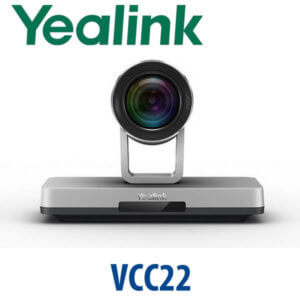
| PTZ Camera | Yealink UVC84 / UVC86 class camera options | Boardroom video capture, presenter tracking and multi-camera Zoom Rooms layouts |
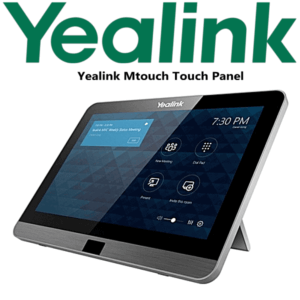
| Touch Controller | CTP18 / CTP25 | One-touch Zoom Rooms meeting control, join, mute, share and room operation |
| Wired Sharing / BYOD | VCH51 Video Conferencing Hub | HDMI / USB-C content input and BYOD use where the room must also serve laptop meetings |
| Wireless Sharing | WPP30 Wireless Presentation Pod | Cable-free content sharing for visiting presenters and senior meeting rooms |
| Microphones | VCM35 / VCM38 / CP50 / CPE40 or compatible third-party audio | Room pickup for board tables, U-shaped layouts and larger meeting spaces |
| Speaker | MSpeaker II / CP50 / CPE40 or compatible third-party audio | Clear room audio output for larger spaces where display speakers are not enough |
Staging Before Dispatch — What Vector Digital Systems Configures
Vector Digital Systems does not ship the MeetingEye 500 as a loose box unless you ask for supply-only. For a proper Dubai meeting room deployment, we stage the room kit before dispatch: firmware check, Zoom Rooms mode confirmation, touch controller pairing plan, camera and audio accessory list, network settings, display output plan, content sharing method, room-name labelling and installer handover notes. For project rooms, David confirms the platform, room size, display count, camera position, table shape, cable path and licensing before the AED quote is issued.
Export from Dubai
Vector Digital Systems supplies Yealink MeetingEye 500 room kits to system integrators, hotel groups, corporate IT teams and AV installers across the region. Export routes include Oman, Saudi Arabia, Kuwait, Bahrain, Qatar, Jordan, Egypt, Kenya, Nigeria and Pakistan. Shipments move FOB Dubai with commercial invoice, packing list and certificate of origin on request. For export buyers, we can bundle codec, camera, controller, microphone, speaker, sharing accessory, cables and mounting hardware into a single project quote so the receiving installer has one complete Yealink room kit.
Get a same-day quote in AED for Yealink MeetingEye 500
Tell David your room size, Zoom Rooms licence status, number of displays, camera positions, microphone preference and whether you need wired or wireless content sharing. We quote with VAT breakdown, delivery and staging included.
Frequently Asked Questions — Yealink MeetingEye 500
Does the Yealink MeetingEye 500 work with Microsoft Teams or do I need a different model?
The MeetingEye 500 is positioned for Zoom Rooms on Android. If your room runs Microsoft Teams Rooms, ask David for the current Yealink Teams-certified MVC, MeetingBar or MeetingBoard model instead. Vector Digital Systems verifies Teams certification against Microsoft’s official device list before quoting any Teams room hardware.
Is the Yealink MeetingEye 500 Zoom certified?
The MeetingEye 500 is a Yealink Zoom Rooms Android room system and appears in Zoom hardware listings. Because Zoom certification windows and firmware requirements can change, Vector Digital Systems verifies the current certification status and supported accessory list at quote time before confirming a project bill of materials.
What room size is the Yealink MeetingEye 500 designed for?
The MeetingEye 500 is designed for large to extra-large Zoom Rooms where a modular room system is needed. It is best for boardrooms, training rooms, executive meeting rooms and AV-led spaces that need separate cameras, table microphones, touch control and professional display layouts.
How many cameras can I use with the Yealink MeetingEye 500?
The MeetingEye 500 supports Yealink PTZ camera options such as the UVC84 / UVC86 class and compatible third-party cameras. Multi-camera designs are possible, but the exact camera count, switching method and Zoom Rooms compatibility should be confirmed by David during the room design stage.
Does the MeetingEye 500 support dual displays or three screens?
The MeetingEye 500 hardware documentation references multiple HDMI display outputs, while current Yealink web material markets dual 4K display output for Zoom Rooms layouts. For live project quotes, Vector Digital Systems confirms the firmware version and active display count before promising a two-screen or three-screen layout.
Can we use the Yealink MeetingEye 500 for Zoom calls and regular SIP video calls?
The MeetingEye 500 hardware supports SIP / H.323 protocol capability, but its main buying path is Zoom Rooms on Android. If your organisation needs SIP / H.323 video interoperability, David will verify the platform, firewall traversal, server compatibility and licensing before quoting the room system.
Does the Yealink MeetingEye 500 need PoE?
No. The MeetingEye 500 is not powered like a Yealink desk phone. It uses an external 48V Yealink power adapter and also needs proper network, display and AV cabling. The VCH interface simplifies connected room devices, but the codec location still needs planned AC power and structured cabling.
MeetingEye 500 vs Yealink A30 — which one should I buy?
Choose a Yealink A30 / MeetingBar class device for a smaller room where an all-in-one camera, microphone and speaker bar is enough. Choose the MeetingEye 500 for a larger Zoom Room where the camera, microphones, controller and codec need to be placed separately, such as a boardroom or training room.
Who is the Yealink authorised supplier in Dubai?
Vector Digital Systems LLC has supplied and integrated Yealink solutions in Dubai since 2009. David handles Yealink pre-sales specification, project pricing, room kit staging and local warranty support, so your MeetingEye 500 project is quoted as a working room solution rather than a box-only purchase.
What is the best Yealink video room system for a large Zoom boardroom in Dubai?
For a large Zoom boardroom that needs separate camera placement, touch control, table microphones and professional display routing, the MeetingEye 500 is a strong choice. For smaller rooms, choose a MeetingBar-class device; for higher-end Pro AV spaces, David can quote a larger Yealink Zoom room kit with advanced cameras and audio.
Does Vector Digital Systems configure the MeetingEye 500 before delivery?
Yes — Vector Digital Systems stages the MeetingEye 500 before dispatch with firmware check, Zoom Rooms mode confirmation, controller pairing plan, camera and audio accessory mapping, network settings, display output plan and installer handover notes. The goal is a cleaner installation with fewer room-site surprises.
Does Vector Digital Systems export Yealink MeetingEye 500 room kits from Dubai?
Yes — Vector Digital Systems exports Yealink room systems from Dubai to integrators, AV installers and enterprise buyers in Oman, Saudi Arabia, Kuwait, Bahrain, Qatar, Jordan, Egypt, Kenya, Nigeria and Pakistan. Export shipments move FOB Dubai with commercial invoice, packing list and certificate of origin on request.