Description
Yealink MVC S40-C5U Microsoft Teams Rooms System Dubai
Yealink MVC S40-C5U — Current Small-Room Teams Rooms System for Dubai
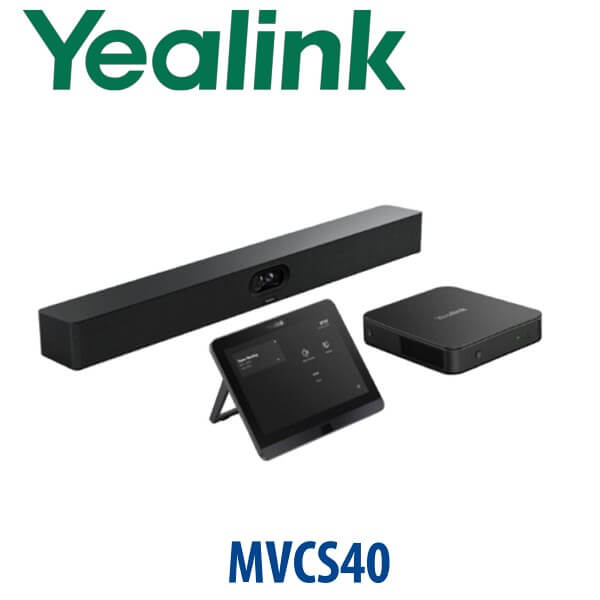
The Yealink MVC S40-C5U is the current-generation Microsoft Teams Rooms on Windows system for small to medium meeting rooms. If your team asked for “MVC S30”, treat this as the current replacement route: Microsoft’s certified device list does not show MVC S30, while MVC S40-C5U is listed as a certified Yealink Teams Rooms system. The S40 bundle gives Dubai offices a complete room setup with MCore 4 AI mini-PC, MTouch Plus touch console, RoomSensor, and SmartVision 40 all-in-one audio/video bar — staged by Vector Digital Systems LLC before delivery.
Platform Check — Teams Rooms, SIP Conference Phone or Zoom Room?
The MVC S40-C5U is a Microsoft Teams Rooms on Windows solution. It is not a SIP conference phone and it is not a Zoom Room kit. This platform check matters because the room hardware, licence, account and user experience are different. Ordering the wrong platform is the most expensive meeting-room mistake we see in UAE offices.
| Your Platform | Right Yealink Device | What You Need |
|---|---|---|
| Microsoft Teams Rooms | Yealink MVC S40-C5U (this page) | Microsoft Teams Rooms licence, Teams room account, display, wired network |
| SIP / PBX audio conference | Yealink CP-series conference phone — ask David for the right model | SIP extension from 3CX, Yeastar, Grandstream UCM or hosted PBX |
| Zoom Rooms | Zoom-certified Yealink room system — verify certification status before quoting | Zoom Rooms licence and Zoom room account |
Certification note: Microsoft Teams Rooms certification for Yealink MVC S40-C5U was verified on 13 July 2026 against Microsoft’s official certified Teams Rooms device list.
Power, PoE and Cabling Truth
The MVC S40-C5U is a room system, not a single USB camera. Your room needs mains power for the room components, a wired network point, an HDMI display, and clean cable routing from the MCore 4 to the MTouch Plus and SmartVision 40. PoE may be required only for specific add-on speaker or camera layouts; it is not a substitute for planning the room power and display wiring. Vector Digital Systems checks your room layout, display position, table cable path and network point before dispatch so installation does not become a site surprise.
Why the S40 Replaces the Old Small-Room MVC Request
Older MVC300, MVC320 and MVC400-style rooms were built around earlier compute and camera kits. The MVC S40-C5U moves the small-room experience to Yealink’s 4th-generation platform: MCore 4 with Intel Core Ultra 5, integrated NPU for AI workloads, SmartVision 40 dual 48MP camera bar, MTouch Plus console, RoomSensor and current Teams Rooms certification. For Dubai offices refreshing huddle rooms after return-to-office, the S40 is the safer current-generation order than chasing older MVC codes.
MVC S40-C5U in the Yealink Room System Range
| Feature | MeetingBar A40 | MVC S40-C5U ★ | MVC S50-C5U |
|---|---|---|---|
| Best room fit | Simple small Teams room | Small to medium Teams Rooms on Windows | Medium room with wider seating |
| Room size | Huddle / compact room | Up to 10 users | Up to 16 users |
| Camera | All-in-one video bar | SmartVision 40 dual 48MP camera | A50 triple 50MP camera bar |
| Audio | Built-in bar audio | 8 MEMS mics, 6m pickup, stereo speakers | Larger bar audio, 8–10m pickup |
| Windows MTR compute | Ask David by SKU | MCore 4, Core Ultra 5, 16GB / 256GB | MCore 4, Core Ultra 5, 16GB / 256GB |
| Touch console | Model dependent | MTouch Plus 11.6″ | MTouch Plus 11.6″ |
| Replaces / upgrades | Basic USB-camera rooms | MVC S30 / MVC320 / MVC400-style small-room requests | Larger MVC room refresh |
| Price tier | Lower | Mid | Higher |
| Choose if… | You want the simplest all-in-one small room | You want a certified Teams Rooms on Windows kit for a serious small/medium meeting room | Your room is wider, deeper or regularly hosts 10–16 people |
Where the MVC S40-C5U Works in Dubai
DIFC and DMCC Teams rooms. Many Dubai offices now run Teams as the default meeting platform, but their small meeting rooms still depend on a laptop, USB camera and messy HDMI cable. The MVC S40-C5U gives the room a dedicated Teams identity, one-touch join, fixed camera position, room touch control and a predictable experience for visiting executives and clients.
Business Bay, JLT and Sheikh Zayed Road SME meeting rooms. The S40 is the sweet spot for 4–10 person rooms where a full large-room ProAV design is too much, but a consumer webcam is no longer acceptable. SmartVision 40’s dual 48MP camera system and IntelliFocus help remote participants see the speaker clearly without someone touching a remote.
Education, healthcare and training rooms. Clinics, training centres, schools and professional institutes in Dubai need consistent hybrid sessions. The MVC S40-C5U supports clear room audio, AI noise reduction, a fixed Teams Rooms workflow, and optional expansion microphones when the room shape demands extra pickup.
Full Technical Specifications
| Specification | Yealink MVC S40-C5U |
|---|---|
| Platform | Microsoft Teams Rooms on Windows |
| Certification | Microsoft Teams Rooms certification verified 13 July 2026 |
| Room Size | Small to medium rooms, up to 10 users |
| Main Components | MCore 4 mini-PC, MTouch Plus touch console, RoomSensor, SmartVision 40 all-in-one audio/video bar |
| Camera | SmartVision 40 dual-camera system, 2× 48MP, 120° field of view |
| Camera Intelligence | IntelliFocus, Video Fence, virtual background, Multi-Stream IntelliFrame support |
| Microphones | Built-in 8 MEMS microphone array |
| Voice Pickup | 6m pickup range; supports up to 2 expansion microphones |
| Speakers | 2× stereo speakers |
| Audio Processing | Full-duplex audio, AI-Enhanced Noise Cancellation, Reverberation Suppression |
| MCore 4 Processor | Intel Core Ultra 5 with integrated NPU, up to 34 TOPS AI compute |
| MCore 4 Memory / Storage | 16GB DDR5 memory, 256GB SSD |
| Display Outputs | 3× HDMI video output with CEC support; HDMI-in for 4K content sharing |
| USB | 4× USB 3.0 ports on MCore 4 |
| Touch Console | MTouch Plus, 11.6-inch IPS display, 1920×1080 resolution, adjustable angle |
| Content Sharing | HDMI / USB-C video input; wireless sharing supported with compatible Yealink sharing accessories where available |
| Network Requirement | Wired network environment required |
| Display Requirement | Room display with HDMI input; display not included |
Compatible Accessories and Add-Ons
| Accessory | Use | Order Note |
|---|---|---|
| Expansion Microphones | Extend pickup in longer or awkward-shaped rooms | Up to 2 compatible expansion microphones; David confirms the exact microphone model per room layout |
| PA20 / WPP sharing pod | Wireless laptop content sharing | Availability varies by region and SKU; confirm before quoting |
| Wall / display mounting | Clean front-wall installation for the SmartVision 40 bar | Mounting position depends on display height, wall type and camera sightline |
| Additional MTouch Plus | Control from multiple room positions | Useful for boardroom tables and training rooms with presenter positions |
Staging Before Dispatch — What Vector Digital Systems Configures
Every Yealink MVC S40-C5U supplied by Vector Digital Systems is checked before delivery: Teams Rooms device readiness, MCore 4 power-up test, MTouch Plus pairing, SmartVision 40 camera and audio test, firmware check, room account guidance, display-output check, content-share path review, and a final packing checklist. For Dubai installations, we also review the display height, table cable route, network point, power socket position and whether expansion microphones are needed. The quote includes VAT breakdown and delivery charges, with project pricing available for 5+ room deployments.
Export from Dubai
Vector Digital Systems exports Yealink Teams Rooms systems from Dubai to system integrators, corporate IT teams, education groups and government suppliers. Common export routes include Oman, Saudi Arabia, Qatar, Kuwait and Bahrain in the Gulf; Jordan and Egypt for regional projects; Kenya and Tanzania for East Africa; and Pakistan and Sri Lanka for South Asian deployments. Shipments are quoted FOB Dubai with commercial invoice, packing list and certificate of origin on request. Contact David with the room count, destination, licence status and installation timeline.
Get a same-day Yealink MVC S40-C5U quote in AED
Tell David your room size, display count, Teams Rooms licence status, network point location and whether you need installation or export packing. We quote with VAT breakdown and delivery included.
Frequently Asked Questions — Yealink MVC S40-C5U
Is Yealink MVC S30 still current, or should I buy the MVC S40-C5U?
Buy the MVC S40-C5U. MVC S30 does not appear in the current Yealink MVC lineup or Microsoft’s current certified Teams Rooms list, while MVC S40-C5U is listed as a certified Yealink Teams Rooms system. For Dubai buyers asking for MVC S30, Vector Digital Systems quotes the current MVC S40-C5U route unless a specific legacy replacement is being matched.
Is the Yealink MVC S40-C5U Microsoft Teams certified?
Yes — Microsoft lists Yealink MVC S40-C5U under certified Teams Rooms on Windows systems. Vector Digital Systems verified the certification status on 13 July 2026 before writing this page. You still need the correct Microsoft Teams Rooms licence and room account for the system to operate.
What room size is the MVC S40-C5U designed for?
The MVC S40-C5U is designed for small to medium rooms, typically up to 10 users. It suits Dubai huddle rooms, client meeting rooms, small training rooms and executive collaboration spaces where a laptop webcam is no longer acceptable but a large-room ProAV design would be excessive.
What is included in the Yealink MVC S40-C5U package?
The MVC S40-C5U package includes the MCore 4 mini-PC, MTouch Plus 11.6-inch touch console, RoomSensor and SmartVision 40 all-in-one audio/video bar. The display, Microsoft Teams Rooms licence, room account, network connection, HDMI display cabling and any room-specific mounting or audio expansion should be planned separately.
Does the MVC S40-C5U work with Zoom or SIP calls?
The MVC S40-C5U is a Microsoft Teams Rooms on Windows system. It is not a SIP conference phone and should not be purchased as a Zoom Room unless the exact Zoom-certified configuration is verified separately. For SIP audio rooms, ask David for a Yealink CP-series conference phone. For Zoom Rooms, ask David to verify the current Zoom-certified Yealink room kit before quoting.
MVC S40-C5U vs MVC S50-C5U — which one should I buy?
Choose MVC S40-C5U for small to medium rooms up to around 10 users, where the SmartVision 40 dual 48MP camera and 6m voice pickup are enough. Choose MVC S50-C5U for wider or deeper rooms up to around 16 users, where the A50 triple 50MP camera system and longer pickup range give better coverage. David can size the room from a photo, drawing or table dimensions.
Can the MVC S40-C5U use expansion microphones?
Yes — the SmartVision 40 supports up to 2 compatible expansion microphones for rooms that are longer, have a U-shaped table, or have participants sitting beyond the built-in 6m pickup range. Vector Digital Systems confirms the exact microphone option during room design so the quote matches the real seating layout.
Does Vector Digital Systems configure the MVC S40-C5U before delivery?
Yes — Vector Digital Systems checks the MCore 4, MTouch Plus, SmartVision 40 camera, audio path, firmware readiness, display output and content-sharing workflow before dispatch. We also guide your IT team on the Teams Rooms licence, room account and network requirements so the installation is not delayed on site.
Who is the Yealink authorised supplier in Dubai?
Vector Digital Systems LLC has supplied Yealink products and VoIP solutions in Dubai since 2009. David is the Yealink specialist for product selection, Teams Rooms sizing, project quotes, staging and warranty handling. Local support means Dubai buyers do not need to manage overseas claims or guess the correct room bundle.
Does Vector Digital Systems export Yealink MVC systems from Dubai?
Yes — Vector Digital Systems exports Yealink MVC systems from Dubai to integrators and enterprise buyers in Oman, Saudi Arabia, Qatar, Kuwait, Bahrain, Jordan, Egypt, Kenya, Tanzania, Pakistan and Sri Lanka. Shipments are quoted FOB Dubai with commercial invoice, packing list and certificate of origin on request.