Description
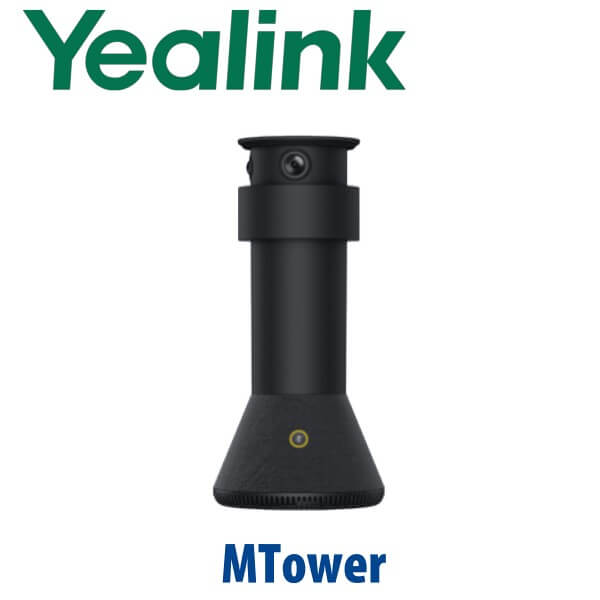
Yealink MTower Dubai Centre-View Intelligent Camera for Microsoft Teams Rooms
Stop Showing Side Profiles in Teams Rooms
Most meeting rooms in Dubai still depend on a front-of-room camera. It captures the table, but remote participants often see side profiles, laptop lids, and people turning away from the screen to speak. The Yealink MTower fixes that specific Teams Rooms problem. It sits on the meeting table as a centre-view intelligent camera, works with the front camera to create a more natural front-and-centre view, and helps remote participants feel as if they are sitting at the table instead of watching from the wall.
MTower is not a SIP phone, not a Zoom Phone, and not a mobile tower PC. It is a Yealink Microsoft Teams Rooms camera accessory for rooms where the front-of-room view alone is not enough. Vector Digital Systems supplies MTower in Dubai with room-design guidance, compatibility checking, firmware coordination, installation planning, VAT breakdown, and same-day AED quotation.
Platform Check — Teams Rooms Camera, Not a SIP or Zoom Device
The most important buying step is platform fit. MTower belongs in a Microsoft Teams Rooms camera design, especially where a front camera such as Yealink SmartVision 40 needs a centre-table view. Microsoft certification was verified on 10 July 2026: the certified peripheral listing is Yealink MTower + Yealink SmartVision 40. Do not order MTower as a standalone webcam or as a generic Zoom/SIP conference device without checking the full room design first.
| Your Platform | Right Device Path | What You Need |
|---|---|---|
| Microsoft Teams Rooms | Yealink MTower with a compatible Teams Rooms camera setup, verified as MTower + SmartVision 40 | Teams Rooms system, supported firmware, correct camera layout, room calibration |
| Zoom Rooms | Use a Zoom-certified Yealink room camera or bar — ask David to verify current certification | Zoom Rooms licence and a confirmed Zoom-certified hardware bundle |
| SIP PBX / Audio Conference | Not MTower — choose a Yealink SIP conference phone or room audio system | SIP server credentials or PBX registration, depending on the conference device |
| BYOD laptop meetings | Verify the room kit first — MTower is not sold as a simple plug-in USB webcam | Correct Yealink room system design, cabling, firmware, and user workflow |
The Buyer Trap: MTower Is Not the Whole Room System
Some UAE listings describe MTower like a complete all-in-one Teams tower, floor stand, battery-powered mobile system, or generic video conferencing bar. That is the wrong expectation. The Yealink MTower is a centre-view intelligent camera for a designed meeting-room system. It gives you the table perspective; it does not replace the full Teams Rooms compute, touch controller, display, front camera, speaker system, or room layout work.
Why Centre-View Matters in Dubai Boardrooms
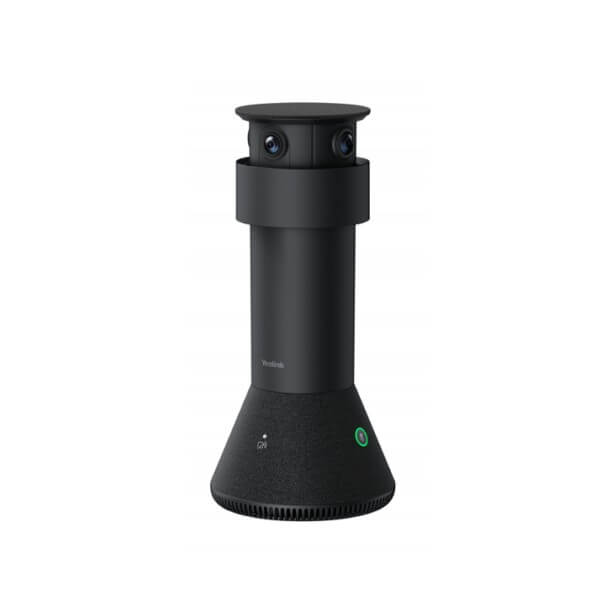
In a typical DIFC, DMCC, Business Bay, or JAFZA meeting room, the screen and front camera sit at one end of the table. Everyone naturally turns toward the screen, so remote attendees see profiles instead of faces. MTower changes the camera geometry by placing an intelligent camera at the table centre. Its triple-eye 4K system captures participants around the table, while AI-powered Best-view Switching helps present the most natural speaker and participant angles.
Where MTower Sits in a Yealink Teams Rooms Design
Choose MTower when the room already needs a Microsoft Teams Rooms experience and the design goal is better participant equity. A simple front camera may be enough for a small huddle space. MTower becomes valuable when people sit along both sides of the table and remote colleagues need a more human, face-to-face view. For larger or more complex rooms, David will confirm whether MTower, SmartVision 40, SmartVision 60, SmartVision 80, AVHub, or a full MVC bundle is the right path before quoting.
| Feature | Front Camera Only | MTower Centre-View ★ | Advanced Multi-Camera Room |
|---|---|---|---|
| Room role | Basic Teams Rooms view | Front + centre participant view | Large-room camera switching |
| Camera position | Display wall | Meeting table centre | Front, ceiling, or AVHub-based design |
| Participant view | Often side profiles | More natural face-to-face angles | Room-wide intelligent capture |
| Camera system | Single front lens | Triple-eye 4K, 322° combined view | Multiple camera sources |
| Microphones | Depends on room kit | 6+1 mics, 360° pickup up to 6m | Ceiling/table audio design |
| Best for | Small rooms with few seats | Small to medium Teams Rooms tables | Large boardrooms and divisible spaces |
| Certification note | Depends on model | Verified as MTower + SmartVision 40 | Bundle-specific verification required |
| Choose if… | Your small room only needs a simple front view | Your Teams room needs natural table-centre participant framing | Your room needs a complete large-room AV design |
Dubai Use Cases for Yealink MTower
Executive boardrooms in DIFC and Downtown Dubai. Senior teams often sit around long tables while remote directors join from overseas. A front camera captures the room, but MTower helps create a stronger face-to-face view for Teams participants who need to read expressions and speaker direction clearly.
Hybrid project rooms in DMCC, JLT, and Business Bay. Consulting, engineering, finance, and legal teams run daily Teams calls with people seated on both sides of a table. MTower gives the room a centre-view perspective without turning the meeting into a laptop-camera compromise.
Training rooms and client presentation spaces. In Jebel Ali, Dubai Silicon Oasis, and Abu Dhabi project offices, Teams Rooms are used for regional training and vendor reviews. MTower improves table coverage when the discussion moves between several in-room participants instead of one presenter at the front.
Rooms already running Yealink Teams hardware. If your Teams room uses Yealink front-room video, touch control, and room compute, David can check whether MTower is the right centre-view upgrade or whether a different Yealink camera/audio bundle is more appropriate.
Full Technical Specifications
| Specification | Yealink MTower |
|---|---|
| Product type | Centre-view intelligent camera for Microsoft Teams Rooms |
| Room role | Tabletop camera accessory for front + centre meeting views |
| Camera system | Triple-eye 4K camera system |
| Combined view | 322° coverage for table-centre room capture |
| Central lens | 84.4° telephoto camera for detailed participant capture |
| Side lenses | Two 151° wide-angle cameras to cover participants around the table |
| Microphones | 6+1 microphone array |
| Voice pickup | 360° pickup range, up to 6 metres |
| AI features | AI-powered Best-view Switching and AI noise reduction |
| Processor | Qualcomm QCS8550 processor for intelligent camera processing |
| Privacy | Magnetic levitation privacy shutter with automatic open/close operation |
| Meeting controls | Mute and camera-mute functions for room control |
| Microsoft Teams status | Verified on Microsoft certified peripherals list as Yealink MTower + Yealink SmartVision 40 |
| Best-fit room size | Small to medium Teams Rooms tables where front-only camera framing is not enough |
Compatible Room Components
| Component | Role in the Room | Ordering Note |
|---|---|---|
| Yealink SmartVision 40 | Front-room camera in the Microsoft-certified MTower + SmartVision 40 combination | David verifies firmware and Teams Rooms compatibility before quote |
| Yealink Teams Rooms system | Compute, control, camera routing, and room workflow | Bundle depends on room size, display count, and Teams Rooms licence plan |
| Room audio | Speaker and microphone coverage for larger spaces beyond MTower pickup | Ceiling/table audio checked for large rooms, glass walls, and noisy offices |
| Cabling and installation accessories | Clean table-centre installation with correct cable path and power/network planning | Confirmed after room photo, table layout, and display position are reviewed |
Staging Before Dispatch
Vector Digital Systems does not ship MTower as a blind box. Before dispatch, David checks the Teams Rooms platform, front-camera model, Microsoft certification status, firmware level, table layout, display wall position, cable path, and room size. For Dubai installations, the team can coordinate camera placement, Teams Rooms settings, test call validation, user handover, and documentation so the meeting room works on the first live call.
Export from Dubai
Vector Digital Systems supplies Yealink MTower and Teams Rooms accessories from Dubai to system integrators, AV installers, corporate IT teams, and regional project buyers. Export routes include Oman, Saudi Arabia, Kuwait, Bahrain, Qatar, Jordan, Egypt, Kenya, Pakistan, and Sri Lanka. Shipments are quoted FOB Dubai with commercial invoice, packing list, and certificate of origin on request. For export projects, share the complete room bill of materials so David can verify whether MTower is being ordered with the correct Yealink camera and Teams Rooms bundle.
Get a same-day Yealink MTower quote in AED
Tell David your room size, table shape, Teams Rooms hardware, front camera model, display location, and whether this is a new room or an upgrade. Quote includes VAT breakdown, delivery, compatibility check, and installation/staging options.
Frequently Asked Questions — Yealink MTower
What is the Yealink MTower used for?
The Yealink MTower is a centre-view intelligent camera for Microsoft Teams Rooms. It sits on the meeting table and works with a compatible front-room camera design to give remote participants a more natural face-to-face view of people around the table.
Is Yealink MTower a complete Teams Rooms system?
No. MTower is not a complete Teams Rooms system, not a mobile tower PC, and not a stand-alone meeting bar. It is a centre-view camera accessory. You still need the correct Teams Rooms compute, controller, display, front camera, audio design, firmware, and room configuration.
Is Yealink MTower Microsoft Teams certified?
Microsoft certification was verified on 10 July 2026 as “Yealink MTower + Yealink SmartVision 40” in the Microsoft Teams Rooms certified peripherals list. Vector Digital Systems verifies the current certification and firmware combination again before quoting any Teams Rooms project.
Does Yealink MTower work with Zoom Rooms?
MTower should not be assumed as a Zoom Rooms camera. It is positioned for Microsoft Teams Rooms centre-view use. If your room runs Zoom Rooms, ask David to verify the current Zoom-certified Yealink camera or room kit before ordering.
What room size is Yealink MTower designed for?
MTower is best suited to small and medium Teams Rooms where participants sit around a table and a front-only camera creates side-profile views. For larger boardrooms, David may recommend a full multi-camera Yealink design instead of, or in addition to, MTower.
What camera and microphone features does Yealink MTower include?
MTower uses a triple-eye 4K camera system with a 322° combined view, including one 84.4° telephoto camera and two 151° wide-angle cameras. It also has a 6+1 microphone array with 360° pickup up to 6 metres, AI noise reduction, and AI-powered Best-view Switching.
MTower vs SmartVision 40 — which one should I buy?
SmartVision 40 is a front-room camera. MTower is a centre-table camera accessory that improves participant perspective when the front camera alone is not enough. For Microsoft Teams Rooms, the certified design to verify is MTower + SmartVision 40, not MTower as a replacement for the front camera.
Does Vector Digital Systems install and configure Yealink MTower in Dubai?
Yes. Vector Digital Systems checks the room layout, Teams Rooms hardware, front camera, firmware, cabling, table position, and test-call workflow before dispatch or installation. The goal is to deliver a working room design, not just a camera shipment.
Who is the Yealink authorised supplier for MTower in Dubai?
Vector Digital Systems LLC has supplied Yealink and VoIP solutions in Dubai since 2009. David is the Yealink specialist for product selection, Teams Rooms compatibility checking, project pricing, staging, warranty support, and export documentation.
Does Vector Digital Systems export Yealink MTower from Dubai?
Yes. Vector Digital Systems exports Yealink MTower and Teams Rooms accessories from Dubai to system integrators and corporate IT buyers in Oman, Saudi Arabia, Kuwait, Bahrain, Qatar, Jordan, Egypt, Kenya, Pakistan, and Sri Lanka. Exports are quoted FOB Dubai with commercial invoice, packing list, and certificate of origin on request.