Description
Yealink MCore-OPS-T Dubai
Turn a Yealink MeetingBoard into a Windows Microsoft Teams Room
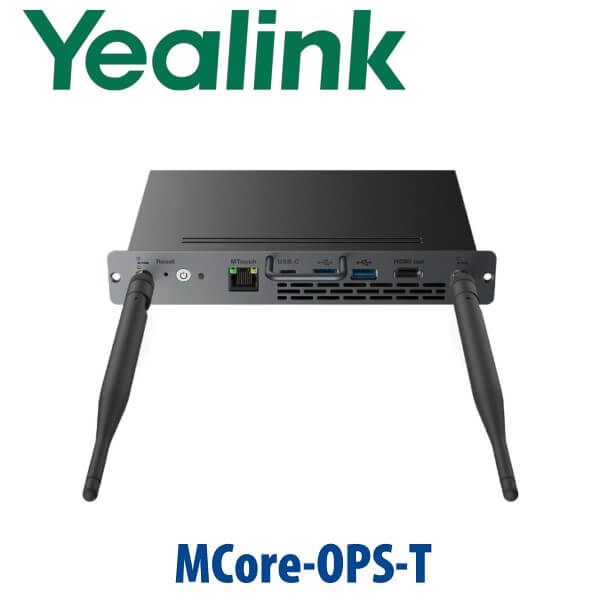
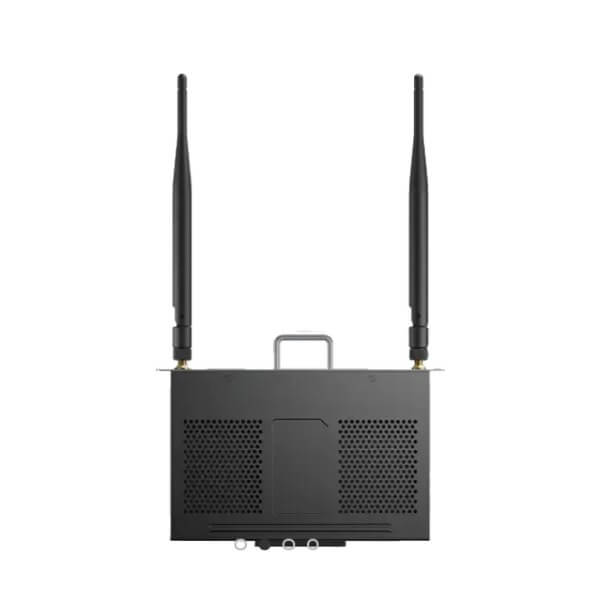
The Yealink MCore-OPS-T is the Windows OPS compute module built for Yealink MeetingBoard deployments that need the Microsoft Teams Rooms experience without adding a separate mini-PC under the table. It slides into the OPS slot of the compatible MeetingBoard display and runs a customised Teams Rooms image with Yealink RoomConnect, giving Dubai meeting rooms a clean all-in-one front-of-room setup with fewer cables, fewer visible boxes, and easier IT management.
For offices in DIFC, DMCC, Business Bay, JLT, Dubai Internet City, and Abu Dhabi branch networks standardising on Microsoft Teams Rooms, this is the compute module that changes the room from an Android-style collaboration board into a managed Windows Teams Rooms endpoint. Vector Digital Systems LLC supplies, stages, and supports Yealink meeting-room systems in Dubai, with David handling Yealink specification and quote support.
Platform Check — Teams Rooms, SIP Calling, or Zoom?
The MCore-OPS-T is not a SIP desk phone, and it is not a standalone video bar. It is a Windows compute module for Yealink MeetingBoard rooms. The main buyer mistake is ordering an OPS module when the room actually needs a full MeetingBoard bundle, a SIP conference phone, or a Zoom Rooms kit. Use this table before approving the quote.
| Your Platform | Right Yealink Direction | What You Need |
|---|---|---|
| Microsoft Teams Rooms on Windows | MCore-OPS-T with compatible Yealink MeetingBoard | Microsoft Teams Rooms licence, Microsoft 365 tenant access, room account and network readiness |
| Microsoft Teams calling at a desk | Yealink MP-series Teams phone — ask David for the current certified desk model | Teams Phone licence per user; do not order MeetingBoard compute for desk calling |
| SIP PBX / 3CX / Yeastar / Grandstream UCM | Yealink SIP phones or SIP conference phones, not MCore-OPS-T | SIP credentials from your PBX or hosted provider |
| Zoom Rooms | Zoom-certified Yealink room system — certification to be verified before quote | Zoom Rooms licence and compatible room hardware |
Teams certification note: Microsoft certification status was checked on 10 Jul 2026. Microsoft lists Yealink MeetingBoard Pro for MTR Windows and specifically references management with the MCore-OPS-T. Final room configuration should still be verified at quote stage because Microsoft certification applies to the approved room system configuration, not to every possible mix of accessories.
Power and Installation Truth — This Is Not a PoE Desk Phone
The MCore-OPS-T is an OPS compute module, not a PoE phone. It installs into the compatible MeetingBoard OPS interface and is powered through the display system, with 12–19V input specified for the module design. Do not plan a PoE switch port as the power source. The room still needs normal AC power for the MeetingBoard, structured network access, Microsoft 365 sign-in readiness, and any room peripherals required for your layout.
Why Dubai Teams Rooms Buyers Choose the OPS Approach
Traditional meeting rooms often end up with a display, mini-PC, USB hub, table console, camera, power bricks, HDMI extenders and loose cables. The Yealink MCore-OPS-T reduces that clutter by integrating the Windows Teams Rooms compute inside the MeetingBoard ecosystem. For boardrooms, HR interview rooms, training rooms and hybrid classrooms, the result is easier to service and cleaner to hand over to facilities teams.
The module includes Windows 11 IoT Enterprise, the Microsoft Teams Rooms app, and Yealink RoomConnect. Hardware is based on an Intel 11th Gen Core i5-1135G7 processor with 8GB DDR4 memory and a 128GB SSD, with Wi-Fi 6 and Bluetooth 5.2 built in. Security features include TPM 2.0, UEFI Secure Boot and Kernel DMA protection — important for UAE enterprises where the meeting-room display is treated as a managed network endpoint.
MCore-OPS-T in the Yealink OPS Range — Where It Sits
The MCore-OPS-T sits between the standard Windows OPS module and the newer G2T generation. Choose it when your MeetingBoard deployment needs Windows Microsoft Teams Rooms support on the established i5 hardware platform. Choose MCore-OPS for non-Teams Windows compute use, and ask David about MCore-OPS-G2T when the room needs the newer Intel Core Ultra 5 platform, more memory, more storage, HDMI input, and longer forward-looking headroom.
| Feature | MCore-OPS | MCore-OPS-T ★ | MCore-OPS-G2T |
|---|---|---|---|
| Best Fit | Windows OPS compute for MeetingBoard | Windows Teams Rooms compute for MeetingBoard | New-generation Teams Rooms compute for MeetingBoard / MeetingBoard Pro |
| Teams Rooms App | No | Yes | Yes |
| CPU | Intel Core i5-1135G7 | Intel Core i5-1135G7 | Intel Core Ultra 5 125H |
| Memory | 8GB DDR4 | 8GB DDR4 | 16GB DDR5 |
| Storage | 128GB SSD | 128GB SSD | 256GB SSD |
| Wireless | Wi-Fi 6 + Bluetooth 5.2 | Wi-Fi 6 + Bluetooth 5.2 | Wi-Fi 6 + Bluetooth 5.2 |
| HDMI Input | No | No dedicated HDMI-in | Yes — supports HDMI ingest for Teams Rooms |
| Security | TPM 2.0, Secure Boot, Kernel DMA | TPM 2.0, Secure Boot, Kernel DMA | TPM 2.0, EDID / CEC support, newer platform |
| Price Tier | Lower | Mid | Higher |
| Choose if… | You need Windows compute but not Teams Rooms preload | You need a clean Windows Teams Rooms module for a compatible MeetingBoard | You want the newer Core Ultra platform, 16GB RAM, 256GB SSD and HDMI ingest |
Where the MCore-OPS-T Works in Dubai
Corporate Teams Rooms upgrades. Many Dubai companies already use Microsoft Teams for daily work but still run meeting rooms from laptops. The MCore-OPS-T gives a compatible Yealink MeetingBoard a dedicated Windows Teams Rooms environment, so users can walk in, tap to join, whiteboard, present, and leave without borrowing someone’s laptop.
DIFC, DMCC and Business Bay executive rooms. These offices need clean rooms that look premium on client visits. Installing the compute inside the MeetingBoard keeps the room uncluttered and avoids the “mini-PC and cable tray” look that appears in many rushed Teams Rooms projects.
Education, training and hybrid classroom spaces. MeetingBoard deployments in universities, training centres and internal academies benefit from the OPS form factor because the compute is fixed inside the display, not sitting loose on a lectern. IT teams can standardise the room image and keep the user experience consistent.
Government suppliers and regulated offices. TPM 2.0, Secure Boot and Windows management matter when the meeting-room endpoint sits on the corporate network. The MCore-OPS-T gives IT a Windows-based Teams Rooms endpoint that can be managed and documented as part of the room system.
Full Technical Specifications
| Specification | Yealink MCore-OPS-T |
|---|---|
| Product Type | Windows OPS compute module for Yealink MeetingBoard interactive displays |
| Platform | Microsoft Teams Rooms on Windows — with compatible MeetingBoard room system |
| System Preload | Windows 11 IoT Enterprise x64, Windows 11 IoT Enterprise licence, Microsoft Teams Rooms app, Yealink RoomConnect |
| Processor | Intel Core 11th Gen i5-1135G7 |
| Memory | 8GB DDR4 (2×4GB) |
| Storage | 128GB SSD |
| Graphics | Intel Iris Xe graphics, 1.30 GHz |
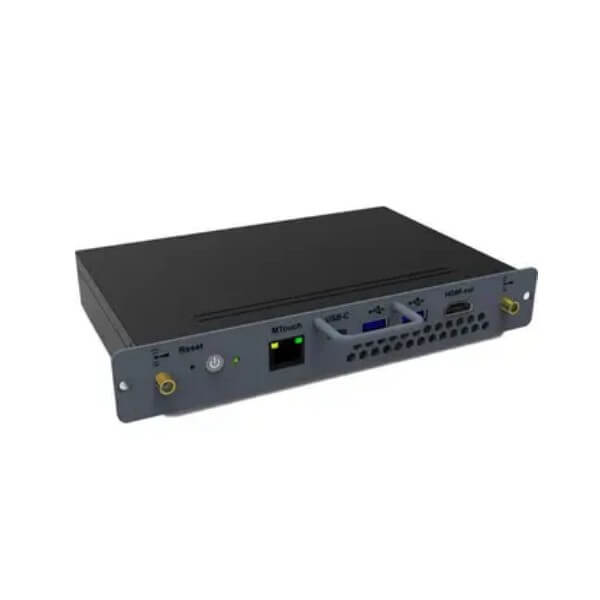
| MTouch Port | 1× RJ-45 MTouch port |
| HDMI | 1× HDMI out |
| USB Ports | 2× USB 3.0 Type-A, 1× USB 3.0 Type-C |
| Wireless | Wi-Fi 6 (802.11ax) and Bluetooth 5.2 AX201 |
| BIOS / Security | TPM 2.0, UEFI Secure Boot, Kernel DMA protection, DP support, CEC support, custom boot logo support |
| Dimensions | 180mm × 119mm × 30mm |
| Weight | 0.7kg net weight |
| Input | 12–19V, 4.7–7.5A through compatible system design |
| Operating Temperature | -10°C to 50°C |
| Operating Humidity | 10% to 90% |
| Storage Temperature | -20°C to 60°C |
| Package Contents | MCore-OPS module, 2× antenna, 2× screw, 1× screwdriver, 1× Quick Start Guide |
| Carton | 267mm × 215mm × 65mm, approx. 0.89kg gross weight |
Compatible Accessories and Room Components
| Component | Compatibility Note | Why It Matters |
|---|---|---|
| Yealink MeetingBoard | Designed for MeetingBoard MB65 / MB86 and compatible MeetingBoard deployments | The MCore-OPS-T slides into the OPS interface as the Windows Teams Rooms compute engine |
| MeetingBoard Pro | Compatibility to be checked against the exact MeetingBoard Pro bundle at quote stage | Room systems are certified as configurations, so the board, compute and room accessories must match |
| MTouch / Room Control | Uses the MTouch RJ-45 port where the selected room configuration requires it | Gives the room a consistent tap-to-join control experience |
| Network and Microsoft 365 | Requires customer tenant, room account, Teams Rooms licence and network readiness | The hardware will not deliver a Teams Rooms experience until the tenant and licence are ready |
| Wall Mount / Floor Stand / Installation Kit | Selected based on MeetingBoard size, wall structure and room layout | Correct mounting prevents service issues and keeps camera height natural |
Staging Before Dispatch — What Vector Digital Systems Configures
Vector Digital Systems stages Yealink room systems before dispatch wherever the customer provides the required Microsoft 365 room-account details. For the MCore-OPS-T, our team checks the compatible MeetingBoard configuration, validates Teams Rooms licensing requirements, confirms network readiness notes, verifies firmware and RoomConnect readiness, labels the room hardware for site delivery, and tests the room workflow before handover. For multi-room rollouts, we prepare a repeatable room checklist so every boardroom, training room and huddle space follows the same naming and sign-in pattern.
Export from Dubai
Vector Digital Systems supplies Yealink MCore-OPS-T modules and MeetingBoard room systems from Dubai to system integrators, AV installers, Microsoft partners, corporate procurement teams and education projects across the region. Common export routes include Oman, Saudi Arabia, Kuwait, Bahrain, Qatar, Jordan, Egypt, Kenya, Nigeria and Pakistan. Shipments are quoted FOB Dubai with commercial invoice, packing list and certificate of origin on request. Tell David the MeetingBoard size, required room count, destination country and whether the project needs staging in Dubai before export.
Get a same-day quote in AED for Yealink MCore-OPS-T
Tell David your MeetingBoard model, room count, Microsoft Teams Rooms licence status, installation location and whether you need supply only, staging, installation or export documentation. VAT breakdown and delivery charges are included in the quote.
Frequently Asked Questions — Yealink MCore-OPS-T
What is the Yealink MCore-OPS-T used for?
The Yealink MCore-OPS-T is a Windows OPS compute module for compatible Yealink MeetingBoard interactive displays. It adds Windows 11 IoT Enterprise, the Microsoft Teams Rooms app and Yealink RoomConnect, allowing the MeetingBoard to run as a managed Microsoft Teams Rooms system instead of relying on a laptop or external mini-PC.
Is the Yealink MCore-OPS-T Microsoft Teams certified?
Microsoft certification was checked on 10 Jul 2026. Microsoft lists Yealink MeetingBoard Pro for MTR Windows and references use with MCore-OPS-T for Windows management. Certification should be verified for the exact room bundle before quote because Teams Rooms approval applies to the complete system configuration, not just one component by itself.
Can I use MCore-OPS-T with a SIP PBX such as 3CX, Yeastar or Grandstream UCM?
No — the MCore-OPS-T is not a SIP phone or SIP conference unit. It is a Windows compute module for Teams Rooms on compatible Yealink MeetingBoard systems. For 3CX, Yeastar, Grandstream UCM or hosted SIP platforms, ask David for Yealink SIP desk phones or SIP conference phones instead.
Does MCore-OPS-T work with Zoom Rooms?
The MCore-OPS-T page should be treated as a Microsoft Teams Rooms solution. If your room is for Zoom Rooms, ask David for the current Zoom-certified Yealink room system and we will verify certification status before quoting. Do not assume a Teams Rooms OPS module is the correct choice for a Zoom Rooms deployment.
MCore-OPS vs MCore-OPS-T — which one should I buy?
Choose MCore-OPS-T when the room needs Microsoft Teams Rooms on Windows because it includes the Teams Rooms app and Yealink RoomConnect. Choose the standard MCore-OPS only when you need Windows OPS compute for a MeetingBoard but not the Teams Rooms preload. For new high-end rooms, ask David whether the newer MCore-OPS-G2T is the better fit.
What hardware is inside the Yealink MCore-OPS-T?
The MCore-OPS-T uses an Intel 11th Gen Core i5-1135G7 processor, 8GB DDR4 memory, 128GB SSD storage and Intel Iris Xe graphics. It includes Wi-Fi 6, Bluetooth 5.2, HDMI out, two USB 3.0 Type-A ports, one USB 3.0 Type-C port and an MTouch RJ-45 port.
Does the MCore-OPS-T need PoE or a separate power adapter?
The MCore-OPS-T is not powered like a Yealink PoE desk phone. It is an OPS module installed into the compatible MeetingBoard system and is powered through that system design. The room still needs normal AC power for the MeetingBoard, plus network access and the correct Microsoft Teams Rooms licensing.
Does Vector Digital Systems configure the MCore-OPS-T before delivery?
Yes — Vector Digital Systems can stage the MeetingBoard and MCore-OPS-T workflow before dispatch where tenant and room-account details are available. We check compatibility, Teams Rooms licence readiness, RoomConnect status, firmware readiness, room naming and basic join workflow so the site installation is faster.
Who is the authorised Yealink supplier in Dubai?
Vector Digital Systems LLC has supplied and integrated Yealink solutions in Dubai since 2009. David handles Yealink pre-sales specification, room-system compatibility checks, project pricing, staging and local warranty support. Quotes are issued in AED with VAT breakdown and delivery charges noted.
What is the best Yealink solution for a Microsoft Teams boardroom in Dubai?
For an interactive front-of-room display, a compatible Yealink MeetingBoard with MCore-OPS-T is the right direction when you want Microsoft Teams Rooms on Windows in a clean all-in-one room. For larger or newer projects, ask David to compare the MeetingBoard Pro and MCore-OPS-G2T configuration before finalising the quote.
Does Vector Digital Systems export Yealink MCore-OPS-T from Dubai?
Yes — Vector Digital Systems exports Yealink room-system hardware from Dubai to integrators and corporate buyers in Oman, Saudi Arabia, Kuwait, Bahrain, Qatar, Jordan, Egypt, Kenya, Nigeria and Pakistan. Shipments are quoted FOB Dubai with commercial invoice, packing list and certificate of origin on request.