
Description
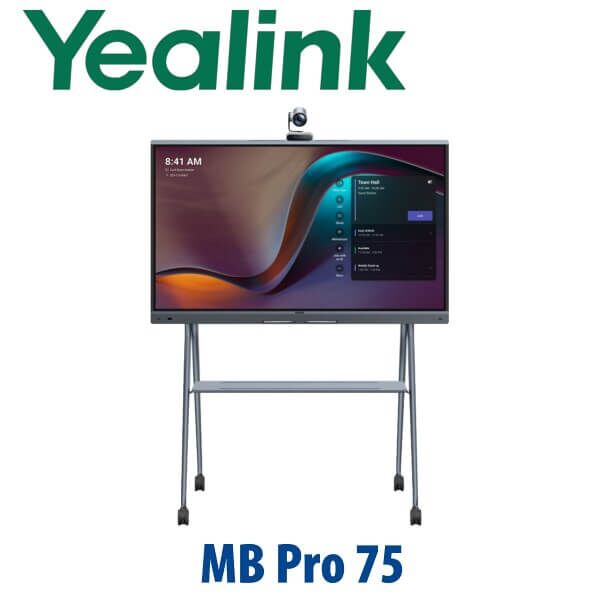
Yealink MeetingBoard 75 Pro 75-Inch Teams & Zoom Interactive Smart Whiteboard Dubai
The 75-Inch Meeting Room Board for Teams, Zoom and Serious Whiteboarding
The Yealink MeetingBoard 75 Pro is built for Dubai meeting rooms that have outgrown laptop conferencing, loose USB cameras and wall-mounted displays that nobody can write on. It combines a 75-inch 4K interactive screen, triple 50MP AI camera system, 16-microphone array, room speakers, wireless sharing and digital whiteboarding in one clean device. For DIFC boardrooms, Business Bay management rooms, DMCC training spaces and hybrid project rooms, it gives the team one front-of-room system instead of a stack of separate camera, speaker, display and controller hardware.
Vector Digital Systems supplies the Yealink MeetingBoard 75 Pro in Dubai with same-day AED quote, VAT and delivery breakdown, installation accessory guidance, room-size matching and staging support before dispatch. Tell David whether your room runs Microsoft Teams Rooms, Zoom Rooms or BYOD laptop meetings — that decision controls the right software mode, controller, OPS module and accessories.
Platform First: Teams Rooms, Zoom Rooms or General Mode?
The MeetingBoard Pro is a room collaboration device, not a SIP desk phone. The important buyer question is not “how many lines?” — it is which meeting platform your organisation standardises on. Certification status was checked on 14 July 2026 before writing this page: Microsoft lists Yealink MeetingBoard Pro 75 in both MTRW and MTRA families, and Zoom lists Yealink MeetingBoard Pro 65/75/86 as certified from September 2025 to September 2027.
| Your Meeting Platform | Right Setup | What You Need |
|---|---|---|
| Microsoft Teams Rooms | Yealink MeetingBoard 75 Pro — MTRA or MTRW configuration | Microsoft 365 tenant, Teams Rooms licence, room account and admin access for staging |
| Zoom Rooms | Yealink MeetingBoard 75 Pro in Zoom Rooms configuration | Zoom Rooms licence, room account and network access for activation |
| BYOD / General Mode | MeetingBoard Pro used as display, camera, microphone, speaker and whiteboard | Laptop connection, HDMI/USB workflow, wireless sharing policy and user training |
Buyer trap: do not buy a room board only by screen size. A Teams-native room, a Zoom-native room and a BYOD room can use the same 75-inch hardware family, but the licensing, sign-in method, controller plan and OPS module choice are different. Vector Digital Systems confirms this before quoting so the board arrives ready for the platform your IT team actually runs.
Power Truth: This Is an AC-Powered Room Device, Not a PoE Display
The MeetingBoard 75 Pro uses AC mains power. Unlike Yealink desk phones, this is not powered by PoE. The box includes a 3-metre AC power cable and a 3-metre CAT5E network cable, while wall mounts, floor stands and certain room accessories are quoted separately. Plan a clean power point behind the board or near the mobile floor stand before installation day.
For network stability, we recommend wired Gigabit Ethernet for Teams Rooms and Zoom Rooms deployments. Wi-Fi 6 is built in and useful for flexible spaces, demonstrations and backup connectivity, but permanent boardrooms in Dubai offices should normally use wired LAN to avoid guest-Wi-Fi congestion during executive meetings.
Where the 75 Pro Sits in the MeetingBoard Pro Range
The MeetingBoard Pro family comes in 65-inch, 75-inch and 86-inch sizes. The 75 Pro is the balanced model: large enough for medium-to-large meeting rooms where people sit across a real boardroom table, but not as installation-heavy as the 86-inch model. It is the right default for management rooms, training rooms, design review spaces and executive meeting rooms where whiteboarding and video calls happen in the same session.
| Feature | MeetingBoard 65 Pro | MeetingBoard 75 Pro ★ | MeetingBoard 86 Pro |
|---|---|---|---|
| Display | 65″ 4K UHD | 75″ 4K UHD | 86″ 4K UHD |
| Best room fit | Small to medium rooms | Medium to large rooms | Large rooms and training spaces |
| Camera | Triple 50MP | Triple 50MP | Triple 50MP |
| Audio pickup | 16 mics, 12m full duplex | 16 mics, 12m full duplex | 16 mics, 12m full duplex |
| Touch | 20-point infrared touch | 20-point infrared touch | 20-point infrared touch |
| Mounting | Wall mount or MB-FS-P650T | Wall mount or MB-FS-P750T | Wall mount or MB-FS-P860T |
| Device weight | 40 kg net | 52.2 kg net | 65.6 kg net |
| Price tier | Lower | Balanced | Higher |
| Choose if… | Your room is compact and people sit close to the screen | You want the best balance for Dubai boardrooms, management rooms and training spaces | You need maximum canvas size for large rooms or classroom-style training |
Dubai Use Cases for the Yealink MeetingBoard 75 Pro
DIFC and Downtown executive boardrooms. The 75-inch canvas gives directors enough space for remote participants, shared spreadsheets, Microsoft Whiteboard sessions and camera views without the room feeling over-equipped. The triple 50MP camera system supports auto framing, speaker tracking and IntelliFocus, so the far end sees the right people instead of a static wide shot of the whole table.
Business Bay, DMCC and free-zone hybrid teams. Many Dubai offices now run a mixed meeting rhythm: Teams with head office, Zoom with clients, and laptop-based calls for suppliers. The MeetingBoard Pro supports native Teams, native Zoom and General Mode / BYOD workflows, so one room can handle different meeting styles without swapping devices.
Training rooms, consultants and project teams. The 20-point infrared touch display, four stylus pens and low-latency whiteboarding make the 75 Pro useful for design reviews, ERP rollouts, sales training, HR onboarding and project workshops. Teams can write, erase, share and save ideas directly from the room board instead of photographing a glass wall at the end of the meeting.
Glass-wall offices and open collaboration spaces. Dubai offices often look beautiful but sound difficult. MeetingBoard Pro uses 16 built-in microphones, AI audio processing, noise suppression and reverberation control to keep speech clear even when rooms have hard surfaces, glass partitions and nearby open-plan activity.
Full Technical Specifications
| Specification | Yealink MeetingBoard 75 Pro |
|---|---|
| Product Type | All-in-one interactive meeting board for Microsoft Teams Rooms, Zoom Rooms and BYOD collaboration |
| Display Size | 75-inch anti-glare 4K UHD display |
| Resolution | 3840 × 2160, 60Hz refresh rate |
| Brightness / Colour | 400 cd/㎡ brightness, 72% NTSC / 99% sRGB, 1.07G colour depth |
| Touch | Infrared touch, 20 touch points, ±1 mm accuracy, 21 ms whiteboard latency, four-level stylus support |
| Camera System | Built-in triple 50MP camera system with Sony sensors, 4K output, autofocus, WDR/HDR and electric privacy shutter |
| Camera AI | Auto framing, speaker tracking, Picture-in-Picture, IntelliFocus and Video Fence |
| Microphones | Built-in 16 MEMS microphone array, 12-metre full-duplex pickup, 48kHz sampling, 24-bit audio |
| Speakers | Stereo speakers, 30W rated power, 36W max power, 90Hz–20kHz frequency response |
| Audio Processing | Yealink AI Audio 2.1 with echo cancellation, noise suppression, reverberation cancellation, beamforming and automatic gain control |
| Operating System | Android 13.0 with optional Windows OPS module support |
| Memory / Storage | 8GB memory, 64GB flash storage |
| Processor / AI | 8-core CPU and 13.2T FLOPS AI computing power |
| Wireless | Wi-Fi 6 dual-band 2.4G/5G, 2×2 MIMO, Bluetooth 5.1 |
| Network Ports | 2 × 10/100/1000 Mbps adaptive Gigabit Ethernet ports |
| Interfaces | HDMI output, HDMI input, RCA line input/output, 3 × USB-A 2.0, 2 × RJ45 VCH, USB-B touch output, OPS slot, AC power input |
| Content Sharing | HDMI input, VCH51 wired sharing, AirPlay, Miracast and Yealink wireless presentation accessories where available |
| Management | Web, device and touchscreen configuration; YMCS, Microsoft Teams Admin Center, MTR Portal Management Platform and Zoom Device Management support |
| Power | 100–240V AC, 50/60Hz; 164W typical, 277W max for 75-inch model |
| Device Dimensions | 1705 × 91 × 1081 mm bare device; 1705 × 850 × 1960 mm with stand |
| Weight | 52.2 kg net, 65 kg gross packaging weight |
| In Box | MeetingBoard Pro, cable pack, 3m AC power cable, 3m CAT5E cable, 4 stylus pens, cable ties and quick start guide. Wall mount sold separately. |
Compatible Accessories for MeetingBoard 75 Pro
| Accessory | Model | Purpose |
|---|---|---|
| Mobile Floor Stand | MB-FS-P750T | Move the 75-inch board between training rooms, project rooms and executive spaces |
| Wall Mount | MB-WallMount-860 | Wall mounting for the 75-inch and 86-inch MeetingBoard Pro models |
| Wall Stand | MB-WallStand-860W | Freestanding wall-style installation where full wall mounting is not preferred |
| Touch Controller | CTP25 | Tabletop meeting control for Teams Rooms or Zoom Rooms spaces |
| Optical Zoom Camera | MB-12X Pro | 12× optical zoom camera module for longer rooms, training spaces and presenter tracking |
| Microphones | VCM35 / VCM36-W / CM20 | Extend pickup coverage using wired, wireless or ceiling microphones |
| Ceiling Speaker | CS10 | Additional room audio coverage for larger spaces |
| Windows OPS Module | MCore-OPS / MCore-OPS-T | Windows system module for MTRW deployments and professional application needs |
| Wired Sharing | VCH51 | Wired content sharing workflow for rooms where wireless sharing is restricted |
Staging Before Dispatch — What Vector Digital Systems Checks
Every MeetingBoard 75 Pro order is checked against the room plan before dispatch: Teams Rooms or Zoom Rooms mode confirmed, licence requirements listed for the IT team, network method confirmed, accessory set matched to the room, firmware and management path checked, camera and microphone coverage reviewed, and installation notes prepared for wall mount or floor stand delivery. For Teams or Zoom deployments, we can coordinate room account sign-in, device naming, management enrolment, wireless sharing policy and a test call workflow with your IT admin.
Export from Dubai
Vector Digital Systems exports Yealink MeetingBoard Pro systems from Dubai for system integrators, hotel groups, enterprise IT teams, universities, government departments and regional project contractors. Common routes include Oman, Saudi Arabia, Qatar, Kuwait and Bahrain across the Gulf; Jordan and Egypt for regional offices; Kenya and Tanzania for East Africa projects; and Pakistan and Sri Lanka for South Asian deployments. Shipments are quoted FOB Dubai with commercial invoice, packing list and certificate of origin on request. Because the MeetingBoard 75 Pro is a large-format 65 kg gross shipment, we confirm packing, destination handling and stand/accessory quantities before issuing the final export quote.
Get a same-day AED quote for Yealink MeetingBoard 75 Pro in Dubai
Tell David your room size, platform (Microsoft Teams Rooms, Zoom Rooms or BYOD), mounting preference, licence status and delivery location. We quote the board, accessories, VAT and delivery clearly — no fixed online price, no missing stand or wall-mount surprise.
Frequently Asked Questions — Yealink MeetingBoard 75 Pro
Is the Yealink MB Pro75 the same as the MeetingBoard 75 Pro?
Yes. Buyers often shorten the name to MB Pro75, but the product page should use the full name: Yealink MeetingBoard 75 Pro. It is the 75-inch model in the MeetingBoard Pro family, positioned between the 65-inch and 86-inch versions.
Is the Yealink MeetingBoard 75 Pro certified for Microsoft Teams Rooms?
Yes. Certification was checked on 14 July 2026 against Microsoft’s official Teams devices list, which lists Yealink MeetingBoard Pro 75 in the MTRW and MTRA families. Vector Digital Systems still confirms the exact bundle and licence requirement before quoting, because Teams Rooms Android and Teams Rooms Windows deployments are not the same.
Is the Yealink MeetingBoard 75 Pro certified for Zoom Rooms?
Yes. Zoom’s certified hardware list, checked on 14 July 2026, lists Yealink MeetingBoard Pro 65/75/86 as a certified collaborative touch space device from September 2025 to September 2027. For Zoom Rooms projects, we confirm your Zoom Rooms licence, room account and management policy before dispatch.
Should I buy the MeetingBoard 65 Pro, 75 Pro or 86 Pro?
Choose the 65 Pro for compact rooms, the 75 Pro for medium-to-large boardrooms and training spaces, and the 86 Pro when the room needs maximum canvas size. The 75 Pro is usually the best balance for Dubai executive rooms because it gives a large whiteboard and video canvas without the weight and wall-space demands of the 86-inch model.
Does the MeetingBoard 75 Pro work for both Teams and Zoom?
Yes, the MeetingBoard Pro platform supports native Teams, native Zoom and General Mode / BYOD workflows. The hardware can serve different meeting styles, but the room should be quoted according to your primary platform because Teams Rooms and Zoom Rooms use different accounts, licences, management tools and setup steps.
Does the Yealink MeetingBoard 75 Pro need PoE?
No. The MeetingBoard 75 Pro is an AC-powered room device, not a PoE display. It includes a 3-metre AC power cable and should be installed near a suitable mains power point. For network reliability, we recommend wired Gigabit Ethernet for permanent Teams Rooms and Zoom Rooms spaces.
What accessories should I order with the MeetingBoard 75 Pro?
Most rooms need either the MB-FS-P750T mobile floor stand or the MB-WallMount-860 wall mount. Larger rooms may add the CTP25 touch controller, VCM36-W wireless microphones, CM20 ceiling microphones, CS10 ceiling speakers, MB-12X Pro optical zoom camera or MCore-OPS module. Vector Digital Systems confirms the accessory set from your room layout before quoting.
Who is the Yealink MeetingBoard supplier in Dubai?
Vector Digital Systems LLC has supplied and integrated Yealink solutions in Dubai since 2009. David handles Yealink product selection, project quotes, room accessory matching, staging support and local warranty coordination for MeetingBoard, MeetingBar, desk phone and headset projects.
Does Vector Digital Systems configure the MeetingBoard 75 Pro before delivery?
Yes. We confirm the platform mode, licence requirements, network method, firmware, room naming, management path, accessory set and test-call workflow before dispatch. For Teams or Zoom rooms, we coordinate with your IT admin so the board arrives ready for activation instead of becoming a first-day troubleshooting project.
Does Vector Digital Systems export Yealink MeetingBoard Pro systems from Dubai?
Yes. Vector Digital Systems exports Yealink MeetingBoard Pro systems from Dubai to integrators and enterprise buyers in Oman, Saudi Arabia, Qatar, Kuwait, Bahrain, Jordan, Egypt, Kenya, Tanzania, Pakistan and Sri Lanka. Export quotes include FOB Dubai terms, commercial invoice, packing list and certificate of origin on request.
