
Description
Yealink DeskVision A24 23.8″ Teams & Zoom Desktop Collaboration Display Dubai
A Cleaner Executive Desk for Teams, Zoom and Hybrid Work
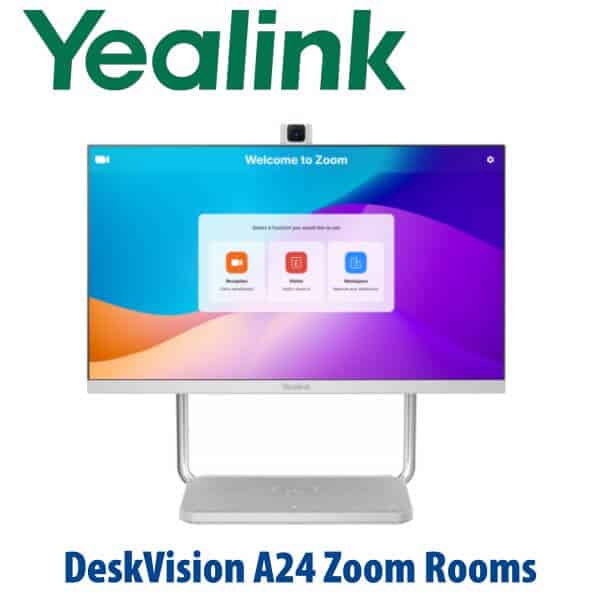
The Yealink DeskVision A24 is built for the Dubai office that wants video meetings to feel permanent, professional and simple — not like a laptop balanced on a stand with a webcam, speakerphone, dock and charger fighting for space. It combines a 23.8-inch Full-HD touch display, pop-up 4K camera, microphones, stereo speakers, USB-C docking, Qi wireless charging and native UC applications into one desktop collaboration device. For executives, phone rooms, hot-desking areas and hybrid work desks, the A24 turns one seat into a ready-to-join Teams or Zoom workspace.
Vector Digital Systems LLC supplies Yealink collaboration devices in Dubai with same-day AED quoting, VAT and delivery clearly noted, and staging support before dispatch. Contact David, our Yealink specialist, with your platform — Microsoft Teams, Zoom, or BYOD workstation mode — so the correct configuration is quoted from the start.
Platform Check: Teams, Zoom or SIP Phone?
The DeskVision A24 is not a SIP desk phone like the Yealink T7 series. It is a desktop collaboration display for Microsoft Teams, Zoom and UC workstation use. That platform distinction matters: a buyer replacing a desk phone should choose a SIP T-series or MP-series Teams phone; a buyer building a personal video meeting desk should choose the DeskVision A24.
| Your Platform | Right Yealink Device | What You Need |
|---|---|---|
| Microsoft Teams meetings / Teams Rooms on Android | DeskVision A24 — verified on Microsoft device list, 23 July 2026 | Microsoft 365 tenant and the correct Teams licence for the deployment type |
| Zoom meetings / Zoom Rooms / Zoom for Home | DeskVision A24 — verified on Zoom hardware list, 23 July 2026 | Zoom account and the correct Zoom Rooms or user licence |
| SIP PBX — 3CX, Yeastar, Grandstream UCM, hosted PBX | Yealink SIP desk phone such as T74U / T74W / T77U — not DeskVision A24 | SIP credentials from your PBX or hosted phone system |
Buyer trap: DeskVision A24 is a video collaboration endpoint and monitor. It is not the replacement for a SIP reception phone, BLF console or call-centre handset. For Teams Phone handsets, ask David for the current Yealink MP-series device; for SIP desk phones, use the T7 range.
Power Truth: This Is Not PoE Desk-Phone Power
DeskVision A24 uses its own DC 19V power input, not PoE. Unlike Yealink SIP desk phones that normally run from a PoE switch and ship without a power adapter, the A24 is a desktop collaboration display with a dedicated power supply requirement. It can then provide USB-C power delivery to a connected laptop, up to 45W, reducing the separate charger and docking clutter on the desk. Tell David whether the A24 will be deployed as a fixed Teams/Zoom endpoint, a shared hot desk, or a laptop docking monitor so the correct cabling is included.
Why DeskVision A24 Instead of a Laptop + Webcam Setup?
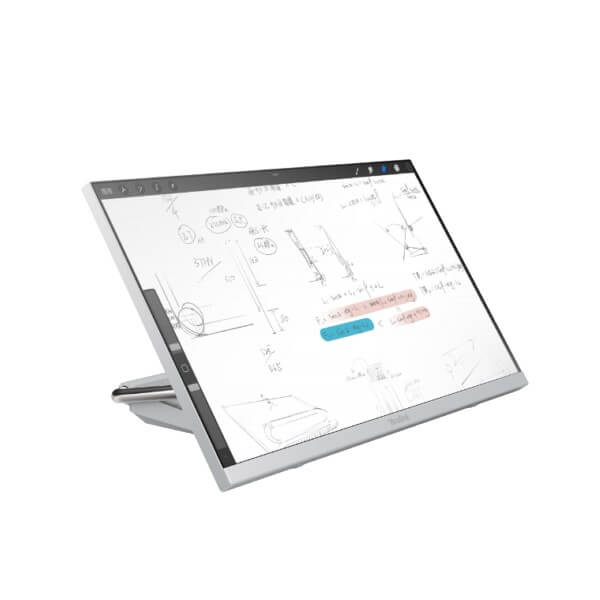
A normal executive video desk often grows into five separate devices: monitor, webcam, speakerphone, USB dock and phone charger. The A24 brings them into one integrated unit. The pop-up 4K camera keeps the user centred and private when not in use; the dual microphones and stereo speakers handle natural full-duplex conversation; the 23.8-inch touch display gives users a dedicated collaboration surface; and USB-C workstation mode turns the same unit into a monitor, USB hub, camera, speakerphone, laptop charger and wireless charging pad.
For Dubai executives moving between office meetings, Teams calls and laptop work, the benefit is not only cleaner cabling. It is speed: one touch to join, one cable to dock, one device for IT to manage, and fewer points of failure before a board call.
Where the A24 Sits in the Yealink Collaboration Range
DeskVision A24 sits between a personal headset/laptop setup and a full meeting-room bar such as the Yealink A20 or A30. It is not designed for a 10-person boardroom; it is designed for one high-value desk, a phone booth, a hot-desk pod, or a small executive huddle position where a permanent Teams or Zoom experience is required.
| Feature | Laptop + Yealink Headset | DeskVision A24 ★ | Yealink A20 MeetingBar |
|---|---|---|---|
| Best fit | Mobile worker or basic remote desk | Executive desk, phone room, hot desk, personal Teams/Zoom space | Small meeting room for 3–7 people |
| Display | Uses laptop screen | 23.8″ Full-HD 10-point touch display | Requires room display |
| Camera | Laptop or external webcam | Built-in pop-up 4K camera, 83° FOV | Room camera for several participants |
| Audio | Headset or laptop audio | Dual microphones + 2×3W stereo speakers | Room microphone and speaker system |
| Platform | Depends on laptop app | Teams / Zoom certified desktop collaboration endpoint | Teams Rooms or Zoom Rooms small-room deployment |
| Docking | Separate dock usually required | USB-C dock, USB hub, display, audio/video and PD up to 45W | Room system, not a laptop desk dock |
| Wireless charging | Separate charger required | Built-in Qi wireless charging pad | Not the main use case |
| Price tier | Entry | Premium personal collaboration | Room system tier |
| Choose if… | The user is mobile and only needs basic audio | You want one clean executive desk for Teams, Zoom, monitor mode and laptop docking | You are equipping a small meeting room, not a personal desk |
Where DeskVision A24 Works in Dubai
Executive offices in DIFC, Downtown and Business Bay. A managing partner, CFO or regional director cannot waste five minutes fixing camera input before every call. DeskVision A24 gives the desk a permanent meeting endpoint with a large touch screen, integrated audio/video and one-cable workstation mode for the laptop.
Phone rooms and focus booths. Many Dubai offices now create small video booths instead of adding more boardrooms. The A24 is a strong fit for one-person rooms because it combines screen, camera, microphone, speaker and collaboration app in one device. A user can enter, sign in, join and leave without pairing a laptop to multiple accessories.
Hot-desking and shared workspace zones. For DMCC, JLT and free-zone offices where staff rotate seats, DeskVision A24 gives each premium shared desk the same collaboration experience. Users get a touch display, USB-C laptop docking, Qi phone charging and native Teams or Zoom access without bringing their own camera or speakerphone.
Hybrid sales, recruitment and consulting desks. Teams that interview candidates, run client demos or hold daily regional calls need reliable video more than they need another generic monitor. The A24 gives the user a dedicated video surface while the laptop remains free for CRM, files, notes and dashboards.
Full Technical Specifications
| Specification | Yealink DeskVision A24 |
|---|---|
| Device type | Desktop collaboration display / personal video endpoint / UC workstation monitor |
| Platform certification | Microsoft Teams certified and Zoom certified — status verified on official device lists, 23 July 2026 |
| Display | 23.8 inch Full-HD screen, 1920×1080 resolution, 60Hz refresh rate |
| Touch | 10-point multi-touch |
| Display quality | 8-bit colour, 1000:1 contrast ratio, 178° horizontal / 178° vertical viewing angle |
| Camera | Built-in pop-up 4K camera with 83° field of view |
| Video call output | Up to 1080p30 video call |
| Camera privacy | Automatic or manually controlled camera lift for privacy |
| Microphones | Built-in dual microphones with intelligent noise cancellation |
| Speakers | Built-in stereo speakers, 2×3W |
| Application mode | Dual mode: built-in Android collaboration endpoint + UC Workstation mode |
| Android system | Android 10.0 |
| Wi-Fi | 2.4GHz / 5GHz dual-mode Wi-Fi |
| Bluetooth | Bluetooth 4.2 |
| USB-C docking | 1× USB-C 3.0 upstream DP-IN with Power Delivery up to 45W |
| Additional ports | 1× HDMI in, 1× USB-C 3.0 downstream, 2× USB-A 3.0 downstream, 1× USB-A 2.0 downstream, 1× RJ45 Ethernet, 1× DC 19V input |
| Wireless charging | Qi wireless charging pad for compatible mobile phones |
| Buttons | Power, volume, mute, camera on/off, switch mode, Teams button |
| Dimensions | Approx. 540 × 219 × 478 mm |
| Carton weight | Approx. 7.904 kg net / 9.346 kg gross per carton |
| Best use cases | Executive office, home office, phone room, hot desk, premium shared workspace, personal Teams/Zoom collaboration desk |
Compatible Accessories and Add-Ons
| Accessory / Add-On | Purpose | David’s Check Before Quote |
|---|---|---|
| USB-C cable set | Connects the A24 to a laptop for monitor, camera/audio, USB hub and PD charging | Laptop USB-C display and charging compatibility |
| Yealink USB headset | Private audio for open offices and shared hot desks | Preferred wired, Bluetooth or DECT headset model |
| Ethernet patching | Stable network connection for Teams/Zoom endpoint mode | Desk LAN availability and VLAN requirements |
| Teams / Zoom licence readiness | Ensures the A24 is deployed under the right room, shared-space or user mode | Tenant type, user mode and admin permissions before dispatch |
Staging Before Dispatch
Vector Digital Systems stages the DeskVision A24 before dispatch where customer access is available: firmware check, platform mode confirmation, Teams or Zoom readiness check, network test, USB-C workstation test, camera/microphone/speaker test, touch display check, and basic user handover notes. For shared-space or executive deployments, David can also coordinate naming conventions, admin account requirements and handover with your Microsoft 365 or Zoom administrator.
Export from Dubai
Vector Digital Systems exports Yealink DeskVision A24 units from Dubai to system integrators, IT procurement teams, telecom providers and hybrid-work project teams across the region. Common routes include Oman, Saudi Arabia, Kuwait, Bahrain and Qatar in the GCC; Jordan and Egypt in the wider Arab market; Kenya and Tanzania in East Africa; and Pakistan, Sri Lanka and Bangladesh in South Asia. Shipments move FOB Dubai with commercial invoice, packing list and certificate of origin on request. Multi-unit project pricing is available for executive-office rollouts, phone-room projects and hot-desk standardisation.
Get a same-day quote in AED for Yealink DeskVision A24
Tell David your platform, quantity, deployment type, delivery location and whether each unit will be used as a Teams/Zoom endpoint, a hot-desk station or a USB-C laptop workstation. We quote with VAT breakdown and delivery included.
Frequently Asked Questions — Yealink DeskVision A24
What is the Yealink DeskVision A24?
The Yealink DeskVision A24 is an all-in-one desktop collaboration display for personal and shared video workspaces. It combines a 23.8-inch Full-HD touch screen, pop-up 4K camera, microphones, stereo speakers, USB-C docking, Qi wireless charging and native Teams/Zoom collaboration into one device.
Is the Yealink DeskVision A24 Microsoft Teams certified?
Yes — the DeskVision A24 appears on Microsoft’s official Teams device list. Vector Digital Systems verified the Microsoft certification status on 23 July 2026 before writing this product page. David will still confirm the correct Teams licence and deployment mode before quoting.
Is the Yealink DeskVision A24 Zoom certified?
Yes — the DeskVision A24 appears on Zoom’s official hardware list for Zoom Rooms / Zoom for Home use. Vector Digital Systems verified the Zoom certification status on 23 July 2026. Tell David whether the unit is for a personal Zoom desk, phone room or shared workspace.
Can DeskVision A24 be used as a normal monitor?
Yes — DeskVision A24 supports UC Workstation mode. A laptop can connect through USB-C so the A24 acts as a 23.8-inch touch monitor, USB hub, camera, microphone, speaker system and laptop power source up to 45W, while still keeping the collaboration system available for meetings.
Does DeskVision A24 replace a Yealink SIP desk phone?
No. DeskVision A24 is a video collaboration display, not a SIP desk phone for 3CX, Yeastar or Grandstream UCM. If you need SIP calling, choose a Yealink T7-series phone such as T74U or T74W. If you need Teams Phone handsets, ask David for the current Yealink MP-series model.
Does the Yealink DeskVision A24 use PoE?
No. DeskVision A24 is not powered by PoE like many Yealink desk phones. It uses a DC 19V power input and can provide USB-C power delivery to a connected laptop. David will confirm desk power, USB-C compatibility and network connection before dispatch.
DeskVision A24 vs Yealink A20 — which one should I buy?
Choose DeskVision A24 for one user, an executive desk, phone booth, hot desk or personal Teams/Zoom space. Choose Yealink A20 when you are fitting out a small meeting room for several people and already have a room display. The A24 is a desktop collaboration device; the A20 is a room MeetingBar.
What is the best Yealink device for an executive Teams desk in Dubai?
For an executive desk that needs a permanent screen, camera, microphone, speaker and USB-C docking station, the DeskVision A24 is the best Yealink option. For a full meeting room, step up to a Yealink A20, A30 or larger Teams Rooms system depending on room size.
Who is the Yealink authorised supplier in Dubai?
Vector Digital Systems LLC has supplied Yealink products and VoIP solutions in Dubai since 2009. David is the Yealink product specialist for quotes, platform checks, staging, project pricing and local warranty handling.
Does Vector Digital Systems configure the DeskVision A24 before delivery?
Yes — where customer access is available, Vector Digital Systems checks firmware, platform mode, Teams or Zoom readiness, network, camera, microphone, speaker, touch display and USB-C workstation behaviour before dispatch. The goal is a clean desk install with no cable or sign-in surprises.
Does Vector Digital Systems export Yealink DeskVision A24 from Dubai?
Yes — Vector Digital Systems exports Yealink DeskVision A24 units from Dubai to integrators and enterprise buyers across Oman, Saudi Arabia, Kuwait, Bahrain, Qatar, Jordan, Egypt, Kenya, Tanzania, Pakistan, Sri Lanka and Bangladesh. Shipments are FOB Dubai with commercial invoice, packing list and certificate of origin on request.