Description
Yealink MeetingBar A40 Teams Rooms All-in-One Android Video Bar with CTP25 Dubai
Teams Rooms Without a Rack, PC or Cable Mess
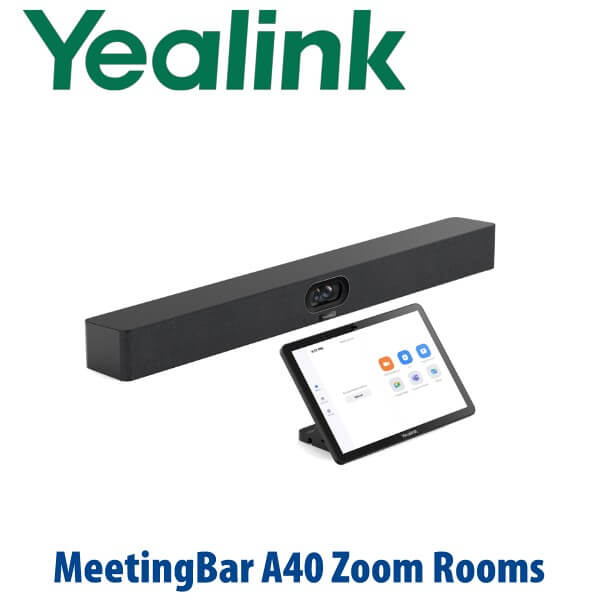
The Yealink MeetingBar A40 Teams Rooms edition is built for Dubai meeting rooms that have outgrown laptop calls but do not need a full rack-mounted AV system. It combines the camera, microphones, speakers, Android meeting appliance and touch control workflow into one compact room system. For small and medium rooms in Business Bay, DIFC, DMCC, JLT and Dubai Internet City, it gives your Microsoft Teams users a familiar one-touch join experience without asking every presenter to bring the right laptop, adapter or webcam.
This page is for the Microsoft Teams Rooms edition with CTP25 touch panel. The A40 platform also exists in Zoom Rooms and flexible BYOD workflows, but Teams certification must always be checked before quoting. Vector Digital Systems verified the Yealink MeetingBar A40 with Touch Panel CTP25 on Microsoft’s official Teams enabled devices list on 10 July 2026.
Teams, Zoom or BYOD? Choose the Correct A40 Workflow Before You Order
The biggest buying mistake with room systems is not camera quality — it is platform mismatch. A Teams Room, a Zoom Room and a USB BYOD room look similar on the table, but licensing, sign-in, device management and user experience are different. Confirm the room platform before purchasing so the bundle, touch panel and deployment plan match your tenant.
| Your Room Platform | Right A40 Setup | What You Need |
|---|---|---|
| Microsoft Teams Rooms | Yealink MeetingBar A40 Teams Rooms edition with CTP25 touch panel | Microsoft 365 tenant, Teams Rooms licence, room resource account, wired LAN and room display |
| Zoom Rooms | Yealink MeetingBar A40 Zoom Rooms appliance — verify Zoom certification before quoting | Zoom Rooms licence, room account, display and network access |
| Bring Your Own Device / USB Mode | A40 used as the room camera, speaker and microphone for a laptop meeting | USB-C connection from the touch console or bar, plus the user’s laptop meeting app |
| SIP / PBX audio calls | Use a Yealink SIP conference phone or desk phone, not an A40 Teams Room | SIP credentials from 3CX, Yeastar, Grandstream UCM or hosted PBX |
Power, Network and Cabling Truth
Do not treat the A40 like a USB webcam. A Teams Room is an IT-managed meeting endpoint. Plan for mains power at the display wall or AV cabinet, a wired network point for the room system, HDMI to the display, and a clean cable path to the CTP25 touch console. Yealink’s one-cable console workflow reduces table clutter: the touch console can connect back to the bar over Cat5e, and a single USB-C cable can be used for content sharing, BYOD mode and laptop charging where supported by the final room configuration.
For UAE installs, we strongly recommend wired LAN for Microsoft Teams Rooms. Wi-Fi may work for some scenarios, but boardrooms with glass walls, guest networks, roaming SSIDs and packed calendars need predictable bandwidth. Vector Digital Systems checks the room display, LAN point, power availability and table cable route before confirming the final quote.
Where the A40 Sits in the Yealink MeetingBar Range
The MeetingBar A40 is the step-up from small huddle room systems and the practical choice before moving to larger-room hardware. It is designed for premium small to medium meeting rooms, with dual 48MP lenses, an 8 MEMS microphone array, two stereo speakers, AI-powered framing and audio processing, and support for additional microphones when the room layout needs more pickup.
| Feature | MeetingBar A25 | MeetingBar A40 ★ | MeetingBar A50 |
|---|---|---|---|
| Room size | Up to 5 people | Up to 12 people | Up to 16 people |
| Best room type | Huddle room / small office | Small to medium boardroom | Medium to larger boardroom |
| Camera | Ultra-wide room camera | Dual 48MP camera system | Large-room camera system |
| AI video features | Auto Framing, Speaker Tracking, IntelliFocus, Video Fence, Picture-in-Picture | Adds People Counting and strong medium-room framing | Large-room framing for wider tables |
| Microphones | 8 MEMS mic array | 8 MEMS mic array + extended mic support | 16 MEMS mic array + extended mic support |
| Pickup range | Up to 5m | Up to 6m | Up to 10m |
| Speaker system | Built-in speaker | Built-in 2 stereo speakers | Built-in 4 stereo speakers |
| Price tier | Entry room system | Premium small/medium room | Large-room tier |
| Choose if… | You are fitting a huddle room or small manager office | You need a clean Teams Room for 6–12 people with strong camera, audio and touch control | Your table is longer, the room is deeper, or you need stronger built-in audio coverage |
Where the A40 Works in Dubai
DIFC and DMCC executive rooms. Hybrid meetings are now part of daily boardroom work. The A40 gives finance, legal, consulting and holding-company teams a fixed Teams Room instead of a laptop balanced under the display. The CTP25 touch panel keeps the room simple for visitors: walk in, tap Join, present content, end the meeting.
Business Bay and JLT SME meeting rooms. Many UAE offices have one room that does everything — vendor calls, interviews, management meetings and client presentations. The A40 is a strong fit when that room seats around 6 to 12 people and needs better camera framing, clearer pickup and a more professional experience than a USB webcam.
Training and project rooms. For engineering firms, clinics, schools, logistics offices and system integrators, the A40 can cover both in-room discussion and remote participants. AI framing helps remote attendees see who is speaking, while noise reduction and reverberation suppression help in glass meeting rooms and hard-finish interiors common across Dubai offices.
Multi-branch Microsoft Teams rollouts. If your head office wants the same Teams Room experience in Dubai, Abu Dhabi, Sharjah, Riyadh, Muscat and Doha, the A40 is easy to standardise. Vector Digital Systems can stage the room system, document the cabling plan and repeat the same deployment checklist across branches.
Full Technical Specifications
| Specification | Yealink MeetingBar A40 Teams Rooms Edition |
|---|---|
| Product type | All-in-one Android video collaboration bar for Microsoft Teams Rooms |
| Certification status | Microsoft Teams enabled device listing verified for Yealink MeetingBar A40 with Touch Panel CTP25 on 10 July 2026 |
| Recommended room size | Premium small to medium rooms; Yealink range comparison positions A40 for up to 12 people |
| Operating platform | Android 13 based room system with Microsoft Device Ecosystem Platform support |
| Camera system | Dual 48MP lenses with wide room framing and AI-powered camera features |
| AI video features | IntelliFocus, Video Fence, Auto Framing, Speaker Tracking, People Counting and Picture-in-Picture |
| Microphones | Built-in 8 MEMS microphone array |
| Pickup range | Up to 6 metres, with support for additional microphones where required |
| Speakers | Built-in 2 stereo speakers |
| Audio processing | Full-duplex audio, AI noise cancellation, Audio Fence and reverberation suppression |
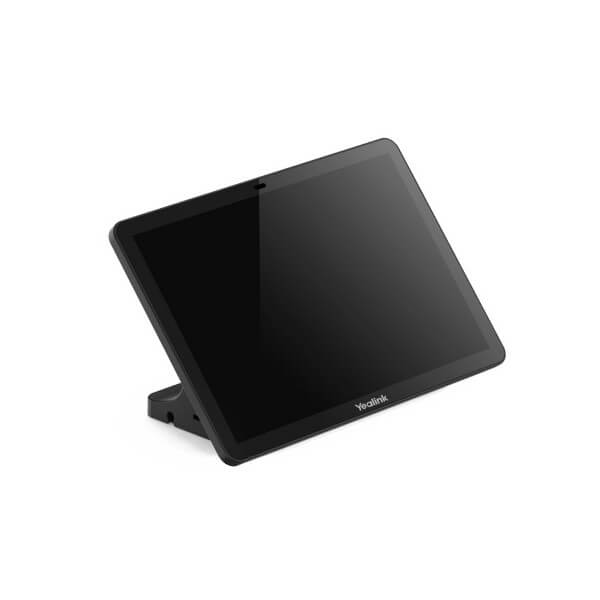
| Touch console | CTP25 touch panel for meeting control, content sharing and BYOD workflow |
| Content sharing | USB-C content sharing / BYOD support through the touch console or bar depending on final setup |
| Display support | Single or dual display room layouts supported; confirm cable route and display inputs before ordering |
| Management | Microsoft Teams Admin Center, Microsoft Teams Rooms management workflow, Yealink management tools and supported room management platforms |
| Mounting | Wall or TV mount included depending on package; desk/table and console mounting accessories available |
| Ideal buyer | Teams-first companies standardising meeting rooms across Dubai and export markets |
Compatible Accessories and Room Options
| Accessory / Option | Model / Type | Purpose |
|---|---|---|
| Touch console | CTP25 | Teams Room control, meeting join, content sharing and BYOD workflow |
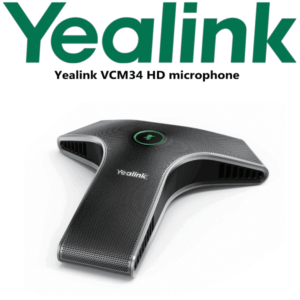
| Extended tabletop microphone | VCM36 / compatible Yealink audio units | Adds pickup coverage for deeper tables or rooms where participants sit far from the bar |
| Ceiling audio | CM20 with matching speaker/audio design as required | For rooms where table microphones are not preferred; audio layout must be planned before installation |
| Mounting | Wall, TV/display and table mounting options | Keeps the camera aligned with the display and table sightline |
| Meeting display | Yealink MeetingDisplay or approved commercial display | Completes the Teams Room with single or dual-screen layouts |
Staging Before Dispatch — What Vector Digital Systems Checks
Every Yealink MeetingBar A40 supplied by Vector Digital Systems is prepared for real deployment, not just box delivery. We confirm the room platform, Teams Rooms licence requirement, room account readiness, firmware status, touch console pairing, display output, camera framing, microphone pickup, speaker output and content sharing path before dispatch wherever customer credentials and room information are available. For project rollouts, we prepare a repeatable room checklist so the installer knows exactly where the display, LAN point, power socket and table cable exit should sit.
For Microsoft Teams Rooms deployments, the buyer must provide or create the Microsoft room resource account and assign the correct Teams Rooms licence. Vector Digital Systems can guide your IT team through the requirement, but Microsoft tenant administration stays with your organisation or Microsoft 365 partner.
Export from Dubai
Vector Digital Systems exports Yealink MeetingBar A40 Teams Rooms systems from Dubai to system integrators, IT resellers, enterprise procurement teams, hotel groups, education groups and government IT departments across the region. Common routes include Oman, Saudi Arabia, Qatar, Kuwait and Bahrain in the GCC; Jordan and Egypt in the broader Middle East; Kenya, Tanzania and Nigeria in Africa; and Pakistan, Sri Lanka and Bangladesh in South Asia. Export shipments are quoted FOB Dubai with commercial invoice, packing list and certificate of origin on request.
Because Teams Rooms projects often involve displays, mounts, licences, cabling and room scheduling accounts, we recommend sending David a room list with table size, seating count, display size, wall photos and required delivery country. Multi-room project pricing is available for 3+ rooms and export batches.
Get a same-day quote in AED — Yealink MeetingBar A40 Teams Rooms edition
Tell David: room size, number of seats, Microsoft Teams tenant status, display count, LAN availability, and whether you need tabletop or ceiling microphones. We quote with VAT breakdown, delivery and staging notes included.
Frequently Asked Questions — Yealink MeetingBar A40 Teams Rooms
Is the Yealink MeetingBar A40 certified for Microsoft Teams Rooms?
Yes — Vector Digital Systems verified the Yealink MeetingBar A40 with Touch Panel CTP25 on Microsoft’s official Teams enabled devices list on 10 July 2026. This page is written for the Teams Rooms edition, not a generic USB camera bundle.
What room size is the Yealink MeetingBar A40 designed for?
The A40 is designed for premium small to medium rooms. Yealink positions it for rooms up to 12 people, making it a strong fit for Dubai boardrooms, management rooms and project rooms where a huddle-room bar is too small but a full large-room system is unnecessary.
Does the Yealink MeetingBar A40 include the CTP25 touch panel?
The Teams Rooms bundle should be quoted with the CTP25 touch panel. The touch panel gives users one-touch meeting join, Teams Room control and content sharing / BYOD workflow. Ask David to confirm the exact bundle code before ordering so the room is not supplied as a bar-only kit by mistake.
Can the Yealink A40 be used for Zoom as well as Microsoft Teams?
The A40 platform supports Teams, Zoom and USB / BYOD workflows, but the ordered edition and licence must match your room platform. If your room is a Zoom Room, ask for the Zoom Rooms appliance and verify Zoom certification. If your room is Microsoft Teams-first, order the Teams Rooms edition with CTP25.
A40 vs A25 vs A50 — which Yealink MeetingBar should I buy?
Choose the A25 for huddle rooms up to 5 people, the A40 for premium small to medium rooms up to 12 people, and the A50 for larger rooms up to 16 people or longer tables that need stronger built-in audio and pickup. For most Dubai SME boardrooms with 6–12 seats, the A40 is the practical middle choice.
Does the Yealink MeetingBar A40 need a Teams Rooms licence?
Yes — a Microsoft Teams Room requires the correct Microsoft Teams Rooms licence and a room resource account in your Microsoft 365 tenant. The hardware alone does not activate the room. Vector Digital Systems can guide your IT team on the requirement before delivery.
Can I add microphones to the Yealink MeetingBar A40?
Yes — the A40 supports additional audio options, including compatible Yealink extended microphones and ceiling audio designs. For deeper tables or rooms with difficult acoustics, send David the room dimensions and table layout so the correct audio accessory is included in the quote.
Who is the authorised Yealink supplier in Dubai?
Vector Digital Systems LLC has supplied Yealink solutions in Dubai since 2009. David handles Yealink product selection, Teams Rooms specification, project pricing, staging and local warranty support, so UAE buyers do not need to manage international warranty claims themselves.
Does Vector Digital Systems configure the Yealink MeetingBar A40 before delivery?
Yes — Vector Digital Systems checks firmware status, touch console pairing, display output, camera framing, microphone pickup, speaker output and content sharing workflow before dispatch where room details and credentials are available. For multi-room projects, we prepare a repeatable deployment checklist.
Does Vector Digital Systems export Yealink MeetingBar A40 systems from Dubai?
Yes — Vector Digital Systems exports Yealink room systems from Dubai to integrators and enterprise buyers in Oman, Saudi Arabia, Qatar, Kuwait, Bahrain, Jordan, Egypt, Kenya, Tanzania, Nigeria, Pakistan, Sri Lanka and Bangladesh. Shipments are quoted FOB Dubai with commercial invoice, packing list and certificate of origin on request.