Description
Yealink MCore Kit MCore 4 AI PC + MTouch Plus for Teams Rooms Dubai
Build the Room Around the Right Yealink Core
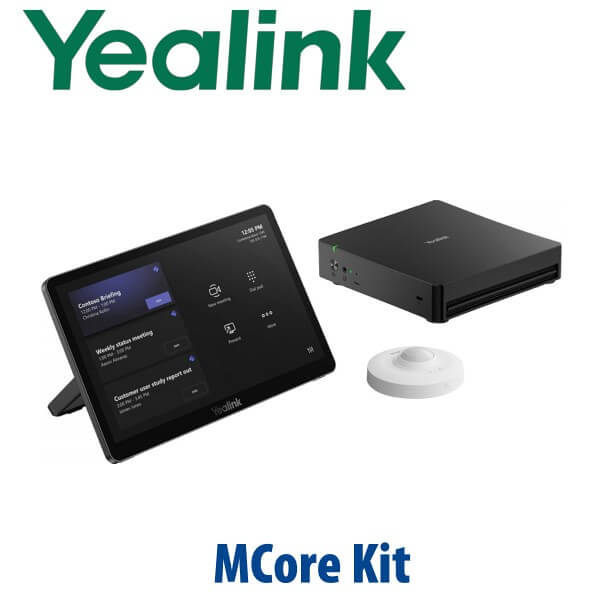
The Yealink MCore Kit is the compute-and-control heart of a modern Yealink MVC meeting room. It combines the MCore 4 AI PC with the MTouch Plus touch controller, giving Dubai IT teams a clean way to build Microsoft Teams Rooms on Windows spaces around the camera, speaker, microphone, display, and room layout they actually need. Instead of buying an all-in-one bar and discovering later that the room needs more flexible AV, the MCore Kit gives you the central platform first — then the room can be designed properly around it.
This page is for customers planning a Yealink room system in Dubai, Abu Dhabi, Sharjah, DIFC, DMCC, Business Bay, JAFZA, or export markets. Vector Digital Systems LLC supplies, stages, and tests Yealink room systems before dispatch, with same-day quote in AED, VAT breakdown, delivery charges, and project pricing for multi-room deployments.
Platform Trap: Teams Rooms, Zoom Rooms, or BYOD?
The biggest mistake in meeting-room procurement is buying the wrong platform. Yealink uses different room solutions for Microsoft Teams Rooms, Zoom Rooms, USB/BYOD rooms, and SIP-style conference calling. The MCore Kit belongs in the Windows room-system family — do not treat it like a standalone desk phone, SIP conference phone, or generic mini PC.
| Your Meeting Platform | Right Yealink Direction | What You Need |
|---|---|---|
| Microsoft Teams Rooms on Windows | Yealink MCore Kit / MVC-series room system — verify current Microsoft certification status before quote | Teams Rooms licence, room account, display, wired network, camera/audio package |
| Zoom Rooms | Zoom Rooms version of the Yealink room kit — ask David to verify the exact Zoom SKU | Zoom Rooms licence, room account, display, camera/audio package |
| USB / BYOD room | Yealink USB camera, video bar, speakerphone, or BYOD extender — not a full MTR core kit | Laptop-based meeting flow, USB-C/HDMI cabling, room display |
| SIP conference calling | Yealink CP-series or SIP conference phone range | SIP PBX credentials from 3CX, Yeastar, UCM, hosted PBX, or operator platform |
Tell David whether the room is Teams, Zoom, USB/BYOD, or SIP before requesting the quote. Platform choice changes the hardware SKU, licence requirement, deployment flow, and support plan.
Room Power Truth: This Is Not a PoE Desk Phone
The Yealink MCore Kit is a meeting-room compute kit, not a PoE desk phone. The MCore 4 uses its own power supply, while the room design may still require PoE or PoE+ for selected cameras, microphones, speakers, network endpoints, or AV accessories. A display, Microsoft Teams Rooms licence, wired network, HDMI cabling, mouse/keyboard for first setup, and room-specific camera/audio devices may be required depending on the final bundle.
Vector Digital Systems checks this before dispatch: room display count, HDMI route, network point, internet access, camera position, table cable route, touch-console placement, and whether any AV device needs PoE or PoE+. This avoids the common Dubai installation-day problem where the mini PC arrives but the room is missing a Teams room account, HDMI cable, display input, or PoE switch port.
Where the MCore Kit Fits in the Yealink Room Range
The MCore Kit is the room core: MCore 4 AI PC plus MTouch Plus controller. It does not replace a camera, soundbar, microphone, or display by itself. For a complete room, it is paired with Yealink camera and audio devices such as SmartVision, UVC, VCM, CM, MSpeaker, or AVHub components depending on room size. Small rooms may be better served by a full MVC S40 bundle. Large boardrooms may need a higher MVC configuration with multi-camera or ProAV audio design.
| Feature | MCoreKit-C4 / Gen-3 | MCore Kit with MCore 4 ★ | Full MVC S40 / S50 Bundle |
|---|---|---|---|
| Best Use | Refresh or support for earlier MVC projects | New room core for flexible MVC design | Complete room bundle with camera/audio included |
| Room Platform | Teams Rooms on Windows, SKU-dependent | Teams Rooms on Windows, verify certification status | Teams Rooms bundle, verify certification status |
| Compute | MCore Pro generation | MCore 4 AI PC with Intel Core Ultra 5 platform | MCore 4 plus room camera/audio package |
| Touch Controller | MTouch E2 / SKU-dependent | MTouch Plus 11.6″ controller | MTouch Plus included in bundle |
| Camera / Audio Included | Depends on bundle | No — choose room-specific Yealink camera/audio | Yes — model-dependent |
| Display Outputs | Multi-display support, generation-dependent | 3× HDMI output with EDID and CEC support | Bundle display support based on MCore platform |
| Deployment Style | Existing room refresh | Custom room build with staged core | Fast standard-room deployment |
| Price Tier | Legacy / project-dependent | Core-kit tier | Higher bundle tier |
| Choose if… | You are maintaining an older MVC environment | You want the latest Yealink room core and will choose camera/audio separately | You want a complete standard room package in one SKU |
Dubai Meeting Room Use Cases
DIFC and Business Bay boardrooms. Executive rooms often need two displays, secure room accounts, HDMI ingest for presentations, and a touch panel on the table that starts meetings without laptop drama. The MCore Kit gives IT teams a dedicated Teams Rooms core instead of asking users to run meetings from personal laptops.
DMCC, JLT, and free-zone hybrid offices. Many UAE offices now run mixed attendance: half the team in the room, half remote. The MCore 4 platform is designed for AI meeting workloads, Copilot-enhanced room scenarios, and clean deployment with Yealink camera/audio devices, so every participant can be framed, heard, and managed from the room console.
Multi-room rollouts across UAE branches. A company refreshing six meeting rooms in Dubai, Abu Dhabi, Sharjah, and Ras Al Khaimah needs consistent sign-in, room naming, firmware, display output, and Teams Rooms settings. Vector Digital Systems stages the kit before dispatch, then standardises the room configuration so the user experience stays the same across every branch.
Custom AV rooms. Larger training rooms, boardrooms, and divisible spaces may not fit a simple video bar. The MCore Kit can become the control core while David helps specify the right Yealink camera, microphone, speaker, AVHub, cabling, and mounting path for the actual room geometry.
Full Technical Specifications
| Specification | Yealink MCore Kit |
|---|---|
| Product Type | Meeting-room compute and touch-control kit for Yealink MVC room systems |
| Core Components | MCore 4 AI PC + MTouch Plus touch controller |
| Platform | Designed for Microsoft Teams Rooms on Windows deployments — verify current Microsoft certification status before quoting |
| Processor Platform | Intel Core Ultra 5 platform with built-in NPU for AI meeting workloads |
| Memory / Storage | 16GB DDR5 memory and 256GB SSD in current MCore 4 room-system specifications |
| Operating System | Windows 11 IoT Enterprise platform with Microsoft Teams Rooms app environment |
| Video Output | 3× HDMI video output with EDID and CEC support |
| Content Input | HDMI input for 4K content sharing; MTouch Plus supports wired and wireless sharing depending on accessories |
| USB | 4× USB 3.0 ports on MCore 4 for room peripherals and integration |
| Touch Controller | MTouch Plus with 11.6-inch narrow-bezel IPS display and 1920×1080 resolution |
| Touch Console Placement | Desktop placement, desktop fixed, or wall-mounted deployment depending on room layout |
| Network / Security | AV LAN and Internet separation support, TPM 2.0-class room-system security features, enterprise manageability |
| Remote Management | Supports Yealink room management tools and Microsoft Teams Admin Center workflows, depending on deployment |
| Not Included by Default | Room display, Teams Rooms licence, Microsoft tenant configuration, camera/audio devices unless bundled, HDMI/network cabling, and room installation accessories |
Compatible Accessories and Room Components
| Accessory / Component | Use in Room Design | Buyer Note |
|---|---|---|
| Yealink SmartVision / UVC Cameras | Front-of-room video for small, medium, and large rooms | Camera choice depends on room width, table depth, display position, and participant count |
| Yealink Room Audio | Table microphones, ceiling microphones, soundbars, or room speakers | David sizes audio pickup by room dimensions, ceiling height, glass walls, and seating pattern |
| RoomSensor | Occupancy detection and smart room wake-up depending on bundle | Confirm inclusion by SKU before quoting |
| WPP30 Wireless Presentation Pod | Wireless content sharing from laptop to room system | Useful for visitor presentations and boardroom laptop sharing |
| HDMI / USB-C / CAT5e Cabling | Display output, content input, controller link, and network connection | Cable length and route must be confirmed before dispatch |
| Mounting Kits | Behind-display, wall, table, or furniture integration | Choose based on display wall, table trenching, and room finish |
Staging Before Dispatch — What Vector Digital Systems Configures
Every Yealink MCore Kit supplied by Vector Digital Systems can be staged before dispatch in Dubai: Windows and Teams Rooms readiness check, Teams room account sign-in support, Yealink RoomConnect check, firmware review, display output test, touch-console pairing, camera/audio detection, HDMI content-sharing test, network test, and a live room call test where customer credentials are available. For multi-room projects, David documents the room naming pattern, device serials, licence status, display count, and cable plan so your IT team can roll out identical rooms across offices.
Export from Dubai
Vector Digital Systems exports Yealink room-system hardware from Dubai to system integrators, corporate IT teams, hotel groups, banking networks, education projects, and government suppliers. Common routes include Oman, Saudi Arabia, Kuwait, Qatar, Bahrain, Jordan, Egypt, Kenya, Pakistan, and Sri Lanka. Shipments move FOB Dubai with commercial invoice, packing list, and certificate of origin on request. For meeting-room projects, send David the room count, platform, display plan, and country of delivery so the quote can include the correct kit, documentation, VAT/export handling, and delivery terms.
Get a same-day Yealink MCore Kit quote in AED
Tell David: room platform, room size, number of displays, camera/audio requirement, Teams Rooms licence status, network availability, and whether you need installation accessories. We quote with VAT breakdown and delivery included.
Frequently Asked Questions — Yealink MCore Kit
What is the Yealink MCore Kit?
The Yealink MCore Kit is the compute-and-control core for Yealink MVC meeting room systems. It combines the MCore 4 AI PC with the MTouch Plus touch controller, giving the room a dedicated Windows-based platform for Microsoft Teams Rooms-style deployments. It is normally paired with Yealink cameras, microphones, speakers, displays, and room accessories depending on the room size.
Is the Yealink MCore Kit Microsoft Teams certified?
The MCore Kit is designed for Microsoft Teams Rooms on Windows deployments, but certification status must be verified against Microsoft’s official certified devices list before quoting or publishing a certification claim. Vector Digital Systems checks the exact SKU and certification status at quote stage so the supplied kit matches your tenant and room requirement.
Does the MCore Kit include the camera, microphones, speakers, and display?
No. The MCore Kit is the room core: MCore 4 AI PC plus MTouch Plus controller. Camera, microphone, speaker, display, mounting kit, HDMI cabling, Teams Rooms licence, and room installation accessories depend on the final room design. If you want a complete package, ask David to quote an MVC bundle such as S40, S50, S90, or a custom Yealink room system.
Can I use the Yealink MCore Kit for Zoom Rooms?
Only if the exact Zoom Rooms SKU is supplied. Teams Rooms and Zoom Rooms kits may look similar but use different platform images, licences, and deployment flows. Tell David whether the room is Microsoft Teams, Zoom, BYOD, or SIP conference before quoting so the correct Yealink kit is selected.
What room size is the Yealink MCore Kit designed for?
The MCore Kit is not limited to one room size by itself. It is the core platform used with different Yealink cameras and audio devices for small, medium, large, and custom AV rooms. For a small-to-medium room, a full MVC S40 or S50 bundle may be simpler. For large boardrooms, training rooms, or divisible rooms, the MCore Kit can be matched with more advanced camera and audio components.
Does the MCore Kit need PoE?
The MCore 4 AI PC uses its own power supply, so it is not powered like a PoE desk phone. However, selected room peripherals such as speakers, cameras, microphones, or AV accessories may require PoE or PoE+ depending on the room design. Vector Digital Systems checks power, network, HDMI, display, and accessory requirements before dispatch.
Can Vector Digital Systems configure the Yealink MCore Kit before delivery?
Yes. Vector Digital Systems can stage the MCore Kit before dispatch in Dubai, including Windows and Teams Rooms readiness checks, touch-console pairing, camera/audio detection, display output test, firmware review, network test, room account sign-in support, and a live meeting test where customer credentials are available.
Who is the Yealink room system supplier in Dubai?
Vector Digital Systems LLC has supplied and integrated Yealink solutions in Dubai since 2009. David handles Yealink pre-sales, room-kit selection, staging, project pricing, warranty handling, and export support. Quotes include AED pricing, VAT breakdown, delivery charges, and project options for multi-room deployments.
Does Vector Digital Systems export Yealink MCore Kits from Dubai?
Yes. Vector Digital Systems exports Yealink room-system hardware from Dubai to integrators and enterprise buyers in Oman, Saudi Arabia, Kuwait, Qatar, Bahrain, Jordan, Egypt, Kenya, Pakistan, and Sri Lanka. Shipments are quoted FOB Dubai with commercial invoice, packing list, and certificate of origin on request.