Description
Yealink MB65C MeetingBoard 65-inch 4K Google EDLA BYOM Interactive Whiteboard Dubai
Yealink MB65C MeetingBoard — The 65-inch Google EDLA Board for Dubai Meeting Rooms
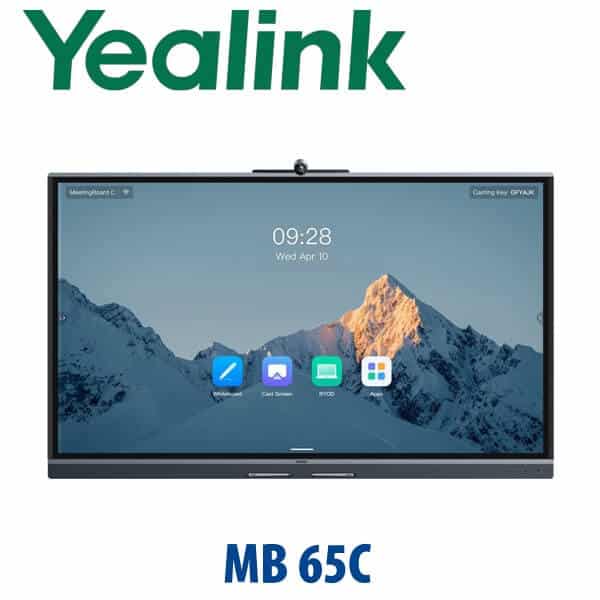
The Yealink MB65C is a 65-inch all-in-one interactive MeetingBoard for offices that want video meetings, whiteboarding, screen sharing and BYOM flexibility in one clean device. Instead of building a room with a separate TV, webcam, speakerphone, mini PC and cables, the MB65C combines a 4K touch display, 50MP camera, 8-microphone array, speakers, Android 15, Google Play access and whiteboard tools into one board. It is sized for small meeting rooms, huddle rooms, clinic consultation rooms, training rooms and management cabins in Dubai where teams use more than one meeting platform.
This is the important buying point: the MB65C is a Google EDLA / BYOM-style collaboration board, not a native Microsoft Teams Room appliance page. If your company needs a certified Microsoft Teams Room or Zoom Room, ask David to route you to the correct Yealink MeetingBoard Teams, MVC, A-series or Zoom-certified configuration after checking the current certification list. If your users bring laptops and run Teams, Zoom, Google Meet, Webex or browser meetings from their own device, the MB65C is the flexible board to quote.
Platform Choice — BYOM Board or Native Room System?
| Your Meeting Style | Right Yealink Route | What You Need |
|---|---|---|
| BYOM — users bring laptops and use Teams, Zoom, Meet or Webex | Yealink MB65C MeetingBoard C (this page) | User laptop, meeting app account, HDMI / wireless sharing / BYOM connection as required |
| Google workspace room / Google app ecosystem | MB65C with Google EDLA and Google Play support | Google account policy, app access and room deployment settings confirmed by IT |
| Native Microsoft Teams Room | Yealink Teams Room / MeetingBoard Teams / MVC route — verify certification before quote | Microsoft 365 tenant, Teams Rooms licence and certified hardware configuration |
| Native Zoom Room | Zoom-certified Yealink room kit — verify current certification before quote | Zoom Rooms licence and approved room appliance or Windows kit |
Tell David how the room is used before ordering: BYOM laptop meetings, Google Meet, Teams Rooms, Zoom Rooms, training whiteboard, or multi-purpose boardroom. That one decision prevents the most expensive meeting-room mistake — buying a flexible board when the IT policy requires a certified native room system, or buying a locked room system when the users only need laptop-based BYOM.
Power and Installation Truth — This Is Not a PoE Desk Phone
The MB65C is powered by AC mains, not PoE. It uses a 100–240V AC power adapter and consumes up to 183W on the 65-inch model. The box includes the MeetingBoard, cable pack, power cable, network cable, two stylus pens, cable ties and quick start guide. Wall mount, floor stand, wall stand, wireless presentation pod, remote, expansion microphones and OPS module are ordered separately based on the room design.
Before dispatch, Vector Digital Systems confirms whether the room needs wall mounting, mobile floor stand, network point, HDMI input from the table, USB-B touch return to a laptop, OPS module, or VCM36 wireless microphones. For Dubai offices in Business Bay, DIFC, DMCC, JLT, JAFZA and Dubai Silicon Oasis, this avoids the usual last-minute installation problem: the board arrives, but the mount, cable path or BYOM table connection was never planned.
Where MB65C Sits in the Yealink Room Range
Think of the MB65C as the interactive board for a small room: bigger and more collaborative than a camera bar, but more compact than a 75-inch board. It fits 1–6 person meeting rooms where people need to write, annotate, share content and run video calls from different platforms. For medium rooms, step up to the MB75C. For a pure video room without an interactive board, David may recommend Yealink A-series or MVC systems instead.
| Feature | Yealink A20 | Yealink MB65C ★ | Yealink MB75C |
|---|---|---|---|
| Best room size | Small video room | Small interactive room, 1–6 people | Medium interactive room, 6–12 people |
| Display | Uses existing room display | 65-inch 4K touch display | 75-inch 4K touch display |
| Whiteboarding | No built-in board surface | Built-in interactive whiteboard | Larger interactive whiteboard |
| Camera | Integrated video bar camera | Built-in 50MP camera, 98.2° HFOV | Built-in 50MP camera, 98.2° HFOV |
| Microphones | Room-system mic setup | 8 MEMS mics, 8 m full-duplex pickup | 8 MEMS mics, 8 m full-duplex pickup |
| BYOM flexibility | Depends on configuration | Designed for BYOM and Google Play flexibility | Same BYOM concept, larger room |
| Mounting | Display/bar installation | Wall, wall stand or floor stand | Wall, wall stand or floor stand |
| Price tier | Lower room-system tier | Mid interactive-board tier | Higher interactive-board tier |
| Choose if… | You only need a video room and already have a display | You need a 65-inch board for BYOM meetings, whiteboarding and Google app flexibility | The room is wider, seats 6–12 people, or needs a bigger writing surface |
Dubai Use Cases for the Yealink MB65C
Small meeting rooms in Business Bay, DIFC and DMCC. The MB65C is built for the room where four to six people review drawings, budgets, sales dashboards or client presentations. Users can walk in, share wirelessly, annotate on the 65-inch touch screen and join a call from the platform their client uses — without turning the meeting room into a cable hunt.
Training rooms and project rooms. Architecture firms, construction teams, IT integrators, schools and consultants in Dubai often need a board more than a classic video bar. The MB65C gives them a proper whiteboard surface with stylus input, palm rejection, sticky notes and diagram tools, then lets the session become a video meeting when a remote stakeholder joins.
Clinics, education and management cabins. The 65-inch size is large enough for clear viewing but not oversized for consultation rooms, principal offices, department meeting rooms or executive cabins. The 50MP camera, 8 m mic pickup and speaker system keep the room ready for teleconsultation, parent calls, supplier reviews and internal management meetings.
Multi-platform offices. Many UAE companies do not live in one meeting app. Internal calls may be Teams, clients may use Zoom, overseas suppliers may use Google Meet, and browser sessions may be needed for audits or demos. The MB65C is a strong fit for that reality because it is not positioned as a single-platform-only room appliance.
Full Technical Specifications
| Specification | Yealink MB65C MeetingBoard C |
|---|---|
| Product Type | 65-inch all-in-one interactive MeetingBoard with video conferencing, whiteboard and BYOM support |
| Recommended Room Size | Small meeting room / huddle room, typically 1–6 people |
| Display | 65-inch anti-glare 4K UHD panel, 3840 × 2160 resolution, 60 Hz refresh rate |
| Colour / Brightness | 72% NTSC / 99% sRGB, 1.07 billion colours, 350 cd/m² maximum brightness, 1200:1 contrast ratio |
| Touch | Infrared touch, 20 touch points, ±1 mm accuracy, 36 ms touch latency, four-level stylus |
| Operating System | Android 15.0 with Google EDLA / Google Play support |
| Processor / Memory | 8-core CPU, 8 GB memory, 64 GB flash, 5T AI computing power |
| Camera | Built-in 50MP camera, 1/1.56 Sony sensor, 98.2° horizontal field of view, electronic pan-tilt, 4× digital zoom |
| Camera AI Features | Auto framing, speaker tracking, Picture-in-Picture, Multi-Focus tracking and Video Fence |
| Video Resolution | Camera lens up to 4K@30fps; camera hardware supports 3840 × 2160 output |
| Microphones | Built-in 8 MEMS microphone array, 8 m full-duplex pickup, expansion input supported |
| Speakers | 2× full-range speakers, 20 W rated power, 25 W maximum power |
| Audio Processing | Echo cancellation, noise suppression, reverberation cancellation, automatic gain control, lip sync detection and beamforming pickup |
| Content Sharing | HDMI input, AirPlay, Miracast and optional wireless presentation pod; local HDMI input up to 4K@60fps |
| Network / Wireless | 1× Gigabit Ethernet port, Wi-Fi 6 2.4G/5G 802.11a/b/g/n/ac/ax 2×2 MIMO, Bluetooth 5.1 |
| Security | HTTPS secure access, H.235, TLS, SRTP, AES-256, VLAN, QoS, 802.1X, LLDP-MED, OpenVPN and built-in certificates |
| Hardware Interfaces | HDMI output, HDMI input, 3.5 mm line input, 3.5 mm line output, 3× USB-A 2.0, RJ45 VCH interface, Windows OPS slot, AC power interface and USB-B touch output |
| Mounting | Wall-mounted, wall-stand or floor-stand installation; VESA 600 × 400 mm |
| Power | 100–240V AC, 50/60 Hz; 65C power consumption up to 183 W, typical 140 W |
| Dimensions / Weight | Bare device 1484.4 × 98.1 × 957.7 mm; net weight 38.5 kg; gross weight 46.6 kg |
| In the Box | 1× MeetingBoard 65C, cable pack, 3 m AC power cable, 3 m CAT5E cable, 2× stylus pens, 2× cable ties and quick start guide. MB-WallMount sold separately. |
Compatible Accessories
| Accessory | Model / Type | Why It Matters |
|---|---|---|
| Wall Mount | MB-WallMount-650 | Wall installation for permanent meeting rooms; sold separately |
| Wall Stand | MB-WallStand-650W | Stand-style installation where wall conditions or landlord rules make direct mounting difficult |
| Floor Stand | MB-FS-VESA | Mobile deployment for training rooms, multi-purpose rooms and temporary project spaces |
| Expansion Microphones | VCM35 wired mic / VCM36-W wireless mic | Extends pickup for longer tables or rooms where people sit beyond the board’s central pickup zone |
| Wireless Presentation | Yealink Wireless Presentation Pod | One-touch wireless sharing for visitor laptops and meeting rooms with mixed Windows / macOS users |
| Controller | MB-Remote | Convenient room control when the board is mounted away from the meeting chair |
| Windows OPS Module | MCore OPS | Optional Windows-side compute for dual-system deployments; quote only after confirming platform requirements |
Staging Before Dispatch — What Vector Digital Systems Configures
Every Yealink MB65C supplied by Vector Digital Systems is prepared for the room before dispatch. We confirm the mounting method, network settings, Google account policy, app requirement, firmware level, HDMI and USB-B touch workflow, wireless sharing method, camera framing, microphone test, speaker test and accessory bundle. For project rooms, training centres and boardrooms, we can label cables, pre-pack accessories by room name and coordinate delivery with your facilities team.
For Dubai installations, ask David for a same-day quote in AED with VAT breakdown, delivery, mounting accessories and optional configuration included. For multi-room projects, send the room list with seating count, wall type, table position, required platform and whether the board must be mobile or wall mounted.
Export from Dubai
Vector Digital Systems exports Yealink MeetingBoard devices from Dubai to system integrators, AV installers, corporate IT teams, education buyers and government procurement departments. Common export routes include Oman, Saudi Arabia, Qatar, Kuwait and Bahrain across the Gulf; Jordan and Egypt for regional projects; Kenya and Tanzania for East African deployments; and Pakistan, Sri Lanka and Bangladesh for South Asian customers. Shipments move FOB Dubai with commercial invoice, packing list and certificate of origin on request. Because the MB65C is a large-format display with mounting accessories, we confirm packing, destination documentation and delivery handling before quoting.
Get a same-day quote in AED for Yealink MB65C in Dubai
Tell David: room size, wall or floor stand, meeting platform, BYOM requirement, Google account policy, and whether you need installation accessories. We quote with VAT breakdown, delivery and export documentation where required.
Frequently Asked Questions — Yealink MB65C
Is the Yealink MB65C a Microsoft Teams Room device?
The MB65C should be treated as a Google EDLA / BYOM MeetingBoard unless a specific certified Microsoft Teams Room configuration is verified before quote. Users can run Teams meetings from a laptop or supported app workflow, but a native Teams Room requires a certified Yealink Teams Room or MeetingBoard Teams configuration. Ask David to verify the current Microsoft certification status before any Teams Room claim is made.
Does the Yealink MB65C work with Zoom, Google Meet and Webex?
Yes, the MB65C is designed for flexible BYOM and Google ecosystem use, so it suits rooms where users bring laptops or use different meeting apps such as Zoom, Google Meet, Webex and Teams. For a native Zoom Room or fully certified platform room, Vector Digital Systems verifies the current Yealink certified hardware route before quoting.
What room size is the Yealink MB65C designed for?
The MB65C is the 65-inch model and is best for small meeting rooms and huddle rooms, typically 1–6 people. For medium rooms with 6–12 people or a wider table, the Yealink MB75C gives a larger 75-inch writing and viewing surface.
Does the Yealink MB65C need PoE?
No. The MB65C is not a PoE desk phone. It uses AC mains power, with 100–240V input and up to 183W maximum consumption on the 65-inch model. It still needs a network connection or Wi-Fi depending on how the room is deployed.
What is included in the Yealink MB65C box?
The box includes the MeetingBoard 65C, cable pack, 3 m AC power cable, 3 m CAT5E network cable, two stylus pens, two cable ties and a quick start guide. The wall mount is sold separately, so David will add the correct mount, stand or floor stand to the quote based on your room.
Yealink MB65C vs MB75C — which one should I buy?
Choose the MB65C for small rooms, huddle spaces, management cabins and training corners where 1–6 people sit close to the board. Choose the MB75C for medium rooms, longer tables, classrooms or spaces where 6–12 people need a larger writing and viewing surface. The buying decision is mainly room size and viewing distance.
Can we use the Yealink MB65C as an interactive whiteboard without a video call?
Yes. The MB65C works as a local interactive whiteboard with stylus input, palm rejection, diagram tools, sticky notes and low-latency writing. Teams can brainstorm in the room, then share content or join a video meeting when remote participants need to be included.
Who is the Yealink authorised supplier in Dubai?
Vector Digital Systems LLC has been a Yealink reseller and system integrator in Dubai since 2009. David handles Yealink product selection, room specification, project pricing, staging, delivery coordination and local warranty handling for Dubai and export buyers.
What is the best Yealink meeting room board for a small office in Dubai?
For a small room where users need whiteboarding, video calls, Google app flexibility and BYOM laptop meetings, the Yealink MB65C is the best fit. For a larger meeting room, step up to the MB75C. For a pure Teams Room or Zoom Room, David will verify the certified Yealink room-system route instead of quoting the wrong board.
Does Vector Digital Systems configure the Yealink MB65C before delivery?
Yes. Vector Digital Systems confirms the mounting method, network settings, firmware level, Google account policy, app requirement, HDMI and USB-B touch workflow, wireless sharing method, camera framing, microphone pickup and speaker test before dispatch. Accessories are packed with the board so the installation team receives the complete room bundle.
Does Vector Digital Systems export Yealink MeetingBoard devices from Dubai?
Yes. Vector Digital Systems exports Yealink MeetingBoard devices from Dubai to integrators, AV installers and enterprise buyers in Oman, Saudi Arabia, Qatar, Kuwait, Bahrain, Jordan, Egypt, Kenya, Tanzania, Pakistan and Sri Lanka. Shipments move FOB Dubai with commercial invoice, packing list and certificate of origin on request.