Description
Yealink DeskVision A24 Microsoft Teams Room on Android 23.8″ Touch Collaboration Display Dubai
Turn a Dubai Phone Booth or Executive Desk Into a Teams Room
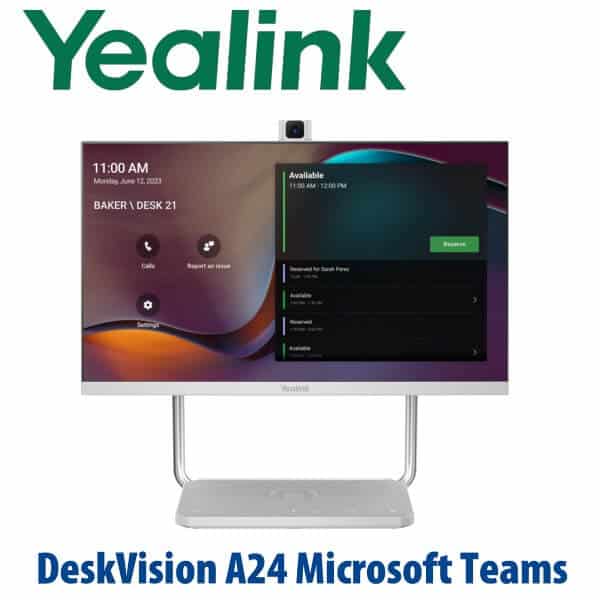
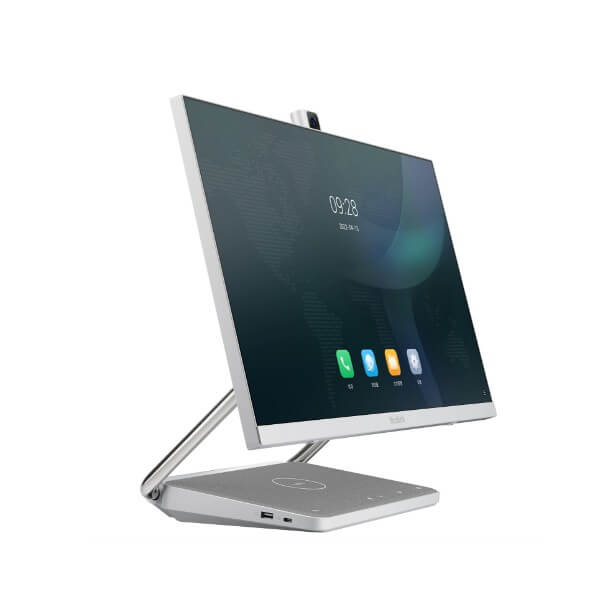
The Yealink DeskVision A24 Microsoft Teams Room on Android is built for the desk or phone room that needs more than a webcam and less than a full boardroom kit. It combines a 23.8-inch full-HD touch display, built-in camera, microphones, stereo speakers, Android-based Teams experience, USB-C docking, network connectivity and wireless phone charging in one clean desktop unit. For Dubai offices building focus rooms, hot-desking booths, executive video desks or compact Teams spaces, the A24 removes the cable mess and gives users a dedicated collaboration screen instead of asking every meeting to start from a laptop.
Teams Rooms, Teams Display, Zoom or SIP? Get the Platform Right Before You Order
The DeskVision A24 on this page is for Microsoft Teams environments. Microsoft Teams device status was checked on 23 July 2026. It is not a SIP desk phone, it is not a Yealink T-series IP phone, and it is not the same buying decision as a normal Teams handset. The common buyer error is ordering “a Yealink Teams device” without deciding whether the space needs a personal Teams display, a phone-room Teams Rooms device, a larger meeting-bar room system, or a SIP phone for a PABX.
| Your Platform / Space | Right Yealink Device | What You Need |
|---|---|---|
| Microsoft Teams — phone room, focus booth, executive desk | DeskVision A24 Microsoft Teams Room on Android (this page) | Microsoft 365 tenant, Teams account/licensing and network access prepared by IT |
| Microsoft Teams — small meeting room | Yealink A20 or MeetingBar A10/A20 family — ask David for current room sizing | Teams Rooms licence, display, room account and room layout planning |
| Zoom Rooms | DeskVision A24 Zoom Rooms Appliance or Zoom-certified Yealink room device — verify current certification | Zoom Rooms licence and Zoom account provisioning |
| SIP PBX — 3CX, Yeastar, Grandstream UCM, hosted PBX | Yealink T7 SIP desk phone range, not DeskVision A24 | SIP credentials from your PABX or hosted voice provider |
Tell David whether the user will sign in with Teams, whether this is a personal desk or shared room, and whether IT wants the device enrolled and staged before delivery. That decision controls the correct licence, account type and installation plan.
Power Truth — This Is Not a PoE Desk Phone
The DeskVision A24 is a powered collaboration display, not a PoE SIP phone. It uses its DC power input and can then reduce desktop cabling through USB-C docking. Do not plan it like a T7 desk phone that draws power from a PoE switch. For a Dubai phone booth or executive desk, confirm AC power at the furniture location, network access, Wi-Fi policy, and whether the laptop will connect over USB-C for monitor and docking mode.
Why the A24 Exists: One Device Instead of Monitor + Webcam + Dock + Speakerphone
A normal hybrid desk often ends up with a monitor, USB dock, webcam, speakerphone, headset charger and mobile charger all fighting for cable space. The DeskVision A24 consolidates the collaboration layer into one device: a 23.8-inch touch screen for Teams, built-in Android for independent conferencing, USB-C docking for the user’s laptop, USB hub functionality, PD charging, camera, microphones, speakers and Qi wireless charging. For Business Bay, DIFC, DMCC and Dubai Internet City offices trying to create clean hot desks and focus booths, that is the operational advantage.
DeskVision A24 in the Yealink Teams Room Range — Where It Sits
The DeskVision A24 sits between a personal Teams phone/display and a full meeting-room bar. Choose it when one or two people need a dedicated Teams space at a desk, booth or compact phone room. Step down to a Teams handset where the user mainly needs calls and calendar; step up to Yealink A20/A30-style room systems when the space has multiple seats, a wall display and wider room coverage.
| Feature | Teams Desk Phone / Display | DeskVision A24 ★ | MeetingBar A20 / A30 Room System |
|---|---|---|---|
| Display | Small phone/display screen | 23.8″ 1920×1080 10-point touch screen | Uses external room display |
| Accounts / Licence | Teams user account | Teams user or room-style deployment depending on IT policy | Teams Rooms account and room licence |
| Programmable Keys | Phone-style controls | Touch interface, Teams button and device controls | Touch console or room controller |
| Network | Ethernet / Wi-Fi by model | RJ45 Ethernet + 2.4G/5G Wi-Fi | Ethernet preferred for room stability |
| Wi-Fi / Bluetooth | Depends on model | Wi-Fi 2.4G/5G + Bluetooth 4.2 | Depends on room kit and installation design |
| Conference Role | Personal calls and calendar | Personal desk, phone booth, hot desk, executive office | Small to medium meeting room |
| Expansion | Limited to desk accessories | USB-C workstation, USB hub, laptop PD, Qi charging | Room mics, controllers and display accessories |
| Replaces | Personal desk phone use | Monitor + webcam + speakerphone + dock clutter | Laptop-on-table meeting rooms |
| Price Tier | Lower | Mid desktop collaboration tier | Higher room-system tier |
| Choose if… | The user mainly needs Teams calling and calendar at a desk | You need a one-person or two-person Teams booth with monitor, camera, audio and dock in one | You are fitting a real meeting room with several seats and a wall display |
Where the DeskVision A24 Works in Dubai
Phone rooms and focus booths. Many Dubai offices now have small acoustic pods for private calls, but the technology is still a laptop balanced on a tiny shelf. The A24 gives that booth a permanent Teams endpoint, touch display, camera, microphones and speakers, so users can walk in, join and leave without plugging three accessories together.
Executive desks in DIFC, DMCC and Business Bay. Senior managers often need Teams meetings all day but still want a clean main desk. DeskVision A24 works as a desktop monitor and Teams collaboration endpoint, with USB-C docking and wireless charging reducing visible desk clutter.
Hot-desking zones and shared offices. For serviced offices, project rooms and flexible workstations, the A24 gives each desk a predictable Teams experience without relying on the user’s own camera, microphone or docking station. IT can standardise the meeting setup across multiple desks.
Hybrid-work upgrade projects. Post-RTO offices in Dubai are refreshing small rooms and individual collaboration spaces before boardrooms. DeskVision A24 is ideal when the business needs a neat, self-contained Teams endpoint but does not need a full MeetingBar room system.
Full Technical Specifications
| Specification | Yealink DeskVision A24 Microsoft Teams Room on Android |
|---|---|
| Device Type | All-in-one desktop collaboration display for Microsoft Teams Rooms on Android / Teams collaboration spaces |
| Certification Status | Microsoft Teams device status verified on 23 July 2026; confirm again at quote stage for project tenders |
| Display | 23.8 inch touch screen, 1920×1080 resolution, 60Hz refresh rate, 8-bit colour depth |
| Touch | 10-point multi-touch |
| Viewing Angle | 178° horizontal, 178° pitch |
| Camera | 8MP camera, 83° field of view, up to 1080p30 video |
| Camera Privacy | Automatically lifted or manually controlled lift privacy protection |
| Microphones | Built-in dual microphones with intelligent noise cancellation |
| Speakers | Built-in stereo speaker, 2×3W output |
| Application Mode | Dual mode: built-in Android mode + monitor mode |
| Android System | Android 10.0 |
| Wireless | 2.4G / 5G dual-mode Wi-Fi and Bluetooth 4.2 |
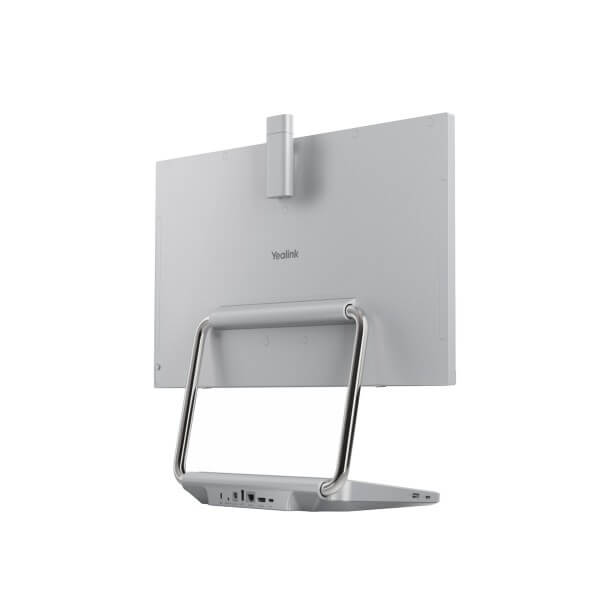
| Ports | 1× HDMI in, 1× USB-C 3.0 upstream DP-IN, 1× USB-C 3.0 downstream, 2× USB-A 3.0 downstream, 1× USB-A 2.0 downstream, 1× RJ45 Internet port, 1× DC 19V port |
| USB-C Docking | USB-C upstream DP-IN with PD up to 45W; supports monitor and docking use with compatible laptops |
| Wireless Charging | Qi wireless charging support for compatible mobile phones |
| Buttons | Power, volume, mute, camera on/off, switch mode, Teams button |
| Dimensions | 540 × 219 × 478 mm |
| Weight | Net weight per carton 7.904 kg; gross weight per carton 9.346 kg |
| Power Consumption | 19W |
Compatible Accessories and Deployment Notes
| Item | Use | Dubai Deployment Note |
|---|---|---|
| USB-C Laptop Cable | Connects compatible laptops for monitor mode, docking and PD charging | Confirm laptop USB-C display and charging support before ordering desks in bulk |
| Ethernet Connection | Stable network access through RJ45 Internet port | Recommended for fixed booths and executive desks where Teams call stability matters |
| USB Headset | Connects through USB for private audio when the desk is in an open area | Ask David to match a Yealink UH/WH/BH headset to the user’s Teams workflow |
| Teams Room Account / User Account | Controls sign-in, calendar and room behaviour | Vector Digital Systems confirms with your IT admin whether the A24 is personal, shared or room-style before staging |
Staging Before Dispatch — What Vector Digital Systems Configures
Vector Digital Systems stages Yealink Teams devices before dispatch wherever the customer provides the required Microsoft tenant, account and network information. For the DeskVision A24, staging can include firmware check, Teams sign-in readiness, device language and region settings, network test, USB-C docking check, camera/microphone/speaker test, Teams call test and handover notes for your IT team. For multi-desk rollouts, we label each unit for its booth, desk or office before delivery so the installer knows exactly where every A24 belongs.
Export from Dubai
Vector Digital Systems exports Yealink collaboration devices from Dubai to system integrators, enterprise IT teams and telecom resellers across the region. DeskVision A24 projects are suitable for corporate headquarters, bank branches, government IT departments, serviced offices and hybrid-work programmes in Oman, Saudi Arabia, Kuwait, Bahrain, Qatar, Jordan, Egypt, Kenya, Pakistan and Sri Lanka. Shipments move FOB Dubai with commercial invoice, packing list and certificate of origin on request. Project pricing is available for multi-unit Teams booth and hot-desk deployments.
Get a same-day quote in AED for Yealink DeskVision A24
Tell David: quantity, Teams tenant status, personal desk or shared room, wired or Wi-Fi network, and whether users need USB-C docking. We quote with VAT breakdown and delivery charges included.
Frequently Asked Questions — Yealink DeskVision A24
Is the Yealink DeskVision A24 Microsoft Teams certified?
Yes — Microsoft Teams device status for the Yealink DeskVision A24 was verified on Microsoft’s official Teams devices page on 23 July 2026. For large tenders, Vector Digital Systems rechecks certification at quote stage before confirming the final bill of materials.
Is DeskVision A24 a Teams Room or a Teams desk phone?
DeskVision A24 is a desktop collaboration display for Microsoft Teams Rooms on Android / Teams display-style spaces. It is not a SIP desk phone and it is not a T-series handset. Choose it for a phone booth, hot desk, executive desk or compact Teams space where a user needs screen, camera, audio and docking in one device.
Does the DeskVision A24 work with Zoom?
Yealink offers DeskVision A24 variants for Microsoft Teams and Zoom use cases, but the model on this page is the Microsoft Teams Room on Android version. If your office runs Zoom Rooms, ask David to verify the current Zoom-certified DeskVision A24 variant before quoting.
Can DeskVision A24 be used as a normal PC monitor?
Yes — DeskVision A24 supports monitor mode as part of its dual-mode design. A compatible laptop can connect over USB-C so the A24 works as a touch display and docking station, while the built-in conferencing system remains available for Teams activity.
Does the DeskVision A24 charge a laptop over USB-C?
Yes — the USB-C upstream DP-IN port supports USB Power Delivery up to 45W. This is suitable for many business laptops, but high-power workstations may still need their own charger. Vector Digital Systems confirms laptop compatibility during project planning.
Does DeskVision A24 need PoE?
No — DeskVision A24 is not a PoE desk phone. It uses DC power and includes network options through RJ45 Ethernet and Wi-Fi. For fixed booths and executive desks, we recommend planning both AC power and a stable wired network point wherever possible.
DeskVision A24 vs MeetingBar A20 — which one should I buy?
Choose DeskVision A24 for a personal desk, phone booth, hot desk or one-to-two-person Teams space where the display is part of the device. Choose MeetingBar A20 when you are building a small meeting room with a wall display, room layout, wider camera coverage and shared-room operation.
What is the best Yealink Teams device for a phone booth in Dubai?
For a single-user phone booth or focus room, DeskVision A24 is the cleanest Yealink option because it combines Teams, touch display, camera, microphones, speakers, USB-C docking and wireless charging in one unit. For a larger room with multiple seats, step up to a Yealink MeetingBar room system.
Who is the authorised Yealink supplier in Dubai?
Vector Digital Systems LLC has supplied and staged Yealink solutions in Dubai since 2009. David handles Yealink product selection, Teams device checks, project pricing, staging coordination and local warranty handling before dispatch.
Does Vector Digital Systems configure DeskVision A24 before delivery?
Yes — where the customer provides the required tenant and account details, Vector Digital Systems can stage the A24 before delivery with firmware check, Teams sign-in readiness, network test, camera and audio test, USB-C docking check and a Teams test call.
Does Vector Digital Systems export Yealink DeskVision A24 from Dubai?
Yes — Vector Digital Systems exports Yealink collaboration devices from Dubai to integrators and enterprise buyers in Oman, Saudi Arabia, Kuwait, Bahrain, Qatar, Jordan, Egypt, Kenya, Pakistan and Sri Lanka. Shipments are quoted FOB Dubai with commercial invoice, packing list and certificate of origin on request.