
Description
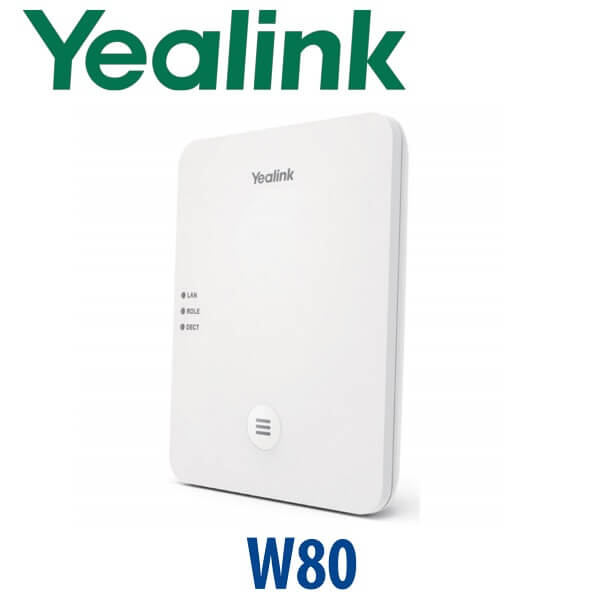
Yealink W80 DECT IP Multi-Cell System W80DM + W80B Roaming Base Solution Dubai
Yealink W80 Multi-Cell DECT System for Roaming Staff in Dubai
The Yealink W80 is not a single cordless-phone base for one reception desk. It is a DECT IP multi-cell system for businesses where staff move through corridors, wards, warehouse aisles, hotel floors, parking areas, stockrooms and service zones while staying on the same call. Built from a W80DM DECT Manager and multiple W80B base stations, the W80 system supports up to 30 base stations, up to 100 handsets or terminal devices, and up to 100 parallel calls. For Dubai hotels, clinics, logistics warehouses, schools and multi-floor offices, it gives you wide wireless voice coverage without relying on congested Wi-Fi.
Vector Digital Systems LLC supplies, stages and deploys Yealink DECT systems from Dubai. David, our Yealink specialist, helps size the W80 system properly: number of floors, wall density, handset count, roaming zones, SIP platform, PoE switch availability and whether the project should stay on W80 or step up to W90.
SIP, Teams or Zoom? Get the Platform Right Before You Order
The W80 is a SIP DECT multi-cell system. It registers to SIP phone systems such as 3CX, Yeastar P-Series, Grandstream UCM, Asterisk, FreePBX and hosted PBX platforms. It is not a standalone Microsoft Teams handset system in the same way an MP-series Teams desk phone is. Yealink notes Microsoft SIP Gateway support for W80, but Teams deployments must be verified against the customer tenant, licence and Microsoft SIP Gateway requirements before quoting. Tell David your platform before ordering.
| Your Platform | Right Yealink Route | What You Need |
|---|---|---|
| SIP PBX — 3CX, Yeastar, UCM, Asterisk, hosted PBX | Yealink W80 multi-cell DECT system | SIP accounts, PoE switch ports, handset plan and DECT cell layout |
| Microsoft Teams | Verify Microsoft SIP Gateway support or choose Yealink MP-series Teams phones | Microsoft 365 tenant, Teams Phone licence and SIP Gateway compatibility check |
| Zoom Phone | Verify Zoom Phone provisioning path before ordering | Zoom Phone licence and supported-device confirmation |
PoE Truth — Plan Switch Ports Before Installation
Each W80B base station is designed for PoE deployment. That means the cleanest installation is a network cable from a PoE-capable switch to each base station location. The W80 system is usually installed high on walls, above corridors, near lift lobbies, across warehouse zones or inside service areas, so PoE planning matters more than it does for a single desk phone. We confirm PoE switch availability, VLAN, IP addressing and cable routes before dispatch so your DECT coverage project does not stop because power was not planned at the base station positions.
Why DECT Instead of Wi-Fi Calling?
Wi-Fi is already carrying laptops, guest phones, tablets, CCTV, payment terminals and cloud apps. DECT gives your voice handsets a dedicated wireless layer with predictable roaming and handover. In dense Dubai buildings — hotel corridors, clinics with partition walls, warehouse mezzanines, school blocks and back-office service areas — DECT is usually the cleaner choice for staff voice mobility. The W80 lets a user walk from one covered zone to another while the call hands over between base stations instead of dropping at the edge of a single-cell cordless base.
Where the W80 Sits in the Yealink DECT Range
Choose the W80 when a single base station cannot cover the site and you need proper roaming between areas. Smaller sites can use W73P or W76P single-cell systems; larger campuses, hospitals, hotel groups and high-density warehouses should step up to W90. The W80 is the middle ground: serious multi-cell roaming without the scale and cost of the W90 platform.
| Feature | W76P Single-Cell | W80 Multi-Cell ★ | W90 Enterprise Multi-Cell |
|---|---|---|---|
| System type | Single base DECT system | W80DM + multiple W80B bases | W90DM + multiple W90B bases |
| Maximum base stations | 1 | Up to 30 | Up to 60 |
| Maximum handsets / devices | Up to 20 class | Up to 100 | Up to 250 |
| Parallel calls | Small-office capacity | Up to 100 | Up to 250 |
| Roaming / handover | No multi-cell handover | Yes — seamless roaming and handover | Yes — larger enterprise roaming |
| Best fit | Small office, shop or single reception area | Hotel floors, clinics, warehouses, schools, multi-floor offices | Hospital campus, large hotel, logistics site, multi-building operation |
| Price tier | Lower | Mid-project | Enterprise |
| Choose if… | One base covers the site and users do not roam between zones | You need up to 30 bases, 100 handsets and clean roaming across one large site | You need more than W80 capacity or a high-density enterprise DECT design |
Where the Yealink W80 Works in Dubai
Hotels and serviced apartments. The W80 is ideal for housekeeping, engineering, front office, security and duty-manager teams who move between guest floors, back corridors, laundry rooms and reception. Instead of relying on mobile phones or weak single-base cordless coverage, staff carry Yealink DECT handsets that stay connected as they move through planned coverage zones.
Clinics and hospitals. Nurses, reception teams, floor supervisors and operations staff need reliable voice without tying calls to one desk. DECT is useful in dense buildings where Wi-Fi can be noisy and where staff move between consultation rooms, nurse stations, pharmacies, labs and administration offices.
Warehouses in Jebel Ali, DIP and Al Quoz. A single cordless base rarely covers loading bays, racks, offices, mezzanines and dispatch areas. With multiple W80B bases, the W80 system can be planned zone by zone so warehouse supervisors and floor staff remain reachable without depending on mobile coverage inside metal-heavy buildings.
Schools, showrooms and multi-floor offices. Operations teams, facilities staff and reception runners often need voice mobility more than a desk phone. The W80 gives them SIP extension mobility across corridors, stairwells and service areas while keeping the call inside the company phone system.
Full Technical Specifications
| Specification | Yealink W80 DECT IP Multi-Cell System |
|---|---|
| System components | W80DM DECT Manager + W80B base stations |
| Deployment type | DECT IP multi-cell system for wide-area wireless voice coverage |
| Maximum base stations | Up to 30 W80B base stations under one W80DM |
| Maximum handsets / terminal devices | Up to 100 registered devices |
| Parallel calls | Up to 100 simultaneous calls |
| Roaming and handover | Seamless roaming and handover between W80B base stations |
| Compatible Yealink devices | W53H, W56H, CP930W and DD Phone (T41S + DD10K), subject to firmware version and project verification |
| Phone books | Local Directory, Remote Phonebook, LDAP and XML Phonebook |
| Audio | HD voice and Opus support where enabled by platform and handset |
| Security | Modern Yealink security features including TLS 1.3 support in current firmware family |
| Power | PoE network deployment recommended for base stations; confirm switch ports before installation |
| Network / PBX compatibility | 3CX, Yeastar P-Series, Grandstream UCM, Asterisk, FreePBX and hosted SIP PBX platforms |
| Deployment tools | Yealink DECT IP Multi-Cell Deployment Toolkit for base location planning and signal measurement |
| Best use cases | Hotels, warehouses, clinics, schools, retail floors, showrooms, service centres and multi-floor offices |
Compatible Accessories and Handsets
| Item | Model | Purpose |
|---|---|---|
| DECT Manager | W80DM | Controls the W80 multi-cell system and coordinates base stations |
| Base Station | W80B | Provides DECT radio coverage; deploy up to 30 units per W80 system |
| Standard Handset | W53H / W56H | Mobile staff handsets for office, hotel and clinic users; firmware compatibility checked before staging |
| Wireless Conference Phone | CP930W | DECT conference endpoint for meeting rooms where cable-free placement is needed |
| Project Step-Up | W90DM / W90B | For larger projects needing up to 60 bases, 250 handsets and 250 simultaneous calls |
Staging Before Dispatch — What Vector Digital Systems Configures
A W80 order is a system project, not a box shipment. Vector Digital Systems stages the W80DM, W80B base stations and handsets before dispatch: SIP account registration, firmware compatibility check, DECT manager setup, base station adoption, handset registration, extension mapping, caller ID naming, dial-plan test, codec priority and live test call. For Dubai installations, we can also assist with DECT cell planning so each base station is positioned for useful coverage rather than guessed from a floor plan.
For bulk handset projects, David can prepare an extension map before delivery: housekeeping, security, clinic reception, warehouse dispatch, supervisor, store manager, facilities, duty manager and maintenance roles can all be named and tested before the equipment reaches site.
Export from Dubai
Vector Digital Systems exports Yealink W80 multi-cell DECT systems from Dubai to telecom operators, system integrators, hotel groups, PABX installers, warehouse operators and enterprise procurement teams. Common export routes include Oman, Saudi Arabia, Kuwait, Bahrain and Qatar in the GCC; Jordan and Lebanon where permitted; Kenya, Tanzania and Uganda in East Africa; Pakistan, Sri Lanka and Bangladesh in South Asia; and Nigeria and Ghana in West Africa. Shipments move FOB Dubai with commercial invoice, packing list and certificate of origin on request. Send David the site type, handset quantity, number of floors or zones, and destination country for a project quote in AED or export format.
Get a same-day Yealink W80 quote in AED
Tell David: site type, number of floors or zones, handset count, SIP platform, PoE switch availability and whether you need installation support. We quote with VAT breakdown, delivery charges and staging included.
Frequently Asked Questions — Yealink W80
What is the Yealink W80 used for?
The Yealink W80 is a DECT IP multi-cell system for businesses that need wireless voice coverage across large areas. It combines a W80DM DECT Manager with multiple W80B base stations so staff can move between corridors, floors, warehouse zones, hotel service areas or clinic departments while staying on the same call.
How many base stations and handsets does the Yealink W80 support?
A Yealink W80 system supports up to one W80DM DECT Manager, up to 30 W80B base stations, up to 100 handsets or terminal devices, and up to 100 simultaneous calls. For larger projects beyond that scale, ask David to quote the Yealink W90 platform.
Does the Yealink W80 support roaming and handover?
Yes. Roaming and handover are the main reasons to choose W80 instead of a single-cell DECT base. A user can walk between planned W80B coverage zones and keep the call active as the handset hands over between base stations.
Will the Yealink W80 work with 3CX, Yeastar, Grandstream UCM or our existing SIP PABX?
Yes. The W80 is a SIP DECT system and can be used with 3CX, Yeastar P-Series, Grandstream UCM, Asterisk, FreePBX and hosted SIP PBX platforms. Vector Digital Systems stages SIP registration, handset mapping and test calls before dispatch.
Does the Yealink W80 work with Microsoft Teams?
The W80 is primarily a SIP DECT multi-cell system. Yealink notes Microsoft SIP Gateway support for W80, but Teams use must be verified against the Microsoft tenant, Teams Phone licence and SIP Gateway requirements before quoting. If you need native Teams desk phones, ask David for the current Yealink MP-series Teams-certified models.
Does the Yealink W80 need PoE or a power adapter?
W80 base stations are normally deployed using PoE from the network switch. That keeps wall and ceiling installations clean, but it means PoE switch ports must be planned before installation. Vector Digital Systems confirms PoE availability, VLAN and cable routes before dispatch.
Which Yealink handsets work with the W80?
Yealink lists W53H, W56H, CP930W and DD Phone as compatible W80 terminal devices, subject to firmware version. For each Dubai project, Vector Digital Systems checks handset firmware and compatibility before staging the system.
W80 vs W90 — which one should I buy?
Choose W80 for multi-cell sites needing up to 30 base stations, 100 handsets and 100 simultaneous calls. Choose W90 for larger or higher-density sites needing up to 60 base stations, 250 handsets and 250 simultaneous calls. David can size the system from your floor plan and handset count.
Who is the authorised Yealink supplier in Dubai?
Vector Digital Systems LLC has supplied and integrated Yealink solutions in Dubai since 2009. David handles Yealink pre-sales, project sizing, staging, local warranty support and export documentation for W80 deployments.
Does Vector Digital Systems export Yealink W80 systems from Dubai?
Yes. Vector Digital Systems exports Yealink W80 systems from Dubai to system integrators, hotel groups, telecom operators and enterprise buyers across Oman, Saudi Arabia, Kuwait, Bahrain, Qatar, Kenya, Tanzania, Uganda, Pakistan, Sri Lanka, Bangladesh, Nigeria and Ghana. Shipments are quoted FOB Dubai with commercial invoice, packing list and certificate of origin on request.

