Description
Yealink MTouch Plus 11.6″ Teams Rooms Touch Panel for MVC Meeting Rooms Dubai
The Touch Panel That Makes a Yealink Meeting Room Feel Finished
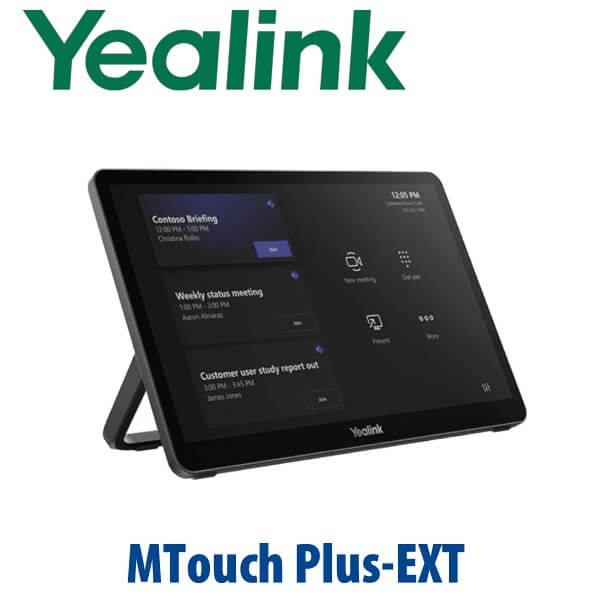
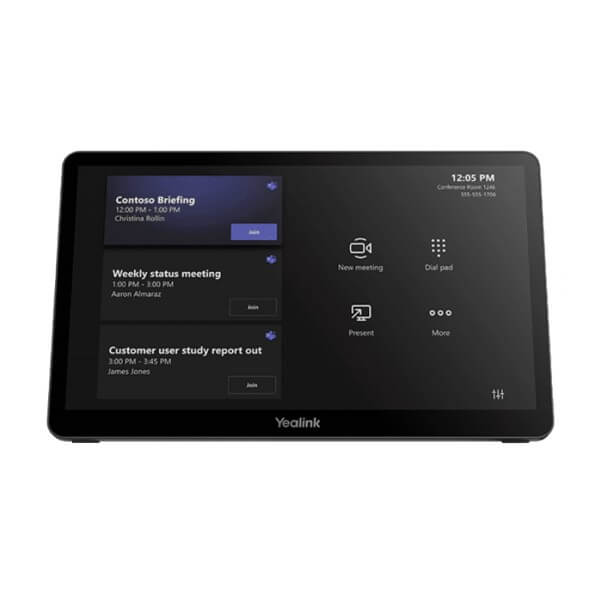
The Yealink MTouch Plus is the large-format touch controller used with Yealink MVC and MCore meeting room systems. It gives your Dubai meeting room a proper in-room control surface: join meetings, adjust layouts, control cameras, start content sharing, and manage the session from an 11.6-inch anti-glare display instead of asking users to touch the mini-PC, remote into Windows, or pass a laptop around the table. For boardrooms, training rooms, and executive meeting spaces in Dubai, the MTouch Plus is the difference between “the room works” and “the room feels professional.”
Platform Trap: This Is a Room Controller, Not a Standalone Teams Phone
The MTouch Plus is not a SIP desk phone, not a standalone Microsoft Teams phone, and not a Zoom appliance by itself. It is a touch console for Yealink meeting room systems. The platform depends on the room kit it is connected to — normally a Yealink MVC / MCore system for Microsoft Teams Rooms on Windows, or the appropriate Yealink room solution specified for the customer’s platform. Vector Digital Systems verifies the full room bundle before quoting, because certification belongs to the room system configuration, not to the touch panel alone.
| Your Platform | Right Yealink Setup | What You Need |
|---|---|---|
| Microsoft Teams Rooms on Windows | Yealink MVC / MCore room system with MTouch Plus | Teams Rooms licence, certified room kit, display, camera, microphone and speaker package |
| Zoom Rooms | Zoom-certified Yealink room system — verify current certification status | Zoom Rooms licence and the correct Yealink room bundle |
| SIP / PBX audio calling | Use a Yealink SIP conference phone or IP phone instead | SIP credentials from 3CX, Yeastar, Grandstream UCM, Asterisk or hosted PBX |
Microsoft certification status checked on 13 July 2026: MTouch Plus appears as part of Yealink MVC room bundles such as MVC860, but should not be sold as a standalone certified Teams endpoint. For Teams or Zoom rooms, David verifies the complete bundle before quoting.
Power and Cabling Truth
Do not order the touch panel alone unless the room kit and cabling are already confirmed. The MTouch Plus connects into the Yealink room ecosystem through the correct MCore / room-system connection, and content sharing may require the proper USB-C, HDMI, WPP30, network and power accessories depending on the room design. The optional 65W PD power supply may be required when you want the panel to power a connected laptop during content sharing. Vector Digital Systems checks the room layout, table position, display wall, floor box and cable route before dispatch so the installer is not missing a cable on site.
Where MTouch Plus Sits in the Yealink Room Range
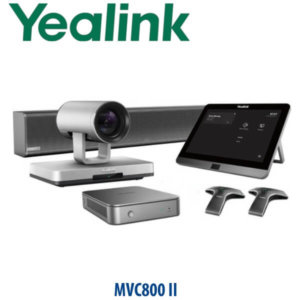
The previous MTouch II was an 8-inch controller used in earlier Yealink room systems. MTouch Plus moves the room experience up to an 11.6-inch Full HD panel with a larger control surface, anti-glare coating, flexible deployment and multi-panel control support. For customers building a current Microsoft Teams Rooms on Windows space, MTouch Plus is normally specified as part of an MVC / MCore room bundle rather than as a loose accessory.
| Feature | MTouch II | MTouch Plus ★ | MTouch Plus-EXT |
|---|---|---|---|
| Display | 8″ IPS | 11.6″ anti-glare IPS | 11.6″ touch panel |
| Resolution | 1280 × 800 | 1920 × 1080 | 1920 × 1080 |
| Platform Role | Legacy room controller | Main room touch console | Additional room touch panel |
| SIP Accounts | Not a SIP phone | Not a SIP phone | Not a SIP phone |
| Programmable Keys | Touch UI controls | Touch UI controls | Touch UI controls |
| GigE | Room-system dependent | Room-system dependent | PoE network connection |
| Wi-Fi / Bluetooth | Earlier room-system spec | Wi-Fi 6 + BT 5.2 listed | Not the primary wireless device |
| Conference | Controls room meetings | Controls room meetings | Extends control positions |
| Expansion | Single controller setups | Supports multi-panel control | Up to 4 EXT panels with 1 MTouch Plus |
| Replaces | Earlier MTouch generation | Upgrade path from MTouch II rooms | Adds extra room control points |
| Choose if… | You are maintaining an older Yealink room | You want the current large touch console for a professional MVC room | You need extra control points in a large or divisible room |
Dubai Meeting Room Use Cases
DIFC and Business Bay boardrooms. Executive rooms need one-button meeting join, camera control and a clean table experience. MTouch Plus keeps the meeting controls in one place so visitors do not need admin access, a keyboard, or help from IT just to start a call.
DMCC, JLT and free-zone training rooms. Larger training spaces often need the controller placed near the presenter, not only at the table. With the right Yealink room design, MTouch Plus and compatible extension panels can support multiple room-control positions for presenter-led sessions.
Hotels, clinics and government suppliers. Meeting rooms in Dubai often switch users several times per day. A dedicated touch panel reduces “how do I join?” support calls and keeps camera, microphone, display and content sharing control away from the Windows mini-PC.
Room refresh projects. If an older Yealink Teams Room still runs an 8-inch controller or a basic table layout, the MTouch Plus upgrade gives the room a larger Full HD control surface and a more modern user experience. David checks compatibility before quoting because the controller must match the MCore / MVC generation.
Full Technical Specifications
| Specification | Yealink MTouch Plus |
|---|---|
| Product Type | Touch panel / room controller for Yealink meeting room systems |
| Display | 11.6-inch anti-fingerprint, anti-glare IPS screen |
| Resolution | 1920 × 1080 Full HD |
| Touch | 10-point multi-touch capacitive control |
| Brightness / Contrast | 290 cd/m² brightness, 1000:1 contrast |
| Main Connection | 1× MCore Pro port / VCH port |
| USB-C Ports | 1× USB 2.0 Type-C port, 1× USB 2.0 Type-C PD port |
| USB-A Ports | 2× USB 2.0 Type-A ports, including one for WPP30 wireless presentation pod |
| Video / Content Sharing | USB-C and HDMI ingest support through included USB-C cable with HDMI adapter; wireless sharing with compatible accessories and firmware |
| Headset Port | 1× 3.5 mm headset port |
| Extension Port | 1× Ext Touch RJ-45 port for compatible multi-panel control designs |
| Wireless | Wi-Fi IEEE 802.11 a/b/g/n/ac/ax and Bluetooth 5.2 listed in Yealink interface specs |
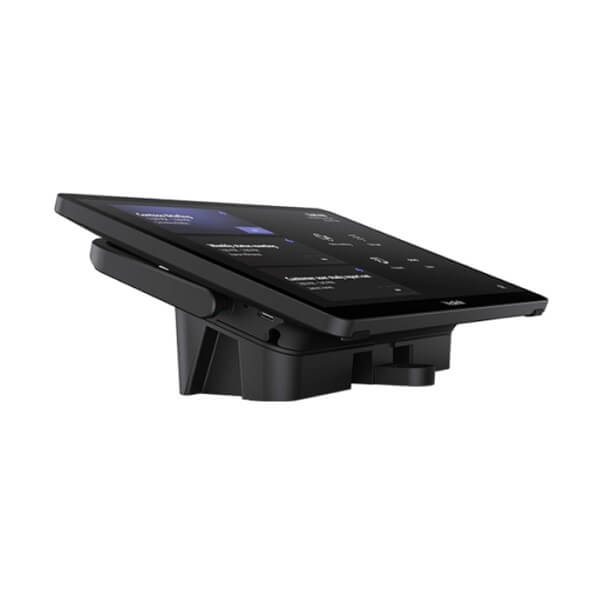
| Deployment | Desktop placement, fixed desktop placement, or wall mounting using bracket system |
| RoomSensor Integration | Supports automatic room wake-up when deployed with compatible Yealink RoomSensor setup |
| Package Content | MTouch Plus touch panel, mounting bracket, double-coating tape, USB Type-C cable with HDMI adapter, 7.5m Ethernet cable |
| Optional Accessories | WPP30 wireless presentation pod, 65W PD power supply, compatible Yealink MVC / MCore room components |
| Weight | 0.967 kg unit weight |
Compatible Accessories and Room Components
| Accessory / Component | Model | Purpose |
|---|---|---|
| Room Compute | Yealink MCore / MCore Pro / MCore 4 family | Runs the Microsoft Teams Rooms on Windows environment in compatible Yealink MVC systems |
| Wireless Presentation | WPP30 | Optional wireless content sharing pod for compatible Yealink room systems |
| Additional Touch Panel | MTouch Plus-EXT | Adds extra touch control points in large boardrooms, training rooms and divisible spaces |
| Room Wake-Up Sensor | RoomSensor | Detects occupancy and wakes compatible Yealink room systems automatically |
| Power Accessory | 65W PD power supply | Optional power supply for USB-C PD content-sharing workflows where laptop charging is required |
Staging Before Dispatch — What We Configure
Vector Digital Systems stages Yealink room systems before dispatch from Dubai. For MTouch Plus projects, we confirm the Teams Rooms or Zoom Rooms platform, match the touch panel to the correct MCore / MVC generation, check firmware requirements, label cables, prepare the room layout notes, and test meeting join, camera control and content-sharing flow where the full kit is supplied. For corporate rollouts, we can prepare multiple rooms with consistent naming, display behaviour, controller placement and documentation before delivery.
Export from Dubai
Vector Digital Systems supplies Yealink MTouch Plus panels and complete Yealink room systems to AV integrators, IT contractors, hotel groups, enterprise procurement teams and government suppliers across the region. We regularly support export enquiries from Oman, Saudi Arabia, Qatar, Kuwait, Bahrain, Jordan, Egypt, Kenya, Nigeria and Pakistan. Shipments move FOB Dubai with commercial invoice, packing list and certificate of origin on request. For export rooms, David can quote the touch panel alone or the full MVC / MCore meeting room bundle with camera, microphones, speaker, display-side compute and accessories.
Get a same-day quote in AED — Yealink room systems supplied from Dubai
Tell David your platform, room size, display count, camera model, table layout and whether you need MTouch Plus as a replacement panel or as part of a complete MVC room bundle. We quote with VAT breakdown and delivery charges included.
Frequently Asked Questions — Yealink MTouch Plus
Is the Yealink MTouch Plus a standalone Microsoft Teams device?
No. The Yealink MTouch Plus is a touch controller for compatible Yealink meeting room systems, not a standalone Teams phone or standalone Teams Room appliance. Microsoft Teams Rooms certification must be checked at the full room-system bundle level. Vector Digital Systems verified on 13 July 2026 that MTouch Plus appears inside Yealink MVC room bundles, so David confirms the complete certified configuration before quoting.
Does the MTouch Plus work with Microsoft Teams Rooms?
Yes, when supplied as part of the correct Yealink MVC / MCore Microsoft Teams Rooms on Windows system. It is the in-room touch console used to join meetings, control cameras, manage layouts and start content sharing. The room still needs the correct MCore compute, camera, audio devices, display, Teams Rooms licence and certified bundle configuration.
Can I use MTouch Plus for Zoom Rooms?
Only with the correct Yealink Zoom Rooms solution and verified certification status. Do not assume a Teams Rooms controller can be repurposed for Zoom without checking the full kit, firmware and licence requirements. David verifies the current Yealink Zoom-certified room options before quoting for Dubai or export projects.
What is the screen size and resolution of the Yealink MTouch Plus?
The Yealink MTouch Plus has an 11.6-inch anti-fingerprint, anti-glare IPS touch screen with 1920 × 1080 Full HD resolution. It supports 10-point multi-touch, giving meeting users a larger and smoother control surface than earlier 8-inch room controllers.
Can the MTouch Plus share content from a laptop?
Yes, in compatible Yealink room-system designs the MTouch Plus supports wired content sharing through USB-C and HDMI ingest, and wireless sharing can be supported with compatible Yealink accessories such as WPP30 and the correct firmware. The optional 65W PD power supply may be added when laptop charging during USB-C sharing is required.
Can I add more than one touch panel in a large meeting room?
Yes, the MTouch Plus supports multi-panel control in compatible Yealink room designs. For larger boardrooms, training rooms and divisible meeting spaces, MTouch Plus-EXT can add extra control points so users can manage the meeting from different positions in the room. Vector Digital Systems confirms the cabling, PoE and room layout before quoting.
MTouch Plus vs MTouch II — which one should I buy?
Choose MTouch Plus for current Yealink MVC / MCore room systems where you want an 11.6-inch Full HD touch controller, modern room-control experience and flexible deployment. MTouch II belongs to earlier 8-inch controller setups. If you are replacing an old panel, David checks compatibility with your existing MCore generation before confirming the correct part.
Who is the authorised Yealink supplier in Dubai?
Vector Digital Systems LLC has supplied and integrated Yealink solutions in Dubai since 2009. David handles Yealink room-system specification, pre-sales compatibility checks, project pricing, staging and local warranty support. For meeting room projects, Vector Digital Systems can quote the MTouch Plus alone or the full Yealink MVC room bundle.
What is the best Yealink touch controller for a Teams Room in Dubai?
For a current Yealink MVC Microsoft Teams Room, MTouch Plus is the recommended large touch console. It gives users an 11.6-inch Full HD control surface for meeting join, camera control and content sharing. For larger rooms, add MTouch Plus-EXT panels; for smaller or older rooms, David first checks the existing MCore and controller generation.
Does Vector Digital Systems configure the MTouch Plus before delivery?
Yes. When supplied with the room system, Vector Digital Systems checks platform fit, firmware needs, cable layout, controller placement, content-sharing accessories and basic meeting-room operation before dispatch. For multi-room Dubai projects, we prepare consistent room naming, labels and handover notes so installation is faster on site.
Does Vector Digital Systems export Yealink MTouch Plus from Dubai?
Yes. Vector Digital Systems exports Yealink MTouch Plus panels and complete Yealink meeting room systems from Dubai to AV integrators, IT contractors and enterprise buyers in Oman, Saudi Arabia, Qatar, Kuwait, Bahrain, Jordan, Egypt, Kenya, Nigeria and Pakistan. Export quotes can include FOB Dubai documentation, commercial invoice, packing list and certificate of origin on request.