
Description
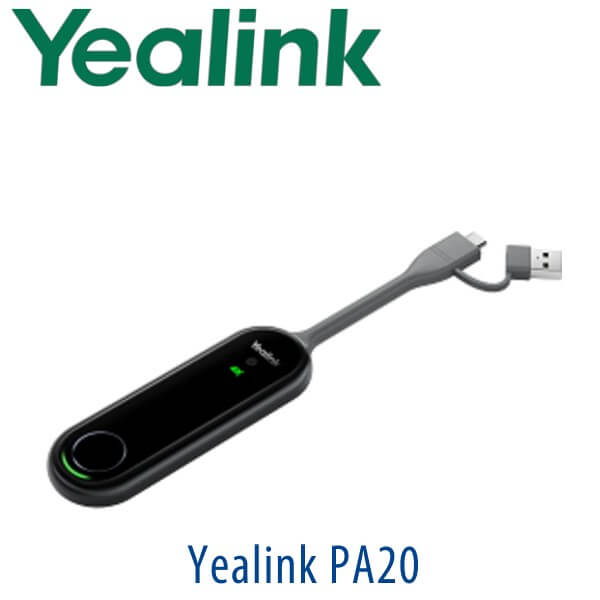
Yealink PA20 4K Content Sharing IP BYOD Device Dubai
One Press to Present — 4K BYOD Sharing for Dubai Meeting Rooms
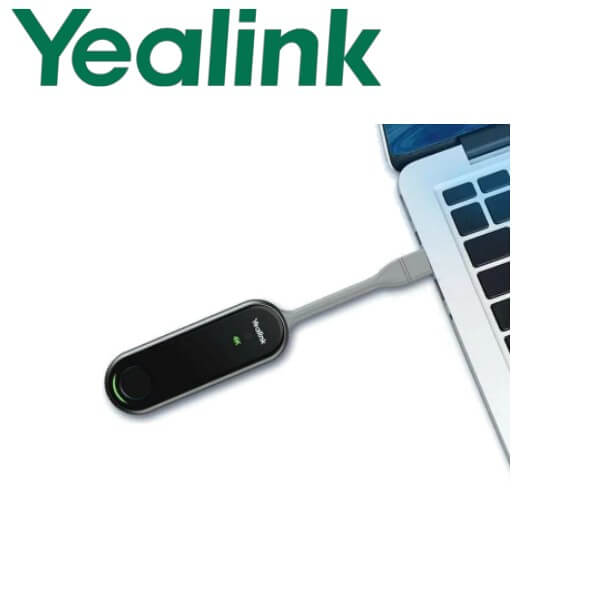
The Yealink PA20 is a compact 4K content sharing IP BYOD device for meeting rooms that need fast, clean screen sharing without asking every presenter to install software. Plug the PA20 into a laptop or supported mobile device, press the button, and share content into a compatible Yealink room setup at up to 4K/30fps. For Dubai boardrooms, training rooms, sales demo spaces, and hybrid meeting rooms where guests bring their own laptops, the PA20 removes the most common delay at the start of a meeting: “How do I share my screen?”
Vector Digital Systems LLC supplies Yealink meeting room accessories in Dubai with same-day quote in AED, VAT breakdown, delivery charges, compatibility guidance, and export documentation when required. David, our Yealink specialist, can confirm whether the PA20 is the right accessory for your existing MeetingBar, MeetingBoard, MVC/ZVC, RoomCast, or Yealink room deployment before you order.
Platform Truth: PA20 Is a BYOD Sharing Device, Not a Teams Phone or Room Kit
The PA20 is not an IP phone, not a SIP endpoint, and not a standalone Microsoft Teams or Zoom Rooms system. It is a presentation-sharing accessory. The certification status that matters is the final room system it connects into — for example a Yealink Microsoft Teams Rooms kit, Zoom Rooms kit, MeetingBar, MeetingBoard, or RoomCast deployment. Do not buy the PA20 expecting it to replace a room codec, camera bar, Teams phone, or Zoom-certified appliance.
| Your Meeting Setup | Where PA20 Fits | What David Verifies Before Quote |
|---|---|---|
| Yealink MeetingBar / MeetingBoard room | Wireless BYOD content sharing pod for presenters | Room device model, firmware level, Wi-Fi/network design, and sharing workflow |
| Microsoft Teams Rooms | Accessory for content sharing into a Teams room system — not a Teams-certified phone | Microsoft-certified room kit status, Teams Rooms licence, and room PC/Android configuration |
| Zoom Rooms | Accessory for presenter screen sharing into a compatible Zoom room ecosystem | Zoom-certified room kit status, Zoom Rooms licence, and receiver compatibility |
| Standard HDMI-only display | PA20 alone is not the full receiver/display solution | Whether you need RoomCast, a MeetingBar, or a full room system instead |
Power Truth: No PoE Switch Requirement, But It Is Not a Desk Phone PSU Scenario
The PA20 is not powered like a Yealink SIP desk phone. It is a USB-connected presentation device used with a computer or compatible room system. There is no PoE-switch requirement like the T7 desk phone range, and it is not the kind of product where you add a Yealink desk-phone PSU to solve power. What matters is the host connection, room receiver, network design, and compatibility of the Yealink meeting-room ecosystem. Vector Digital Systems checks those items before dispatch so the pod is ready for the room you are deploying.
Why PA20 Exists: No Driver, No Guest IT Ticket, No Meeting Delay
Guest presenters in Dubai offices often arrive with locked-down corporate laptops, MacBooks, USB-C ultrabooks, or security policies that block new software. The PA20 is designed for exactly that reality: hardware-based 4K/30fps sharing, USB Type-C with USB Type-A compatibility, embedded meeting assistant logic, and Wi-Fi 6 wireless performance. The result is a simpler meeting-room workflow for reception-managed boardrooms, training centres, university classrooms, and sales demo rooms where different people present every hour.
Where the PA20 Sits in a Yealink Room Setup
Think of the PA20 as the presenter-side sharing pod. It is not the main meeting room device. The main room system still handles camera, microphone, speaker, display output, Teams/Zoom/SIP platform, and room management. The PA20 simply makes it easier for a presenter to share 4K content into that room without a software install. That makes it a strong add-on for rooms already running Yealink video collaboration equipment or for new Yealink room projects where guest sharing is a priority.
| Feature | Cable-Only Sharing | Yealink PA20 ★ | Full Yealink Room System |
|---|---|---|---|
| Primary role | Basic laptop-to-display connection | 4K wireless/IP BYOD content sharing | Complete meeting room endpoint |
| Resolution | Depends on cable and display | Up to 4K/30fps | Depends on room system and display |
| Driver install | No, but adapters are often needed | No software or driver required | Room system managed by IT |
| Connector | HDMI/USB-C cable | USB Type-C with USB Type-A compatibility | HDMI, USB, network, room display |
| Wireless technology | None | Wi-Fi 6, 2×2 MIMO, 2.4GHz/5GHz | Varies by room device |
| Best use case | Fixed internal laptop only | Guest BYOD sharing in meeting rooms | Teams/Zoom/video room deployment |
| Platform certification | Not applicable | Verify with final Yealink room system | Teams/Zoom certification checked per kit |
| Price tier | Lowest | Accessory add-on | Project system |
| Choose if… | The room has one fixed laptop and no guest-sharing need | You need simple 4K BYOD sharing for different presenters | You need the camera, microphone, speaker, codec, and meeting platform too |
Where the Yealink PA20 Works in Dubai
DIFC and DMCC boardrooms. Visiting partners, auditors, consultants, and regional managers often arrive with their own locked-down laptops. The PA20 gives them a clean screen-sharing workflow without calling IT to install a driver or hunt for an HDMI adapter. For professional services, finance, and legal offices, that small detail keeps high-value meetings moving.
Business Bay and JLT training rooms. Trainers move quickly between slides, browser demos, spreadsheets, and videos. PA20 supports Duplicate Desktop and Extended Desktop modes, so the presenter can choose a mirrored screen or keep notes private while sharing the main presentation.
Hotel meeting rooms and serviced offices. Guest users change every day, so permanent software installs are unrealistic. A plug-and-play content sharing pod makes the room easier for non-technical users, reception teams, and visiting companies renting the space for a workshop or board meeting.
Education and healthcare collaboration rooms. Universities, clinics, and training centres often need multiple lecturers or specialists to connect quickly. Hardware encoding reduces reliance on the presenter laptop’s CPU, which is useful when the laptop is already running a video call, browser tabs, medical images, or teaching software.
Full Technical Specifications
| Specification | Yealink PA20 |
|---|---|
| Product Type | Content Sharing IP BYOD Device / 4K presentation assistant |
| Video Sharing Output | Up to 4K Ultra HD at 30fps |
| Encoding | Built-in hardware encoding for CPU-efficient presentation sharing |
| Software / Driver | No driver or software installation required for normal plug-and-play sharing |
| Computer Connection | USB Type-C with USB Type-A compatibility |
| Wireless | Wi-Fi 6 module, 2×2 MIMO, dual-band 2.4GHz/5GHz |
| Sharing Modes | Duplicate Desktop and Extended Desktop |
| Control | One START/STOP button for presenter control |
| Security | AES encryption with WPA/WPA2 wireless security support |
| Power | USB-powered operation; no PoE switch requirement |
| Typical Power Consumption | Approximately 2.2W typical power consumption |
| Dimensions | Approx. 220 × 38 × 16 mm |
| Weight | Approx. 75 g |
| Typical Compatibility | Yealink meeting room ecosystems such as MeetingBar, MeetingBoard, MVC/ZVC, RoomCast and related room solutions — confirm per deployment before quote |
Compatible Room Accessories and System Checks
| Item | What to Check | Why It Matters |
|---|---|---|
| Yealink room device | MeetingBar, MeetingBoard, MVC/ZVC, RoomCast or other receiver device | The PA20 needs the right room-side device and firmware to complete the sharing workflow |
| USB-C / USB-A user devices | Presenter laptop port types and company security policy | Avoid adapter problems and driver-blocking issues in guest meetings |
| Room Wi-Fi / network | 2.4GHz/5GHz coverage, VLAN policy, interference, and guest access rules | 4K sharing depends on stable room wireless performance |
| Teams / Zoom room kit | Certification status of the main Yealink room system, not just the PA20 accessory | Prevents the common mistake of treating a sharing pod as a certified room endpoint |
Staging and Pre-Dispatch Check by Vector Digital Systems
Vector Digital Systems does not ship the PA20 as a blind accessory. Before dispatch, David confirms the room device model, meeting platform, receiver compatibility, USB-C/USB-A user requirement, Wi-Fi environment, and whether the room is a Teams Rooms, Zoom Rooms, BYOD, or mixed-use space. For project rooms, we can prepare a deployment checklist covering room name, display layout, network notes, firmware check, and presenter handover instructions so the PA20 arrives with the rest of the Yealink room kit ready for installation.
Export from Dubai
Vector Digital Systems exports Yealink PA20 presentation devices and room accessories from Dubai to system integrators, hotel groups, corporate IT teams, universities, training centres, and AV installers across the region. Common export destinations include Oman, Saudi Arabia, Kuwait, Qatar, Bahrain, Jordan, Egypt, Kenya, Pakistan, and Sri Lanka. Shipments move FOB Dubai with commercial invoice, packing list, and certificate of origin on request. For room projects, David can quote PA20 units together with Yealink room bars, room panels, speakerphones, cameras, and accessories as one consolidated Dubai shipment.
Get a same-day quote in AED for Yealink PA20
Tell David your room device model, meeting platform, quantity, and whether the PA20 is for a new Yealink room kit or an existing room upgrade. We quote with VAT breakdown, delivery, compatibility guidance, and export documents where required.
Frequently Asked Questions — Yealink PA20
What is the Yealink PA20 used for?
The Yealink PA20 is a 4K content sharing IP BYOD device for meeting rooms. It lets presenters share a laptop or compatible device screen into a supported Yealink room setup without installing software or drivers. It is best used in boardrooms, training rooms, huddle rooms, serviced offices, and hotel meeting rooms where different presenters bring their own devices.
Is the Yealink PA20 a Microsoft Teams or Zoom certified room system?
No. The PA20 is a content sharing accessory, not a standalone Teams Rooms or Zoom Rooms system. The certification status belongs to the main Yealink room kit, such as a Teams Rooms or Zoom Rooms endpoint. Vector Digital Systems verifies the complete room system and platform before quoting any Teams or Zoom deployment.
Does the Yealink PA20 need software or drivers?
No. The PA20 is designed for plug-and-play presentation sharing without software or driver installation. That makes it useful for guest laptops, locked-down corporate devices, training rooms, and boardrooms where users cannot install apps during a meeting.
Does the Yealink PA20 support 4K screen sharing?
Yes. The PA20 supports content sharing up to 4K Ultra HD at 30fps using hardware encoding. Actual performance depends on the receiving room device, display, firmware, and network conditions, so David checks the full room setup before dispatch.
Will the PA20 work with USB-C and USB-A laptops?
Yes. The PA20 is designed around USB Type-C with USB Type-A compatibility, making it practical for modern USB-C laptops and older USB-A devices. For mixed meeting rooms in Dubai, this reduces the number of emergency adapters needed at the table.
PA20 vs HDMI cable — which one should I buy?
Use an HDMI cable if the room has one fixed laptop and no guest-sharing workflow. Choose the PA20 when different presenters bring their own devices, you want 4K wireless/IP BYOD sharing, and you want to avoid driver installs, loose adapters, and cable handover delays.
Does the PA20 require PoE or a Yealink desk-phone power adapter?
No. The PA20 is not powered like a Yealink SIP desk phone. It is a USB-connected presentation device and does not use a Yealink desk-phone PSU or PoE switch port. What matters is the host connection, compatible room receiver, and Wi-Fi/network design.
Who is the authorised Yealink supplier in Dubai for PA20?
Vector Digital Systems LLC has supplied and integrated Yealink solutions in Dubai since 2009. David handles Yealink pre-sales specification, compatibility checks, project pricing, staging guidance, and local warranty support for PA20 and related Yealink room devices.
What is the best Yealink screen sharing device for a Dubai meeting room?
For a Yealink room that needs simple presenter BYOD sharing, the PA20 is the right accessory because it supports 4K/30fps sharing, Wi-Fi 6, USB-C/USB-A use, and driver-free operation. For rooms that still need the main receiver, camera, microphone, speakers, or Teams/Zoom endpoint, David will recommend a full Yealink room system instead of only the PA20.
Does Vector Digital Systems export Yealink PA20 from Dubai?
Yes. Vector Digital Systems exports Yealink PA20 units and room accessories from Dubai to integrators and enterprise buyers in Oman, Saudi Arabia, Kuwait, Qatar, Bahrain, Jordan, Egypt, Kenya, Pakistan, and Sri Lanka. Export shipments move FOB Dubai with commercial invoice, packing list, and certificate of origin on request.

