Description
Fanvil Cloud Management System for Property Access Control Dubai
The villa compound is ready for handover. The gate station is mounted, the lobby door phone is online, the apartment list is loaded, and the property manager asks the question that decides whether the system will be used properly after you leave: “Can we add residents, change access rights, and see who opened the door without calling the installer every time?”
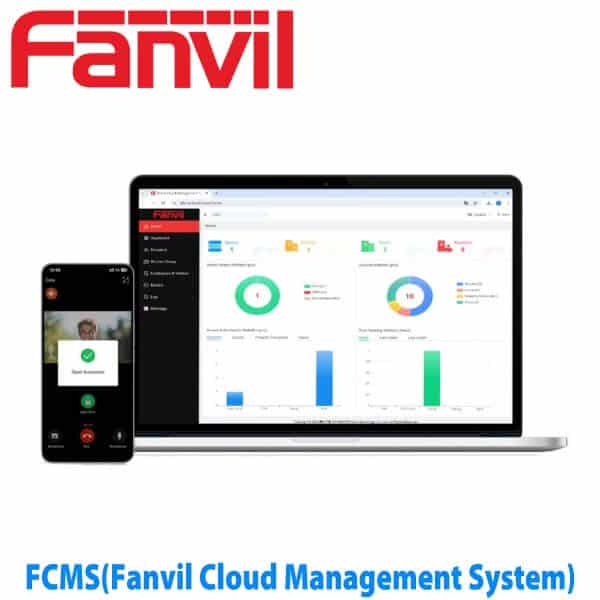
That is the job of Fanvil FCMS — Fanvil Cloud Management System. It is not a desk phone, and it is not a replacement page. It is Fanvil’s cloud-based management platform for villa, residential community, apartment, and office access-control projects where devices, users, permissions, mobile app access, logs, and property accounts need one managed place.
For UAE projects, this matters. A single villa gate is simple. A tower in JLT, a staff accommodation block in DIP, or a residential community in Dubai with several entrances is different. The installer has to bind devices, assign users, set access rules, create property admin accounts, and leave the client with a system they can operate. Vector Digital Systems supplies Fanvil FCMS from Dubai with project planning, account structure, device binding, and handover support for installers, ELV contractors, property teams, and system integrators.
What Fanvil FCMS is
Fanvil FCMS is the cloud management layer for Fanvil property access-control deployments. It is designed for residential communities, villas, and office environments. In project terms, it gives the property manager, installer, reseller, or distributor a place to manage users, buildings, rooms, offices, devices, permissions, and records after the Fanvil door phones and access-control devices are installed.
The platform works with Fanvil Link App for the resident or user side. That is where the end user can unlock a door, monitor a door phone, and create temporary access for a visitor or courier when the project is configured for those functions. For a villa owner, that might mean opening the gate from the phone. For an apartment resident, it might mean receiving a visitor call and opening the lobby entrance. For an office manager, it might mean giving temporary access to a contractor for a planned visit.
FCMS is useful because it separates daily property management from installation work. The installer still has to design the access-control layout, mount the devices, connect the network, and test the doors. But once the project is handed over, the property team can handle common jobs from the cloud platform instead of raising a support ticket for every resident, staff change, or access rule.
Project fit
Use FCMS where the project has users, doors, devices, and permission changes after handover: villas, communities, apartments, staff accommodation, offices, and managed buildings. For a single door with no property team, a local-only setup may be enough. Send us your door count, user count, and project type on WhatsApp and we confirm the right Fanvil structure.
The Dubai property-management problem it solves
Most access-control problems in the UAE do not start on day one. Day one is clean. The contractor has finished the installation. The client has accepted the system. The trouble starts in month two, when a tenant moves out, a new resident moves in, a staff card is lost, a guard asks for a door log, or the building manager wants to know which devices are online.
Without a management platform, those small changes go back to the installer. The ELV contractor gets calls for user edits. The PABX installer gets pulled into door-access questions. The property team keeps spreadsheets. The resident complains that the app was not set up. Nobody knows which device is bound to which room. That is exactly the kind of after-handover friction FCMS is built to reduce.
For a Dubai residential building, FCMS can hold the structure of buildings and apartments. For an office, it can map staff to offices or departments. For a villa project, it can bind equipment, users, and the project so the owner can use the system without daily installer involvement. That is why the platform belongs in the design conversation before the first door station is quoted, not after the site is already live.
FCMS users — who gets which role
FCMS is not only for the resident. It has value at different levels of a project chain. A distributor can create accounts for resellers or installers and view project activity. A reseller or installer can manage villa, community, and office projects, bind devices, add users, and set up the property administrator. The property manager can add residents, assign office staff, change device settings, set access rules, and view logs.
That role split is important for MEA projects supplied from Dubai. A telecom reseller in Oman, a system integrator in Kenya, or an ELV contractor in Abu Dhabi may not want the end client touching installer-level settings. At the same time, the property manager needs enough access to add a new resident or check a door record. FCMS gives the project a cleaner handover model: installer control during deployment, property control for daily operation, user access through Fanvil Link App.
| Role | Typical FCMS work |
|---|---|
| Distributor | Create reseller or installer accounts, support device estate visibility, review sales and service activity where assigned |
| Installer / Reseller | Create villa, community, or office projects, bind devices, add users, and prepare handover |
| Property Manager | Manage residents, office staff, access permissions, PIN codes, IC/ID cards, device names, relay settings, and logs |
| Resident / Office User | Use Fanvil Link App for door unlocking, monitoring, visitor handling, and temporary access where enabled |
Access control without the handover mess
The daily jobs are the ones that make or break the system. Add a resident to the right building and apartment. Assign office staff to their department. View whether a device is online. Check which user is bound to which device. Change a device name after the property team renames an entrance. Adjust relay and door settings. Set PIN codes and IC/ID cards for different access scenarios. Create schedules so a cleaner, contractor, or staff member does not have open-ended access.
FCMS keeps those jobs in a managed platform. Door access logs, call logs, security logs, and system login logs give the property team a record to check when there is a complaint or incident. Notifications can be sent to residents. Device deployment, device status, access-control activity, and call statistics can be viewed from the platform. In plain project language: the client can see what is happening instead of guessing.
This is especially useful in Dubai free zone offices, mixed-use buildings, and villa communities where different parties share responsibility. The security team cares about doors. The property manager cares about residents. The IT manager cares about devices being online. The installer cares that the system is supportable after handover. FCMS gives each party a more orderly operating model.
Confirm device compatibility before quoting
FCMS is a platform, not a stand-alone door controller. It must be matched with supported Fanvil access-control devices and Fanvil Link App requirements for the project. We confirm the device list, app requirement, door count, user roles, and handover flow in the same quotation.
Fanvil Link App — the resident side of the project
Property managers need FCMS. Residents and office users need Fanvil Link App. The app is the user-facing part of the system, paired with FCMS, for door phone operation such as unlocking and monitoring. It is built for the user who does not want to understand the access-control platform. They want to answer the visitor, open the door, monitor the entrance, or create a temporary key for a courier.
That difference matters in a UAE handover. The property team should not give every resident platform access. Residents should use the app. The property manager controls who belongs to which apartment, office, or role. The installer sets the project correctly. Vector Digital Systems helps define that structure during staging so the client receives a system that can actually be operated by the right people.
For a villa, the app can become the owner’s daily gate-control tool. For an apartment, it becomes the resident’s visitor screen. For an office, it supports controlled staff access and visitor handling. Same platform family. Different operating model. That is why FCMS should be quoted as part of the access-control project, not treated as an afterthought.
Vector Digital Systems LLC supplies Fanvil FCMS from Dubai for UAE projects and MEA export engagements, with Fanvil access-control devices, project staging, installer support, and handover guidance. Operating since 2009, we support deployments across Dubai, Abu Dhabi, Sharjah, Ajman, Ras Al Khaimah, Fujairah, and Umm Al Quwain.
Cloud platform, not a powered device
Fanvil FCMS is a cloud service platform. It does not sit on a desk, take PoE, pass a PC network connection, or ship with a power adapter. The powered equipment in the project is the Fanvil access-control hardware: door phones, indoor stations, and compatible devices at entrances, lobbies, gates, service doors, villas, apartments, and offices.
That difference avoids a common quotation mistake. FCMS should not be quoted like a handset. It should be quoted as part of the access-control design: supported Fanvil devices, Fanvil Link App requirement, account structure, property roles, user count, door count, and handover support. The installer still needs the correct switch ports, PoE budget, relay wiring, network access, and door-lock interface for the hardware. FCMS gives the management layer above that installation.
No power adapter question on FCMS
FCMS is a cloud platform, so there is no PoE class, no desk power adapter, and no in-box accessory. Power planning applies to the Fanvil door phones, indoor stations, switches, relays, and access-control devices used with the platform. We confirm those items in the same Dubai project quote.
Platform access and mobile app truth
FCMS is used from a browser-based management platform, while Fanvil Link App is used on the mobile side. Fanvil lists mobile support for Android 9 or later, iOS 12 or later, and HarmonyOS 3.0 or later. That matters when the project is for mixed users: villa owners, apartment residents, office staff, guards, property administrators, and maintenance teams may all use different phones.
For Dubai handovers, we do not assume every resident will install the app on day one. The better way is to prepare the platform structure first: buildings, rooms, offices, users, devices, administrator accounts, and access roles. Then the app becomes the resident-facing tool, not the place where the project is designed. That keeps the property manager in control and keeps the resident experience simple.
Before you quote FCMS
Send the number of entrances, apartments or offices, expected app users, card or PIN requirement, guard desk requirement, and whether the site is villa, community, apartment, or office. We map the Fanvil device list and FCMS account structure before pricing.
Current FCMS functions that matter after handover
The useful FCMS work starts after installation. Property managers can add residents to buildings and apartments, assign office staff to offices or departments, check device online status, and view the binding between users and devices. For a tower in JLT or a managed office in Business Bay, that means the building team is not guessing which user belongs to which door phone or room.
Device settings can be adjusted from the platform, including device names, relay settings, and door settings where the connected equipment supports those functions. Access control can be built with PIN codes and IC/ID cards, with schedules for different people and roles. That is the difference between “everyone has access forever” and a cleaner, contractor, tenant, or office user receiving the access they actually need.
Logs are also part of the value. Door access logs, call logs, security logs, and system login logs help the property team answer normal building questions: who opened the door, when the visitor call happened, which account logged in, and whether the access event matches the complaint. For property managers in Dubai, Sharjah, and Abu Dhabi, this is often the reason FCMS gets approved by the client after the first demo.
The platform also gives a view of device deployment, device status, access-control activity, and call activity. For a reseller or installer supporting several sites, that makes FCMS more than a resident app back end. It becomes the operating layer that keeps the installed Fanvil estate organised.
FCMS, Fanvil Link App, FDMS, or FNCS — choose the right Fanvil platform
| Fanvil platform | Primary use | Typical buyer | Choose it if… |
|---|---|---|---|
| FCMS — this platform | Property access-control management for villas, communities, apartments, and offices | Property managers, ELV contractors, installers, resellers | You need to manage residents, devices, access permissions, logs, and Fanvil Link App users |
| Fanvil Link App | Mobile user side for unlocking, monitoring, and visitor handling | Residents, villa owners, office users | The end user needs mobile access to the door phone or entrance |
| FDMS | Fanvil device management for deployed endpoints | IT teams, system integrators, telecom resellers | Your main issue is endpoint estate management, not property access control |
| FNCS | Nurse call system platform | Healthcare and care-facility projects | The project is patient calling, ward alerts, or care-room communication |
| Verdict | Choose FCMS if the project is about property access control. Choose Fanvil Link App for the resident-facing mobile side. Choose FDMS if the project is mainly device estate management. Choose FNCS if the project is healthcare calling. | ||
For Fanvil access-control projects, FCMS and Fanvil Link App usually belong together. FCMS is where the property side is managed. Fanvil Link App is what the resident or office user touches. FDMS and FNCS are different Fanvil platforms with different jobs, so we keep the scope clean in the quotation.
Pricing, supply, staging, and handover from Dubai
FCMS pricing depends on project scope, not a single desk quantity. A villa, a 12-office floor, a 120-apartment building, and a multi-entrance community all need different account structures and device lists. Vector Digital Systems quotes FCMS with the Fanvil access-control hardware, app requirement, user roles, staging work, VAT breakdown, delivery, and installation where required.
For project quantities, we prepare the account structure before dispatch. Devices are matched to the project list, users and property roles are planned, and the handover flow is agreed with the installer or property team. That avoids the common site problem where the door phone is physically installed but nobody has decided who owns the platform, who adds users, or who supports residents.
Staging before handover: project type confirmed, supported Fanvil device list checked, property roles planned, account flow prepared, app requirement confirmed, user-import method discussed, and test access scenarios agreed before site handover. For multi-site UAE rollouts, we keep the same structure across locations.
Frequently asked questions
Will Fanvil FCMS work with our Fanvil door phones and access-control devices?
Yes, when the devices are supported by FCMS and the project is designed correctly. We confirm the Fanvil door phone, indoor station, access-control device, Fanvil Link App requirement, door count, user count, and property role structure before quoting.
Does Fanvil FCMS come with a power adapter, or do I need PoE?
FCMS is a cloud platform, so it does not use PoE and does not come with a power adapter. PoE and adapter planning apply to the Fanvil hardware connected to the project, such as door phones, indoor stations, switches, and access-control devices.
What does FCMS manage in a property access-control project?
FCMS can manage residents, office staff, buildings, apartments, offices, devices, access permissions, PIN codes, IC/ID cards, schedules, door access logs, call logs, security logs, system login logs, notifications, and device status views where supported by the project setup.
Fanvil FCMS vs Fanvil Link App — what is the difference?
FCMS is the management platform for the property team, installer, reseller, or distributor. Fanvil Link App is the mobile app used by residents or office users for door unlocking, monitoring, visitor handling, and temporary access where enabled. Most property projects use both.
Can FCMS be used for villas, apartments, and offices?
Yes. FCMS is designed for residential communities, villas, and office environments. In Dubai, we normally see it quoted for villa gates, apartment entrances, managed office floors, staff accommodation, and community access-control projects.
Does Vector Digital Systems configure FCMS before handover?
Yes. We help plan the project structure, supported device list, user roles, property administrator flow, app requirement, and test scenarios before handover. For larger projects, we coordinate with the ELV contractor, PABX installer, IT team, or property manager.
Is cloud access control legal in the UAE and does it relate to TRA?
FCMS is a property access-control management platform. Voice or video calling over telecom services must follow UAE TRA rules and use licensed services where applicable, including Etisalat or du business services when SIP calling is part of the design. We keep the access-control and telephony parts of the project aligned with the approved site requirement.
Is Fanvil FCMS covered under Fanvil warranty and support in the UAE?
FCMS is supplied as part of a Fanvil project through Vector Digital Systems LLC in Dubai. Fanvil hardware warranty is handled locally through the project engagement, and FCMS support is coordinated with the platform and device scope confirmed in the quotation.
Who is the supplier of Fanvil FCMS in Dubai?
Vector Digital Systems LLC is an authorised Fanvil supplier in Dubai, UAE, operating since 2009. We supply Fanvil FCMS with compatible Fanvil access-control devices, staging, provisioning, installation support, warranty handling, and official quotations for property developers, ELV contractors, system integrators, and procurement teams.
What is the best Fanvil cloud platform for villa and community access control in Dubai?
For villa, apartment, community, and office access-control management, choose Fanvil FCMS. It is the Fanvil platform built around residents, devices, access permissions, logs, and Fanvil Link App. If the project is mainly endpoint device management instead of property access control, ask us to compare FDMS in the same quote.
Does Vector Digital Systems export Fanvil FCMS projects from Dubai?
Yes. We support Fanvil FCMS project supply from Dubai for telecom resellers, ELV contractors, PABX installers, and property system integrators in Saudi Arabia, Oman, Qatar, Kuwait, Kenya, Tanzania, Uganda, Nigeria, Ghana, and Pakistan. FOB Dubai pricing is available with commercial invoice, packing list, certificate of origin, and Fanvil manufacturer warranty on hardware.
UAE coverage and MEA export
Vector Digital Systems supplies and supports Fanvil FCMS projects across all seven UAE emirates: Dubai, Abu Dhabi, Sharjah, Ajman, Ras Al Khaimah, Fujairah, and Umm Al Quwain. We work with villa owners, property managers, ELV contractors, office IT teams, and system integrators in free zones and project areas including DMCC, JLT, Business Bay, Dubai Silicon Oasis, JAFZA, DIP, and Dubai Internet City.
For export, we quote Fanvil FCMS with the related Fanvil access-control devices under one Dubai engagement. Gulf projects commonly ship to Saudi Arabia, Oman, Qatar, and Kuwait; East Africa projects to Kenya, Tanzania, and Uganda; West Africa projects to Nigeria and Ghana; and South Asia projects to Pakistan. Export quotes are prepared FOB Dubai with commercial invoice, packing list, certificate of origin, and hardware warranty documentation.
Get a quote for Fanvil FCMS
Dubai project supply · Access-control planning · Fanvil Link App scope · UAE installation and MEA export