
Meeting room scheduling panel beside a glass door in a modern Dubai and Abu Dhabi office — Yealink RoomPanel E2 booking system installed by Vector Digital Systems
Yealink Authorised Distributor · Dubai Since 2009

Meeting Room Booking Systems in Dubai — Panels That Release the Room When Nobody Shows Up

It is 9:15 on a Tuesday. The calendar says Boardroom A is booked until 10. The glass says nobody is inside. Three people are standing in the corridor with laptops, and the room they need is held by a meeting that ended in a chat message two hours ago. Your building does not have a meeting room shortage. It has a release problem — and it is solved with hardware, not another memo.

Dubai stock ready All 7 emirates installed 45-country export Same-day quotation Authorised ROOMZ reseller
In Stock — Dubai Warehouse
RoomPanel E2 — 8" Teams & Zoom panel
RoomPanel Plus E2 — 10.1" with badge-tap
RoomSensor — BT5.0 direct, 4-yr battery
Calendar integration — included in every install
WhatsApp — Booking Systems Team
2009
Authorised distributor since
7
UAE emirates — installed on-site
45
Export countries from Dubai
Same day
Quotation on WhatsApp
The Real Problem

The Calendar Counts Bookings. Not Bodies.

Walk any Dubai office floor at 11AM and count: how many rooms show red on the calendar and empty through the glass? Every one of those is a held slot someone else cannot book. The capacity problem most facilities teams are solving with fit-out budget is actually a release problem — the booking system captures reservations but nothing returns the room when the meeting collapses, moves or simply never happened.

Recurring meetings are the worst offenders. A weekly slot booked eight months ago by someone who changed teams in March holds that room every Tuesday until the end of time. Nobody cancels it, because nobody owns it. Eight years of "please cancel rooms you don't need" emails have not moved the number.

The fix is not discipline. The fix is a booking layer that checks whether anyone actually showed up — and takes the room back when they didn't.
40%
Average no-show rate on booked meeting rooms in multi-floor Dubai offices — rooms held, capacity wasted
60%
Typical utilisation recovery after auto-release panels are installed — same rooms, real availability returned
How It Works

Auto-Release in Plain Language

Two mechanisms do the releasing. Which one you deploy depends on how far you want to go. Both connect to your existing calendar — nothing replaces it, everything feeds into it.

TRIGGER Nobody shows or ends early DETECT Sensor reads timer expires ACTION Panel cancels the booking SYNC Calendar updates instantly RESULT Room shows available

The sensor talks to the panel. The panel talks to the calendar. The data goes to the dashboard.
No server. No middleware. No six-month IT programme.

Check-in Countdown
Panel only — no sensor needed
When the meeting is supposed to start, the panel prompts for a check-in tap. No tap within your grace window — 5, 10 or 15 minutes, your policy — and the panel cancels the booking automatically. The freed slot appears instantly on every panel on the floor and in everyone's calendar. One PoE cable. That is the entire system.
✓ No sensor required  ·  Fastest to deploy
Presence Detection
Panel + sensor — fully automatic
A sensor inside the room detects whether humans are present. No tap, no action from anyone. Nobody walks in within the grace window — released. The meeting ends twenty minutes early — released, slot returned to the floor. The room manages itself. People booking rooms stop thinking about releasing them, because they don't have to.
✓ Zero user action required  ·  Early-free included
The Hardware

Yealink RoomPanel E2 & Plus E2 — Two Panels, One Decision

The panel at the door does one job: show the room's status from thirty metres and take the next booking on the spot. Choose E2 for the standard booking experience; choose Plus E2 when every booking needs a name attached to it.

RoomPanel E2
The standard door panel — fast, PoE, calendar-native
Screen8 inch anti-fingerprint touch
Status LEDsFull-length RGB both edges
PlatformTeams native · Zoom native
OSAndroid 13
PowerSingle PoE cable
Mount2-gang retrofit · glass · wall
Who this serves: Every meeting room. The green/red status strip is visible at corridor distance — walk past and read the floor without opening an app. Proximity sensor wakes the screen as someone approaches.
Teams RoomsZoom RoomsGoogle3rd-party platforms
View RoomPanel E2 →
RoomPanel Plus E2
Badge-tap accountability — every booking has a name
Screen10.1 inch — larger display
Status LEDsFull-length RGB both edges
IdentityNFC / RFID badge reader built in
PlatformTeams · Zoom · Google · Universal
PowerSingle PoE cable
Mount2-gang retrofit · glass · wall
Who this serves: Floors where anonymous recurring blocks have become political. Staff tap their access card to book, check in or extend. Every hold traces to a person. The recurring meeting nobody owns stops existing — because it cannot exist without a name.
Law firmsAdvisoryFinanceGovernment
View RoomPanel Plus E2 →

One PoE cable. Bluetooth sensor. Live calendar. The complete Yealink booking loop — visible in one diagram.

The Sensor Layer

From Knowing the Room Is Booked to Knowing It Is Used

The panel handles the booking logic. The sensor handles the truth. Start with RoomSensor for automatic release; step up to Pro when headcount and analytics matter.
RoomSensor
Presence detection — auto-release tier
Pairs directly with RoomPanel over Bluetooth 5.0 — no gateway, no hub, no network drop
Mounts with adhesive — no ceiling cabling, no electrician
CR123A battery — ~4 years per cell, likely outlasts your lease
Reports presence, temperature, humidity and ambient light
±20° detection field — covers standard meeting room seating
✓ Enables full auto-release loop — panel + sensor, no other infrastructure
View RoomSensor →
RoomSensor Pro
AI people counting — analytics tier
AI headcount — distinguishes moving and stationary people across 8 zones
Covers up to 50 square metres — single sensor covers most large meeting rooms and boardrooms
Live headcount visible on the panel outside — "Boardroom A · 3 of 12 seats"
Chains up to 4 standard RoomSensors for irregular or large rooms
IoT hooks — occupancy can drive lighting and HVAC, not just the booking
✓ Adds people counting, zone analytics, and IoT control on top of the full auto-release loop
RoomSensor Pro — product page coming shortly. Ask about availability on WhatsApp.
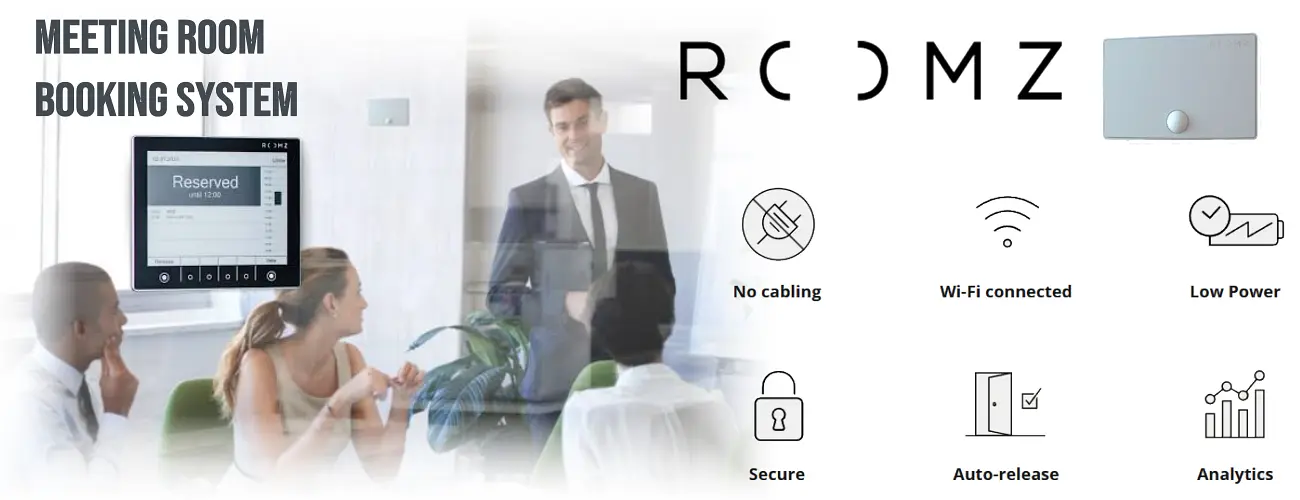
ROOMZ meeting room booking system — e-paper display showing Reserved status, Wi-Fi connected, no cabling required, auto-release, analytics — supplied in Dubai UAE by Vector Digital Systems
Authorised ROOMZ Reseller · UAE

ROOMZ — When the Landlord Says No Drilling

The email arrives from the landlord: "No drilling, no wall penetration, no new cabling. Existing infrastructure only." Every wired booking panel you have been looking at just became impossible to install. ROOMZ was built for exactly this moment.

The ROOMZ display installs like a picture frame, not like IT equipment. An 8-inch e-paper screen in a brushed aluminium frame with a glass front — it mounts with adhesive on glass, wood, stone or masonry, joins your existing Wi-Fi network, and runs for around four years on battery. No PoE. No power point. No cable of any kind. A floor of twenty rooms goes up in an afternoon. And if you re-stack the floor next year, the displays peel off and move with you.

The e-paper screen is a deliberate engineering choice, not a cost cut. Like a Kindle, it reflects ambient light instead of emitting it — which means it reads perfectly in direct sunlight where a backlit LCD washes out, it consumes up to 10,000 times less energy than a conventional display, and it looks like a printed room sign rather than a glowing gadget mounted on the wall.

"Architects who veto wall tablets approve ROOMZ displays. On certain projects, that is the entire specification."

Vector Digital Systems holds the authorised ROOMZ reseller line for the UAE — AED pricing, Dubai-based installation team, same-day survey across all seven emirates, and local support when a display needs attention years down the line. This is not a product we source on request; it is stocked and integrated by the same team that handles the Yealink side of your estate.

1,800+
organisations running ROOMZ globally
50,000+
offices equipped worldwide
Since 2016
ETH Zurich — original units still in service
How Booking Happens

Four Ways to Book — One Calendar Behind All of Them

ROOMZ does not replace your calendar. It puts four doors on it. Every booking — however it is made — writes back to the same room resource and is visible to everyone instantly.

Route 01
From your calendar — as always
Add the meeting room to an Outlook invite, a Teams meeting, or a Google Calendar event. The room accepts automatically. The booking — organiser name, meeting title, duration — appears on the door display within the sync cycle. Your team changes nothing about how they work.
Nobody learns new software. Nobody changes a habit.
Route 02
At the door — on the spot
Display shows the room is free. Press Book, pick the duration, done. The reservation writes back into the room's real calendar immediately, visible in Outlook and Teams across the organisation. On Microsoft 365, an instant booking from the door display can automatically create a Teams online meeting — the ad-hoc room grab comes with a join link already attached.
Corridor booking that creates a real calendar event, instantly.
Route 03
From the phone — before arriving
The myROOMZ app shows a live floor plan of every room, desk and huddle space — book from home the night before, from the taxi on the way in, or standing in the corridor reading the map instead of walking it. Over one million bookings have been made through the app.
Book your room before you leave home on Sunday night.
Route 04
From the big screen — Flightboard
The ROOMZ Flightboard turns any Smart TV in your reception, lobby or corridor into a live departures board for every meeting room on the floor — room name, status, current meeting, next booking, location on the floor plan. Visitors know where to go. Staff see the whole floor at a glance before walking it.
Runs on the Smart TVs you already own. Zero extra hardware.
How Release Works

Ghost Meetings Die Quietly — Every Day

Automatic
The sensor decides
The ROOMZ Sensor watches the room using passive infrared detection and a patented occupancy algorithm. If nobody enters within the first 15 minutes of the booking, the reservation is cancelled — on the display, in the calendar, in the app, on the Flightboard — without anyone lifting a finger. Ghost meetings stop accumulating from day one.
No user action required
Manual
Two taps at the door
Meeting finished twenty minutes early? Hold Release on the display, tap Confirm, and the remaining time returns to the pool immediately. Every colleague on the floor sees it free in the same moment — on their panel, in Outlook, in the app.
Under five seconds
No camera. No microphone. No identity.
The ROOMZ Sensor uses passive infrared — it detects presence, not people. No image, no audio, no biometric data, no individual tracking. Occupancy data is completely anonymous by design. This is why privacy-sensitive organisations — government ministries, legal practices, financial institutions — approve and deploy it without a legal review.
One honest trade-off — stated upfront
The e-paper display updates on a synchronisation cycle — a release or new booking appears on the door display within seconds, not milliseconds. A powered LCD panel updates the instant the calendar changes. That gap is real and deliberate: the sync cycle is what buys the four-year battery, the zero-cable install, and the 10,000× energy saving. For most buildings it is imperceptible in practice. If your requirement is a per-second live screen with millisecond-level updates, that is the Yealink path — and we will tell you so in the survey, not after the hardware arrives.
For the IT Reviewer

Which Microsoft Account Does ROOMZ Actually Need?

Every booking panel project eventually reaches an IT manager who asks three questions. Here are the answers before you have to ask.

For the decision-maker — plain language
If your meeting rooms already appear in Outlook when someone books a meeting — the resource accounts already exist. That is all ROOMZ needs to see. The IT work is confirming access permissions, not creating anything new. A room with a calendar in Microsoft 365 is a room ready for ROOMZ. On Google Workspace, the same logic applies to room resources in Google Calendar.
For the IT team — what gets configured
What does each room need?
A standard Microsoft 365 room resource mailbox — the free, unlicensed room calendar your organisation already uses for bookable meeting rooms. ROOMZ reads and writes this calendar through Microsoft Graph. No new mailbox type, no additional licences per room.
What access does ROOMZ receive — and what is it structurally blocked from?
Two connection methods, both configured by VDS during commissioning. Simple route: one dedicated unlicensed service account (e.g. roomz-manager@yourcompany.com) granted delegate access to room calendars only. Enterprise route preferred by security teams: an Azure app registration with application permissions under RBAC, scoped to a management scope containing only room mailboxes.
"The connector is technically incapable of touching a user's mailbox, email or personal calendar — its permission boundary contains nothing but meeting rooms. New rooms join the scope automatically; no per-room scripts needed when you add a room."
What do people see on the door display?
By default, Exchange writes only the organiser's name to a room calendar. If you want meeting titles shown on the display — a one-line Exchange setting per room, which we run during commissioning. Any meeting flagged Private in Outlook shows only as "Reserved" on the display — the booking is visible, the subject is nobody's business.
What about mixed estates — Exchange on-premise, or Google Workspace, or another booking system?
ROOMZ integrates with Microsoft 365, Exchange on-premise, Google Workspace, iCal XML and over 20 other booking platforms. Mixed estates are fully supported in the same ROOMZ portal — whether your rooms run Yealink, Neat, Logitech or any other certified system, the booking panel at the door is calendar-driven, not room-system-specific. Every VDS installation ships with the connector tested green in the ROOMZ portal and documented for your IT file before handover.
One Question Decides
Can you run a single Ethernet cable to each meeting room door?
That is the deciding factor. Everything else — platform, analytics, people-counting — follows from this one answer.
Yes
PoE available → Yealink RoomPanel
Yealink RoomPanel E2 / Plus E2
Native Teams Rooms or Zoom Rooms scheduling experience
People-counting, configurable release policies, instant sync
One management console with your Yealink room systems
Badge-tap accountability (Plus E2) — every booking has a name
WhatsApp — Yealink booking panels →
No
No cabling possible → ROOMZ
ROOMZ e-paper display system
Wi-Fi connected, battery-powered — zero cable anywhere
Same auto-release, same calendar integration, same analytics
Swiss-made · ISO 27001 · anonymous PIR · on-premise option
Works on 20+ platforms — mixed estates supported
WhatsApp — ROOMZ wire-free panels →
What the Data Pays Back

The System Pays for Itself in the First Quarter Report

Every check-in, release, no-show and occupancy count flows into a dashboard. After ninety days, you are not guessing about your floor — you are reading it.

By room
Utilisation by room, by floor, by hour — which rooms run full and which run empty, every day
By week
Peak days, average no-show rates by team, early-release recovery rates — the real shape of how your building gets used
Exportable
In formats a regional head office in London, Singapore or Riyadh accepts — the documentation trail for every facilities decision
"Boardroom A sits empty 60% of its booked hours."
That one sentence — from a real utilisation dashboard — has cancelled more office-expansion plans than any cost-cutting committee. A report built on bookings instead of bodies is fiction with a chart. The sensor layer replaces the fiction with the number your facilities head can actually use.
Where This Gets Deployed

Four Environments — One Technology

Corporate Floors — Business Bay, DIFC, Downtown
The classic ghost-booking cure: panels on every door, sensors on the contested rooms, utilisation data to facilities. The floor that looked undersized becomes correctly sized — same square meterage, real availability returned.
Law Firms and Advisory Practices
Plus E2 with badge-tap — because on a floor where partners bill by the hour, "who took the boardroom" cannot be a mystery. Every booking carries a name. The anonymous recurring slot that nobody owns stops existing.
Hotels, Business Centres and Co-Working Operators
Rooms that sell by the hour need displays that show truth by the minute. Released inventory goes straight back on sale — the front desk stops getting calls about "the system" and starts getting bookings.
Government, Free-Zone HQs and Defence-Adjacent
Where cabling approvals are slow and procurement asks about origin: the ROOMZ wire-free path fits both the wall and the file. No drilling, no contractor, Swiss manufacture — a booking system that clears procurement without a committee.
Installation

Calendar-Connected. Configured. Handed Over.

A booking panel that is not connected to your calendar is a photo frame. The integration is the product — and it is included in every VDS installation.

01
Survey and Scope
On-site or remote survey — wall type, PoE availability, room calendar structure. We confirm mount positions, power routing and any electrical work before a single bracket goes on a wall.
02
Mount, Power and Pair
Panels mounted — glass, concrete, drywall or 2-gang retrofit over existing panel positions. PoE connected, sensors paired direct over Bluetooth, estate brought online. Single room: under an hour. Full floor of 12 rooms: one day.
03
Integrate and Configure
Calendar connected — Microsoft 365 room resources, Google Workspace or Exchange. Check-in grace window, release policy and display settings configured to your decision. Floor-walk handover with your facilities or IT team before we leave.
What we tell you before you sign — not after
Panels need PoE or a nearby power point. Where neither exists, we quote the electrical work separately — as its own line, before installation begins.
Yealink panels are managed through the Yealink platform. ROOMZ through the ROOMZ cloud. Both are stated per-unit on the quotation.
Software subscriptions, where a platform requires them, appear on the quote before you approve. No line appears on an invoice that did not appear on the quote.
We need admin access to create or map room calendar resources from your side. That is the whole list of what we need from you.
Investment

What a Booking System Costs in Dubai

Every tier includes calendar integration, configuration and handover. WhatsApp your room count and platform — quotation same day.

Single Smart Room
AED 3,500 – 5,500
One room — panel only, check-in release
  • RoomPanel E2 mounted and powered
  • Teams, Zoom or Google calendar connected
  • Check-in auto-release configured
  • Same-day quotation on WhatsApp
Floor & Building Rollout
Scoped per building
10 panels or 200 — surveyed and phased
  • Mixed Yealink and ROOMZ estates
  • People-counting on contested rooms
  • Utilisation dashboard to facilities and IT
  • Phased rollout — rooms go live in batches
MEA Export

Booking Panels From Dubai Stock — 45 Countries

Booking panels export cleanly: small, high-value, and configured before they fly. We supply meeting room booking systems from Dubai stock to 45 countries across the GCC, Africa, South Asia, the CIS and the Caucasus — each panel labelled per room, firmware-updated before dispatch, with full export documentation and air freight in 3–7 days. A Nairobi or Riyadh office orders Monday and mounts panels the following week. Export enquiries: WhatsApp the export desk.

Saudi Arabia · Oman · Qatar · Kuwait · Bahrain · Iraq · Jordan · Kenya · Ethiopia · Tanzania · Uganda · Rwanda · Burundi · Djibouti · South Africa · Mozambique · Zimbabwe · Zambia · Mauritius · Seychelles · Nigeria · Ghana · Senegal · Côte d'Ivoire · Cameroon · Angola · Togo · Benin · Congo DR · Gabon · Egypt · Morocco · Algeria · Tunisia · Pakistan · Bangladesh · Sri Lanka · Kazakhstan · Uzbekistan · Turkmenistan · Kyrgyzstan · Tajikistan · Georgia · Azerbaijan · Armenia

WhatsApp Export Desk (Aneesh)
Client Experience

What Happened After Installation

★★★★★
"We had eleven meeting rooms and a permanent shortage. Vector installed panels with sensors on a Thursday; by the following week the shortage was gone — same eleven rooms. The no-show data ended an argument about leasing another floor. Nobody talks about meeting rooms here anymore, which I consider the entire point."
Deepa Nair, Facilities Manager
Advisory firm, DIFC
Direct Client
★★★★★
"The badge-tap booking changed behaviour in a way three years of emails never did. Every booking has a name on it now. Installation was one day for six rooms, and the release policy was configured the way we asked, not the way the box came. The honest scope list before we signed was what made us choose Vector."
Rashed Al Shamsi, Operations Director
Government-linked entity, Abu Dhabi
Direct Client
★★★★★
"Ordered panels for our new Nairobi floor from Vector in Dubai. Everything arrived labelled per room with the calendar accounts already mapped — my team mounted and went live in an afternoon. Air freight was five days. The pre-configuration alone saved us two days of local IT work."
Samuel Otieno, IT Lead
Regional HQ, Nairobi, Kenya
Export Client
Common Questions

Meeting Room Booking Systems — Answered

Our rooms show booked all day but half are empty. Will this actually fix it?
Yes — that exact pattern is what auto-release exists for. The panel requires a check-in when the meeting starts; no check-in within your grace window and the booking is cancelled, the room flips to available on every panel and every calendar. Add the occupancy sensor and the release happens on real presence — no tap needed, and rooms free up early when meetings finish ahead of schedule. Ghost bookings stop accumulating from day one.
Does the sensor need a gateway, a hub or extra wiring?
No. The Yealink RoomSensor pairs directly with the RoomPanel over Bluetooth 5.0 — no gateway box, no network drop, no cabling. It is battery-powered with roughly four years on a single CR123A cell, and mounts with adhesive. The only cable in the whole room-booking system is the one PoE cable feeding the panel — and on the ROOMZ path, not even that.
We are a Microsoft Teams organisation. How native is this?
Fully. RoomPanel E2 runs the Microsoft Teams panels experience — the same interface, the same room resource calendar, managed alongside your Teams Rooms. Bookings made in Outlook, Teams or at the panel are one and the same calendar. Zoom organisations get the equivalent native Zoom Rooms scheduling experience on the same hardware.
Can bookings be tied to a person, so anonymous block-booking stops?
Yes — that is the RoomPanel Plus E2 with its NFC/RFID reader. Staff tap their access badge to book, check in or extend, so every hold on every room carries an identity. On floors where room competition is political, accountability changes behaviour faster than any policy memo.
What happens when a meeting ends early?
With the sensor layer, the room releases itself. When the sensor detects the room has emptied ahead of the booking end time, the remaining slot is freed and appears as available across the floor. Without sensors, the room frees at the booking end or when someone ends it at the panel.
Can it show how many people are in the room, not just whether it is occupied?
Yes — the RoomSensor Pro adds AI people counting across 8 zones covering up to 50 square metres, and the live count displays on the panel outside. It is the difference between knowing a room is used and knowing a twelve-seat room hosted three people — the number that reshapes how a floor gets planned.
We cannot run cables — the landlord will not approve wall works. Are we stuck?
No. That is the ROOMZ deployment path: a Swiss-engineered battery-powered e-paper display that mounts with adhesive and runs up to four years per charge, paired with a wireless sensor for auto-release. Zero cabling, zero drilling, nothing to approve. It is the standard answer for heritage buildings, leased floors and rapid rollouts.
What does the dashboard actually tell us?
Room-by-room utilisation, peak hours and days, no-show rates, early-release recovery, and — with people counting — average headcount against room capacity. Exportable in formats a head office accepts. Most clients find the first quarter of data settles at least one long-running argument about whether more rooms are needed.
Which areas of the UAE do you cover for booking panel installations?
Vector Digital Systems serves businesses across all seven UAE emirates — Dubai, Abu Dhabi, Sharjah, Ajman, Ras Al Khaimah, Fujairah and Umm Al Quwain — supplying, installing and calendar-connecting meeting room booking systems. Within Dubai, active client sites include Business Bay, DIFC, Jumeirah Lake Towers (DMCC), Barsha Heights (TECOM), Dubai Internet City, Dubai Media City, Dubai Silicon Oasis, Downtown Dubai, Sheikh Zayed Road, Jebel Ali Free Zone (JAFZA), Dubai Investment Park (DIP), Dubai World Trade Centre, Dubai Healthcare City, Al Quoz, Deira, Bur Dubai, Al Barsha, Dubai Marina and Dubai South. Across the Northern Emirates and Abu Dhabi: Musaffah Industrial City (ICAD), Khalifa Industrial Zone (KIZAD), Masdar City, Al Ain, SAIF Zone (Sharjah), Hamriyah Free Zone, Sharjah Industrial Area, RAKEZ, Fujairah Free Zone and Ajman Free Zone. On-site installation, configuration and fault response across all of the above.
Do you export meeting room booking panels from Dubai?
Yes. We export meeting room booking panels and sensors from Dubai stock to 45 countries: Saudi Arabia, Oman, Qatar, Kuwait, Bahrain, Iraq, Jordan, Kenya, Ethiopia, Tanzania, Uganda, Rwanda, Burundi, Djibouti, South Africa, Mozambique, Zimbabwe, Zambia, Mauritius, Seychelles, Nigeria, Ghana, Senegal, Côte d'Ivoire, Cameroon, Angola, Togo, Benin, Congo DR, Gabon, Egypt, Morocco, Algeria, Tunisia, Pakistan, Bangladesh, Sri Lanka, Kazakhstan, Uzbekistan, Turkmenistan, Kyrgyzstan, Tajikistan, Georgia, Azerbaijan and Armenia — staged before dispatch, labelled per room, with full export documentation and air freight in 3–7 days.
Can the panels replace older scheduling panels we already have on the walls?
In most cases, yes — the RoomPanel family mounts flush on a standard 2-gang electrical box, which is how many earlier-generation panels were installed. Your existing cabling and wall positions carry over; the panels swap. It is the cheapest path to a modern booking estate, and we confirm compatibility at the site survey.
How long does installation take, and what do you need from us?
A single room is typically done within the hour on-site; a floor of eight to twelve rooms is a one-day job including calendar integration and testing. From your side: admin access to create or map the room calendar resources, and a decision on your check-in and release policy. Everything else — mounting, power, pairing, configuration, floor-walk training — is ours.

Count Your Rooms. Tell Us Your Platform.

Send two things on WhatsApp — how many meeting rooms, and whether you run Teams, Zoom or Google. The quotation comes back the same day, with the panel-and-sensor mix already matched to your building. Available from Dubai stock. Installed across all seven emirates.

WhatsApp — Same-Day Quotation
Available from Dubai stock  ·  All 7 emirates  ·  WhatsApp answered evenings and weekends