Description
Yealink MVC S90 Teams Rooms System Large Boardroom Video Conferencing Dubai
Yealink MVC S90 for Large Microsoft Teams Rooms in Dubai
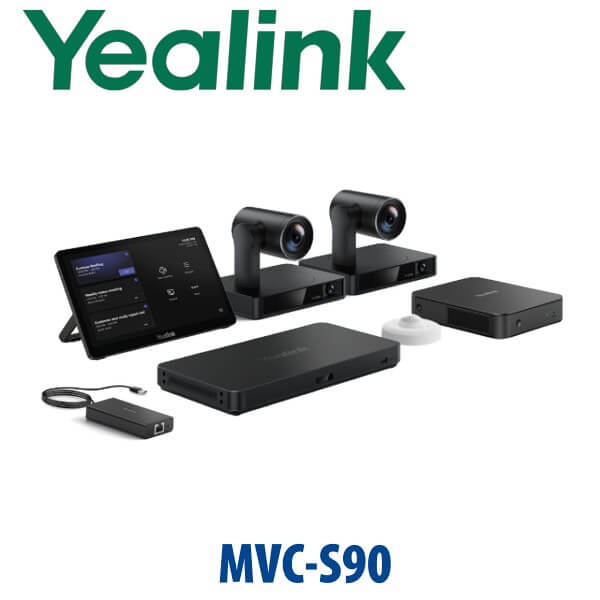
The Yealink MVC S90 is positioned for the Dubai buyer who needs a serious Microsoft Teams Rooms setup — not a webcam on a trolley, not a small huddle-room bar, but a complete boardroom system with room compute, touch control, camera, microphones, speakers and professional staging. It is the kind of solution used in executive boardrooms, training rooms, government meeting spaces, DIFC offices, DMCC headquarters and hybrid-work meeting rooms where every meeting must start cleanly from the room calendar.
Vector Digital Systems LLC supplies Yealink video collaboration systems in Dubai with pre-sales room sizing, hardware selection, staging, test calls and local warranty handling. Contact David, our Yealink specialist, with your room size, seating count, display plan and Microsoft 365 setup for a same-day quote in AED with VAT and delivery noted.
Platform Check — Teams Room, SIP Room or Zoom Room?
The biggest mistake in room-system buying is ordering a Microsoft Teams Rooms kit for a room that actually needs SIP video conferencing, Zoom Rooms or BYOD USB. The MVC S90 page is for Microsoft Teams Rooms planning. Before final quote, Vector Digital Systems verifies the current Microsoft certification status and confirms the right Yealink room package for your tenant, licence and room size.
| Your Meeting Platform | Right Yealink Direction | What You Need |
|---|---|---|
| Microsoft Teams Rooms | Yealink MVC S90 / MVC large-room package — verify certification status before final quote | Microsoft 365 tenant, Teams Rooms licence, room resource account and network access |
| Zoom Rooms | Zoom-certified Yealink room system — ask David for the current certified kit | Zoom Rooms licence, room calendar and admin access |
| SIP / H.323 video or boardroom audio only | Different Yealink conference or video system — not this Teams Rooms page | SIP video platform, VC gateway or room audio design |
Certification Rule — We Verify Before We Quote
Microsoft Teams Rooms certification must be checked before publishing or quoting. Yealink MVC packages are built for Teams Rooms, but the exact kit name, camera bundle and regional SKU can change. Vector Digital Systems verifies the current Microsoft-certified device listing before making a final certification claim. Until that check is complete, the correct buyer-safe wording is: verify certification status.
Power, Cabling and Room Readiness — No Surprises on Installation Day
A Teams Rooms system is not powered like a desk phone. The room needs AC power at the display wall, table or credenza, network access for the Teams Rooms compute, display cabling, camera cabling, audio cabling and, where required, PoE or network runs for additional room devices. We confirm the cabling plan before dispatch so the Dubai installation team does not arrive to find a missing floor box, short HDMI run or blocked conduit.
Where the MVC S90 Sits in the Yealink Room Range
The MVC S90 request normally means a large-room Yealink Teams Rooms requirement. Smaller rooms can often use a compact A-series or MVC400-style package; medium boardrooms move into MVC640 or MVC840-style designs; larger boardrooms, training rooms and council-table spaces need the MVC S90 / MVC900-class approach with stronger camera framing and distributed audio. Vector Digital Systems sizes the system to the room rather than forcing one bundle into every layout.
| Feature | MVC840 Class | MVC S90 / Large-Room Class ★ | MVC900 II Class |
|---|---|---|---|
| Best Room Size | Medium to large boardroom | Large boardroom, training room, executive suite | Large and extra-large multi-camera room |
| Platform | Microsoft Teams Rooms | Microsoft Teams Rooms — verify certification status | Microsoft Teams Rooms — verify current SKU |
| Camera Design | Single intelligent camera | Large-room intelligent camera plan | Advanced large-room camera plan |
| Audio | Room microphones and speaker set | Distributed microphones and speakers sized to table layout | Expanded audio for larger spaces |
| Touch Control | Teams Rooms touch panel | Teams Rooms touch panel with calendar join | Teams Rooms touch panel |
| Typical Buyer | Boardroom refresh | Executive room, HQ boardroom, training space | Enterprise large-room standardisation |
| Price Tier | Upper-mid | Large-room project tier | Enterprise large-room tier |
| Choose if… | You have a normal boardroom and want Teams-native meetings | You need a large-room Teams setup sized properly before quote | You want the highest large-room MVC package and expanded room coverage |
Dubai Use Cases for the Yealink MVC S90
Executive boardrooms in DIFC and Downtown Dubai. The MVC S90 class is built for rooms where remote participants must see the whole table, hear every speaker and join from the room calendar without IT support. This is the right conversation for CEOs, board secretaries, legal teams and finance leadership running regular Teams meetings with overseas stakeholders.
DMCC, JLT and Business Bay hybrid offices. Many Dubai offices have returned to the workplace but still run hybrid meetings with regional teams in Saudi Arabia, Qatar, India, Pakistan and Europe. A properly staged Teams Rooms system removes the usual laptop-sharing problem: no one searches for cables, changes audio devices or joins late because the wrong microphone was selected.
Training rooms and government meeting spaces. Large tables, classroom layouts and council-style seating need more than a single small-room bar. Vector Digital Systems checks the room shape, participant distance, display height and acoustic reflections before confirming the camera and microphone plan.
Full Technical Specification
| Specification | Yealink MVC S90 Large-Room Teams Rooms System |
|---|---|
| Product Type | Microsoft Teams Rooms video conferencing system for large rooms |
| Platform | Microsoft Teams Rooms — certification status must be verified before final quote |
| Room Size | Large boardrooms, executive meeting rooms, training spaces and council-table rooms |
| Core Components | Teams Rooms compute, touch controller, camera, microphone and speaker package — final bundle confirmed by current Yealink SKU |
| Camera | Large-room intelligent Yealink camera design; exact camera model verified before quote |
| Audio | Room microphones and speakers sized to seating count, table length and acoustic conditions |
| Touch Control | Teams Rooms touch panel for one-touch join, meeting control, mute, volume and participant management |
| Display Support | Single or dual display room design depending on Microsoft Teams Rooms layout and site cabling |
| Network Requirement | Reliable wired network for Teams Rooms compute, tenant access, Teams service access and room calendar integration |
| Licence Requirement | Microsoft Teams Rooms licence and room resource account configured by the customer or Microsoft 365 administrator |
| Installation Scope | Supply, pre-sales design, staging and dispatch; installation quoted separately where required |
| Warranty | Local warranty handling through Vector Digital Systems LLC in Dubai |
Compatible Accessories and Room Add-Ons
| Accessory / Add-On | Use | Quote Note |
|---|---|---|
| Additional Microphones | Extends pickup across long tables, U-shaped rooms or training layouts | Selected after room drawing or site photo |
| Additional Speakers | Improves audio coverage for larger rooms and long boardroom tables | Quoted with room dimensions |
| Dual Display Cabling | Separates remote participants and shared content across two screens | Confirm HDMI path and display inputs |
| Room Scheduling Panel | Outside-room booking visibility for meeting spaces | Optional; depends on office workflow |
| Installation Materials | Mounts, cable management, patch leads, trunking and labelling | Quoted after site readiness check |
Staging Before Dispatch — What Vector Digital Systems Configures
Vector Digital Systems stages Yealink Teams Rooms systems before dispatch wherever customer tenant access and Microsoft 365 details are available. The process includes hardware inspection, component pairing, firmware readiness check, Teams Rooms startup test, touch-panel response check, camera and audio verification, cable labelling and dispatch packing. For Dubai installations, we also confirm the display plan, network port, room account readiness, Teams Rooms licence and installation accessories before the system reaches site.
Export from Dubai
Vector Digital Systems exports Yealink room systems from Dubai to system integrators, corporate IT teams, hotel groups and government procurement teams across the Gulf, Africa and South Asia. Common destinations include Oman, Saudi Arabia, Kuwait, Qatar, Bahrain, Kenya, Tanzania, Nigeria, Pakistan and Sri Lanka. Shipments are quoted FOB Dubai with commercial invoice, packing list and certificate of origin on request. For export buyers, David can quote complete Yealink room kits, spare microphones, touch panels and installation accessories together so the remote integrator receives one project-ready shipment.
Get a same-day MVC S90 quote in AED
Send David your room size, seating count, screen count, Microsoft Teams Rooms licence status and whether installation is required. We quote the correct Yealink room package with VAT breakdown, delivery and staging scope.
Frequently Asked Questions — Yealink MVC S90
Is the Yealink MVC S90 a Microsoft Teams Rooms system?
The MVC S90 request is treated as a Yealink large-room Microsoft Teams Rooms requirement. Before final quote, Vector Digital Systems verifies the exact current Yealink SKU and Microsoft certification status so the system matches your tenant, licence and meeting-room size.
Does the Yealink MVC S90 work with Zoom or SIP video calls?
This page is for Microsoft Teams Rooms planning. If your room runs Zoom Rooms, SIP video, H.323 or BYOD USB conferencing, ask David for the correct Yealink platform instead. Ordering a Teams Rooms kit for the wrong meeting platform is the room-system version of the Yealink platform trap.
What room size is the Yealink MVC S90 designed for?
The MVC S90 class is intended for large meeting rooms such as executive boardrooms, training rooms and long-table conference rooms. David will confirm the camera and audio design from your seating count, room dimensions, table layout and display wall before quoting.
MVC S90 vs MVC840 — which one should I buy?
Choose an MVC840-class system for a normal medium-to-large boardroom. Choose the MVC S90 / large-room class when the table is long, the room is used for executive meetings or training, and you need stronger camera and audio coverage. For enterprise standardisation across very large rooms, David may recommend an MVC900 II-class package after checking the current Yealink lineup.
Does the Yealink MVC S90 need a Microsoft Teams Rooms licence?
Yes. A Microsoft Teams Rooms system needs the correct Teams Rooms licence, a room resource account and Microsoft 365 tenant configuration. Vector Digital Systems supplies and stages the Yealink hardware; your Microsoft 365 administrator provides or approves the room account and licence.
Can Vector Digital Systems install the Yealink MVC S90 in Dubai?
Yes. Vector Digital Systems can quote supply, staging and installation scope for Dubai meeting rooms. Installation requirements depend on display mounting, cable paths, network availability, table boxes, AC power and whether the room needs extra microphones, speakers or scheduling panels.
Who is the Yealink authorised supplier in Dubai?
Vector Digital Systems LLC has supplied Yealink products and VoIP solutions in Dubai since 2009. David handles Yealink pre-sales specification, Teams Rooms package selection, project pricing, staging and warranty coordination locally.
What is the best Yealink video system for a large boardroom in Dubai?
For a large Microsoft Teams boardroom, the MVC S90 / MVC900-class Yealink room package is usually the right starting point. For smaller meeting rooms, an A20, A30 or MVC400-style solution may be more cost-effective. David will recommend the exact model after reviewing the room size, seating count, display plan and platform.
Does Vector Digital Systems configure the Yealink MVC S90 before delivery?
Yes. Vector Digital Systems stages the system before dispatch wherever tenant access and customer details are available. Hardware is checked, touch control is tested, camera and audio are verified, cables are labelled and the system is packed for the room installation team.
Does Vector Digital Systems export Yealink Teams Rooms systems from Dubai?
Yes. Vector Digital Systems exports Yealink room systems from Dubai to integrators and enterprise buyers in Oman, Saudi Arabia, Kuwait, Qatar, Bahrain, Kenya, Tanzania, Nigeria, Pakistan and Sri Lanka. Shipments are quoted FOB Dubai with commercial invoice, packing list and certificate of origin on request.