
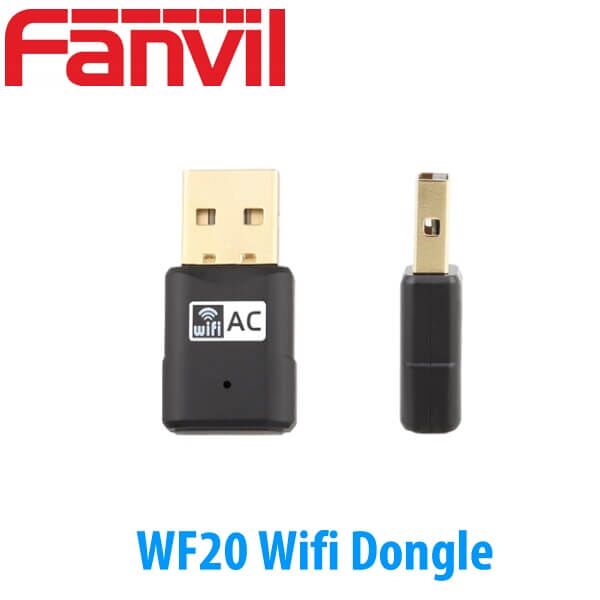
Description
Fanvil WF20 USB Wi-Fi Dongle 2.4GHz Wi-Fi Adapter for Fanvil IP Phones Dubai
Compatible with Fanvil IP phones that support Wi-Fi through a USB dongle — including project phones such as the Fanvil X7, X7C, X210, X210i, and older compatible USB models still running in UAE offices — the Fanvil WF20 USB Wi-Fi Dongle is the small accessory that solves a very common site problem: the phone location is fixed, but the Cat6 point is missing, blocked, or too expensive to pull after handover.
This is not the part you buy for every desk. It is the part you keep ready for the exceptions: the temporary reception counter in a Dubai fit-out, the showroom desk moved after furniture installation, the hotel back office where the wall point is behind a cabinet, or the branch manager desk where the phone must go live today and the network contractor comes next week.
Vector Digital Systems supplies the Fanvil WF20 from Dubai for project quantities, staged Fanvil phone rollouts, and replacement accessory orders. We do not position it as a replacement for proper structured cabling across a full office. We position it honestly: when the phone supports USB Wi-Fi, and the office Wi-Fi is stable at that desk, WF20 gets the handset online without another cable run.
What the WF20 is
The Fanvil WF20 is a USB Wi-Fi dongle for Fanvil IP phones that support wireless connectivity through a USB Wi-Fi adapter. It connects the phone to a 2.4GHz wireless network and supports a 150Mbps transmission rate. The unit is small, low power, and plug-and-play in the right Fanvil handset.
For a project buyer, the important line is not just “USB Wi-Fi.” The important line is “compatible phone.” WF20 does not turn every Fanvil phone into a Wi-Fi phone. The desk phone must have the correct USB port and must support Wi-Fi dongle operation. That is why we check the phone model before quoting the accessory. One letter in a Fanvil model name can change the network story.
In a staged deployment, we test the phone and dongle before dispatch where the phone batch is supplied by Vector Digital Systems. For export orders, we label accessories by model and quantity so the receiving installer knows which desk phones are getting the WF20 instead of a wired network connection.
Compatibility rule before ordering
WF20 works only with Fanvil IP phones that support Wi-Fi through a USB dongle. Send us the phone model and quantity on WhatsApp and we confirm the right accessory before you place the order.
Where it earns its place in a Dubai phone project
Most new office deployments in Dubai should still be wired. One Cat6 point to the desk, PoE from the comms room, phone and PC passthrough where the handset supports it. That is the cleanest fit-out. It gives the installer fewer calls later and gives the IT manager a predictable voice path.
But projects are not always clean. Furniture changes. Reception counters move. Temporary offices open. A showroom desk shifts after the sales manager sees the customer flow. A JLT or Business Bay tenant may inherit a layout where the floor boxes are in the wrong place. In those cases, WF20 keeps the Fanvil handset usable while the network plan catches up.
The accessory is also useful for demo rooms, training rooms, branch testing, and hotel back-office desks. A system integrator can prepare the PABX, register the extensions, test the phone on the bench, and dispatch the handset with WF20 for the desk that cannot be cabled on day one.
The honest limit is simple: Wi-Fi coverage equals call coverage. If the wireless signal at the desk is weak, the call will not feel like a wired phone. We ask where the phone will sit, how far it is from the access point, and whether the site has proper office Wi-Fi or only guest Wi-Fi. That question saves return visits.
2.4GHz / 150Mbps — what that means for voice
WF20 supports 2.4GHz Wi-Fi and a 150Mbps wireless rate. Voice traffic does not need anything close to 150Mbps. A SIP phone call uses a small amount of bandwidth compared with video, file transfer, or cloud backup. The reason the specification matters is range and compatibility, not raw speed.
2.4GHz often travels farther inside offices than 5GHz, especially around partitions, small meeting rooms, and older interiors. That helps when the phone is at a reception side table, warehouse admin desk, or temporary counter. The trade-off is that 2.4GHz is also the crowded band in many buildings. Many access points, printers, scanners, handheld devices, and guest networks live there.
For a single Fanvil desk phone, WF20 is normally fine when the signal is strong and the wireless network is not overloaded. For thirty desks, we do not recommend building the voice project around dongles. Run cable. Use PoE. Keep WF20 for the desks where cabling is late, impossible, or not worth the civil work.
Wi-Fi is not the same as a wired voice point
WF20 depends on the site wireless network. If the desk has poor Wi-Fi, the phone will behave like a device on poor Wi-Fi. For front desks, operator positions, and high-call desks, we still prefer wired Ethernet with PoE.
The buyer mistake we see with Wi-Fi dongles
The most common mistake is ordering the dongle without checking the phone. “It is a Fanvil, so it should work” is not enough. Some Fanvil phones have built-in Wi-Fi. Some support Wi-Fi by USB dongle. Some are meant to stay wired. Some older models in UAE offices support WF20, but they may be near the end of their useful project life. The accessory decision depends on the handset.
The second mistake is using WF20 to avoid proper cabling on a new office. One or two dongles for special desks is normal. A whole-floor voice deployment over mixed Wi-Fi is a service call waiting to happen. If the client has already paid for a fit-out, cable the desks that take daily calls. Use WF20 for the exception desk, not the standard desk.
That is how we quote it from Dubai: phone model first, site use second, quantity third. We can supply a single WF20 for an existing phone, or include it inside a staged Fanvil project where selected desks cannot use Ethernet. For new phone selection, compare the Fanvil desk phone range first on the Fanvil IP phone matrix, then decide which seats need Wi-Fi.
Power, ports, and network truth
WF20 is a USB accessory. It does not have SIP lines, PoE, DSS keys, a display, or a phone power supply. It draws low power from the compatible Fanvil phone’s USB port and provides the phone’s wireless network path. The phone itself still needs power. That power may come from PoE, from a Fanvil power adapter, or from the phone model’s normal power method.
This is where accessory orders get confused. A Wi-Fi dongle removes the network cable requirement for data, but it does not magically power the phone. If the phone was previously powered by PoE through the Ethernet cable, and you remove that cable, the phone now needs a local power adapter unless the site still uses the Ethernet cable for PoE only. In practice, most desks using WF20 also need us to check the power method.
Dongle does not power the phone
WF20 gives Wi-Fi connectivity to a compatible Fanvil phone. The phone still needs power. If you are not using PoE through the network cable, ask us to include the correct Fanvil power adapter in the same quote.
For Dubai office projects, this matters at handover. The installer may arrive with the dongle, plug it into the phone, and then realise the phone was depending on PoE from the switch. We stop that problem at quotation stage: phone model, desk power, Wi-Fi SSID, and quantity are checked before dispatch.
Current compatibility notes for Fanvil deployments
Fanvil lists WF20 for Fanvil IP phones that support Wi-Fi connectivity through a Wi-Fi dongle. The older accessory documentation names models such as X5S, X6, X7, X7C, X210, and X210i. In live UAE projects, that means we treat WF20 as a checked accessory, not a universal add-on. We confirm the exact phone model before we quote.
That check is even more important now because many current Fanvil phones have model variants with built-in Wi-Fi, wired-only versions, or different suffixes. A buyer may be better served by a Wi-Fi model from the start instead of adding a dongle later. For a new project, we compare the desk phone, the cabling plan, and the user role before deciding.
For example: a receptionist on an Fanvil X210 should be wired where possible because the desk handles transfers all day. A manager’s temporary desk or a showroom handset may be suitable for WF20 if the Wi-Fi signal is strong. A hotel back office phone may use WF20 during refurbishment where pulling cable would delay room turnover.
WF20, BT20, or a Wi-Fi phone — choose the right Fanvil path
| Fanvil item | What it adds | Best use | Decision note |
|---|---|---|---|
| WF20 — this accessory | 2.4GHz Wi-Fi network connection through USB | Compatible Fanvil phones where Ethernet is not practical | Check phone model and power method before ordering |
| BT20 | Bluetooth headset connection through USB | Users who need wireless headset pairing on supported Fanvil phones | It is for headset audio, not Wi-Fi network access |
| Fanvil W-model phone | Built-in Wi-Fi on selected phone variants | New projects where Wi-Fi is part of the desk plan | Better choice when many desks need wireless from day one |
| Wired Fanvil phone | Ethernet and PoE through network cabling | Reception, operators, call-heavy desks, stable office rollouts | Choose wired when voice quality matters more than desk flexibility |
| Verdict | Choose WF20 if the Fanvil phone already supports USB Wi-Fi and the desk has good wireless coverage. Choose BT20 if the user needs a Bluetooth headset. Choose a W-model Fanvil phone if Wi-Fi is part of the project from the start. Choose wired Ethernet for front desks and heavy call positions. | ||
Platform compatibility in Dubai projects
WF20 is not a PABX platform license and it does not change the SIP registration itself. The compatible Fanvil phone still registers to the voice platform: 3CX, Grandstream UCM, Yeastar, Asterisk, or to Etisalat and du SIP service through the customer’s approved setup. WF20 only changes how that phone reaches the network.
During staging, we register the extension, apply the provisioning template, test a call, and then check the wireless path where the deployment uses WF20. For project batches, we label the phones that need the dongle so the installer does not waste time opening every box at site.
This is the difference between buying a dongle and buying a deployment-ready accessory. A USB adapter in a packet is only one part of the job. The phone must be compatible, powered, provisioned, and tested. That is why project buyers in Dubai ask us to quote WF20 with the phones, power adapters where needed, and staging in one line.
Pricing, supply, and staging from Dubai
Fanvil WF20 is supplied from Dubai with same-day AED quotation. We quote it as a single accessory, as part of a Fanvil desk phone batch, or as an export accessory line for resellers and PABX installers. VAT breakdown and delivery can be included for UAE orders.
For 10+ or 50+ desk phone deployments, we do not simply multiply dongles. We ask which desks actually need Wi-Fi. Most offices need only a few. That keeps the project cleaner and avoids turning wireless into the default voice network by accident.
Staging before dispatch: compatible Fanvil phone checked, extension registered, provisioning template applied, Wi-Fi requirement marked, test call made where the phone batch is supplied for staging. For export orders, WF20 quantities are packed and labelled by model and destination.
Frequently asked questions
Which Fanvil phones does the WF20 work with?
WF20 works with Fanvil IP phones that support Wi-Fi connectivity through a USB dongle. Known compatible project models include Fanvil X7, X7C, X210, X210i, and older compatible USB models still in service such as X5S and X6. Send us the exact phone model before ordering and we confirm compatibility.
Will the WF20 work with our 3CX / Grandstream UCM / Yeastar system?
Yes, where the Fanvil phone itself is compatible with your platform. WF20 only provides the Wi-Fi network path. The phone still registers as a SIP endpoint on 3CX, Grandstream UCM, Yeastar, Asterisk, or the approved Etisalat and du setup used at the site.
Does the WF20 come with a power adapter, or do I need PoE?
WF20 is a USB Wi-Fi dongle and does not power the phone. If the phone is not powered through PoE, you may need the correct Fanvil power adapter. We check the phone model and include the power adapter in the same quote when needed.
Does the WF20 support 5GHz Wi-Fi?
No. WF20 is a 2.4GHz Wi-Fi dongle with 150Mbps wireless rate. For voice, the key question is not speed; it is signal quality at the desk. If the 2.4GHz network is crowded or weak, use wired Ethernet or choose the right Fanvil Wi-Fi phone for the project.
Fanvil WF20 vs BT20 — what is the difference?
WF20 is for Wi-Fi network connectivity on supported Fanvil phones. BT20 is for Bluetooth headset connectivity on supported Fanvil phones. They solve different problems. If the phone needs wireless internet access, ask for WF20. If the user needs a Bluetooth headset, ask for BT20.
Does Vector Digital Systems configure the phones before delivery?
Yes. For staged Fanvil phone projects, we register extensions, apply the provisioning template, mark the phones that need WF20, and test calls before dispatch. For accessory-only orders, we confirm phone compatibility before quoting.
Is VoIP legal in the UAE and will this work with Etisalat or du?
Business VoIP over licensed operators is standard in the UAE under TRA regulation. WF20 does not change the legal setup; it only connects a compatible Fanvil phone to Wi-Fi. The phone must still be configured on an approved Etisalat or du business voice service, or through the customer’s licensed PABX setup.
Is the WF20 covered under Fanvil warranty in the UAE?
Yes. Fanvil WF20 supplied by Vector Digital Systems is covered under Fanvil manufacturer warranty, with UAE warranty handling through our Dubai team for supported deployments and confirmed accessory orders.
Who is the supplier of Fanvil WF20 in Dubai?
Vector Digital Systems LLC is an authorised Fanvil supplier in Dubai, UAE, operating since 2009. We supply Fanvil WF20 with compatibility checking, phone staging where required, procurement documentation, and warranty handling for UAE project buyers, system integrators, PABX installers, and resellers.
What is the best Wi-Fi accessory for Fanvil IP phones in Dubai?
For a compatible Fanvil phone that supports USB Wi-Fi, the WF20 is the right Wi-Fi accessory: 2.4GHz, 150Mbps, low-power USB design, and project-friendly ordering from Dubai. For a new deployment with many wireless desks, consider a Fanvil phone variant with built-in Wi-Fi instead of adding dongles to every handset.
Does Vector Digital Systems export Fanvil WF20 from Dubai?
Yes. We export Fanvil WF20 accessories from Dubai to telecom resellers, PABX installers, and system integrators in Saudi Arabia, Oman, Qatar, Bahrain, Kenya, Tanzania, Uganda, Nigeria, Ghana, and Pakistan. FOB Dubai pricing is available with commercial invoice, packing list, and certificate of origin.
UAE coverage and MEA export
Vector Digital Systems supplies Fanvil WF20 across Dubai, Abu Dhabi, Sharjah, Ajman, Ras Al Khaimah, Fujairah, and Umm Al Quwain. For UAE projects, we can supply the dongle alone, bundle it with compatible Fanvil phones, or include it inside a staged PABX rollout for offices, hotels, showrooms, and free zone branches.
For export, we supply Fanvil WF20 from Dubai on FOB terms to telecom resellers and installers across the Gulf, East Africa, West Africa, and South Asia. Export documentation includes commercial invoice, packing list, and certificate of origin. Send the model, quantity, and destination on WhatsApp for an export quote.
Get a quote for Fanvil WF20
Dubai stock · Same-day AED quote · Compatibility check · Project quantities and export

