

Write on it. Call from it. Share it.
If you buy the right one of five. All 7 emirates.
Every supplier sells a "smart board." Five completely different products hide behind that name — and most boardrooms honestly don't need the expensive one. Vector Digital Systems stocks the real thing across seven brands, tells you plainly when a normal display serves you better, and installs whichever answer is true. Since 2009, from Dubai stock.
- The right one of the five products sold as "smart board"
- An honest answer on whether you need touch at all
- Remote participants who can actually see the ink
- Size measured from the last seat, not the wall
- Current Android with real certification, not a trap
- Installed, configured and demonstrated live
Everyone sells you a "smart board" — five different products hide behind that name
Ask five Dubai suppliers for a smart board and you will receive five quotes for five different machines — all called the same thing, priced thousands of dirhams apart, each salesman certain his is the one you meant.
One is a complete meeting system with cameras and microphones built into the glass. One is a classroom panel running Android whiteboarding. One is just a big touchscreen waiting for your PC. One isn't interactive at all — it's a wireless presentation screen wearing the wrong name. And one is a camera pointed at the ordinary whiteboard you already own. Buy the wrong one and you discover it in week two: the boardroom that paid for touch nobody uses, the classroom panel that can't join a Teams call by itself, the "interactive" display that turns out to be a mirror for laptops.
This page is the decoder. The five products separated in plain language, the question that tells you whether you need touch at all, the truth about how people on the call actually see your writing, and the one-photo shortcut to the right answer for your room.
The five products sold as a “smart board” — separated in plain language
1. The all-in-one collaboration board (AED 16,000–45,000). A complete meeting room in one panel: 4K touch glass, cameras, microphone arrays and speakers built in, running native Microsoft Teams or Zoom — walk up, tap once, you are in the call, writing on a shared canvas the far end sees live. The Neat Board and Yealink MeetingBoard class. This is the real "smart board" most corporate buyers imagine, and the only type that is a video conferencing system by itself.
2. The interactive flat panel — IFP (AED 4,500–18,000). A 4K touch panel running Android whiteboarding and apps, with no built-in conferencing camera worth the name. The classroom and training standard — twenty-point touch, two students writing at once, lessons saved and shared. For video calls it needs a camera, a microphone and usually a PC added. Brilliant at what it is; routinely mis-sold as type one.
3. The plain touch display (AED 3,500–12,000). A large touchscreen with no operating system ambitions — it shows and touches whatever your connected PC runs. The right answer for control rooms, kiosk-style uses and rooms standardised on Windows software. It is a peripheral, not a system, and honest quotes say so.
4. The wireless presentation display — not interactive at all. A screen with wireless sharing built in or added — the BenQ InstaShow class — where phones and laptops mirror without cables. Superb at exactly that, and sold with alarming frequency to buyers who asked for a whiteboard. If your finger does nothing on the glass, you did not buy an interactive display.
5. The whiteboard camera (AED 1,500–4,500). A companion camera — the class Logitech's Scribe defines — aimed at the ordinary dry-erase board you already own, sharing the physical ink into the call and cleaning up the presenter's shadow. The budget path to "remote people can see the board" — with the honest limits that the ink stays analog and nothing is saved as data.
Ranges are supply-only per class; installation and configuration are quoted per room. The expensive mistake in this category is rarely overpaying inside a type — it is being sold type two or four when your meetings needed type one.

Do you actually need touch? Most boardrooms don't — here's who does
The least profitable sentence on this page, and the most useful: most boardrooms never touch the glass after week one. Meetings there are talking, slides and video calls — a excellent normal display with a good camera and microphones serves them better, for less money, with nothing to smudge.
Who genuinely needs touch: trainers and teachers, because a lesson is written, annotated and saved, every session; designers, engineers and planners, who mark up drawings and sketch options with clients in the room and on the call; workshop and strategy rooms, where the board is the meeting — sticky-note canvases, live edits, group work; and huddle spaces built for co-creation, where two people stand and think on the glass. If your room lives in one of those sentences, buy touch and use this page to buy the right type. If it doesn't, say so on WhatsApp and we will quote you a better room for less — the survey exists to stop you paying for glass your meetings will never finger.
Can the people on the call actually see what you write? The question that decides everything
Here is the scene that sells half the boards in Dubai: someone writes on a whiteboard during a video call, and the remote side sees a glare-washed rectangle with a person's back in front of it. Whatever fixes that scene is what the buyer is really shopping for — and there are exactly two fixes, with very different prices.
Fix one: digital ink. On types one and two, the writing never exists on physical glass — it is data on a shared canvas, and the far end sees it pixel-perfect, live, from the first stroke. On the all-in-one boards the canvas travels inside the Teams or Zoom whiteboard natively; participants can even ink back from their laptops. Saved, searchable, emailed at meeting end. This is the full answer, at full-answer prices.
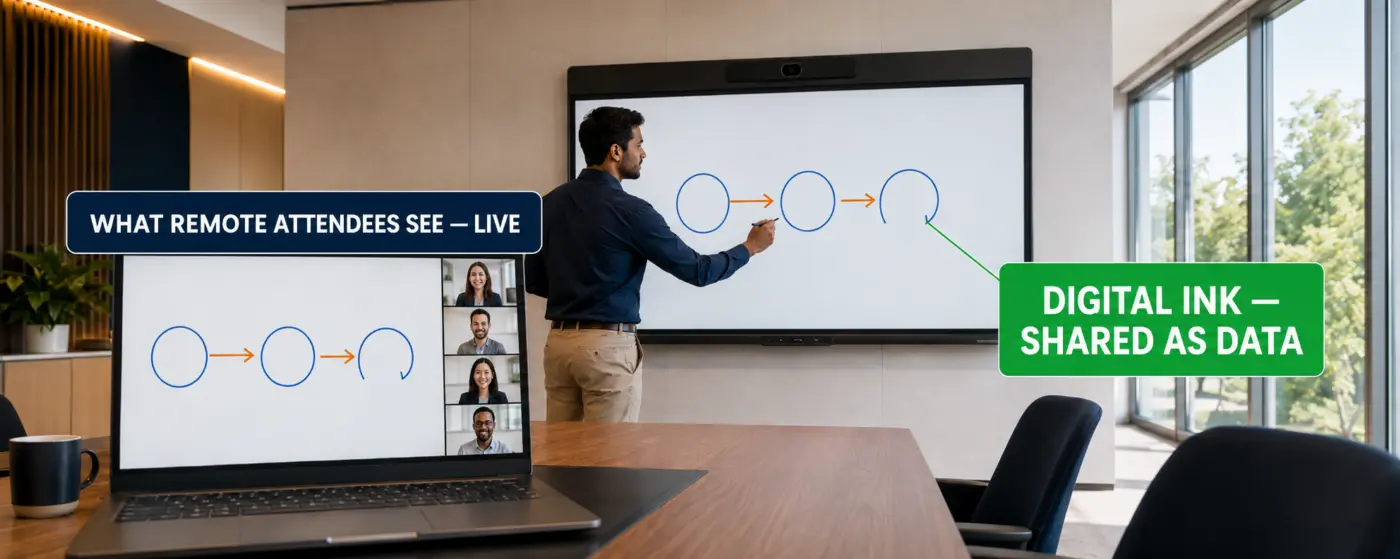
Fix two: a camera on the analog board. The whiteboard-camera class shares your existing dry-erase board into the call, software-enhancing the ink and ghosting the presenter's body so remote viewers see through them. Dramatically cheaper, honestly effective — and honestly limited: the ink is still marker on glass, nothing is a file, and the board itself is still the one that needs wiping. Training rooms on a budget love it; document-driven teams outgrow it.
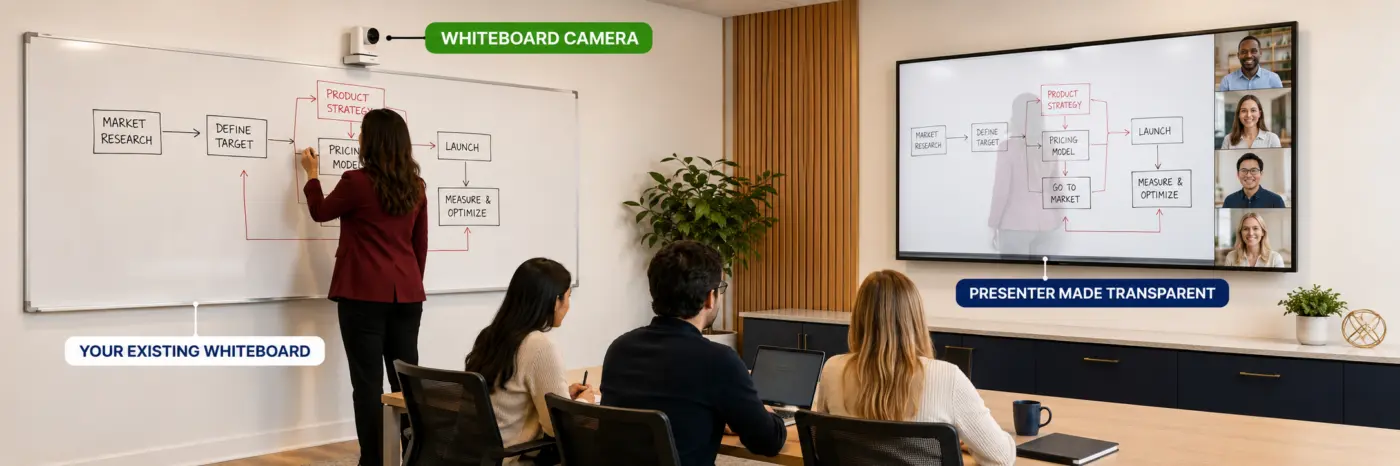
Ask every supplier this one question — "show me exactly what the remote participant sees when I write" — and watch the five product types separate themselves in thirty seconds. It is the demonstration we lead with, because it is the moment buyers actually decide.
The four specs that matter — and the Android trap inside cheap panels
The Android trap first, because it costs the most. Budget panels ship with old Android versions and no certification path — which means app stores that half-work, conferencing apps that age out of support, and a board that is obsolete as software while the glass is still perfect. Current-generation panels carry recent Android with Google's EDLA certification — full Play Store, managed updates, a supported life measured in years. It is one line on the datasheet and the whole difference between an appliance and a regret; we check it on every panel we quote.
Touch quality: twenty-point touch is the professional standard — two people writing simultaneously without the glass arguing — and the writing feel comes from low latency and properly bonded glass, which is why we make you write on the demo unit rather than read numbers. Glare and glass: anti-glare etched glass decides whether the board is readable opposite a Dubai window — bring your room's lighting into the conversation, not just the spec sheet. Built-in AV or not: the honest boundary between type one and type two — if the panel has no real camera and microphones, every video-call promise on its brochure is quietly assuming equipment you haven't bought yet.
What size board? Measure the last seat, not the wall
Boards run 55, 65, 75, 86 and up — and the 75-inch is the most-quoted size in the UAE market for one reason: it fits the most common rooms. But "most common" is not "yours." The test is the same one our large meeting rooms page applies to every display: can the person in the farthest seat read what is written? Handwriting is smaller and thinner than presentation text, so interactive boards genuinely need more inches per metre of room than a slides-only screen.
Working guidance from our installs: huddle rooms to 3–4 metres, 55–65 inch. Standard meeting rooms to 6 metres, 65–75. Boardrooms and classrooms to 8 metres, 75–86. Past that depth, one board stops being an answer — the back row cannot read ink — and the room moves to a board-plus-repeater-display design, or reconsiders whether the far zone needed to read the ink at all. Send the room depth with your photo; the size question closes in the first reply.
Teams and Zoom on the board itself — one touch, and the licence line as always
The all-in-one class runs Microsoft Teams Rooms or Zoom Rooms natively on the board: the calendar on the glass, one tap to join, the whiteboard shared into the call as a first-class citizen. It is the cleanest meeting-start experience in any room we build — and it carries the recurring line this site refuses to hide: a native room platform means a room licence, per board, per year. Teams Rooms and Zoom Rooms are licensed per room; the whiteboard-in-call and one-touch experience ride on that licence, and our quotations state it as its own line — included, excluded or not applicable — exactly as our divisible rooms page explains for every native room. Boards used BYOD-style — your laptop drives the call, the board is canvas and screen — carry no room licence at all, which is part of why type two and three quotes look lighter. Neither answer is wrong; undisclosed is wrong.
Huddle, boardroom, classroom, executive suite — the right board for each
The huddle room. A 55–65 inch all-in-one board is the entire room: camera, audio, canvas, calls, no other equipment, one cable to power. The highest satisfaction-per-dirham install in this category.
The boardroom. Ask the touch question honestly first. Boards that earn their place here are type one at 75–86 inch, native platform, whiteboard used in real strategy sessions. Boards that don't get used become the most expensive slide screen in the building — the survey exists to catch that before the invoice does.
The classroom and training room. Type two territory: 75–86 inch IFP, twenty-point touch for group work, lesson recording, and the current-Android certification checked hard because education panels live the longest and suffer software age the worst. Pair with a tracking camera and the hybrid classroom is complete.
The executive suite. Design-forward all-in-ones — the class where the Neat Board built its reputation — where the board must look like furniture, join calls in one touch, and never require IT to visit. Aesthetics are a real requirement here, not vanity; the board lives where clients sit.
Eight brands, compared honestly
Yealink — the MeetingBoard: a true type-one all-in-one running native Teams, the sharpest value in the class, and the natural choice for organisations already on Yealink rooms. Neat — the Neat Board and Board Pro: the design-forward all-in-one that defined the category's executive tier, with Neat Pulse management behind it. MAXHUB — the value-engineering champion of types one and two: current V6-generation panels with Google EDLA certification at prices that make multi-room rollouts add up. Samsung — the display giant's interactive Flip line and commercial panels: glass and image quality first, the corporate-standard badge on the wall. ViewSonic — the ViewBoard line: education's workhorse, deep whiteboarding software, honest pricing. Promethean — the ActivPanel line: the pure-education specialist, built around pedagogy and classroom management rather than boardrooms. BenQ — the Board line for classrooms plus InstaShow for the wireless-presentation class — germ-resistant glass and eye-care modes that education buyers specifically ask for. Logitech — no touch board, and honestly so: its answer is Scribe, the reference whiteboard camera — AI that lets remote viewers see through the presenter, a wireless share button, and native integration with Teams, Zoom and Meet rooms. The right brand when your answer to the touch question was "no — but remote people must see the board."
All eight are stocked or supplied from Dubai, which is why the comparison can stay honest: your room type picks the product class, the class shortlists two or three brands, and budget plus demo-feel pick the winner. We will not sell an education panel into a boardroom brief, or the reverse — the return visit costs us more than the honesty does.
Two smart-board quotes, thousands apart — here’s what the cheap one skipped
You asked three suppliers for the same size board. The quotes came back far apart — sometimes for the same brand. Before choosing the cheap one, check what it actually includes, because a board in a carton and a board working on your wall are different products.
Five things separate them. The product type — is it truly the all-in-one you asked for, or a type-two panel wearing the name, with the camera and microphones you'll need priced nowhere? The wall — an 86-inch board weighs what a small fridge weighs; the mount, the wall reinforcement and the cable path to it are real works, and a quote silent on the wall has not visited your room. The compute — native Teams or Zoom boards may need their room compute and always need their licence line disclosed. The configuration — platform enrolment, apps, wireless sharing, and the whiteboard actually tested into a live call, not just powered on. The handover — an hour teaching your team the three things they'll actually do: start a call, write and share, send the canvas.
The cheap quote is usually missing the wall works or the configuration. It doesn't disappear — it returns as a variation order, or as a board that ends up used as a very expensive television. Our quotations list all five as lines, so the comparison you make is real. Put any quote beside this list and ask which line is missing.
Send one photo and two sentences — get the right board the same day
A photo of the wall the board would live on, taken from the farthest seat. One sentence on who will actually touch it — trainers, designers, workshop teams, or honestly nobody. One sentence on your platform — Teams, Zoom, or laptops. That is enough for a product type, a size, a brand shortlist and a budget range the same day, 8am–6pm Mon–Sat. If the honest answer is that your room needs a great display and camera rather than touch, that is the answer you will get — with the cheaper quote to prove it.
Interactive displays, exported from Dubai
Vector Digital Systems exports interactive displays and smart boards — all-in-one collaboration boards, education IFPs, mounts, OPS compute and configuration documentation — from Dubai stock to 45 countries across the Middle East, Africa, South Asia, Central Asia and the Caucasus. Schools, universities, training networks and corporate rollouts receive pre-configured boards with platform enrolment notes that turn commissioning into hours; air freight typically lands in 3–7 days. For export enquiries, WhatsApp our export desk.
What interactive-display clients say
"We asked for a smart board and Vector asked who would actually touch it. Honest answer: nobody — we present and take calls. They quoted a proper display and camera instead, for less. Six months in, they were completely right, and they earned the next three rooms."
"Our trainers write for six hours a day. Vector put current-Android certified panels in all four rooms and configured lesson saving to our drive. The demo before buying — writing on three brands side by side — is what every school should be offered."
"Twelve all-in-one boards shipped to our Riyadh and Jeddah offices, pre-enrolled into our Teams tenant with the licence lines stated clearly in the quote. Walked in, tapped, joined. Their export documentation made our IT team's week."
Interactive meeting room displays — FAQ
What is the difference between a smart board, an interactive flat panel and a touch display?
Five products share the name. An all-in-one collaboration board is a complete meeting system — touch glass plus built-in cameras, microphones and native Teams or Zoom. An interactive flat panel (IFP) is a touch panel running Android whiteboarding with no real conferencing hardware — the classroom standard. A plain touch display is a big touchscreen for your PC. A wireless presentation display mirrors laptops and is not interactive at all. And a whiteboard camera shares your existing analog board into calls. Naming which one your room needs is most of the buying decision.
Do we actually need a touch screen in our boardroom?
Honestly — most boardrooms don't. If meetings there are talking, slides and video calls, a quality display with a good camera and microphones serves better for less. Touch earns its price where writing is the work: trainers and teachers, designers marking up drawings, workshop and strategy rooms where the canvas is the meeting, and huddle spaces built for co-creation. If nobody will write weekly, buy the better normal room and spend the difference on the camera and audio.
Can remote participants see what we write on the board?
Yes — by one of two mechanisms, and the difference decides your budget. On all-in-one boards and IFPs the ink is digital: the far end sees the shared canvas pixel-perfect and live, inside Teams or Zoom, saveable and searchable. On an ordinary whiteboard, a companion whiteboard camera shares the physical ink into the call and ghosts the presenter's body — far cheaper, honestly effective, but the ink stays analog and nothing becomes a file. Ask any supplier to demonstrate exactly what the remote side sees when you write; the products separate themselves in thirty seconds.
Why does the Android version on a panel matter so much?
Because the panel outlives its software if you let it. Budget panels ship with old Android and no certification path — app stores that half-work and conferencing apps that age out of support while the glass is still perfect. Current-generation panels carry recent Android with Google's EDLA certification: full Play Store, managed updates, a supported life measured in years. It is one datasheet line and the entire difference between a five-year appliance and a two-year regret; we verify it on every panel we quote.
Does a Teams or Zoom board need a licence?
If it runs the platform natively — yes. Microsoft Teams Rooms and Zoom Rooms are licensed per room, per year, and the one-touch join and in-call whiteboard experience ride on that licence. Boards used BYOD-style, driven by a laptop, carry no room licence at all — part of why type-two and type-three quotes look lighter. Our quotations state the licence position as its own line: included, excluded, or not applicable.
What size interactive display do we need for our room?
Measure to the last seat, not the wall — handwriting needs more inches per metre than slides. Working guidance from our installs: huddle rooms to 3–4 metres take 55–65 inch; standard rooms to 6 metres take 65–75; boardrooms and classrooms to 8 metres take 75–86 — and the 75-inch is the most-quoted size in the UAE market because it fits the most common rooms. Past 8 metres of depth, one board stops being the answer and the design adds repeater displays for the far zone.
Can two people write on the board at the same time?
On professional panels, yes — twenty-point touch is the current standard, comfortably supporting two writers with palms rejected and lines unbroken. It matters most in classrooms and workshops where group work is the point. The feel of simultaneous writing varies more between brands than the spec suggests, which is why our demo puts two markers in two hands before anyone signs.
Our meeting room has strong window light. Will the board be readable?
Only if the glass is right. Anti-glare etched glass diffuses reflections so ink stays readable opposite a bright Dubai window; glossy budget glass turns the board into a mirror at exactly the wrong angle. Panel brightness helps but cannot beat physics — glass treatment first, brightness second, and where possible we position the board on a wall perpendicular to the glazing during the survey. Mention the window orientation with your photo; it changes the recommendation.
Can we use our existing TV and just add a whiteboard camera?
Often, yes — and it is the budget path we quote honestly. A whiteboard camera — Logitech's Scribe is the reference product — shares your existing dry-erase board into Teams or Zoom, enhancing the ink and making the presenter semi-transparent so remote viewers see through them. The limits are equally honest: the ink stays marker-on-glass, nothing saves as a file, and the board still needs wiping. Training rooms on a budget love it; teams that live in saved, searchable canvases outgrow it within a year.
What does an interactive display cost in Dubai?
Supply pricing by product type: all-in-one collaboration boards with built-in cameras and native Teams or Zoom run roughly AED 16,000–45,000; interactive flat panels for classrooms roughly AED 4,500–18,000; plain touch displays roughly AED 3,500–12,000; whiteboard cameras roughly AED 1,500–4,500. Wall works, mounts, compute, licences and configuration are quoted per room and belong on every honest quotation as separate lines — a board priced bare is a quote with chapters missing.
Two smart-board quotes are thousands apart for the same size. What am I missing?
Check five lines: the actual product type (an all-in-one, or an IFP wearing its name with the camera priced nowhere), the wall works (an 86-inch board weighs like a small fridge — mount, reinforcement and cable path are real costs), the compute and the licence position (disclosed or buried), the configuration (platform enrolment and a live-call test, not just power-on), and the handover training. The cheap quote is usually missing the wall or the configuration — and the gap returns later as a variation order or an expensive television.
What should we send on WhatsApp for a same-day recommendation?
One photo and two sentences: the wall the board would live on, photographed from the farthest seat; who will actually touch it — trainers, designers, workshop teams, or honestly nobody; and your platform — Teams, Zoom, or laptops. That is enough for a product type, size, brand shortlist and budget the same day, 8am–6pm Mon–Sat. If the honest answer is that you need a great display rather than touch, that is the answer you will get.
Which areas of the UAE do you cover for interactive display installations?
Vector Digital Systems serves businesses across all seven UAE emirates — Dubai, Abu Dhabi, Sharjah, Ajman, Ras Al Khaimah, Fujairah and Umm Al Quwain — supplying, installing and supporting interactive displays and smart boards. Within Dubai, active client sites include Business Bay, DIFC, Jumeirah Lake Towers (DMCC), Barsha Heights (TECOM), Dubai Internet City, Dubai Media City, Dubai Silicon Oasis, Downtown Dubai, Sheikh Zayed Road, Jebel Ali Free Zone (JAFZA), Dubai Investment Park (DIP), Dubai World Trade Centre, Dubai Healthcare City, Al Quoz, Deira, Bur Dubai, Al Barsha, Dubai Marina and Dubai South. Across the Northern Emirates and Abu Dhabi: Musaffah Industrial City (ICAD), Khalifa Industrial Zone (KIZAD), Masdar City, Al Ain, SAIF Zone (Sharjah), Hamriyah Free Zone, Sharjah Industrial Area, RAKEZ, Fujairah Free Zone and Ajman Free Zone. On-site installation, configuration and fault response are available across all emirates; remote support is available UAE-wide.
Do you export interactive displays from Dubai?
Yes. We export interactive displays and smart boards from Dubai stock to 45 countries: Saudi Arabia, Oman, Qatar, Kuwait, Bahrain, Iraq, Jordan, Kenya, Ethiopia, Tanzania, Uganda, Rwanda, Burundi, Djibouti, South Africa, Mozambique, Zimbabwe, Zambia, Mauritius, Seychelles, Nigeria, Ghana, Senegal, Côte d'Ivoire, Cameroon, Angola, Togo, Benin, Congo DR, Gabon, Egypt, Morocco, Algeria, Tunisia, Pakistan, Bangladesh, Sri Lanka, Kazakhstan, Uzbekistan, Turkmenistan, Kyrgyzstan, Tajikistan, Georgia, Azerbaijan and Armenia — pre-configured with platform enrolment notes and full export documentation, air freight in 3–7 days.