


Description
Fanvil X7A Android Touch Screen IP Phone, 20 SIP Lines, 7-Inch Display Dubai
The handover problem with a video desk phone is never the screen size. It is what happens after the installer leaves. Reception answers the gate, the manager wants a video call, the IT team asks for Wi-Fi because the desk moved, and procurement asks why the power adapter was not inside the box. One phone has to satisfy all of that without turning the Dubai office fit-out into a second visit.
The Fanvil X7A is for that seat. Not every desk. The seat that needs a 7-inch Android touch screen, 20 SIP lines, built-in dual-band Wi-Fi, Bluetooth, dual Gigabit, PoE, video intercom view, and up to 116 virtual DSS keys in one unit. We supply it for reception desks, executive offices, showroom manager desks, clinic counters, and branch offices where a plain SIP handset is too limited but a separate video monitor is extra clutter.
Vector Digital Systems LLC supplies the Fanvil X7A from Dubai for project quantities, staged before dispatch. Extensions registered. Provisioning template applied. DSS keys programmed. Door-video behaviour tested where the intercom is included. Same engagement for single-site UAE installations and MEA export orders.
What the X7A is
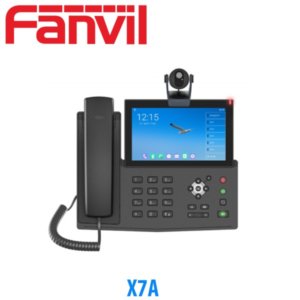
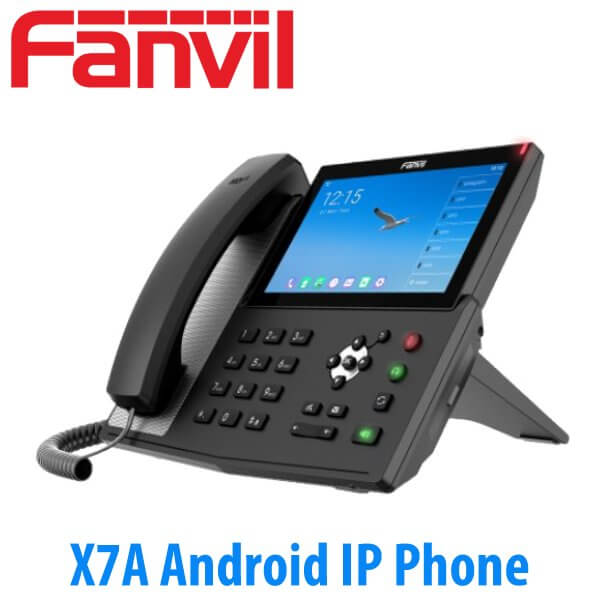
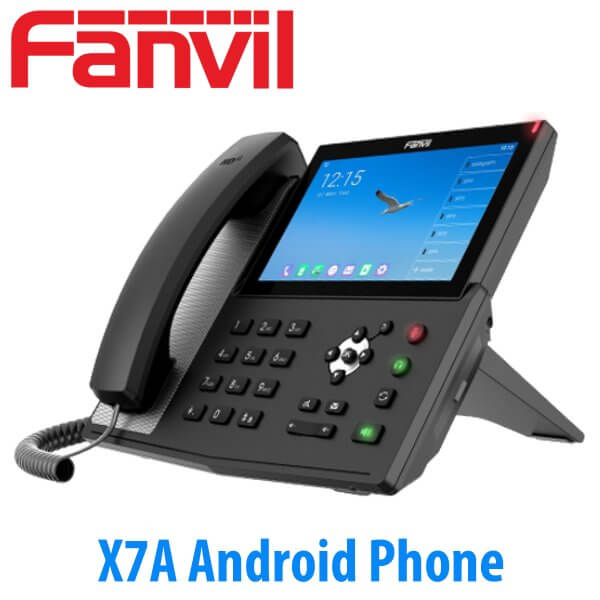
The X7A is Fanvil’s Android touch screen IP phone for desks that need more than voice. It runs Android 9.0, uses a 7-inch 1024×600 IPS colour touch display, supports 20 SIP lines, and gives the user up to 116 virtual DSS keys for BLF, speed dial, line keys, and one-touch functions. The phone has dual Gigabit Ethernet with PC passthrough, built-in dual-band Wi-Fi, built-in Bluetooth 4.2, PoE, 10-way audio conferencing, and 3-way video conferencing.
That mix makes it different from a normal executive phone. The X7A is closer to a communication screen for a real desk: calls, contacts, BLF, video door phone, camera preview, and Android-based apps on one device. For a reception desk in Business Bay, a clinic counter in JLT, or a management office in JAFZA, that matters more than adding a second display that nobody wants to maintain.
The optional USB camera is quoted separately where video calling is required. We do not assume it is in the box unless your order is for the camera bundle. For door-video projects, we pair the X7A with a compatible Fanvil video intercom and test the answer, preview, and unlock flow during staging.
Camera is project-dependent
The X7A supports video calling and can be ordered with a compatible USB camera where needed. We quote the camera clearly as a separate line item or bundle item, so procurement knows exactly what is being supplied.
20 SIP lines — what that number actually means
A 20-line phone is often oversold. It does not mean the person at the desk will make 20 outside calls at once. SIP lines are registered accounts and call appearances. They let the phone hold multiple identities and handle call states without running out of buttons or screen slots.
A normal staff desk may need 1 SIP account: extension 214, answer and transfer, done. A reception or manager desk can be different. It may register a personal extension, a reception group extension, a branch line, and a service-desk identity. It may hold one call, answer a second, park a third, and transfer to another user while BLF keys show who is free. The X7A’s 20 SIP lines give room for that call-handling pattern.
The number of simultaneous external calls still comes from your PABX and SIP trunk capacity. Etisalat and du trunk channels, call routing rules, and PABX licensing decide that side. The phone gives the desk enough appearances and identities to work without fighting the interface.
Sizing guidance for project buyers
Use the X7A for the few desks that need Android touch control, video, Wi-Fi, Bluetooth, and many screen keys. Use lighter Fanvil models for ordinary staff desks. For a 40-extension Dubai office, that may mean 1 X7A at reception, 2 higher-end phones for managers, and 37 standard SIP phones. Send us your requirement on WhatsApp and we confirm the right model.
The real reason to choose X7A: video at the desk
The X7A earns its place when the screen is used. A 7-inch touch panel changes how a front desk handles visitors. Pair it with a Fanvil video intercom at the entrance and the receptionist can see the visitor on the phone, answer the call, and release the door from the desk. For villa compounds, clinics, serviced offices, warehouses, and JAFZA reception counters, that removes the need to keep switching between a phone and a separate monitor.
The phone supports video call display up to 1080p, with video preview and full-screen remote video display. In practical terms, that means a Dubai office entrance camera can become part of the call flow instead of a separate security-screen habit. The receptionist hears the ring, sees the visitor, speaks, then opens the door where the access-control wiring supports it.
This is why we position the X7A differently from the Fanvil X210 operator phone. The X210 is the BLF console for seeing many extensions. The X7A is the touch-screen video desk phone for sites where visitor video, Android control, Wi-Fi, and Bluetooth matter. Both sit above the normal staff-phone layer in the Fanvil IP phone range.
A screen phone still needs clean provisioning
Touch phones show every bad setup. Wrong time zone. Missing BLF names. Door preview not tested. Bluetooth headset not paired. Wi-Fi saved on the wrong network. The X7A is powerful, but it should not reach the desk as an untouched box on a project handover day.
For UAE project quantities, we stage the phone in Dubai before dispatch. The extension is registered to the PABX, the provisioning template is applied, BLF and speed-dial keys are mapped, network mode is set, and test calls are made. If the order includes a Fanvil video intercom, we test the video call path and door action before the site team receives it.
That is the difference between buying a touch phone and deploying one. The phone should arrive with the user’s name, extension, language, dial plan, and keys already in place.
Power and network truth
The X7A is built for proper office cabling. It supports PoE over IEEE 802.3af and has dual Gigabit Ethernet ports. One Cat6 cable can run from the comms room to the phone, then the user’s PC can connect through the phone’s second Gigabit port. That saves one switch port per desk and keeps the desk free from power bricks where a PoE switch is installed.
Power adapter is not assumed in the box
The X7A is PoE-ready. Use a PoE switch for the cleanest Dubai fit-out. If your switch is not PoE, ask for the 5V/2A power adapter in the same quotation. We add it before dispatch so the site team does not discover a missing desk power option during installation.
Built-in dual-band Wi-Fi gives another option where a cable is not available: 2.4GHz for reach, 5GHz for cleaner office networks where coverage is strong. For reception and fixed executive desks, we still prefer wired Gigabit with PoE. For temporary counters, showroom desks, and small office moves, built-in Wi-Fi keeps the phone usable without pulling cable on day one.
Bluetooth 4.2 is built in, so compatible Bluetooth headsets can pair without a dongle. EHS headset support is available through the correct cable for supported wireless headset bases. We quote EHS cables, power adapters, and USB camera accessories in the same project bill of materials.
Capabilities many old listings miss
Many online listings still describe the X7A as a simple Android touch phone with 112 DSS keys. Current Fanvil documentation gives more to work with: up to 116 virtual DSS keys, 10-way audio conference, 3-way video conference, 2,000 local phonebook entries, 1,000 call-log entries, Opus and G.722 wideband audio, and video display support up to 1080p.
There are also practical contact-screen improvements that matter in real offices. The X7A can work with remote phonebooks, LDAP contacts, contact photos, and extra directory fields such as job title or email where the phonebook is prepared correctly. That helps reception users choose the right person before transferring, especially in offices where several staff share similar names or roles.
For door and camera use, the phone can show video preview, full-screen remote video, and camera views in a way that fits a reception workflow. In a villa office, clinic, logistics counter, or school administration desk, the user is not just answering a call. They are identifying the visitor and deciding whether to release the door.
One section competitors usually skip: phonebook data
The X7A is not only a video phone. It becomes easier for reception when the directory is built properly: names, departments, BLF keys, photos where available, and useful fields. We set the phonebook and DSS layout during staging instead of leaving the user with blank keys.
Platform compatibility in Dubai
The Fanvil X7A registers as a standard SIP endpoint on common office PABX platforms used in the UAE, including 3CX, Grandstream UCM, Yeastar, and Asterisk-based systems. It also works in licensed business voice setups using Etisalat or du SIP services through a PABX or approved SIP configuration.
For project supply, we do not ship it as an empty handset unless requested. We prepare the template, extension credentials, display name, time zone, call settings, DSS layout, BLF keys, and test calls before dispatch. For multi-site work, we label phones by branch, user, or desk position so the installer is not guessing at the site.
That matters for system integrators and PABX installers buying for Dubai, Abu Dhabi, Sharjah, and export projects. One wrong template can turn a good phone into a support ticket. We keep the phone model, platform, and site role together from quotation to dispatch.
X7A sibling comparison — choose by desk role
| Model | Main screen role | Keys / visibility | Best desk role |
|---|---|---|---|
| Fanvil V67 | Touch-screen executive video desk | Screen-based keys and video-first layout | Manager or executive desk needing modern video calling |
| Fanvil X7A — this phone | 7-inch Android touch screen | 20 SIP lines and up to 116 virtual DSS keys | Reception, executive, clinic, showroom, and video-door desk |
| Fanvil X210 | 4.3-inch centre display plus two side screens | 106 DSS keys with live BLF visibility | Busy reception and operator positions routing many extensions |
| Fanvil X7C | One 5-inch colour touch screen | Executive call handling with on-screen keys | Existing X7C fleets and replacement planning where stock is available |
| Verdict | Choose the X7A if the desk needs Android touch control, video intercom view, Wi-Fi, Bluetooth, and many screen keys. Choose the X210 if the user’s main job is watching extension status and transferring calls all day. Choose the V67 if you want the newer video-executive style. Choose the X7C only when matching an existing X7C deployment or planning a staged replacement. | ||
For staff desks behind these phones, use lower-cost Fanvil desk models from the matrix instead of oversizing. A clean project design may use X7A at reception, X210 for a pure operator seat, V67 for executive video desks, and standard Fanvil handsets for normal extensions.
Pricing, supply, and staging from Dubai
Fanvil X7A pricing is quoted in AED on request. We do not publish fixed prices because project quantities, camera option, power adapters, headset cables, installation, and export documentation change the final bill. For 10+, 25+, and 50+ phone projects, we quote the X7A as part of the full extension schedule, not as an isolated retail item.
Stock & Projects: Fanvil X7A supply from Dubai. Same-day quote in AED on WhatsApp. VAT breakdown and delivery included. Supply and installation across all 7 UAE emirates. Project quantities and MEA export — FOB Dubai pricing on request.
For staging, we register extensions, apply the provisioning template, program BLF and speed-dial keys, test voice calls, test video where supplied, label units, and pack by site or department. For multi-branch rollouts, the same configuration logic is kept under one engagement, so the Abu Dhabi branch and Dubai head office are not built as two separate guesses.
Frequently asked questions
Will the Fanvil X7A work with our 3CX / Grandstream UCM / Yeastar?
Yes. The X7A registers as a SIP endpoint on 3CX, Grandstream UCM, Yeastar, Asterisk-based systems, and licensed Etisalat or du business SIP setups through a PABX. We apply the provisioning template during staging, then test registration and calls before dispatch.
Does the Fanvil X7A come with a power adapter, or do I need PoE?
The X7A is PoE-ready and supports IEEE 802.3af. For a clean office fit-out, use a PoE switch and one Cat6 cable to the desk. If your switch is not PoE, we quote the 5V/2A power adapter as an add-on in the same order.
What does 20 SIP lines actually mean — can I make 20 calls at once?
No. The 20 SIP lines are registered accounts and call appearances, not 20 simultaneous outside calls. Your PABX and Etisalat or du trunk channels decide simultaneous call capacity. The X7A gives the desk enough call slots and identities for reception, manager, and service-desk use.
Fanvil X7A vs Fanvil X210 — what is the difference?
Choose the X7A when the desk needs a 7-inch Android touch screen, Wi-Fi, Bluetooth, video calling, and video intercom view. Choose the X210 when the main job is watching many extensions and transferring calls all day using 106 DSS keys across dedicated side screens.
Does the X7A include the camera?
The X7A supports a compatible USB camera, but the camera must be confirmed in the quotation. We can supply the phone alone, or quote it with the camera where video calling is required. The quote will show this clearly for procurement.
Can the Fanvil X7A show our door camera and open the door?
Yes, when paired with a compatible Fanvil video intercom or supported camera setup. The X7A can show visitor video on the screen, answer the intercom call, and trigger door release where the access-control wiring supports it. We test this during installation.
Does Vector Digital Systems configure the X7A before delivery?
Yes. Staging is standard for project orders: extension registration, provisioning template, BLF and speed-dial programming, phonebook setup, test calls, and video-door testing where supplied. The phone is packed by user, branch, or desk role before dispatch.
Is VoIP legal in the UAE and will the X7A work with Etisalat or du?
Business VoIP over licensed services is the normal UAE office setup under TRA regulation. The X7A works with Etisalat and du business SIP services through a PABX or approved SIP configuration. We configure licensed business voice setups for Dubai and UAE projects.
Is the Fanvil X7A covered under Fanvil warranty in the UAE?
Yes. Vector Digital Systems supplies the X7A with Fanvil manufacturer warranty support in the UAE. We handle warranty coordination for supplied project units, including documentation needed by corporate procurement teams.
Who is the supplier of Fanvil X7A in Dubai?
Vector Digital Systems LLC is an authorised Fanvil supplier in Dubai, UAE, operating since 2009. We supply the Fanvil X7A with staging, provisioning, installation, warranty handling, and official quotations for IT managers, ELV contractors, system integrators, and corporate procurement teams.
What is the best Android IP phone for a reception desk in Dubai?
For a reception desk that needs Android touch control, video intercom view, Wi-Fi, Bluetooth, and up to 116 virtual DSS keys, the Fanvil X7A is a strong fit. If the desk mainly transfers calls for a large office and needs more always-visible BLF keys, step up sideways to the Fanvil X210 operator phone instead.
Does Vector Digital Systems export Fanvil X7A from Dubai?
Yes. We export Fanvil X7A phones from Dubai to telecom resellers, PABX installers, and system integrators in Saudi Arabia, Oman, Qatar, Kuwait, Kenya, Tanzania, Uganda, Nigeria, Ghana, and Pakistan. Export orders are quoted FOB Dubai with commercial invoice, packing list, certificate of origin, and Fanvil manufacturer warranty documentation.
UAE coverage — all seven emirates
Vector Digital Systems supplies and installs the Fanvil X7A across Dubai, Abu Dhabi, Sharjah, Ajman, Ras Al Khaimah, Fujairah, and Umm Al Quwain. We support office fit-outs in DMCC, JLT, Business Bay, Dubai Internet City, DIFC, JAFZA, DIP, and other UAE business districts where staged IP phones are needed before handover.
MEA export from Dubai
For export buyers, the X7A is supplied from Dubai with FOB Dubai pricing and the documentation needed for freight and customs: commercial invoice, packing list, and certificate of origin. We prepare quantities for telecom resellers in the Gulf, PABX installers in East Africa, and IT distributors in West Africa and South Asia.
Common export lanes include Saudi Arabia, Oman, Qatar, Kuwait, Kenya, Tanzania, Uganda, Nigeria, Ghana, and Pakistan. Send the model, quantity, camera requirement, power-adapter requirement, and destination. We will quote the X7A as phone-only or as a staged project batch from Dubai.
About Vector Digital Systems — authorised Fanvil supplier in Dubai
Vector Digital Systems LLC is an authorised Fanvil supplier supplying the Fanvil X7A from Dubai, UAE, with staging, configuration, and installation across all 7 UAE emirates — Dubai, Abu Dhabi, Sharjah, Ajman, Ras Al Khaimah, Fujairah, and Umm Al Quwain — and export across the Middle East and Africa with FOB Dubai pricing. Operating since 2009. Contact: sales@vectordigitals.net · Monday–Saturday 8AM–6PM.
Get a quote for Fanvil X7A
In stock Dubai · Same-day AED quote · Supply and installation · Project quantities and export