

3CX AI Receptionist in Dubai — Every Call Answered. Every Caller Reached.
The reception phone rang at 6:17PM on Thursday. Nobody answered. The caller tried again Saturday morning, waited through two transfers, and hung up. You never saw that call. The 3CX AI Receptionist answers the 6:17PM call, the Saturday call, the lunchtime call when both lines are busy — greets naturally, understands what the caller needs, and routes them to the right person or takes a message. No press-1. No hold music. No missed call.
Vector Digital Systems has installed business phone systems from Dubai since 2009 and holds 3CX Titanium — the highest partner tier 3CX awards. AI Receptionist configuration, AI engine connection and call-flow design are part of every AI Edition deployment we hand over.
The caller says what they need. The AI understands and connects them.
Not press-1 for sales, press-2 for accounts. A conversation. Here is what changes for the person calling your office.
Press-1 tree — what callers deal with today
- Caller listens to four options before they hear the one they need
- Caller who does not know which department they want presses the wrong number
- Caller reaches the wrong person, explains again, waits on hold for a transfer
- Caller calls at 6PM — rings out, goes to voicemail, tries again tomorrow
- Caller calls in Arabic — English-only system routes them wrong
- Caller gives up after the second transfer. You never know they called.
3CX AI Receptionist — what the same caller experiences
- Greeted by name of the business, asked what they need — in their own words
- AI understands the answer and routes directly — no menu, no guesswork
- If the right person is busy, takes a message with the caller’s name and reason
- Answers routine questions from your own uploaded business information — services, policies, hours — before ever falling back to general AI knowledge
- Answers the 6PM call, the 11PM call, the Saturday morning call
- Recognises the caller’s language and responds in it — Arabic bench-tested at setup
- Every call logged. No caller invisible.
The AI works from the business information and call flows you give it — the right answers come from your data, not generic responses. A caller asking about a shipment from two years ago gets routed to the person who handles accounts, not a dead end.
Spam never reaches your team
Spam, abusive and non-collaborative callers are detected and handled with configured actions — disconnected or redirected — before the call touches a person. Your team answers customers, not nuisance traffic.
Busy check before transfer
Before any transfer, the AI checks whether the destination extension is actually available. If the person is busy or away, the caller chooses how to leave it — voicemail, chat message or email — never a dead transfer to a desk that will not answer.
It does not hand out your team
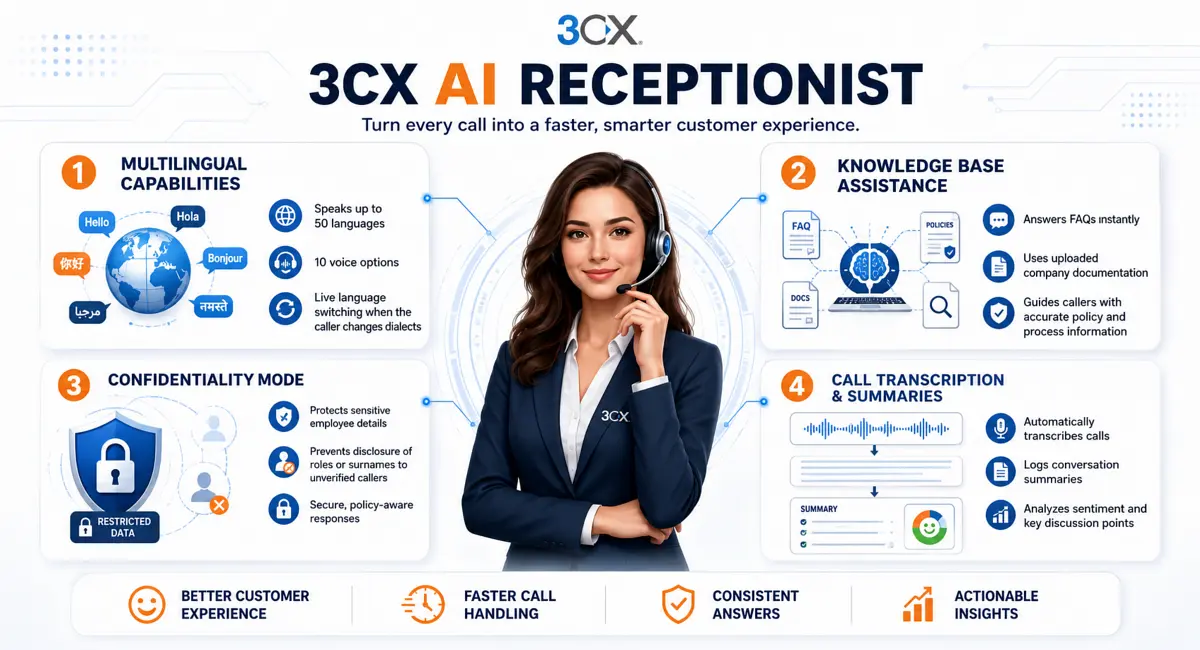
Configured with confidentiality rails, the receptionist does not disclose team members’ names, roles or direct numbers to unverified callers. It routes the call — it does not read out your staff directory.
The same receptionist, on your website
A talk link puts the same AI on your site — a visitor clicks and speaks to it, or chats with it, exactly as a phone caller would. One receptionist, one configuration, covering the phone line and the website together.
Routes by name — and by meaning
A caller who says “transfer me to George” gets George. A caller who only describes a problem gets the right department — the AI classifies what was said against your routing rules, not against a menu tree.
More than one receptionist
Run several AI agents on one system — a different receptionist per department, brand or language, each with its own number, greeting and behaviour. A trading company running three names answers each one correctly.

You read every conversation. It protects your people. It answers from your facts.
Three features that separate a receptionist a business trusts from a voice that just picks up. Each one is configured — not assumed — during setup.
Every conversation, in writing — waiting for you in the morning
It is 8AM. Last night the AI took eleven calls. What did it say? What did the callers actually want? With transcription switched on, you do not wonder — you read. Each call the receptionist handles is transcribed and summarised into the log: who called, what they asked, what the AI answered, and how the call ended. The Saturday enquiry that would have been a mystery missed call is now three lines of text with a name and a number attached.
The summaries also carry tone — a caller who sounded frustrated is flagged, so the morning callback list starts with the person who most needs a human voice, not the first number in the queue. And the transcription engine is your choice: the connected AI engine, 3CX’s own service, or the on-premise engine that keeps call audio entirely inside your building — the same choice covered in the audio question below, decided with you before anything goes live.
It protects your people — because some callers are mapping, not asking
Anyone can ring an office and ask: who handles your purchasing? What is his surname? Is he in today? What is his direct number? A helpful human receptionist sometimes answers all four — and that is exactly how impersonation calls gather what they need. The AI Receptionist is configured with confidentiality rails: it will connect a caller to a person without describing that person. Surnames, roles, direct numbers and who-is-in-today stay inside the company.
The behaviour is simple to state and strict in practice: questions that map your organisation get a polite transfer, not an answer. A genuine caller loses nothing — they still reach the right person. A caller collecting details for a convincing follow-up call gets nothing to work with.
It answers from your facts — not from the internet
Half of what a front desk answers is the same ten questions: opening hours, location, do you handle this, what documents are needed, roughly how long does it take. The receptionist answers those from your own uploaded documentation — your service list, your policies, your delivery terms — and only falls back to general knowledge when your documents do not cover the question. The difference matters: a caller asking about your warranty terms hears your warranty terms, not a plausible-sounding general answer.
The documents are yours to change. Update the price policy or the working hours, and the receptionist’s answers update with them — no retraining, no reconfiguration visit. And where a question sits outside what you have provided, the AI does what it is configured to do everywhere else on this page: it routes or takes a message. It does not guess on your behalf.
It runs on your 3CX system. The AI engine is yours to connect.
Two parts: your on-premise 3CX, and an AI engine account the business connects under its own billing. Both are required. Here is exactly what each involves.
| What | Requirement |
|---|---|
| 3CX edition | AI Edition — includes Receptionist, Agents, Transcription. One tier above PRO. |
| Minimum version | V20 Update 8. Update 9 (current production) recommended. |
| AI engine | OpenAI or Grok. Paid account, billing configured, API key generated, spending cap set. |
| Deployment | On-premise — the same server that runs your 3CX today. No third-party cloud involved. |
| Configuration | Partner-configured: AI engine connection, call flows, business information, fallback paths and load testing before handover. |
The failure mode that catches offices out: a low-tier AI engine account hits rate limits after the first minute of a conversation. The receptionist greets the caller — then goes silent. This is an AI account configuration issue, not a 3CX issue. The fix is the right account tier, the right API rate limits and a tested spending cap. Every VDS AI Edition setup tests under load before handover. It is the difference between a system that works in the demo and one that works at 5PM on a Monday.
One license level above PRO. No per-call charge from 3CX.
The 3CX AI Receptionist is included in the AI Edition — the tier above PRO, formerly called Enterprise. No per-minute fee from 3CX. No per-call charge. No usage billing on the 3CX side. The license is an annual fee by simultaneous calls, the same SC model as the rest of the range.
What the business does pay separately: AI engine usage, billed by the provider — OpenAI or Grok — under a spending cap the business controls. For a Dubai office with normal inbound call volume, the engine cost is a modest monthly figure. It runs under the business’s own AI account, not through VDS.
For offices already on PRO: the upgrade to AI Edition is one step — processed the same day, no reinstallation, the AI layer activates on the existing system. If a renewal is due in the next few months, the upgrade and the renewal are handled as one conversation. Full edition pricing and AED figures are on the 3CX phone system price page; the upgrade-at-renewal path is on the 3CX license renewal page. The full system picture is on the 3CX Dubai hub; installation is covered on our phone system installation page.
Default setup takes five minutes. Configured for your office takes an afternoon.
The basic receptionist: add it under Integrations → AI, set a name, save. It answers calls, asks who the caller wants, and transfers. That is the starting point — not the finish line. The value is the layer on top: the business information, department logic and call-flow design that makes the AI useful for the callers of this specific office.
Appointment and results routing
Appointment calls routed to the booking team. Results enquiries separated and handled by the right department. After-hours message format set for the morning team. Insurance question path scripted.
Project and agent routing
Developer and project names the AI knows. Each agent’s projects mapped to their extension. Viewing enquiries routed direct. After-hours callback message captured with project and budget.
Supplier and customer separation
Supplier calls separated from customer calls at the first question. Shipment status path scripted. Accounts team reached without a transfer chain. Weekend enquiries captured with reference number.
The calls that arrive after hours
Working-hours flow and after-hours flow are configured separately. The AI answers both — with a different greeting, a different message path, and an optional escalation trigger for urgent calls.
How VDS sets it up
Connect
AI engine account linked to 3CX via API key. Spending cap set. Rate limits confirmed. Tested before any caller hears it.
Instruct
Business name, departments, the questions callers ask every day, routing logic, fallback paths — all written into the AI’s instructions.
Test
Called from outside in every scenario: correct routing, unknown department, after-hours, language switch, high-volume burst. Corrected until it holds.
Hand over
The setup is yours. Business information and call flows are updated from the 3CX admin console. No dependency on VDS for day-to-day changes.
What the AI handles. What stays with your team. Stated before you buy.
The AI Receptionist routes callers faster than any human can. It does not replace the person the caller is being routed to. Here is the honest line.
AI Receptionist handles well
- Every incoming call, around the clock — including weekends and after hours
- Routing by name, department or what the caller says they need
- The questions the office answers the same way every working day
- Taking a message with the caller’s name, number and reason
- Language switching mid-call when a caller speaks in a different language
- After-hours calls with a different greeting and message path
- Overflow when the main line is busy and the human receptionist is on another call
Stays with your team
- The sales conversation with a new client who wants to talk to a person
- A complaint that needs listening, judgement and authority to resolve
- A caller with a request nobody scripted for — the AI hands off, does not improvise
- Any decision that requires account history the AI was not given
- An emergency — the AI routes fast, but the person on the other end handles it
The AI routes callers to the right person faster. It does not replace the conversation that follows. That is the correct frame — and the one we use when sizing the setup for each office, so nobody buys more AI than their call flows actually need.
3CX AI Receptionist in Dubai — the questions offices ask first
Before setup, during the upgrade conversation, and the morning after it goes live.
My receptionist is leaving next month. Can 3CX AI handle the calls from that date?
Will callers know they are talking to an AI?
What happens when a caller asks something the AI cannot answer?
Does the 3CX AI Receptionist support Arabic?
Does it answer calls after hours and on weekends?
We have 3CX PRO. What does upgrading to AI Edition involve?
Where does the call audio go? Does it leave our building?
Can it handle multiple callers at the same time?
We want to keep a human receptionist for some calls and use AI for others. Can both run together?
Does the AI Receptionist change how our Etisalat or du lines work?
What if the AI engine goes down — does the phone system stop working?
Which areas of Dubai and the UAE do you cover for 3CX AI Receptionist setup?
Already on 3CX? Send the edition and we tell you how fast it goes live.
Current 3CX edition, SC size and the approximate daily call volume on WhatsApp — we confirm the upgrade path, the configuration scope and whether the system goes live today or requires a same-week setup visit. Nothing is quoted before the scope is agreed in writing.