
Description
Yealink MeetingEye 400 Video Conferencing 4K Small Room SIP/H.323 Endpoint Dubai
Yealink MeetingEye 400 for Small Meeting Rooms in Dubai
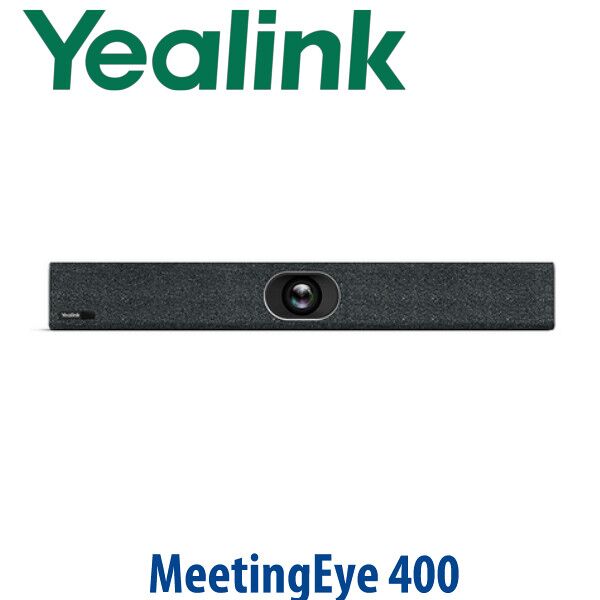
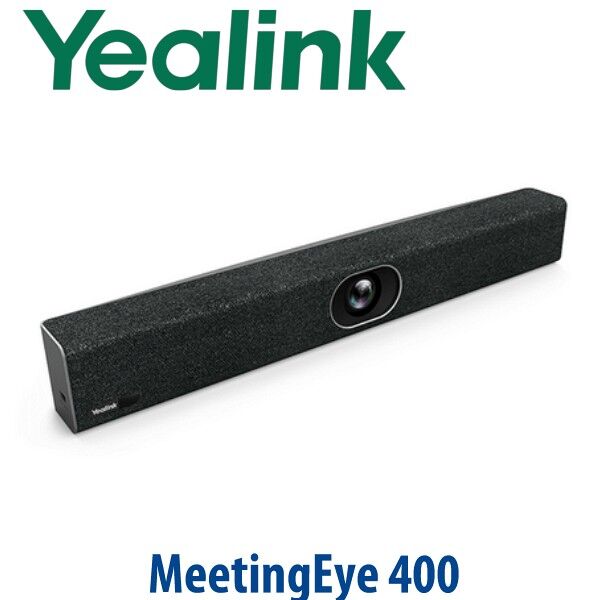
The Yealink MeetingEye 400 is a 4K all-in-one video conferencing endpoint for small meeting rooms that need a cleaner, more reliable setup than a laptop webcam and table speakerphone. It combines the codec, 20MP camera, microphones, speaker, Wi-Fi, Bluetooth and presentation tools into one compact video bar, making it a strong fit for SME boardrooms, manager cabins, huddle rooms and training spaces across Dubai. Vector Digital Systems supplies the MeetingEye 400 with Dubai-based staging, VAT breakdown, delivery quote and local warranty handling.
Platform First: SIP/H.323 Endpoint, BYOD USB Mode, or Native Teams/Zoom Room?
The MeetingEye 400 is not a native Microsoft Teams Rooms appliance. Its main role is as a standards-based H.323/SIP video endpoint and Yealink Meeting endpoint, with USB mode available through the VCH51 sharing box for laptop-based video apps. For a native Teams Rooms or Zoom Rooms deployment, choose the certified Yealink room range after verification — do not assume certification from the model name alone.
| Your Platform | Right Device Path | What You Need |
|---|---|---|
| Standards video — SIP / H.323 / Yealink Meeting | Yealink MeetingEye 400 (this page) | SIP/H.323 account, Yealink Meeting Server or compatible standards platform |
| BYOD laptop meetings | MeetingEye 400 with VCH51 USB mode | Laptop running your meeting app, USB-C connection through VCH51 |
| Microsoft Teams Rooms | Yealink MVC / Teams Rooms range — verify certified model before quote | Microsoft 365 tenant, Teams Rooms licence and certified room kit |
| Zoom Rooms | Zoom-certified Yealink room range — verify certification status | Zoom Rooms licence and certified room hardware |
Tell David which meeting platform your room uses when requesting a quote. This avoids the common Dubai buyer error: ordering a standards-based video endpoint when the room actually needs a native Teams Rooms or Zoom Rooms appliance.
Power Truth: This Is Not PoE-Powered
The Yealink MeetingEye 400 uses an external Yealink power adapter. Unlike many Yealink desk phones, this video endpoint is not powered from a PoE switch port. The room needs AC power near the display or cabinet, plus network and HDMI cabling planned before installation. Vector Digital Systems confirms the display position, network point, power point and cable route before dispatch so the room is ready for installation.
Why It Beats a Laptop Webcam Setup
A laptop on the meeting table works for one person; it fails when six people need to be seen and heard. The MeetingEye 400 gives the room a dedicated 20MP camera with a 133° wide-angle lens, AI Auto Framing, Speaker Tracking, an 8 MEMS microphone array and a built-in speaker. The camera covers the room from the display wall, while the audio system is designed for group conversation instead of one user sitting directly in front of a laptop.
Where MeetingEye 400 Sits in the Yealink Room Range
The MeetingEye 400 is best viewed as a standards-based 4K endpoint for small rooms. If the room is purely USB/BYOD, a Yealink USB video bar may be enough. If the room is medium size or needs tighter speaker close-ups, step up to MeetingEye 600. If the room is Teams-first or Zoom-first, David will quote the current certified Yealink room system instead of forcing MeetingEye 400 into the wrong platform.
| Feature | Yealink USB Video Bar | MeetingEye 400 ★ | MeetingEye 600 |
|---|---|---|---|
| Best room size | Small BYOD rooms | Small meeting rooms | Medium rooms |
| Room platform | Laptop app / USB | SIP, H.323, Yealink Meeting, USB mode | SIP, H.323, Yealink Meeting, USB mode |
| Camera | USB room camera | 20MP Sony 1-inch CMOS | 20MP wide camera + PTZ camera |
| Field of view | Model dependent | 133° super-wide | 133° wide + PTZ close-up |
| Zoom | Model dependent | 4× e-PTZ | 10× hybrid zoom |
| Built-in audio | USB audio, model dependent | 8 MEMS mics + 5W speaker | 8 MEMS mics + higher room output |
| Presentation | Laptop share | WPP20, AirPlay, Miracast, HDMI/USB-C via VCH51 | WPP20, AirPlay, Miracast, HDMI/USB-C via VCH51 |
| Price tier | Lower | Mid | Higher |
| Choose if… | You only need a USB peripheral for laptop meetings | You need a compact 4K SIP/H.323 room endpoint with BYOD flexibility | You have a longer medium room and need stronger close-up coverage |
Dubai Use Cases for the MeetingEye 400
Business Bay and JLT SME meeting rooms. The MeetingEye 400 gives a small management room a fixed video system that is always ready. No hunting for the right webcam, no laptop balanced at the end of the table, and no weak audio from a built-in notebook microphone.
DIFC, DMCC and professional services offices. Legal, finance, consultancy and audit teams often need a secure, predictable room endpoint for regional calls. The auto privacy shutter keeps the camera visibly closed when not in a meeting, while SIP/H.323 support helps with standards-based room networks.
Training and hybrid meeting spaces. The 133° wide lens is useful in compact rooms where participants sit close to the display wall. AI Auto Framing adjusts the picture around the people in the room, and Speaker Tracking helps remote participants follow who is talking.
Export-ready standard room kits. For system integrators building repeatable small-room packages in Oman, Saudi Arabia, Kuwait, Qatar, Bahrain, Kenya, Nigeria and Pakistan, MeetingEye 400 is easier to ship and document than a room built from separate camera, codec, speakerphone and wireless presentation hardware.
Full Technical Specifications
| Specification | Yealink MeetingEye 400 |
|---|---|
| Product type | Smart UHD 4K video conferencing endpoint for small rooms |
| Operating system | Android 9.0 based |
| Supported platforms | Yealink Meeting Server, Yealink Meeting, H.323/SIP, USB mode via VCH51 |
| Camera | 20MP camera with Sony 1-inch CMOS sensor |
| Field of view | 133° super-wide-angle lens |
| Zoom | 4× e-PTZ digital zoom |
| AI features | Auto Framing and Speaker Tracking |
| Privacy | Automatic camera privacy shutter |
| Video quality | Up to 4Kp30 people video + 4Kp15 content sharing |
| Video codecs | H.265, H.264 High Profile, H.264, H.263, H.263+ |
| Microphones | Built-in 8 MEMS microphone array; optional wireless microphone support |
| Speaker | Built-in 5W speaker |
| Audio processing | Yealink Noise Proof Technology, beamforming pickup, multi-channel echo cancellation, dereverberation and full-duplex voice pickup |
| Communication protocols | H.323/SIP, H.239, BFCP, FECC H.224/H.281 |
| Network | 1× 10/100/1000M Ethernet, IPv4/IPv6, VLAN, QoS, LLDP-MED, IEEE802.1X |
| Wireless | Built-in dual-band Wi-Fi 802.11a/b/g/n/ac and Bluetooth 4.2 |
| Content sharing | HDMI/USB-C via VCH51, WPP20 wireless presentation pod, Apple AirPlay, Miracast, virtual whiteboard |
| Connections | 1× HDMI output, 2× USB 2.0, 1× Gigabit Ethernet, 1× Yealink extension port, power port, security lock slot, reset slot |
| Power | External Yealink power adapter, AC 100–240V input, DC 48V / 0.7A output |
| Power consumption | Idle below 8.8W; normal operating 9.2W; maximum 10.2W |
| Dimensions | 600 × 68 × 82 mm |
| Package includes | MeetingEye 400 codec, VCR20 remote control, wall bracket |
Compatible Accessories
| Accessory | Model | Purpose |
|---|---|---|
| Sharing box | VCH51 | USB mode for laptop-based video apps; also supports HDMI/USB-C content sharing |
| Wireless presentation pod | WPP20 | Wireless screen sharing and presentation control |
| Touch control | Yealink Collaboration Touch Panel | Room-side meeting control where remote-only operation is not preferred |
| Wireless microphone | Yealink wireless microphone option | Additional pickup for rooms where participants sit farther from the display wall |
| Mounting | Wall bracket included; TV mount kit optional | Clean installation below or above the meeting room display |
Staging Before Dispatch
Vector Digital Systems stages the MeetingEye 400 before dispatch from Dubai. We confirm the room platform, network mode, SIP/H.323 or Yealink Meeting account details, display output, remote-control setup, firmware baseline, presentation accessory requirement and basic call test. For BYOD rooms, we confirm whether VCH51 is required. For project orders, we label each unit by room name, prepare the configuration sheet and include VAT, delivery and installation notes in the quote.
Export from Dubai
Vector Digital Systems exports Yealink video conferencing devices from Dubai to system integrators, telecom operators, corporate IT buyers and hotel groups across Oman, Saudi Arabia, Kuwait, Qatar, Bahrain, Kenya, Nigeria, Pakistan and Sri Lanka. Shipments can be arranged FOB Dubai with commercial invoice, packing list and certificate of origin on request. For export projects, send David the room count, destination country, required accessories and preferred incoterm so the quote includes the correct documentation and packing details.
Get a same-day quote in AED — Dubai supply and staging
Tell David your room size, meeting platform, display position, network availability and whether you need VCH51, WPP20 or installation support. Your quote includes VAT breakdown and delivery charges.
Frequently Asked Questions — Yealink MeetingEye 400
Is the Yealink MeetingEye 400 a Microsoft Teams Rooms device?
No — the MeetingEye 400 should be treated as a standards-based H.323/SIP and Yealink Meeting video endpoint, with USB mode available via VCH51 for laptop-based apps. For a native Microsoft Teams Rooms deployment, ask David for the current Yealink MVC or Teams-certified room system, verified against Microsoft’s official certified-device list before quoting.
Does the MeetingEye 400 work with Zoom?
The MeetingEye 400 can be used in BYOD USB mode through VCH51 with a laptop running Zoom, and it can also work in standards-based video environments. Do not treat it as a native Zoom Rooms appliance unless certification is verified for your exact requirement. For Zoom Rooms, David can quote the current Zoom-certified Yealink room range.
What room size is the Yealink MeetingEye 400 designed for?
The MeetingEye 400 is designed for small meeting rooms and huddle rooms. Its 133° wide-angle camera works well when participants sit close to the display wall, while the 8 MEMS microphone array and built-in speaker support group conversation in a compact room.
Does the MeetingEye 400 use PoE or a power adapter?
The MeetingEye 400 uses an external Yealink power adapter, not PoE. Before delivery, Vector Digital Systems checks the display location, AC power point, network point and cable route so the room is ready for installation.
MeetingEye 400 vs MeetingEye 600 — which one should I buy?
Choose the MeetingEye 400 for a small meeting room where a 133° wide-angle camera and 4× e-PTZ are enough. Choose the MeetingEye 600 for a longer medium room where the dual-camera system and 10× hybrid zoom give better close-up coverage of distant participants.
Can the MeetingEye 400 be used as a USB camera and speaker for a laptop?
Yes, with the VCH51 sharing box, the MeetingEye 400 can act as the PC audio and video peripheral through USB mode. This is useful for Dubai offices that want fixed room hardware but still join meetings from a user’s laptop app.
What accessories should I order with the MeetingEye 400?
Common accessories include the VCH51 sharing box for USB/BYOD use, WPP20 wireless presentation pod for wireless sharing, a collaboration touch panel for room control, optional wireless microphones and a TV mount kit where wall mounting is not suitable. David confirms the correct bundle from your room layout.
Who is the Yealink authorised supplier in Dubai?
Vector Digital Systems LLC has supplied and integrated Yealink products in Dubai since 2009. David is the Yealink specialist for product selection, project pricing, staging, delivery coordination and local warranty handling.
What is the best Yealink video conferencing device for a small Dubai meeting room?
For a standards-based small room, the MeetingEye 400 is a strong choice because it combines the codec, 4K camera, microphones, speaker and wireless presentation support in one device. For a Teams-first room, choose a certified Yealink MVC or Teams Rooms system instead. For a larger medium room, step up to MeetingEye 600 or the current Yealink room system recommended by David.
Does Vector Digital Systems export Yealink MeetingEye 400 from Dubai?
Yes — Vector Digital Systems exports Yealink video conferencing devices from Dubai to integrators, telecom operators and enterprise buyers in Oman, Saudi Arabia, Kuwait, Qatar, Bahrain, Kenya, Nigeria, Pakistan and Sri Lanka. Export shipments can be prepared FOB Dubai with commercial invoice, packing list and certificate of origin on request.
Does Vector Digital Systems configure the MeetingEye 400 before delivery?
Yes — Vector Digital Systems stages the MeetingEye 400 before dispatch, including platform confirmation, network settings, SIP/H.323 or Yealink Meeting account details, firmware check, display output, presentation accessory requirement and a basic call test where credentials are available.

