Description
Yealink CP920 Conference Phone SIP Conference Phone for Small & Mid Meeting Rooms Dubai
Yealink CP920 Conference Phone for Dubai Meeting Rooms
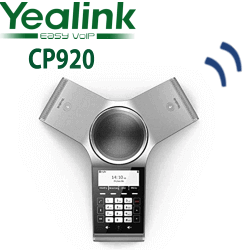
The Yealink CP920 is the practical SIP conference phone for Dubai offices that need clear table audio without turning every small meeting room into a full video room. It sits in the middle of the table, gives the room a dedicated dial-in device, and keeps regular SIP calls away from laptop speakers, mobile phones, and improvised Bluetooth speakers. For SMEs, clinics, training rooms, sales offices, and boardrooms with regular voice meetings, the CP920 is the clean conference-phone choice: 360-degree pickup, a 20-foot / 6-metre microphone range, Yealink Noise Proof Technology, USB/Bluetooth audio bridging, and PoE network connection from a single Ethernet cable.
SIP, Microsoft Teams or Zoom? Choose the Correct Platform
The CP920 is primarily a SIP conference phone. It registers to a SIP PBX or hosted SIP service such as 3CX, Yeastar P-Series, Grandstream UCM, Asterisk, FreePBX, or a UAE-hosted provider. For Microsoft Teams rooms, do not assume the CP920 is the right Teams device — Yealink Teams conference and room systems are separate models. For Zoom Phone, the CP920 appears on Zoom’s certified hardware list, but deployment should use the correct Zoom Phone firmware and account provisioning process.
| Your Platform | Right Phone | What You Need |
|---|---|---|
| SIP PBX — 3CX, Yeastar, UCM, Asterisk, hosted PBX | Yealink CP920 (this page) | SIP account credentials and Ethernet network point |
| Microsoft Teams | Yealink Teams conference or room device — ask David to verify the current certified model | Microsoft 365 tenant, Teams Phone or Teams Rooms licensing, certified Teams hardware |
| Zoom Phone | CP920 can be supplied for Zoom Phone after certification and firmware check | Zoom Phone licence, supported firmware, and Zoom provisioning |
Tell David which platform you use before quoting. A SIP conference room, a Teams room, and a Zoom Phone room may look similar to the buyer, but they need different provisioning paths.
Power and Cabling Truth — Check PoE Before Delivery
The CP920 is designed for a clean meeting-room table with network power over Ethernet. Connect it to a PoE-capable switch port and it can run from the Ethernet cable. If your meeting room has only a non-PoE network point, ask David to include the correct Yealink power option or plan the switch-side PoE injector before delivery. This check prevents the most common installation-day issue: the conference phone arrives, the network point is ready, but the room has no power method for the device.
Where the CP920 Sits in the Yealink Conference Range
The CP920 is the wired SIP conference phone for small and mid meeting rooms. Choose it when the room has a fixed table, a reliable Ethernet point, and a need for dedicated conference-call audio. If the room cannot be cabled neatly, look at the CP930W cordless DECT conference phone. If the room needs a larger touchscreen conference system or more advanced room-device workflow, compare with the CP960 / CP965 tier after platform verification.
| Feature | CP920 | CP920 ★ | CP930W |
|---|---|---|---|
| Best room type | Fixed small meeting room | Fixed small-to-mid meeting room | Cable-free room |
| Connection | Ethernet SIP | Ethernet SIP | DECT wireless to base |
| Pickup | 360° room pickup | 360° room pickup | 360° room pickup |
| Pickup range | Up to 20 ft / 6 m | Up to 20 ft / 6 m | Up to 20 ft / 6 m |
| Display | 3.1″ graphical LCD | 3.1″ graphical LCD | Conference phone display |
| USB / Bluetooth bridge | Yes | Yes | Check configuration |
| Microsoft Teams | Verify certification status | Verify certification status | Verify certification status |
| Zoom Phone | Certified hardware list check required | Certified hardware list check required | Check current Zoom list |
| Price tier | Entry conference tier | Entry conference tier | Cordless conference tier |
| Choose if… | You want the same wired SIP meeting-room model | You need a dedicated conference phone for a fixed Dubai meeting room | You need the table phone free from network cabling |
Dubai Use Cases for the Yealink CP920
SME meeting rooms in Business Bay and Al Quoz. Many Dubai offices still use laptop speakers for supplier calls and internal meetings. The CP920 gives the room a fixed SIP conference endpoint with better pickup, faster dial-in, and fewer setup delays.
Clinic, training and consultation rooms. For clinics in Jumeirah, education centres in Knowledge Park, and training rooms in Deira or Bur Dubai, the CP920 keeps group calls simple: one device, visible mute keys, clear table audio, and SIP registration to the main PABX.
Branch-office conference calling. Multi-branch businesses across Dubai, Sharjah, Abu Dhabi, and the Northern Emirates can standardise the CP920 in each meeting room, with Vector Digital Systems loading the same dial plan and extension naming before dispatch.
Hybrid voice backup for video rooms. Some rooms run Teams or Zoom on a screen but still keep a dedicated SIP conference phone for supplier calls, PSTN fallback, reception transfers, and external audio-only conferences. The CP920 fits that role without forcing the room into a full video-system upgrade.
Full Technical Specifications
| Specification | Yealink CP920 |
|---|---|
| Product type | Touch-sensitive HD IP conference phone |
| Room size | Small-to-mid meeting rooms and huddle rooms |
| Microphone pickup | 360-degree pickup, up to 20 ft / 6 m |
| Audio technology | Yealink Optima HD Voice and Noise Proof Technology |
| Display | 3.1 inch 248×120 graphical LCD |
| Keypad | Touch-sensitive keypad with three one-touch mute keys and LED indicators |
| SIP support | SIP v1 / SIP v2 compatible; works with RFC-compliant SIP platforms |
| Hybrid UC meeting | USB and Bluetooth audio bridging for supported meeting workflows |
| Network | Ethernet connection for SIP registration and room deployment |
| Power | PoE-capable deployment; confirm switch-side PoE or power option at order stage |
| Zoom Phone | Certified hardware list check required before quoting; Zoom Phone firmware may be required |
| Microsoft Teams | Verify certification status; Teams conference deployments may require a separate Yealink Teams model |
| Compatible platforms | 3CX, Yeastar P-Series, Grandstream UCM, Asterisk, FreePBX, hosted PBX, and SIP trunk/PABX environments |
Compatible Accessories and Room Options
| Accessory / Option | Use | Order Note |
|---|---|---|
| PoE switch port | Clean single-cable conference room installation | Confirm the room network point is connected to PoE |
| Power option | For rooms without PoE | Ask David to add the correct Yealink power option if needed |
| CPN10 PSTN bridge | Analog PSTN call bridging where required | Confirm availability and use case before quoting |
| Zoom Phone firmware / provisioning | For Zoom Phone deployment | Certification and firmware checked before dispatch |
Staging Before Dispatch — What Vector Digital Systems Configures
Every Yealink CP920 supplied by Vector Digital Systems is staged before dispatch from Dubai. We load the SIP registration, provisioning template, extension name, outbound dial plan, codec priority, timezone, and basic room label. For 3CX, Yeastar, Grandstream UCM, Asterisk, FreePBX, and hosted SIP platforms, we test registration and complete a live test call before the unit is delivered. For Zoom Phone projects, David verifies the certification and firmware path first, then stages the phone according to the approved Zoom provisioning workflow.
Export from Dubai
Vector Digital Systems exports Yealink CP920 conference phones from Dubai to system integrators, telecom operators, PABX installers, hotel groups, corporate IT teams, and procurement departments across the region. Common routes include Oman, Saudi Arabia, Kuwait, Bahrain, Qatar, Jordan, Egypt, Kenya, Tanzania, Pakistan, Sri Lanka, and Bangladesh. Export shipments are quoted FOB Dubai with commercial invoice, packing list, and certificate of origin on request. Project pricing is available for multi-room deployments, branch rollouts, and reseller stock orders.
Get a same-day quote in AED for the Yealink CP920
Tell David your room size, platform, quantity, PoE availability, and whether the phone is for SIP PBX or Zoom Phone. We quote with VAT breakdown and delivery charges included.
Frequently Asked Questions — Yealink CP920
What room size is the Yealink CP920 designed for?
The Yealink CP920 is designed for small-to-mid meeting rooms and huddle rooms. Its 360-degree pickup and 20-foot / 6-metre microphone range suit typical Dubai meeting rooms where participants sit around one table.
Does the Yealink CP920 work with Microsoft Teams or do I need a different model?
For Microsoft Teams, verify certification status before ordering. The CP920 is a SIP conference phone first, while Yealink Teams conference and room deployments normally use separate certified Teams hardware. Ask David to check the current Microsoft certified list before quoting a Teams room device.
Does the Yealink CP920 come with a power adapter, or do I need PoE?
The CP920 is normally deployed using PoE from the network switch for a clean single-cable meeting-room setup. If your room network point is not connected to PoE, ask David to include the correct power option or plan a PoE injector before delivery.
Will the CP920 work with our 3CX, Grandstream UCM, Yeastar P-Series, or existing SIP PABX?
Yes — the Yealink CP920 is a SIP conference phone and works with RFC-compliant SIP platforms including 3CX, Yeastar P-Series, Grandstream UCM, Asterisk, FreePBX, and hosted PBX providers. Vector Digital Systems stages the SIP account and tests registration before dispatch.
Can we use the CP920 for Zoom Phone?
Yes, subject to current Zoom Phone certification and firmware requirements. Zoom lists the Yealink CP920 in its certified hardware list, and some Yealink phones require Zoom-specific firmware. David verifies the current Zoom status before quoting or staging the device.
CP920 vs CP930W — which one should I buy?
Choose the CP920 for a fixed meeting room with an Ethernet point and PoE available. Choose the CP930W when the meeting table cannot be cabled neatly and you need a cordless DECT conference phone. David can check the room layout and recommend the right model.
Does Vector Digital Systems configure the CP920 before delivery?
Yes — Vector Digital Systems configures the CP920 before dispatch, including SIP registration, provisioning template, extension name, dial plan, codec priority, timezone, and a live test call. The phone arrives ready for the meeting room.
Who is the Yealink authorised supplier in Dubai?
Vector Digital Systems LLC has supplied and staged Yealink products in Dubai since 2009. David handles Yealink pre-sales, compatibility checks, project pricing, staging, and local warranty handling for CP920 conference phone orders.
What is the best Yealink conference phone for a small Dubai meeting room?
For a fixed small meeting room with a network point, the Yealink CP920 is the recommended entry conference phone. It gives 360-degree pickup, a dedicated SIP endpoint, and simple table controls. For cable-free rooms, step up to the CP930W.
Does Vector Digital Systems export Yealink CP920 phones from Dubai?
Yes — Vector Digital Systems exports Yealink CP920 conference phones from Dubai to integrators and enterprise buyers in Oman, Saudi Arabia, Kuwait, Bahrain, Qatar, Jordan, Egypt, Kenya, Tanzania, Pakistan, Sri Lanka, and Bangladesh. Shipments are quoted FOB Dubai with export documentation.