Description
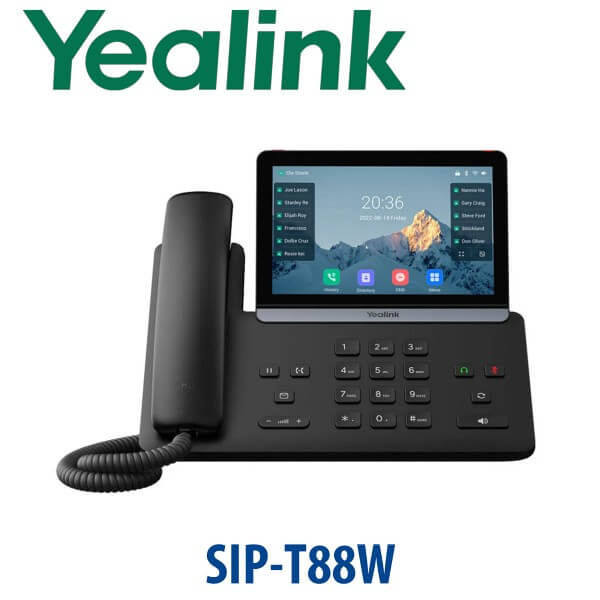
Yealink SIP-T88W IP Phone 7-Inch Touchscreen Wi-Fi 6 SIP Desk Phone Dubai
Yealink SIP-T88W — The Smart Touchscreen SIP Desk Phone for Dubai Executives
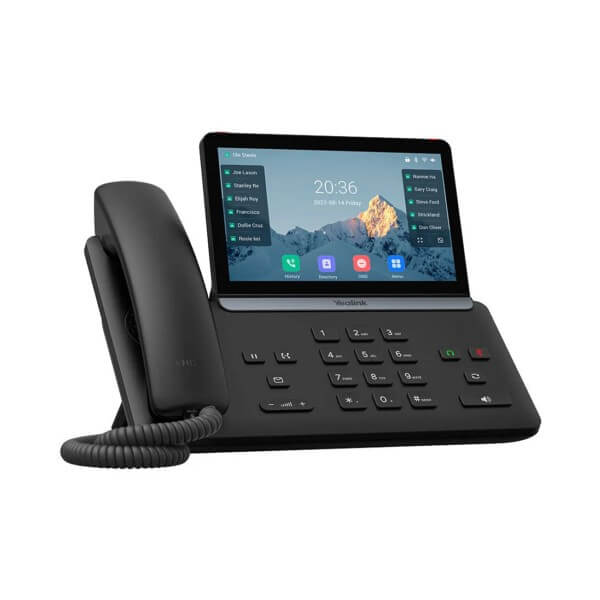
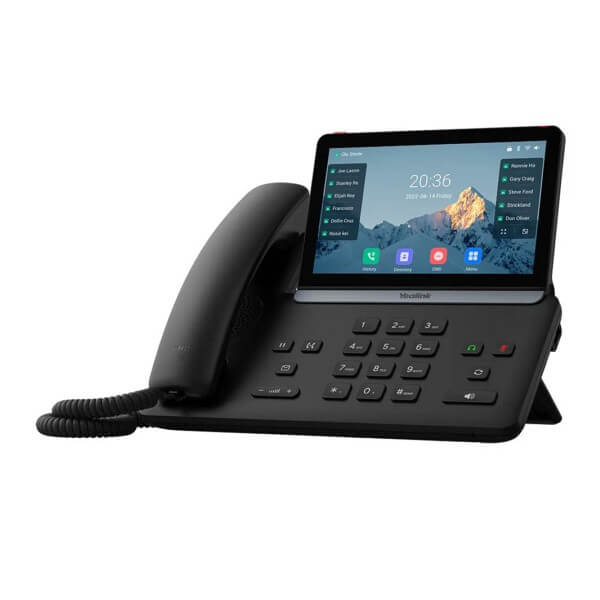
The Yealink SIP-T88W is the new smart-business desk phone for buyers who want a modern executive phone without moving away from SIP. It brings a 7-inch 1024×600 adjustable touchscreen, Android 13, built-in Wi-Fi 6, Bluetooth 5.0, AI Noise Cancellation, Acoustic Shield, and Yealink’s T8 security architecture into one premium desk device. For Dubai offices replacing older touchscreen phones such as the T48U or T58W-era devices, the T88W is the model to quote when the user wants a cleaner screen, wireless networking, modern security, and a boardroom-grade desk presence.
SIP, Microsoft Teams, or Zoom? Choose the Platform Before You Order
The SIP-T88W is a SIP phone. It is built for 3CX, Yeastar P-Series, Grandstream UCM, Asterisk, FreePBX, and hosted SIP platforms. Do not confuse it with a Microsoft Teams desk phone: Teams devices are a separate Yealink MP-series family. A SIP phone cannot be turned into a Teams phone by a field reflash, so Vector Digital Systems checks the platform before quoting.
| Your Platform | Right Phone | What You Need |
|---|---|---|
| SIP PBX — 3CX, Yeastar, UCM, Asterisk, hosted PBX | Yealink SIP-T88W (this page) | SIP credentials from your phone system |
| Microsoft Teams Phone | Yealink MP-series Teams phone — ask David for the current certified model | Microsoft 365 tenant + Teams Phone licence per user |
| Zoom Phone | Zoom-certified Yealink range — ask David to verify current certification status | Zoom Phone licence per user |
PoE Truth — Do Not Let the Power Adapter Surprise You
Yealink desk phones normally ship without a power adapter. The SIP-T88W should be planned as a PoE-powered desk phone, drawing power from a PoE-capable network switch port. If your executive desk, reception counter, or private office does not have PoE, ask David to add the correct Yealink PSU to the quote. If the phone is ordered with two or three EXP55 expansion modules, an external power supply is required regardless of PoE.
Where the SIP-T88W Sits in the Yealink Range
The T88W sits above the T87W as the larger smart-touch model in the T8 family. The T87W is the 7-inch 800×480 touch-screen option, while the T88W moves to a sharper 7-inch 1024×600 display and Android 13. The T88W Pro and T88V Pro add the Yealink BTH88 Bluetooth handset as standard, while the standard T88W supports the BTH88 as an optional accessory. For most Dubai executive desks, the standard T88W is the smarter value; for senior management desks that specifically want the Bluetooth handset in the box, ask David to quote the Pro variant.
| Feature | SIP-T87W | SIP-T88W ★ | SIP-T88W Pro / T88V Pro |
|---|---|---|---|
| Display | 7″ 800×480 touch | 7″ 1024×600 adjustable touch | 7″ 1024×600 adjustable touch |
| Platform | SIP | SIP with Android 13 | SIP with Android 13 |
| Programmable Keys | Touch UI + expansion support | Touch BLF / soft keys + EXP55 support | Touch BLF / soft keys + EXP55 support |
| GigE | Verify at quote | Verify at quote | Verify at quote |
| Wi-Fi / Bluetooth | Wi-Fi 6 + BT 5.0 built in | Wi-Fi 6 + BT 5.0 built in | Wi-Fi 6 + BT 5.0 built in |
| Conference | SIP platform dependent | SIP platform dependent | SIP platform dependent |
| Expansion | Colour-screen expansion modules | Up to 3× EXP55 | Up to 3× EXP55 |
| Replaces | T57W/T58W-tier buyers | T48U/T58W-era touchscreen desks | Premium handset/video-tier desks |
| Price Tier | Premium | Upper premium | Flagship premium |
| Choose if… | You want a touch SIP phone but can accept the lower-resolution screen | You want the sharp 7-inch smart SIP experience with Wi-Fi 6 and optional BTH88 | You want the BTH88 handset included as standard or need the top T88 variant |
Where the Yealink SIP-T88W Works in Dubai
Executive desks in DIFC, Business Bay, and DMCC. The SIP-T88W is built for senior users who live on calls but still want a premium touch interface. It gives the desk a boardroom-grade look without forcing the business into Teams Phone or Zoom Phone licensing if the existing platform is SIP.
Reception and assistant desks that need visual BLF control. The touchscreen handles daily call control, while optional EXP55 modules add large labelled BLF walls for executive assistants, legal reception desks, clinics, and corporate front desks. For two or three EXP55 modules, Vector Digital Systems adds the required external PSU to the quote.
Wi-Fi-first offices and renovated spaces. Many Dubai offices now redesign desks faster than network contractors can recable them. Built-in Wi-Fi 6 gives the SIP-T88W a clean deployment option where a wired drop is unavailable, while Bluetooth 5.0 supports modern headset workflows.
Security-sensitive procurement. Banks, legal firms, government suppliers, and enterprise IT teams increasingly audit every network endpoint. The T88W’s Trusted Execution Environment, secure boot integrity checks, encrypted firmware approach, TLS 1.3, SRTP, 802.1X, and WPA3 support make it easier to justify as a modern endpoint instead of another unmanaged desk device.
Full Technical Specification
| Specification | Yealink SIP-T88W |
|---|---|
| Product Family | Yealink T88W / T88W Pro / T88V Pro Series |
| Display | 7 inch 1024×600 capacitive adjustable touchscreen |
| Operating System | Android 13 |
| Platform | SIP firmware — for 3CX, Yeastar, UCM, Asterisk, FreePBX, hosted SIP PBX |
| Wireless | Built-in Wi-Fi 6 and Bluetooth 5.0 |
| Audio | AI Noise Cancellation, Acoustic Shield, 3W speaker |
| Security | Trusted Execution Environment, secure boot integrity verification, encrypted firmware and signature certificate |
| Network Protection | 802.1X authentication, WPA3 encryption, content security policy protections |
| Transmission Security | TLS 1.3, strong cipher suites, SRTP media protection, encrypted configuration file |
| Bluetooth Handset | Supports Yealink BTH88. Optional for T88W; standard for T88W Pro / T88V Pro. |
| Expansion | Supports up to 3× Yealink EXP55 colour expansion modules |
| Materials / Sustainability | PCR materials, green packaging, power-saving mode |
| Power | PoE planning recommended. PSU not assumed in box; add PSU if no PoE switch port or multi-EXP55 setup. |
Compatible Accessories
| Accessory | Model | Use Case |
|---|---|---|
| Bluetooth Handset | Yealink BTH88 | Optional for SIP-T88W; standard on T88W Pro / T88V Pro. Adds a cable-free premium handset experience. |
| Expansion Module | EXP55 | Colour-screen BLF and speed-dial expansion. Up to 3 modules supported; 2–3 modules require external PSU. |
| Power Supply | Yealink PSU — confirm at quote | Required if the desk has no PoE switch port and required for multi-EXP55 console builds. |
| Headsets | Yealink USB / Bluetooth / WH range | For executive, assistant, and call-handling desks. David confirms headset compatibility before quoting. |
Staging Before Dispatch
Vector Digital Systems stages every Yealink SIP-T88W before delivery: SIP registration, provisioning template, codec priority, dial-plan test, BLF and speed-dial keys, user labels, headset check, and a live test call. For EXP55 orders, the key map is programmed before dispatch and the external PSU requirement is checked before the quote is finalised. The phone arrives ready for the desk, not as an untouched box.
Export from Dubai
Vector Digital Systems supplies Yealink SIP-T88W phones from Dubai to system integrators, telecom operators, PABX installers, banking procurement teams, hotel groups, and enterprise IT departments. Export routes include Oman, Saudi Arabia, Kuwait, Qatar, Bahrain, Jordan, Egypt, Kenya, Nigeria, and Pakistan. Shipments move FOB Dubai with commercial invoice, packing list, and certificate of origin on request. Ask David for project pricing on 5+ units, VAT breakdown where applicable, and delivery charges included in the quote.
Get a same-day Yealink SIP-T88W quote in AED
Tell David your quantity, SIP platform, PoE availability, headset requirement, and whether you want the standard T88W or the Pro version with BTH88 handset. Dubai stock, VAT breakdown, staging, and delivery are confirmed in the quote.
Frequently Asked Questions — Yealink SIP-T88W
Does the Yealink SIP-T88W work with Microsoft Teams?
The SIP-T88W is a SIP phone for 3CX, Yeastar, Grandstream UCM, Asterisk, FreePBX, and hosted SIP platforms. Microsoft Teams phones are a separate Yealink MP-series range, so do not order the SIP-T88W for a Teams-only office. Ask David to verify the current Teams-certified Yealink model before quoting.
Does the SIP-T88W come with a power adapter, or do I need PoE?
Plan the SIP-T88W as a PoE-powered desk phone. If your switch port does not provide PoE, ask David to add the correct Yealink PSU to the quote. A desk using two or three EXP55 modules needs an external PSU regardless of PoE.
Will the SIP-T88W work with our 3CX, Yeastar, Grandstream UCM, or existing SIP PABX?
Yes. The SIP-T88W is designed for SIP platforms including 3CX, Yeastar P-Series, Grandstream UCM, Asterisk, FreePBX, and hosted SIP providers. Vector Digital Systems stages the phone with your SIP registration, provisioning template, BLF keys, and dial-plan test before dispatch.
Yealink T88W vs T88W Pro — which one should I buy?
Choose the SIP-T88W when you want the 7-inch smart touchscreen phone and are happy to add the BTH88 Bluetooth handset only if required. Choose the T88W Pro if the Bluetooth handset should be included as standard for an executive desk. David can quote both variants in AED.
Yealink T87W vs T88W — what is the difference?
Both are premium T8 SIP phones with Wi-Fi 6, Bluetooth 5.0, AI audio, and security features. The T88W steps up to a sharper 7-inch 1024×600 adjustable touchscreen and Android 13, making it the better choice for executive desks and modern reception points where the screen matters.
Can I add EXP55 expansion modules to the Yealink SIP-T88W?
Yes. The SIP-T88W supports up to three EXP55 colour expansion modules. This is useful for reception desks, executive assistants, and supervisor desks that need many labelled BLF or speed-dial keys. Two or three modules require the external PSU, which Vector Digital Systems checks before quoting.
What is the best Yealink IP phone for an executive desk in Dubai?
For a premium SIP executive desk, the SIP-T88W is the strongest recommendation because it combines a 7-inch touch display, Wi-Fi 6, Bluetooth 5.0, AI noise handling, and modern security. For a lower budget, consider T87W. For a handset-included flagship experience, ask for T88W Pro.
Who is the Yealink authorised supplier in Dubai?
Vector Digital Systems LLC has supplied Yealink products and VoIP systems in Dubai since 2009. David is the Yealink specialist for product selection, staging, project pricing, and local warranty handling, so you are not left managing international courier claims.
Does Vector Digital Systems export Yealink SIP-T88W phones from Dubai?
Yes. Vector Digital Systems exports Yealink phones from Dubai to Oman, Saudi Arabia, Kuwait, Qatar, Bahrain, Jordan, Egypt, Kenya, Nigeria, and Pakistan. Shipments are quoted FOB Dubai with commercial invoice, packing list, and certificate of origin on request.
Does Vector Digital Systems configure the SIP-T88W before delivery?
Yes. The SIP-T88W is staged before dispatch with SIP registration, provisioning template, BLF and speed-dial setup, dial-plan testing, headset check, and a live test call. EXP55 console layouts are programmed before delivery.