Description
Lenovo IBM System x3500 M5 Server Dubai
Some servers stay in production long after the invoice file is forgotten. The IBM System x3500 M5 is one of them. You still see it in Dubai offices, school IT rooms, clinic back offices, warehouse control rooms, and small data rooms where a full rack was never planned. It sits beside a UPS, runs file shares, Active Directory, accounting software, SQL, CCTV storage, or a small VMware or Hyper-V setup. Not exciting. Just important.
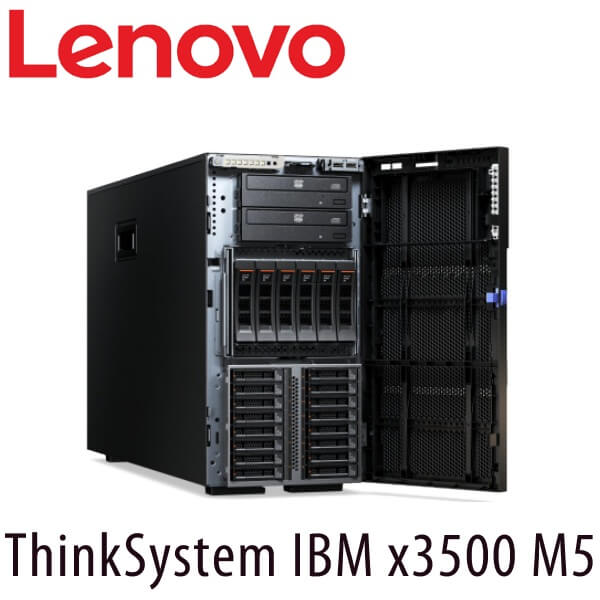
The x3500 M5 belongs to the IBM System x generation before the ThinkSystem tower family. It is an enterprise tower server, not a desktop-class machine with a server badge. It was built for two Intel Xeon processors, ECC DDR4 memory, hot-swap storage, hardware RAID, redundant power options, and remote management through IBM Integrated Management Module II. That is why many UAE businesses kept it running for years.
Vector Digital Systems works with IBM and Lenovo server environments across Dubai, Abu Dhabi, Sharjah, Ajman, Ras Al Khaimah, Fujairah, and Umm Al Quwain. If you have an IBM System x3500 M5 in production, we can help identify the installed processor, memory, RAID controller, drive layout, power supply, firmware level, and workload before any quotation or service plan is discussed. That matters. Two x3500 M5 servers can look the same from the front and be completely different inside.
IBM System x Era — Enterprise Tower Platform
The IBM System x3500 M5 is a legacy enterprise tower server from the IBM System x family. It is not a ThinkSystem V1, V2, V3, or V4 model. It uses Intel Xeon E5-2600 v3 processors, DDR4 ECC memory, PCIe 3.0 expansion, IBM ServeRAID controller options, and Integrated Management Module II for remote server management.
Who Still Uses the IBM x3500 M5?
The x3500 M5 usually appears in businesses that need serious server hardware but do not want a rack. Trading companies in Deira. Clinics in Jumeirah. Construction offices in Al Quoz. Logistics teams near JAFZA. Schools and warehouses with one IT room and one person responsible for everything. For that kind of site, a tower server makes sense. No rack, no raised floor, no data centre contract. Just clean power, cooling, backup, and a server that can be serviced without pulling a 2U chassis out of a rack.
Typical workloads include Windows Server file sharing, Active Directory, DNS, DHCP, print services, SQL Server, ERP, accounting software, local application hosting, CCTV recording, branch inventory systems, and virtualisation hosts. Many x3500 M5 units in the UAE run three to fifteen virtual machines. Some run only one heavy database. Some are used as backup repositories because they have enough drive bays and redundant power.
The important point is this: the x3500 M5 was not an entry server. It was IBM’s higher-end tower platform for customers who wanted rack-server features in a tower chassis. That is why buyers still search for it by model number years later. They are not looking for any tower. They are looking for a specific class of machine.
IBM System x3500 M5 Technical Specifications
| Specification | Detail |
|---|---|
| Product Family | IBM System x3500 M5 |
| Generation | IBM System x legacy generation, before Lenovo ThinkSystem V-series naming |
| Form Factor | Enterprise tower server, rack-convertible to 5U with rail kit |
| Processor Family | Up to 2x Intel Xeon E5-2600 v3 processors |
| Processor Cores | Up to 18 cores per processor, up to 36 cores per server depending CPU installed |
| Memory Type | DDR4 ECC RDIMM / LRDIMM |
| Memory Slots | 24 DIMM slots across two processors |
| Memory Speed | Up to 2133 MHz DDR4, depending processor and DIMM population |
| Maximum Memory | Up to 1.5TB with 64GB LRDIMMs |
| Storage Bays | Up to 32x 2.5-inch hot-swap drive bays or up to 12x 3.5-inch hot-swap drive bays, depending chassis configuration |
| Drive Types | SAS HDD, SATA HDD, SAS SSD, SATA SSD depending backplane and controller |
| RAID Options | IBM ServeRAID M1215, ServeRAID M5210, ServeRAID M5210e and related cache/flash upgrade options depending configuration |
| Expansion | PCIe 3.0 expansion slots, with slot count depending riser and processor population |
| Remote Management | IBM Integrated Management Module II, also called IMM2 |
| XClarity Version | No Lenovo XClarity Controller. This model uses IBM IMM2 management. |
| Power Supplies | Hot-swap redundant power supply options, commonly 550W, 750W, or 900W depending installed CPUs, drives, and adapters |
Remote Management — IMM2, Not XClarity
The IBM System x3500 M5 uses IBM Integrated Management Module II for out-of-band management. It is not an XClarity Controller server. XClarity Controller, XCC, and XCC2 belong to later Lenovo ThinkSystem generations. For an x3500 M5 audit, we check IMM2 access, firmware level, event logs, power status, fan health, RAID status, and remote console availability.
Processor Platform — Intel Xeon E5-2600 v3
The IBM System x3500 M5 is a dual-socket platform built for Intel Xeon E5-2600 v3 processors. That means one or two CPUs can be installed. Many UAE units were sold with a single processor first, then expanded later when more virtual machines or users were added. The second processor is not just about CPU cores. On this platform, it also affects memory slot access and expansion planning.
Processor options in this family range from lower-core E5-2600 v3 CPUs for file and domain services to higher-core models for virtualisation and database workloads. The platform supports up to 18 cores per processor, giving a maximum of 36 physical cores in a fully populated dual-CPU configuration. For older Windows Server, VMware ESXi, Hyper-V, SQL Server, and ERP deployments, that was a serious amount of compute when the server was new.
When we inspect an installed x3500 M5, we do not assume the CPU from the model label. We check the actual processor SKU from BIOS, operating system inventory, or IMM2. A server with 2x 6-core CPUs and 64GB memory is a different machine from a server with 2x 14-core CPUs and 384GB memory. Same front panel. Different business value.
Memory — DDR4 ECC, Not DDR5
The x3500 M5 uses DDR4 ECC memory. That distinction matters. It does not use DDR3 like older IBM towers, and it does not use DDR5 like current Lenovo ThinkSystem V3 tower servers. For cluster matching, spare planning, and memory reuse, DDR4 is the key word.
The platform has 24 DIMM slots across two processors. With RDIMMs or LRDIMMs, memory capacity depends on the DIMM size, processor population, and memory layout. Maximum memory is up to 1.5TB using 64GB LRDIMMs. Most live business units in Dubai are far below that. Common installed capacities are 32GB, 64GB, 128GB, 256GB, and 384GB.
For virtualisation, memory is usually the first limit. A server can still have CPU headroom while VMs are already paging to disk. If your x3500 M5 runs ten virtual machines and users complain that everything slows down after 10AM, the real issue may be memory pressure, RAID write latency, or old disks. We check performance before recommending parts or a new project.
Do Not Mix Memory Types
IBM System x3500 M5 uses DDR4 ECC memory. DDR3 from older IBM systems will not fit. DDR5 from current Lenovo ThinkSystem V3 servers will not fit. Even within DDR4, RDIMM and LRDIMM population rules must be followed. Wrong mixing can stop the server from booting or force lower memory speeds.
Storage and RAID — The Part That Usually Decides the Risk
The x3500 M5 was offered with flexible hot-swap storage layouts. The two common directions are 2.5-inch bays for higher spindle count and SSD options, or 3.5-inch bays for larger capacity hard drives. Depending on chassis and backplane, the platform supports up to 32x 2.5-inch hot-swap drive bays or up to 12x 3.5-inch hot-swap drive bays.
Drive support depends on the backplane and RAID controller. Typical media includes SAS HDD, SATA HDD, SAS SSD, and SATA SSD. For production workloads, the RAID controller matters as much as the drive count. The IBM ServeRAID M1215 is a common entry controller. Higher configurations use ServeRAID M5210 or M5210e with cache and flash backup options. RAID 1, RAID 5, RAID 6, RAID 10, and related levels depend on the controller and licence/features installed.
In Dubai service calls, the risk is often not the server board. It is storage. Ageing SAS drives. One failed disk ignored for months. A second disk starts throwing media errors. A RAID battery or flash module that no one checked. A degraded array that still boots until it doesn’t. When a tower server runs payroll, attendance, ERP, or CCTV retention, that is not a small issue.
Before touching an old x3500 M5 storage configuration, we check RAID health, array status, controller model, cache state, disk serial numbers, predictive failure flags, hot-spare status, and backup condition. Pulling the wrong drive from an old array can turn a warning into downtime. Better to inspect first.
Expansion, Networking, and Physical Deployment
The IBM System x3500 M5 uses PCIe 3.0 expansion. Slot availability depends on the riser configuration and whether one or two processors are installed. This is where many tower servers are misunderstood. The empty slot may not be usable without the right CPU or riser. For network upgrades, backup cards, Fibre Channel, or extra SAS connectivity, the motherboard layout must be checked before ordering any adapter.
Network configurations vary. Some units run basic 1GbE for office workloads. Others have add-in 10GbE cards for virtualisation, backup, NAS access, or database traffic. For older VMware or Hyper-V hosts, a 10GbE upgrade can help only when the storage and switching side are ready. A faster NIC connected to an old 1GbE switch changes nothing.
Physically, the x3500 M5 is a large enterprise tower. It needs clean airflow, stable power, and space behind the chassis. Dubai heat is not a theory. In office IT rooms with poor ventilation, dust and high ambient temperature shorten fan, disk, and power supply life. Sites connected through Etisalat Business or du Enterprise links often run the server as the local anchor for branch users. When it goes down, the internet is still up, but the business apps are gone.
The server can also be rack-mounted as a 5U system with the right conversion kit and rails. That suits customers moving from an office corner to a small rack in a DMCC, JAFZA, DAFZA, or Equinix-connected environment. The chassis is heavy, so rack planning matters. Power feed, UPS capacity, cooling path, cable length, and service clearance should be planned before the server is moved.
Power, Cooling, and Dubai Site Conditions
The IBM System x3500 M5 was built as an enterprise tower, but it still needs proper server-room conditions. It is not the kind of machine that should sit under a desk beside paper boxes and a kettle. The chassis pulls air through the front and pushes warm air out the back. Block that airflow and the server will compensate with higher fan speed, higher noise, and higher component stress.
Dubai makes cooling mistakes show up faster. A store room in Al Quoz can reach high ambient temperature quickly if the split AC is turned off after office hours. A branch office in Deira may have the server beside a UPS with no rear clearance. A warehouse near JAFZA may collect dust around the intake grille. The x3500 M5 can run for years, but dirty airflow and ageing fans shorten the life of drives, RAID cache modules, power supplies, and motherboard components.
Power supply configuration depends on the installed hardware. Common options include hot-swap redundant 550W, 750W, and 900W power supplies. A lightly configured server with one CPU, a few drives, and basic networking has very different power needs from a dual-CPU server with many SAS drives and PCIe cards. We check actual power supply rating, redundancy status, power cord type, UPS load, and event logs before advising on service or relocation.
For production use, connect the x3500 M5 to a proper UPS with battery health monitoring. Not just any UPS that still beeps when tested. If the server hosts Active Directory, ERP, SQL, or CCTV recording, the shutdown sequence should be tested. Power failure is rarely clean. Storage arrays do not like sudden loss of power, especially when old disks and RAID cache are involved.
Site Check Before Any Work
For IBM System x3500 M5 service in UAE, we check power supply rating, redundancy, fan status, IMM2 logs, RAID status, disk health, UPS load, firmware level, operating system version, backup state, and physical airflow. The front model badge is not enough. The installed configuration decides the risk.
Grey Market Warning for IBM System x3500 M5 Buyers
Many IBM System x3500 M5 units in the market are used, pulled from overseas data rooms, or assembled from mixed parts. That does not automatically make them bad. It does mean the buyer has to be careful. A clean front bezel tells you nothing about drive age, RAID cache condition, DIMM health, fan hours, power supply history, or whether the firmware has been updated in years.
The risk is not just hardware. Old servers often arrive with mismatched drives, unknown RAID configuration, non-original caddies, missing blanks, unsupported firmware, and passwords still set on IMM2. Some units boot at the seller’s place and fail when moved. Some have predictive drive errors hidden until the event log is checked. Some work fine for lab use but should not host production ERP, payroll, or database workloads.
Do Not Buy Only by Model Number
IBM System x3500 M5 configurations vary by CPU, memory, drive bay layout, RAID controller, power supply, riser, network card, and management access. A low price can mean missing trays, failed cache, locked IMM2, non-redundant power, or unsupported disks. Ask for the exact installed configuration before purchase.
What Vector Digital Systems Provides
Vector Digital Systems works with Lenovo and IBM server environments for UAE businesses that need practical help, not just a quote. We can inspect the IBM System x3500 M5, identify the installed configuration, confirm whether the server is safe to keep in use, and advise what should be serviced, backed up, expanded, or moved.
For live servers, the first step is always information. We document CPU model, memory population, RAID controller, RAID level, drive health, firmware versions, IMM2 access, operating system version, VM count, backup status, and network connections. If the server is running Windows Server, VMware ESXi, Hyper-V, Linux, SQL, ERP, file services, or CCTV recording, we map the workload before touching hardware.
Installation and rack deployment are standard VDS services. For a tower server, that can mean clean placement, UPS check, cable dressing, network handover, backup device connection, firmware review, and documented login handover. For a rack-converted x3500 M5, we plan the 5U space, rail fitment, rear clearance, power feeds, and service access. If the server is moving from an office corner to a rack in Business Bay, DMCC, DAFZA, JAFZA, or an Equinix-connected site, we plan the move before the shutdown window.
For customers standardising on newer Lenovo hardware, we also help compare the IBM System x3500 M5 configuration against current ThinkSystem tower options. That includes workload sizing, memory sizing, storage planning, RAID selection, Windows Server or VMware licensing checks, and Lenovo Premier Support options. Premier Support gives production customers 24/7 access, advanced technical routing, and onsite response options depending the selected warranty level.
For Active Systems, Backups Come First
Before service work on an old IBM System x3500 M5, confirm backup status. A verified backup is not the same as a backup job that says “completed.” We check restore points, backup target health, last successful restore test, and whether critical VMs or databases are included.
Stock and Availability in Dubai
Stock & Availability: IBM System x3500 M5 is a legacy IBM System x server. New factory stock is not the normal buying route. Availability depends on used, refurbished, pulled, or customer-owned units. Vector Digital Systems can help with configuration checks, service assessment, parts guidance, and Lenovo ThinkSystem tower options in Dubai. Quote and availability by WhatsApp.
If you already own an x3500 M5, send the machine type, serial number, front photo, rear photo, RAID screen if available, and a list of workloads. That gives us enough to start. If the server is down, share the error on screen, IMM2 event log if accessible, RAID controller message, disk LED status, and any recent changes before failure.
If you are looking to buy an x3500 M5 for lab use, spare compatibility, or short-term workload hosting, ask for exact CPU model, installed memory, drive bay count, RAID controller model, power supply count, rail kit status, caddies, bezel, IMM2 access, and firmware state. For production use, ask us to review the risk before committing budget.
Common Questions About IBM System x3500 M5
What generation is the IBM System x3500 M5?
The IBM System x3500 M5 is a legacy IBM System x generation server. It is not a Lenovo ThinkSystem V1, V2, V3, or V4 model. It came before the Lenovo ThinkSystem tower naming used on ST50, ST250, ST550, and ST650 servers.
What processors does the IBM x3500 M5 support?
The x3500 M5 supports up to two Intel Xeon E5-2600 v3 processors. The platform supports up to 18 cores per processor, giving up to 36 physical cores in a dual-CPU configuration, depending on the exact processor SKUs installed.
Does the IBM System x3500 M5 use DDR4 or DDR5 memory?
It uses DDR4 ECC memory. It does not support DDR3 and it does not support DDR5. The server has 24 DIMM slots across two processors and supports RDIMM or LRDIMM configurations depending the memory layout.
Does the IBM x3500 M5 use Lenovo XClarity Controller?
No. The IBM System x3500 M5 uses IBM Integrated Management Module II, also called IMM2. Lenovo XClarity Controller, XCC, and XCC2 are used on later Lenovo ThinkSystem platforms.
Can I still use IBM x3500 M5 for virtualisation?
Yes, if the installed CPU, memory, RAID, storage, and hypervisor version are still healthy and supported for your environment. Many x3500 M5 servers run small VMware ESXi or Hyper-V workloads. The risk is usually age: disks, RAID cache, firmware, OS support, and backup condition must be checked.
What warranty options are available in UAE?
For IBM System x3500 M5, original manufacturer warranty is normally expired because the model is legacy. Service depends on inspection, parts availability, and support scope. For current Lenovo ThinkSystem tower servers, Lenovo Essential Support and Lenovo Premier Support options are available depending model and configuration.
Comparable Lenovo Tower Servers
The IBM System x3500 M5 sits in the enterprise tower category. That matters when comparing it with current Lenovo models. A small entry tower is not the same class of machine. If your x3500 M5 runs only one light file server workload, a smaller tower may be enough. If it runs virtualisation, SQL, ERP, or many drives, compare it with the enterprise tower line first.
| Model | Best Fit |
|---|---|
| Lenovo ThinkSystem ST650 V3 | Enterprise tower workloads, dual-socket compute, virtualisation, databases, and office data rooms needing tower format |
| Lenovo ThinkSystem ST250 V3 | Single-socket tower for SMB applications, branch file services, and moderate database workloads |
| Lenovo ThinkSystem ST50 V3 | Entry tower for small offices, light file sharing, accounting, and basic on-premises workloads |
| Lenovo Server Dubai | Main Lenovo server hub for rack, tower, edge, storage, and project server requirements in UAE |
Africa, GCC, and MEA Export
Vector Digital Systems supports UAE and export customers from Dubai. For Africa, GCC, and South Asia projects, we can help with IBM System x3500 M5 configuration checks, Lenovo tower server selection, packing guidance, and FOB Dubai quotation. Common export destinations include Saudi Arabia, Qatar, Oman, Kuwait, Egypt, Kenya, Tanzania, Uganda, Nigeria, and South Africa.
For export enquiries, share the destination country, required quantity, preferred configuration, warranty expectation, and whether the server is for production or lab use. For current Lenovo ThinkSystem servers, Lenovo Premier Support availability depends on country coverage and warranty terms. For legacy IBM System x hardware, availability and support scope must be checked case by case.
About Vector Digital Systems — Authorised Lenovo Server Partner
Vector Digital Systems is an authorised Lenovo server partner in Dubai, UAE, supporting IBM System x3500 M5 and Lenovo ThinkSystem tower server requirements with installation and rack deployment across all 7 UAE emirates — Dubai, Abu Dhabi, Sharjah, Ajman, Ras Al Khaimah, Fujairah, and Umm Al Quwain. Lenovo Premier Support warranty options are available for current Lenovo ThinkSystem models. Export to Africa, GCC, and international markets — FOB Dubai pricing on request. Operating since 2009. Contact: +971 4 450 4145 · Monday–Saturday 8AM–6PM.
Get a quote for IBM System x3500 M5 service or availability
Dubai · UAE support · configuration check · Lenovo tower server options · project pricing on WhatsApp