

Video conferencing for large meeting rooms.
Engineered, installed, tested. All 7 emirates.
Training halls, boardrooms and townhall spaces where a video bar cannot reach the back row. Vector Digital Systems designs the camera coverage, the ceiling audio and the processing — then installs it and proves it with a live call before handover. Since 2009, from our Dubai warehouse.
- Modular Teams Rooms & Zoom Rooms systems
- PTZ cameras with 12x–20x optical zoom
- Ceiling microphone & speaker arrays
- Audio DSP with echo cancellation per zone
- Multi-camera switching with AI direction
- Dual 4K displays and content cameras
The moment every large room owner recognises
The room seats twenty-four. The video bar on the wall was expensive, the reviews were excellent — and the people in the last two rows still sound like they are calling from a car park. The far side of the U-shaped table never appears on camera unless someone physically turns the bar. Remote attendees have quietly stopped joining meetings held in that room.
Nothing is broken. The equipment is simply working beyond its physical limits. Every conference camera has a distance beyond which faces stop being recognisable, and every microphone has a radius beyond which speech arrives as echo. In a 5-metre huddle room those limits never matter. Past roughly 8 metres of room depth, they decide everything — and no amount of settings menus will change the physics.
This page explains the actual engineering: where the limits sit, what each system tier adds, and what it honestly costs — so that when quotes arrive 40,000 dirhams apart, you know exactly why.
When a video bar stops being enough
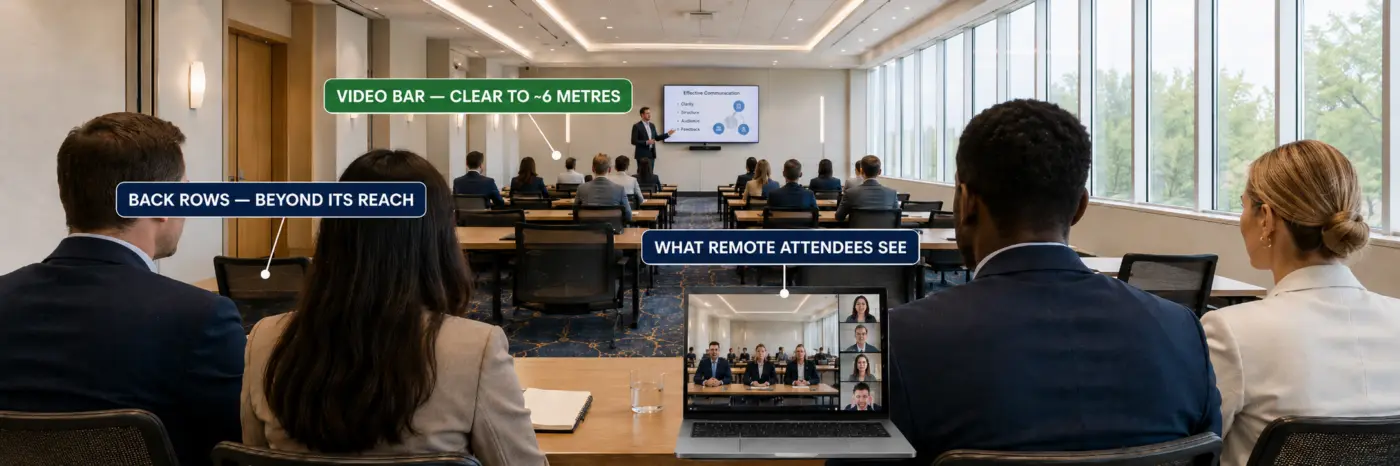
All-in-one video bars — a camera, microphones and speakers in one enclosure — are honest equipment inside their envelope. Manufacturer deployment guidance across the major brands converges on the same numbers we verify on site: camera framing holds to roughly 8 metres, and audio pickup degrades from roughly 6 metres. A bar serves a room where the farthest seated participant is within that reach.
Three measurements decide whether your room has crossed the line. Room depth: past 8 metres from the display wall, faces at the back render too small for remote participants to read expressions, and digital zoom only enlarges the blur. Seat-to-microphone distance: past 6 metres, the microphone captures more room reflection than voice — the "speaking from a well" sound. Seating geometry: U-shapes, classroom rows and divided zones put people outside a single camera's useful field no matter how wide the lens claims to be.
If your room fails one of the three, you need the tier above a bar. If it fails all three, you need the tier above that — and knowing this before requesting quotes is worth more than any discount.
The three system tiers for large rooms — and the trigger for each
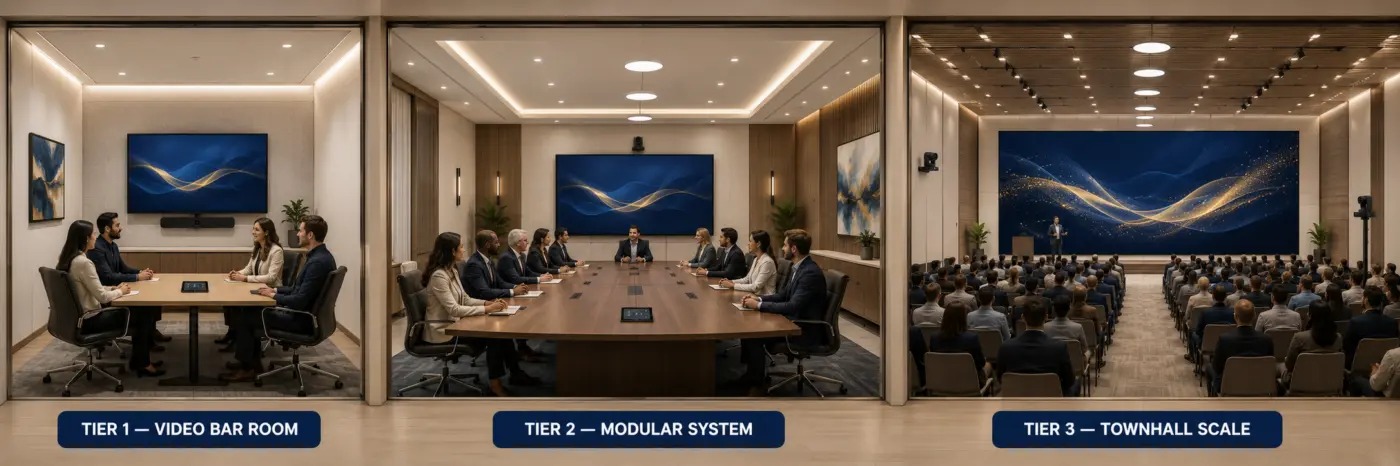
Tier 1 — High-end video bar with expansion microphones (AED 9,500–19,000). For rooms of 8–10 metres with conventional boardroom seating. A flagship bar handles the camera work while wired or wireless expansion microphones extend audio reach down the table. The trigger for this tier: depth under 10 metres, one seating zone, audio the only complaint. Honest limitation: the camera still frames from one point — if the back row is unreadable today, expansion mics will not fix it.
Tier 2 — PTZ camera plus DSP audio system (AED 28,000–65,000). The first true large-room architecture. A pan-tilt-zoom camera with 12x–20x optical zoom reads faces at 15 metres and beyond, because optical zoom preserves detail where digital zoom destroys it. Audio moves to the ceiling: microphone arrays with a defined pickup radius per unit, fed into a digital signal processor that handles echo cancellation for the whole space. The trigger: room depth 10–16 metres, or any room where presentation happens from a lectern or stage.
Tier 3 — Modular multi-camera system (AED 65,000–180,000+). For townhalls, training centres, auditoriums and rooms with multiple active zones. Two to four cameras — audience, presenter, whiteboard — with an AV processor directing between them automatically based on who is speaking. Ceiling audio scales to full coverage, content sources multiply, and the room runs as a native Microsoft Teams Room or Zoom Room with one-touch join. The trigger: more than one zone that matters, more than 16 metres of depth, or an audience that faces a stage.
These ranges are supply-and-installation figures for typical rooms; a site survey turns them into a fixed quotation. What the tiers share at Vector: every system is installed by our own engineers and handed over on a live test call — never boxes on a pallet.
Why two quotes for the same room can be 40,000 dirhams apart
Three quotations on your desk. Same room, same brief — and the numbers are a world apart. Before assuming someone is overcharging, check what actually moves the price, because in large rooms it is rarely the camera on the brochure.
The five line items that move a large-room price: camera count (each additional position adds the camera, its cabling and its licence-side configuration); ceiling works (microphone and speaker arrays mean ceiling access, containment and sometimes tile modification — the cost hides in the ceiling, not the boxes); DSP class (an eight-channel echo-cancelling processor and a two-channel one look identical in a line item and behave nothing alike in a townhall); display strategy (one 86-inch panel, dual panels, or direct-view LED are three different budgets); and platform licensing (a native Teams Room or Zoom Room carries an annual licence that some quotes include and some quietly leave for you to discover).
What Vector states in writing before you sign: equipment at quoted price, installation and cabling included, licence lines shown separately and explicitly, and anything excluded — named as excluded. If a comparison quote is dramatically cheaper, put it next to this list. The missing 40,000 dirhams is usually sitting in the ceiling works or the DSP class, waiting to reappear as a variation order.
Camera reach: the 8-metre and 10-metre rules
Manufacturer deployment guides — the documents integrators design from, not the marketing pages — specify camera placement by participant distance. The pattern that holds across Yealink, Poly and Logitech large-room lines: a fixed wide camera serves to about 8 metres; a PTZ camera with genuine optical zoom serves to about 10 metres per camera position, and further with higher zoom classes. Past those distances the correct answer is not a better camera in the same place — it is a second camera in a different place.
That is why serious large-room designs specify camera count from room geometry before any brand is chosen. A 17-metre training hall is a two-to-four camera room by physics: typically an audience camera at the front, a presenter-tracking camera at the rear aimed at the stage, and optionally a whiteboard or content camera. The AV processor — Yealink's AVHub, Poly's equivalent in the G7500 ecosystem, Logitech's Rally infrastructure — acts as director, cutting between feeds as the active speaker changes. One detail that separates installed-and-working from installed-and-troublesome: on Yealink modular systems the cameras connect to the AV processor over its dedicated VCH protocol on Cat6, not onto the data LAN — a wiring decision that must be made before containment closes, not after.
Speaker tracking itself runs on the camera, with the processor directing — which is why tracking quality is a camera-selection criterion, not a software toggle. We cover tracking technology in depth on its own page shortly; for a large room, the takeaway is simpler: count your zones, and you have counted your cameras.
Audio reach: why large rooms move to the ceiling
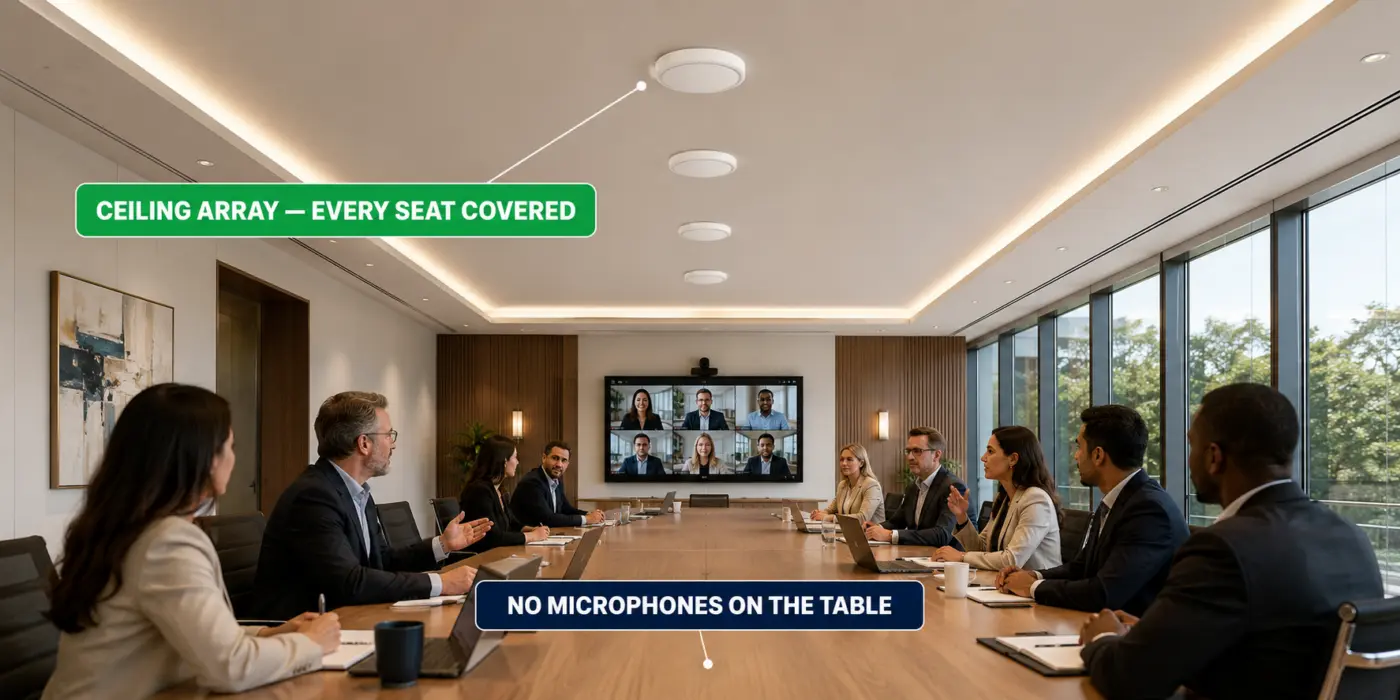
Table microphones fail large rooms twice: they hear the ceiling fan as clearly as the chairman, and they leave every seat more than 3 metres away sounding distant. The large-room answer is ceiling audio — microphone arrays with a defined coverage radius per unit, paired with ceiling speakers, all running through a DSP that cancels echo across the whole space rather than per device.
Coverage is arithmetic, not judgement. Each ceiling microphone in the current Yealink, Poly and Shure generations covers a specified radius; divide your room into those circles and the unit count writes itself. A 16-by-7-metre hall typically lands at four to six ceiling microphones and a matching speaker grid — and critically, the DSP must have the channel capacity and acoustic echo cancellation for every microphone it hosts. Undersizing the DSP is the most common hidden defect in cheap large-room quotes: the microphones are on the drawing, the processing behind them is not.
Two field lessons from recent Dubai deployments worth stealing. First: new conferencing audio must be fully separate from any existing building PA — overlapping legacy speaker zones with new conferencing audio produces an echo no DSP setting can remove, because the two systems fight each other in the same air. Second: if presenters use handheld wireless microphones, they can coexist with ceiling arrays — but only with licensed-band units validated on site against the ceiling pickup during staging, never assumed from a datasheet.
Vector supplies and installs ceiling audio from Yealink's SkySound family, Shure and Poly — see our Shure page for the audio-specialist line.
The room itself: glass, echo and the window behind the chairman
Some of the worst-sounding rooms in Dubai have the best equipment in them. The room is fighting the system. Glass walls — the default in DIFC and Business Bay fit-outs — reflect sound back across the table, and a microphone cannot un-hear a reflection. Full replacement is never the first answer: in most glass rooms, repositioning ceiling microphones out of the strongest reflection paths, adding soft treatment to one or two surfaces, and letting the DSP handle the remainder brings the room back without touching the walls.
Light is the same story for cameras. A camera pointed at a window renders every person in front of it as a silhouette — the classic Dubai boardroom problem, a floor-to-ceiling view behind the head of the table. The fixes are ranked by cost: reorient the camera axis at design stage (free), motorised blinds tied to the room controller (moderate), or accept the view and specify a camera with strong backlight compensation (a selection criterion, not a setting). This is precisely why the survey measures glass percentage and window orientation — the two facts about your room that no datasheet can know.
Displays: sized from the last row, not the budget
The test is brutal and simple: can the person in the farthest seat read a spreadsheet cell? Display size is calculated from the farthest viewer, and in large rooms that calculation routinely lands past what a single panel can do. Typical outcomes we install: rooms to 10 metres run one or two 86–98-inch panels; halls past 12–14 metres of viewing distance move to direct-view LED walls, where size is built to the room rather than picked from a catalogue.
Just as important is what each screen is for. Large rooms run dual roles — people on one display, content on the other — so remote faces never shrink to thumbnails the moment a deck is shared. Add a content camera or wireless sharing at the lectern and the presenter stops being tethered to a laptop at the far end of the room. One honest exclusion: we do not sell display inches your last row cannot justify — the survey measurement decides, and we show you the working.
Four large-room types, four different designs
The long boardroom (10–14 m). One seating zone, high stakes on eye contact. Design centre: a 12x–20x optical PTZ at display height, ceiling audio in two to three circles, dual displays so people and content never compete. This is Tier 2 territory, and the most common large-room brief in Dubai.
The training hall (12–20 m, rows). Two zones — trainer and audience — which means two cameras minimum, presenter tracking on the trainer, and audio designed for questions from the back row, not just the head table. Content capture (whiteboard camera or interactive display) earns its cost here faster than anywhere else.
The townhall / all-hands space. Stage plus audience. The design inverts: the presenter camera becomes primary, audience audio becomes the hard problem, and the handheld-microphone coexistence rule above becomes mandatory reading. Runs best as a native Teams Room or Zoom Room so any manager can start the monthly all-hands without an AV technician.
The divisible hall. One venue, an operable wall, sometimes one room and sometimes two. This is its own engineering discipline — partition sensors, paired systems, two platform licences, merge logic — and it deserves its own page, which is next in this series. If this is your room, WhatsApp us directly; we have designed exactly this in Dubai recently.
Teams Rooms, Zoom Rooms or BYOD at large-room scale
At bar scale the platform choice is casual. At large-room scale it is structural. A native Microsoft Teams Room or Zoom Room gives one-touch join, calendar on the controller, and — decisive in multi-camera rooms — the platform's own intelligent framing and speaker views driving the camera director. Each native room needs its own platform licence (Teams Rooms Pro or Zoom Rooms), a line item that belongs in the budget from day one, not as a surprise at deployment.
BYOD — the presenter's laptop drives the room over one cable — suits venues hosting outside organisations, because every guest brings their own platform. The engineering cost: USB has hard length limits, so large-room BYOD is designed with active extenders at the table, a decision that again must precede cabling. Many of our large-room clients run both: native Teams for internal meetings, a BYOD path at the lectern for guests. Both paths are stocked in Dubai and installed by the same team — see the full video conferencing systems range.
The IT manager's section: network, accounts and management
You are the one who answers for this room after the installers leave — so here is what a properly delivered large room hands you. Its own wired network drop: a multi-camera room moving processed video and Dante-class audio does not belong on office Wi-Fi, and we cable it that way without being asked. A Teams resource account or Zoom Room account created and enrolled correctly, calendar visible on the controller, so booking the room books the system. PoE budgets calculated, not assumed — ceiling arrays and cameras draw real power, and an undersized switch fails on the busiest day. And remote management enabled on day one: firmware, monitoring and fault diagnostics reachable without a ladder, through the platform's own admin portal and the manufacturer's device management.
At handover you receive the documentation your head office will one day ask for: port map, account credentials process, cable schedule, and the configuration record. If you have ever inherited a room with none of that — you already know why this paragraph is on the page.
The large-room brands, compared honestly
Yealink — the widest modular Teams Rooms range at the sharpest AED, with the MVC S-series scaling to multi-camera rooms and the SkySound ceiling audio family integrating natively; the value engineering choice for multi-room rollouts. See Yealink video conferencing.
HP Poly — the G7500 ecosystem with studio-grade optics and DirectorAI tracking; the choice where boardroom image quality is a stated requirement. See HP Poly video conferencing.
Logitech — Rally Plus and its ecosystem, the strongest plug-scale-repeat story for enterprises standardising globally. See Logitech video conferencing.
Neat — the design-forward option, with Neat Board Pro anchoring large collaborative spaces and the cleanest zero-touch management story. See Neat video conferencing and its Neat for large rooms page.
AVer — the training-room and lecture-hall specialist, with CAM570 tracking cameras, the FONE700 chained speakerphone system, and the new MT500 AI matrix tracking core that auto-directs multi-camera rooms over Dante and NDI — a genuinely fresh option for platform-flexible large spaces.
Shure — the audio specialist we bring in when the room's acoustics are the hardest part of the brief: MXA ceiling arrays with steerable pickup lobes, IntelliMix DSP handling echo cancellation per zone, and the licensed wireless handheld systems that let a townhall presenter roam without fighting the ceiling microphones. See Shure audio.
We stock all of them in Dubai, which is precisely why the recommendation can be honest: the room's geometry chooses the tier, the tier shortlists the brands, and your platform and budget pick the winner.
What the survey actually measures — check your own room first
The free survey is not a sales visit with a tape measure for decoration. Every number below changes the design, and you can pre-check most of them yourself before we arrive.
Depth from the display wall to the last seat — the number that picks the tier. Width and seating plan — decides camera field and whether a U-shape needs a second angle. Ceiling height and type — tile, solid or open grid changes how arrays mount and what containment costs. Glass percentage and window orientation — the echo and backlight facts from the section above. HVAC noise at seated height — a hissing diffuser above the table becomes the loudest participant on every call. Existing PA zones — anything already making sound in that ceiling must be mapped before new audio goes in, for the echo reason that cannot be processed away. Containment routes and power — where cable can physically travel, and whether the switch cabinet has the PoE headroom. The wall itself, if it moves — partition type and stacking direction, because a divisible room is designed around its wall.
Send us four of those numbers on WhatsApp — depth, width, ceiling height, seat count — and you get a realistic tier and budget range the same day, before anyone visits. The survey then turns the range into a fixed quotation.
How a Vector large-room project runs
Survey. An engineer measures the room — depth, width, ceiling height, seating plan, existing PA, containment routes. Same-day surveys across Dubai, Mon–Sat. Design. You receive a system design with camera positions, microphone circles, DSP sizing and a fixed quotation — the engineering on this page, applied to your walls. Install. Our own technicians, not subcontractors: cabling, mounting, commissioning, platform enrolment. Live-call handover. The system is proven on a real call with you in the room — back row heard, every zone framed — before we sign off. After. AMC contracts with remote diagnostics and priority on-site response, 8am–6pm Mon–Sat.
Large-room systems, exported from Dubai
Vector Digital Systems exports complete large-room packages — cameras, ceiling audio, DSP, mounts, cabling schedules and configuration — from Dubai stock to 45 countries across the Middle East, Africa, South Asia, Central Asia and the Caucasus. Integrators and end clients receive pre-configured systems with full export documentation; air freight typically lands in 3–7 days. For export enquiries, WhatsApp our export desk.
What large-room clients say
"Our 14-metre boardroom was the room everyone avoided for client calls. Vector redesigned it with a PTZ camera and ceiling microphones — the difference was obvious on the handover call itself. The back of the table is finally part of the meeting."
"They were the only supplier who asked for room measurements before sending a price. The training hall now runs two cameras with automatic switching and our trainers stopped carrying a laptop to every session — one touch and the Teams call is live."
"We ship Vector's large-room kits to our projects in East Africa. Everything arrives configured with the documentation customs actually asks for. Their engineers answer WhatsApp questions during our installs — that support is why we keep ordering from Dubai."
Large meeting room video conferencing — FAQ
What size room needs more than a video bar?
As a working rule, a room deeper than 8 metres from the display wall, or with any seat more than 6 metres from the bar, has outgrown all-in-one video bars. Past those distances camera framing and microphone pickup degrade for physical reasons that settings cannot fix. Rooms of 10 metres and beyond are designed with PTZ cameras and ceiling audio; rooms past 16 metres or with multiple zones move to multi-camera systems.
How many cameras does a large meeting room need?
Count the zones that matter, and you have counted the cameras. One seating zone within 10 metres needs one PTZ camera. A trainer plus an audience is two cameras. A stage, an audience and a whiteboard is three. Manufacturer deployment rules place one camera position per 8–10 metres of coverage, and an AV processor switches between them automatically based on the active speaker.
How many ceiling microphones does my room need?
Each ceiling microphone covers a specified radius — divide your seating area into those circles and the count writes itself. A typical 16-by-7-metre hall lands at four to six ceiling microphones with a matching speaker grid. Equally important is the DSP behind them: it must have echo-cancelled channels for every microphone it hosts, which is the item most often undersized in cheap quotations.
What does a large meeting room video conferencing system cost in Dubai?
Supply and installation for a high-end bar with expansion microphones runs roughly AED 9,500–19,000. A PTZ camera with ceiling audio and DSP — the first true large-room tier — runs roughly AED 28,000–65,000. Modular multi-camera systems for training halls and townhalls run from about AED 65,000 upward depending on camera count, audio coverage and displays. A free site survey converts these ranges into a fixed quotation.
Do large rooms work with Microsoft Teams and Zoom?
Yes — large rooms run as native Microsoft Teams Rooms or Zoom Rooms with one-touch join, and the platform's intelligent framing drives the multi-camera direction. Each native room requires its own platform licence, which should be budgeted from day one. A BYOD path can be added for guest presenters who bring their own platform on a laptop.
Can you fix the audio in our existing large room without replacing everything?
Often, yes. If the camera work is acceptable, ceiling microphones and a DSP can be added to an existing system, and expansion microphones can extend a bar in rooms under 10 metres. The survey establishes what is reusable. One thing we will not do is layer new conferencing audio over an active building PA in the same zone — overlapping systems create echo that no processing removes.
Do you supply presenter tracking cameras?
Yes. Presenter and speaker tracking runs on the camera itself in current Yealink, Poly and Logitech large-room lines, with the AV processor directing between feeds. Tracking quality is therefore a camera-selection decision made at design stage, and it matters most in training halls and townhalls where the presenter moves.
Can one system cover a room that splits into two with a movable wall?
Divisible rooms are their own engineering discipline: paired systems, partition sensors that tell the equipment whether the wall is open or closed, and — if both halves must host meetings simultaneously — two platform licences. We have designed exactly this for a Dubai venue recently and a dedicated divisible-rooms page is coming to this site; until then, contact us directly with your floor plan.
Two quotes for the same room are 40,000 dirhams apart. What am I missing?
Compare five line items before assuming anything: camera count, ceiling works (access, containment, tile modification — where most hidden cost lives), the DSP class and its echo-cancelled channel count, the display strategy (single panel, dual, or LED wall), and whether the annual platform licence is included or quietly excluded. The missing money is almost always in the ceiling works or the DSP class, and it reappears later as a variation order.
Is 20x digital zoom the same as 20x optical zoom?
No — and in a large room the difference decides whether the back row has a face. Optical zoom magnifies through the lens before the image is captured, preserving detail at 15 metres and beyond. Digital zoom crops and enlarges pixels that were already captured, so a distant face becomes a larger blur. For rooms past 10 metres, specify genuine optical zoom in the 12x–20x class; treat digital zoom figures in brochures as marketing, not reach.
How do I know if the DSP in a quote is big enough?
Count the microphones, then read the DSP specification for how many channels carry acoustic echo cancellation — not just how many inputs exist. Every ceiling microphone in the room needs an echo-cancelled channel behind it; a processor with many inputs but few AEC channels will pass a demo in an empty room and fail in a full one. Also check power: ceiling arrays running on PoE need the DSP or switch to supply the full wattage budget, which better large-room processors state explicitly.
Why do modular system cameras need their own cable runs instead of the office network?
Current modular room systems connect their cameras to the AV processor over dedicated point-to-point links on Cat6 — a manufacturer transport protocol, not ordinary network traffic — so video reaches the processor uncompressed and in sync. Putting cameras on the office LAN instead is the classic cause of a multi-camera room that never behaves. The practical consequence: camera cable routes must be planned before containment closes, which is exactly why the survey maps them.
Our room has glass walls and the echo is terrible. Is that fixable without rebuilding?
Usually, yes. Glass reflects speech back across the table and microphones capture the reflection along with the voice. The staged fix: reposition ceiling microphones out of the strongest reflection paths, add soft acoustic treatment to one or two chosen surfaces, and let a properly sized DSP remove what remains. Full wall treatment is the last resort, not the first quote line. What cannot fix it is a settings menu — the geometry has to change, even slightly, before processing can finish the job.
Can the same room run both Microsoft Teams and Zoom?
Yes, two honest ways. A native Teams Room can join Zoom meetings as a guest (and a Zoom Room can join Teams) through built-in interoperability — one-touch for your home platform, guest-join for the other. Or the room adds a BYOD path at the table or lectern, where any laptop drives the room's cameras and audio over one cable, making the platform irrelevant. Venues hosting outside organisations almost always want the BYOD path; internal rooms usually standardise on one native platform.
What should I send on WhatsApp to get a realistic estimate before a site visit?
Four numbers and one photo: room depth from the display wall to the last seat, room width, ceiling height, seat count — plus a photo taken from the display wall toward the back of the room. That is enough for a same-day tier recommendation and budget range, 8am–6pm Mon–Sat. The free survey then converts the range into a fixed quotation with camera positions and microphone coverage drawn for your actual walls.
Which areas of the UAE do you cover for large meeting room installations?
Vector Digital Systems serves businesses across all seven UAE emirates — Dubai, Abu Dhabi, Sharjah, Ajman, Ras Al Khaimah, Fujairah and Umm Al Quwain — supplying, installing and supporting large meeting room video conferencing systems. Within Dubai, active client sites include Business Bay, DIFC, Jumeirah Lake Towers (DMCC), Barsha Heights (TECOM), Dubai Internet City, Dubai Media City, Dubai Silicon Oasis, Downtown Dubai, Sheikh Zayed Road, Jebel Ali Free Zone (JAFZA), Dubai Investment Park (DIP), Dubai World Trade Centre, Dubai Healthcare City, Al Quoz, Deira, Bur Dubai, Al Barsha, Dubai Marina and Dubai South. Across the Northern Emirates and Abu Dhabi: Musaffah Industrial City (ICAD), Khalifa Industrial Zone (KIZAD), Masdar City, Al Ain, SAIF Zone (Sharjah), Hamriyah Free Zone, Sharjah Industrial Area, RAKEZ, Fujairah Free Zone and Ajman Free Zone. On-site installation, configuration and fault response are available across all emirates; remote support is available UAE-wide.
Do you export large meeting room systems from Dubai?
Yes. We export pre-configured large-room systems from Dubai stock to 45 countries: Saudi Arabia, Oman, Qatar, Kuwait, Bahrain, Iraq, Jordan, Kenya, Ethiopia, Tanzania, Uganda, Rwanda, Burundi, Djibouti, South Africa, Mozambique, Zimbabwe, Zambia, Mauritius, Seychelles, Nigeria, Ghana, Senegal, Côte d'Ivoire, Cameroon, Angola, Togo, Benin, Congo DR, Gabon, Egypt, Morocco, Algeria, Tunisia, Pakistan, Bangladesh, Sri Lanka, Kazakhstan, Uzbekistan, Turkmenistan, Kyrgyzstan, Tajikistan, Georgia, Azerbaijan and Armenia — with air freight in 3–7 days and full export documentation.
How long does installation take?
A Tier 1 bar upgrade is typically installed in half a day. A PTZ-plus-ceiling-audio room takes one to two days including commissioning. Multi-camera halls run two to five days depending on cabling routes and ceiling works. Every project ends the same way: a live test call with you in the room before handover, followed by optional AMC support at 8am–6pm, Mon–Sat.